Recommended resources
The freely available resources this lesson will direct you to.
Hello! Welcome to your next lesson in learning SQL.
Introduction
In our last lesson, we learned how to handle missing data using IS NULL and IS NOT NULL. This gave us more control over filtering, allowing us to include or exclude rows based on whether data is present. So far, all our queries have focused on selecting which rows to include in our results.
But what about the order in which those results are presented? By default, a database returns data in whatever order it finds most efficient, which often appears random. For meaningful analysis, we need to impose our own structure.
Lesson Goal: Today, you will learn how to sort results using the ORDER BY clause. This is a fundamental skill for making sense of data, allowing you to find the most recent events or identify top users—tasks that are central to understanding product usage and user behavior.
1. The Basics of Sorting: ORDER BY
The ORDER BY clause is used to sort the result set of a query by one or more columns. This is how you arrange your data in a logical sequence, such as alphabetically, numerically, or chronologically.
The basic syntax is simple: you add ORDER BY column_name at the end of your query.
Let's start by reading a brief introduction to the clause.
Mastering SQL ORDER BY for Beginners
This article, "Mastering SQL ORDER BY for Beginners," provides a great foundation. We'll start with the sections that define the clause and its basic syntax.
Please read the sections "Understanding the SQL ORDER BY Clause" and "Syntax and Usage of ORDER BY". Focus on the definitions of ASC (ascending) and DESC (descending) order.
Sorting Order: ASC and DESC
As you just read, SQL gives you two options for sorting:
ASC(Ascending): Sorts from lowest to highest. This is the default behavior.- Numbers: 1, 2, 3...
- Dates: Oldest to newest.
- Text: A, B, C...
DESC(Descending): Sorts from highest to lowest. You must explicitly specify this.- Numbers: 100, 99, 98...
- Dates: Newest to oldest.
- Text: Z, Y, X...
Product Design Application: Finding the Most Recent Events
Imagine you're investigating a recent spike in support tickets related to password resets. You want to see the most recent password_reset events to understand the timeline. You would sort by the event's timestamp in descending order.
SELECT
  user_id,
  event_name,
  event_timestamp
FROM
  events
WHERE
  event_name = 'password_reset'
ORDER BY
  event_timestamp DESC;
This query first filters for only password_reset events and then sorts them, showing the newest ones at the top.
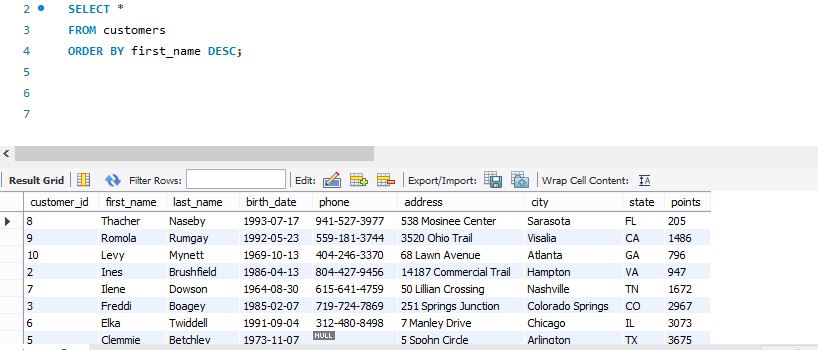
The image below shows a simple example of sorting customer names in descending alphabetical order.
2. Sorting by Multiple Columns
Sometimes, sorting by a single column isn't enough. For example, you might want to see users grouped by their subscription plan, and then see the most recent signups within each plan. SQL lets you do this by providing a comma-separated list of columns in the ORDER BY clause.
The query sorts the results based on the first column listed. Then, for any rows where the first column's value is the same, it sorts them by the second column, and so on.
Syntax:ORDER BY column_1 [ASC|DESC], column_2 [ASC|DESC];
Product Design Application: Analyzing Activity by Segment
Let's say you want to review the latest activity for users on different device platforms. You want to group them by platform and then see the most recently active users within each group.
SELECT
  user_id,
  platform,
  last_active_date
FROM
  users
ORDER BY
  platform ASC,      -- First, group by platform (A-Z)
  last_active_date DESC; -- Then, sort by activity date within each platform (newest first)
This query would produce a list like this:
- All 'Android' users, sorted from most to least recently active.
- Followed by all 'iOS' users, sorted from most to least recently active.
- Followed by all 'Web' users, sorted from most to least recently active.
This image provides a great visual breakdown of how multi-column sorting works.

3. Combining ORDER BY with LIMIT to Find "Top" Users
One of the most powerful uses of ORDER BY for a product designer is to find the "top N" of something—your most engaged users, most used features, or highest value customers.
You achieve this by combining ORDER BY with the LIMIT clause, which we briefly saw in the first module. LIMIT simply restricts the query to return a specific number of rows.
Product Design Application: Identifying Power Users
You want to run a user research session with your top 10 most active users. Assume you have a user_metrics table that tracks the number of sessions for each user.
SELECT
  user_id,
  email,
  session_count
FROM
  user_metrics
ORDER BY
  session_count DESC -- Sort from most sessions to least
LIMIT 10;              -- Only return the top 10 rows
This simple but powerful pattern—ORDER BY metric DESC LIMIT N—is one you will use constantly to identify key user segments.
Let's read a short section that reinforces this combination.
This article, "ORDER BY Clause in SQL," has a great section on combining ORDER BY with LIMIT.
Please read the section "Limiting the Number of Rows Returned with ORDER BY". It provides a clear example of finding the top 10 highest-paid employees, which is analogous to finding top users.
A Note on Query Execution Order
You might wonder how ORDER BY, WHERE, and LIMIT all work together. There's a logical order of execution that SQL follows, which is slightly different from the order you write the clauses.
This short video explains it well. Understanding this helps clarify why certain things are possible in SQL (like using a column alias in ORDER BY).
Learn SQL: Order of Operations vs Execution
This video from Maven Analytics explains the SQL order of execution. It's a key concept for understanding how your queries are processed.
Watch from 02:31 to the end (03:33). The key takeaway is that ORDER BY is one of the very last steps, happening after filtering (WHERE) and column selection (SELECT).
The crucial point is: Filter -> Group -> Select -> Sort. Because ORDER BY happens last, it sorts the final result set you've already filtered and constructed.
4. Practice Questions
Let's put this into practice. Imagine you're working with an events table that has the columns: event_id, user_id, event_name, platform ('iOS', 'Android', 'Web'), and event_timestamp.
Write a query for each of the following scenarios:
- You want to see a list of all events, starting with the oldest and ending with the most recent.
- You need to find the
user_ids of the 5 users who triggered the 'share_photo' event most recently. - You want to create a report of all 'login_failed' events. The report should be organized alphabetically by platform, and within each platform, the most recent failures should be listed first.
Click to see the answers
Answer 1:
This requires a simple sort on the timestamp in ascending order.
SELECT *
FROM events
ORDER BY event_timestamp ASC;
(Note: ASC is optional here since it's the default, but it's good practice to be explicit.)
Answer 2:
This requires filtering for the event, sorting by date descending, and limiting the result.
SELECT user_id
FROM events
WHERE event_name = 'share_photo'
ORDER BY event_timestamp DESC
LIMIT 5;
Answer 3:
This requires filtering, followed by a multi-column sort.
SELECT *
FROM events
WHERE event_name = 'login_failed'
ORDER BY
  platform ASC,
  event_timestamp DESC;
Conclusion
Excellent work! You can now not only select the data you need but also present it in a logical and insightful order. This is a huge step forward in turning raw data into actionable analysis.
Key Takeaways:
- The
ORDER BYclause sorts your query results. It's placed at the end of theSELECTstatement. ASCsorts in ascending order (default), whileDESCsorts in descending order.- You can sort by multiple columns to create more refined, grouped lists.
- Combining
ORDER BYwithLIMITis the standard way to find "top N" or "bottom N" records, like your most active users or most recent events.
Next Lesson Preview:
So far, all of our analysis has been on a single table at a time. But what if you need to connect information from multiple tables? For example, how would you find the names of the users who performed the most recent actions? To do that, you'd need to connect the users table with the events table. In our next lesson, we'll dive into the world of JOINs, starting with the concepts of primary and foreign keys that make these connections possible.