Recommended resources
The freely available resources this lesson will direct you to.
Hello! Welcome to the third lesson in your "DJing for DnB release" course.
Introduction
In our last lesson, you designed a powerful, personalized metadata system using Rekordbox's 'My Tag' and star rating features. You created a schema to classify your DnB tracks by subgenre, energy level, and specific sonic elements. This was about embedding rich, queryable information directly into your tracks.
Today, we will build on that foundation to address the learning outcome: Implement an advanced playlist management strategy, creating intelligent playlists and folders for different set intentions (e.g., warm-up, peak-time, closing).
If the last lesson was about defining a data schema for your music, this lesson is about writing the queries to leverage it. We'll use Rekordbox's Intelligent Playlists—which function much like saved queries or database views—to automate the organization of your library. You'll define the rules once, and Rekordbox will handle the task of keeping your playlists perfectly updated as your collection grows. We'll then organize these automated playlists into a logical folder structure, creating an efficient system for both preparing sets and performing live.
1. The Strategy: Organizing by Set Intention
Before we dive into the technical "how," let's establish the "why." An advanced playlist strategy isn't just about grouping tracks by genre; it's about grouping them by their purpose within a DJ set. The most crucial organizing principle for this is energy.
A DJ and writer, Daniel Sokolovskiy, has written an excellent article detailing his personal system. His approach provides a strong conceptual framework for what we're about to build.
In his article 'How I prepare my DJ playlists,' Daniel Sokolovskiy explains how he uses energy levels as the primary axis for organizing his music. This will help you think about the purpose behind the playlists we're about to create.
First, read the section 'Energy levels' to understand why subjective energy is a more useful metric than BPM. Then, scroll down to the comment section and read the exchange between Joseph Saliba and Daniel Sokolovskiy, where Daniel gives concrete examples for each of his five energy levels, linking them to specific moments in a set (e.g., 'people are just arriving').
Sokolovskiy's system maps directly to the star ratings you established in the last lesson. Your playlists for "warm-up," "peak-time," and "closing" will be built around these energy levels. His sub-classifications of "Vibe" (Dark/Melodic) and "Flow" (Hands-up/Heads-down) also show how the My Tag system you built can be used to create even more specific playlists.
2. The Tool: Building Intelligent Playlists
Now, let's translate this strategy into an automated system using Intelligent Playlists. These are dynamic playlists that automatically populate with any tracks from your collection that match a set of rules you define.
The following video provides a clear, step-by-step guide to creating them.
ZERO EFFORT Music Library Organisation - 3 Easy Tips
This video from Chris M, titled 'ZERO EFFORT Music Library Organisation', demonstrates how to create and combine rules for Intelligent Playlists. We'll use this as our primary guide.
Watch from 00:33 to 03:43. The video covers: The basic concept of Intelligent Playlists. Creating a simple playlist based on the Genre tag. Creating a more powerful playlist using the My Tag feature (which you set up last lesson). Adding multiple rules to create highly specific playlists (e.g., combining a vibe tag with a 'date added' filter).
As you saw, the process involves defining one or more conditions. Rekordbox offers a wide range of attributes and logical operators for these conditions.
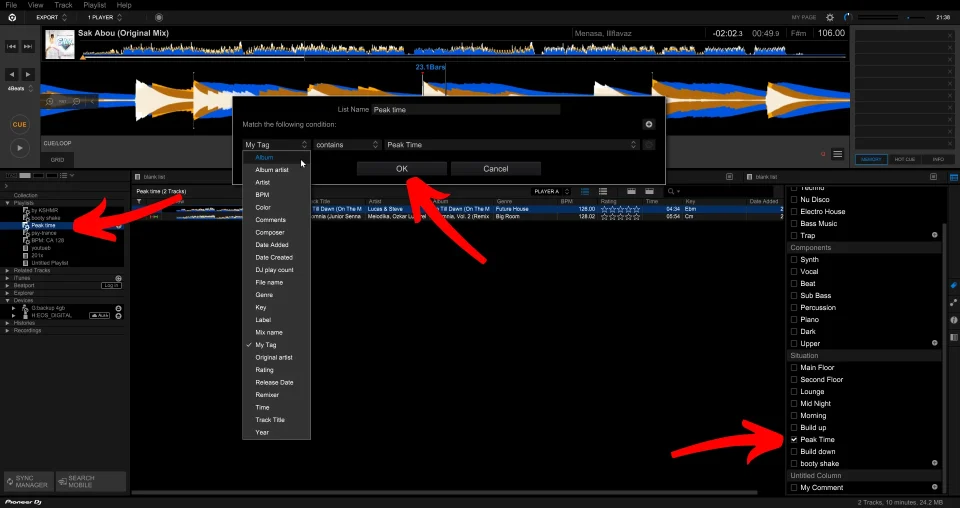
To give you a better sense of the variety of rules you can create, the next video explores other useful modifiers.
Rekordbox DJ - Intelligent Playlists How-To & Tips
This video from PDot, 'Rekordbox DJ - Intelligent Playlists How-To & Tips', provides further examples of the types of rules you can create, such as filtering by BPM or year ranges.
Watch the segment from 01:11 to 03:44. Pay attention to the different modifiers available, like 'is in the range of', 'starts with', and 'does not equal'. This expands the query language you have at your disposal.
The key advantage, as mentioned in the video, is that these playlists are live-updating. When you import and tag a new track, it will automatically appear in every Intelligent Playlist whose rules it matches. This is the "zero effort" organization that lets you focus on creativity.
3. The Structure: Using Folders for Hierarchy
Having dozens of playlists in a flat list can become unwieldy. The final step in our advanced strategy is to create a logical hierarchy using folders. This makes your library clean and easy to navigate, which is especially important when you're using CDJs and have to scroll through lists.
Rekordbox DJ - Intelligent Playlists How-To & Tips
The same video from PDot also has an excellent section on using folders to create a multi-level organizational structure.
Watch from 04:14 to 08:15. The presenter demonstrates how to create folders and nest playlists within them. He explains how this approach is invaluable for open-format DJs using CDJs, a principle that applies equally well to managing a diverse DnB collection.
By combining folders and Intelligent Playlists, you can build a powerful, self-organizing system.

4. Practical Exercise: Building Your Playlist Strategy
It's time to implement this system. This exercise will walk you through creating the playlists and folders for your DnB collection.
Estimated Time: 20-25 minutes
Part A: Create Foundational Energy Playlists
Using the star rating system from the previous lesson, create five Intelligent Playlists—one for each energy level.
- Right-click on
Playlistsin the left-hand panel and selectCreate New Intelligent Playlist. - Name the first one
1* Warm-up. - Set the rule:
Rating|is|★☆☆☆☆. - Click
OK. - Repeat this process for the other energy levels:
2* Build-up(Ratingis★★☆☆☆)3* Driving(Ratingis★★★☆☆)4* Peak-time(Ratingis★★★★☆)5* Bangers(Ratingis★★★★★)
Part B: Create Specific, Multi-Condition Playlists
Now, create a few more targeted playlists that combine rules. This is where the power of the system really shines.
- "Fresh Liquid":
- Name:
Fresh Liquid - Rule 1:
My Tag|contains|Liquid - Click the
+to add a second rule. - Rule 2:
Date Added|is in the last|2|Months
- Name:
- "Peak-Time Neurofunk":
- Name:
Peak-Time Neuro - Set the top dropdown to
Match all of the following conditions. - Rule 1:
My Tag|contains|Neurofunk - Add a second rule, but this one will be a group. Click the
+button with the folder icon to create a sub-group. - Set the sub-group dropdown to
Match any of the following conditions. - Rule 2a:
Rating|is|★★★★☆ - Rule 2b:
Rating|is|★★★★★ - This creates a playlist for all Neurofunk tracks rated 4 or 5 stars.
- Name:
Part C: Build Your Folder Structure
Finally, organize these new playlists into a clean folder hierarchy.
- Right-click on
Playlistsand selectCreate New Folder. - Create the following folders:
_ENERGY(the underscore keeps it at the top of the list)_SUBGENRES_RECENT
- Drag and drop your playlists into the appropriate folders:
- Drag all five star-rated playlists into the
_ENERGYfolder. - Create an Intelligent Playlist for each of your main subgenres (e.g., just
My TagcontainsDancefloor) and place them in the_SUBGENRESfolder. - Place your
Fresh Liquidplaylist into the_RECENTfolder.
- Drag all five star-rated playlists into the
You now have a clean, scalable, and automated system for managing your music library.
Conclusion
Today, you've bridged the gap between having well-tagged tracks and having a fully organized, performance-ready library. You've implemented a strategy that automates the tedious work of playlisting, freeing you up to focus on the creative aspects of DJing.
Key Takeaways:
- Strategy First, Tools Second: A good playlist structure is based on set intentions, primarily organized by energy level.
- Intelligent Playlists as Queries: Think of Intelligent Playlists as saved, live-updating queries that you run against your music database.
- Combine Rules for Specificity: The real power comes from combining multiple rules (e.g.,
My TagANDRatingANDDate Added) to create highly specific playlists for any scenario. - Folders Create Navigable Hierarchy: Use folders to group your playlists logically, making it easy to find what you need, especially on CDJs.
Next Lesson Preview
With your library now expertly organized, our focus will shift from high-level management to the micro-details of track preparation. In the next lesson, we will apply advanced beat grid correction techniques for tracks with complex rhythms, syncopation, or tempo changes common in DnB. This is a critical skill for ensuring your mixes are tight and perfectly in sync, especially with the intricate and often off-kilter drum patterns found in Drum and Bass.