Recommended resources
The freely available resources this lesson will direct you to.
- k6 Scenarios & Metrics You Must Knowwww.youtube.com
- Go (Golang) vs Node.js: Performance (Latency - Throughput - Saturation - Availability)www.youtube.com
- GitHub - tsenart/vegeta: HTTP load testing tool and library. It's over 9000! · GitHubgithub.com
- Benchmarking and Load Testing for Networked Go Apps - Go Optimization Guidegoperf.dev
Hello. In the previous lesson, you built a worker pool and verified that it never exceeded its configured number of active jobs. Now you’ll measure what a concurrent workload actually delivers: successful work per second and the latency experienced by individual requests.
This begins the module on measuring concurrent behavior. In about 40 minutes, you’ll run a small Go HTTP service, apply a controlled load, and read throughput alongside the 50th, 95th, and 99th latency percentiles. The aim is not to find the fastest possible number yet; it is to make a measurement you can interpret.
One workload, two questions
Throughput asks, “How many requests completed successfully per second?” Latency asks, “How long did a request take?” Neither answers the other. A service can complete many requests per second while a small but significant fraction take much longer than the rest.
The image below shows one reason to keep them separate. Each client waits for a database response before making its next query. Over the illustrated 50 ms interval, shorter round trips allow four queries rather than two.
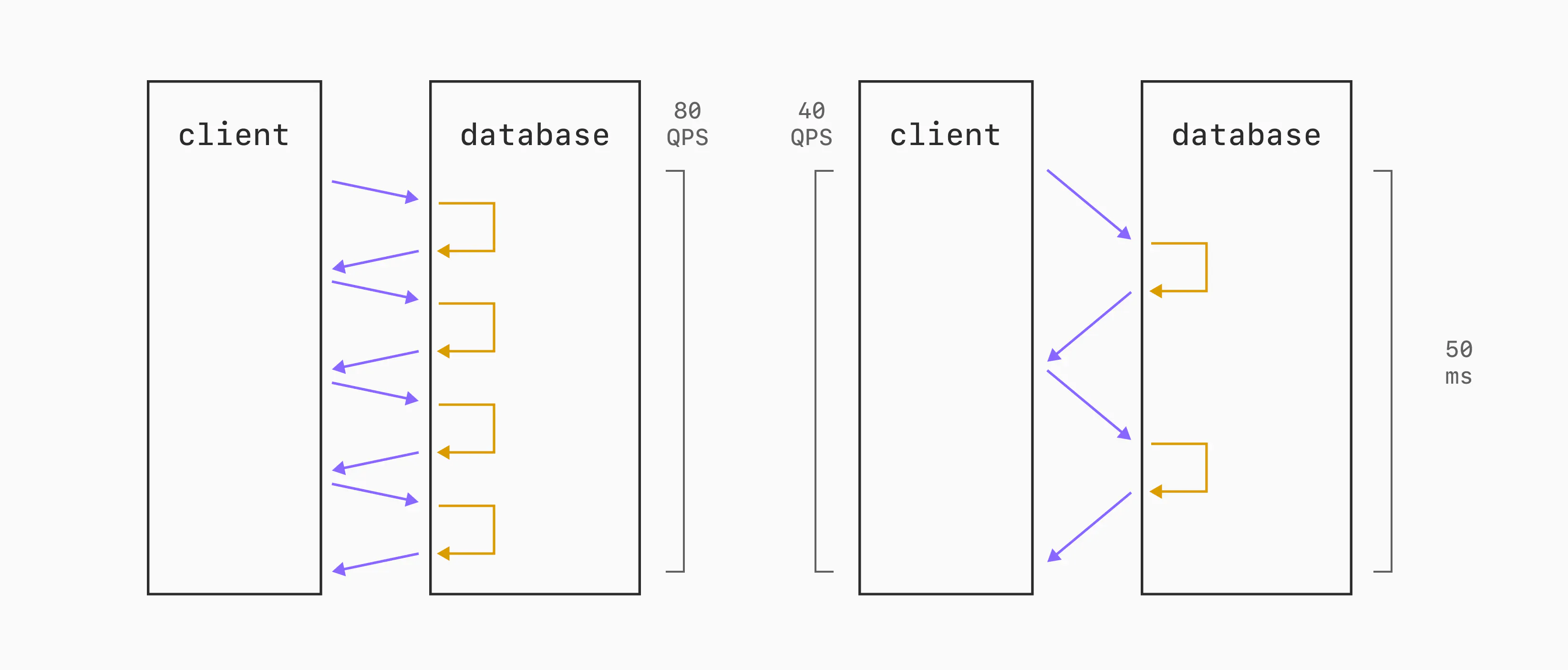
Concurrent clients can keep more requests in flight and raise aggregate throughput, but they do not make an individual slow round trip fast. That distinction matters when choosing how much load to generate.
For this lesson, use three measurements together:
- Issued request rate: how many requests the load generator actually started per second.
- Successful throughput: how many successful responses it obtained per second over the full run.
- Latency percentiles: how long requests took at different points in the observed distribution. The 95th percentile, or p95, is a value at or below which approximately 95% of recorded request latencies fall; p99 does the same for approximately 99%.
A percentile is not the latency of a particular request, and p99 is not the maximum. Percentiles describe the measured set, so always note the workload and number of requests that produced them.
Choose a controlled load
We’ll use Vegeta because it lets you specify a request rate and a ceiling on the load generator’s concurrent workers. Read the relevant parts of its documentation before running it.
GitHub - tsenart/vegeta: HTTP load testing tool and library. It's over 9000! · GitHub
Vegeta’s documentation explains the controls we will set and, crucially, the difference between its reported request rate and successful throughput.
In “Usage: CLI,” go to the “attack command” subsections “-duration,” “-rate,” “-workers,” and “-max-workers.” In “-duration,” read the timing rule. In “-rate,” read the rate guidance, including the warning about unlimited rate. Then read the worker controls across the final two subsections. Next, in the “report command” subsection “report -type=text,” inspect the sample report. Read the explanation starting at “The Requests row shows” through the explanation of “Duration”; the request measures are different quantities. Continue from the paragraph beginning “Latency is the amount of time taken” through the “Success,” “Status Codes,” and “Error Set” explanations. Focus on what is included in a latency measurement and why errors must accompany any performance claim.
Setting an offered rate does not guarantee that the load generator will sustain it. Nor does setting four Vegeta workers mean the Go server has four workers: it caps concurrency in the client generating the load. We will set the initial and maximum worker counts to the same value so the client-side limit is explicit.
Run a small Go service
Save this as server.go:
package main

import (
	"log"
	"net/http"
	"time"
)

func main() {
	handler := http.HandlerFunc(func(w http.ResponseWriter, r *http.Request) {
		time.Sleep(25 * time.Millisecond)
		w.WriteHeader(http.StatusOK)
		_, _ = w.Write([]byte("ok"))
	})

	server := &http.Server{
		Addr:    "127.0.0.1:8080",
		Handler: handler,
	}
	log.Fatal(server.ListenAndServe())
}
In one terminal, run go run server.go and leave it running. The 25 ms pause makes each request take a measurable amount of time without making the example depend on a database or external network. Because handlers can run concurrently, several requests can be waiting during the same interval.
Install Vegeta if needed with go install github.com/tsenart/vegeta@latest, then ensure your Go-installed binaries are on your shell’s PATH. In a second terminal, run:
for rate in 40 80 120; do
  printf 'GET http://127.0.0.1:8080/\n' |
    vegeta attack \
      -rate="${rate}/s" \
      -duration=15s \
      -workers=4 \
      -max-workers=4 \
      -timeout=2s \
      -output="rate${rate}.bin"
  echo "Requested rate: ${rate}/s"
  vegeta report "rate${rate}.bin"
done
Each run uses the same endpoint, duration, worker ceiling, and timeout; only the requested rate changes. The binary result files preserve the individual observations so you can generate reports again without rerunning the service. Run the generator and server under comparable conditions each time: avoid unrelated CPU-heavy work, and do not change the handler between runs.
Why might four client workers suffice here? If completed requests take roughly 25 ms, sustaining 120 requests per second requires roughly three requests in flight on average. This is an estimate, not a guarantee: real response time includes more than the handler’s sleep, and requests do not complete at perfectly even intervals. The report will tell you whether the client actually sustained each requested rate.
Read the result as a whole
For each run, first inspect Requests [total, rate, throughput]. The rate is the rate Vegeta actually issued requests during its attack period; throughput counts successful requests over the full period, including the wait for outstanding responses. Check Success, Status Codes, and Error Set before treating either number as healthy service capacity.
Then inspect Latencies [min, mean, 50, 95, 99, max]. Compare p50 with p95 and p99 at the same requested rate, and compare each percentile across the three runs. The latency measurement extends until the response is read, including the response body bytes Vegeta captures. It is therefore a client-observed HTTP measurement, not a timer around time.Sleep alone.
The documentation’s sample report illustrates why all these fields belong together: it shows 1,200 issued requests and an actual issue rate of 120/s, but successful throughput of only about 65.87/s and success of 55.42%. Its p99 is about 248 ms. Reporting only “120 requests per second” would conceal that many requests failed; reporting only p99 would conceal the failures too.
Your local results will vary. At the higher requested rates, a rising p95 or p99 may indicate increasing delay, but first check whether the actual issued rate still matches the requested rate. If it falls short, the four-worker load generator may be limiting the experiment. If failures appear, examine their status codes or errors rather than interpreting a lower successful throughput as merely a slower server. Vegeta’s reported latency percentiles summarize recorded requests; they are not, by themselves, percentiles exclusively for successful responses.
Takeaways
A controlled concurrent measurement specifies the endpoint, offered rate, duration, client concurrency limit, and timeout. Interpret actual issued rate, successful throughput, success and errors, and latency percentiles together. In particular, verify that the load generator sustained the intended workload before drawing conclusions about the service.
This lesson used external HTTP requests to establish what users of a service might observe. Next, you’ll use testing.B.RunParallel to benchmark concurrent Go code more directly at several parallelism levels.