Recommended resources
The freely available resources this lesson will direct you to.
Hello again! It's great to have you back.
In our last lesson, you masterfully guided Claude Code through an iterative sync-to-async refactoring of a FastAPI route. You broke a complex problem into manageable steps, demonstrating the control and precision required for professional-grade, AI-assisted development. However, the job isn't done until the paperwork is filed—and in software engineering, the "paperwork" is the test suite.
Today's learning outcome is to direct Claude Code to update corresponding unit tests to validate the migrated asynchronous API route. We are closing the loop on our refactoring task. By making our tests pass, we gain confidence that the new async implementation is not only syntactically correct but also functionally sound. This process mirrors the "verify" stage of a classic development cycle and is crucial for maintaining a robust codebase.
The Challenge: Testing Asynchronous Code
Our existing tests were written for a synchronous world. If we run them against our new async endpoint, they will fail. This is because standard pytest and FastAPI's synchronous TestClient don't know how to handle Python's await keyword or manage the underlying asyncio event loop.
To fix this, our test suite needs a few key upgrades:
- An async-native HTTP client to make requests to our app.
- A way to tell
pytestthat our test functions themselves are asynchronous. - Async-compatible fixtures for setting up prerequisites like database sessions.
Let's start by understanding the specific tools for this job.
async test patterns for Pytest - Anthony Shaw
The blog post 'async test patterns for Pytest' by Anthony Shaw is an excellent, practical guide to this exact problem. It provides clear, copy-pasteable solutions for the issues we're about to solve.
Please read the sections Async test functions and Async fixtures. Pay close attention to: The role of the pytest-asyncio plugin and the @pytest.mark.asyncio marker. The syntax for defining an async def test function. The pattern for creating an async fixture using httpx.AsyncClient within an async with block, which is the standard for testing FastAPI async endpoints.
The Workflow: An Iterative Test-and-Fix Loop
Now that you have the technical blueprint, we'll guide Claude Code to implement it. Our workflow will be an interactive loop: instruct, execute, observe the result (pass or fail), and refine. This is the essence of the test-driven feedback loop, a concept that is more important than ever when working with AI agents.
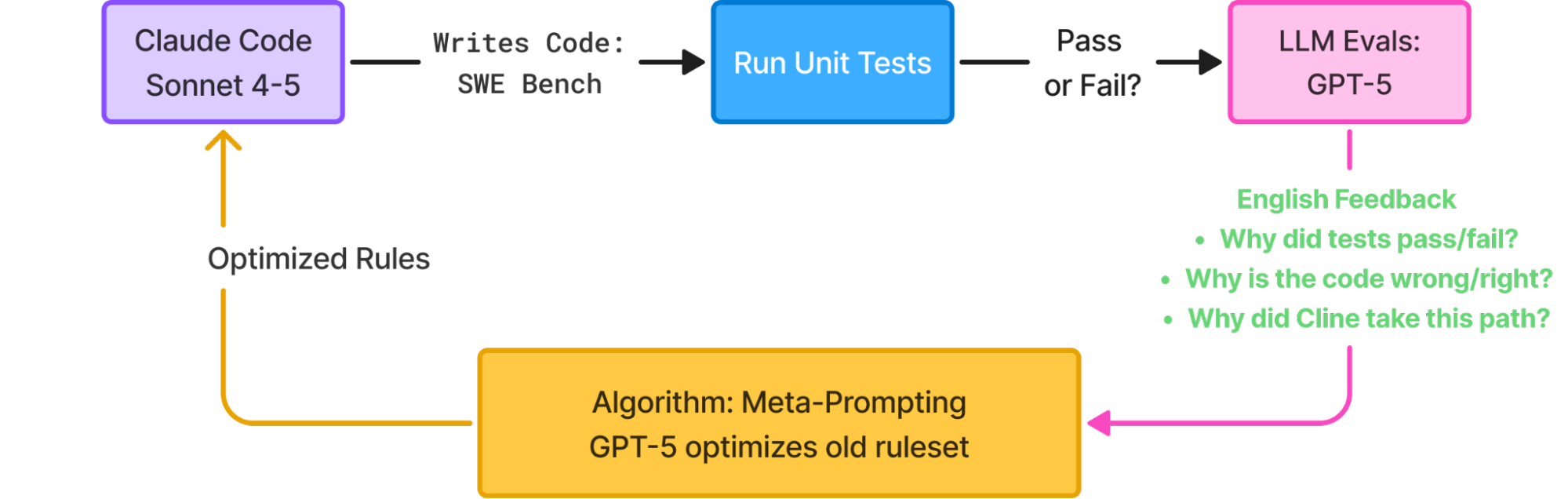
Let's begin.
Step 1: Establish the "Red" Baseline
First, we need to see the tests fail. This confirms our test runner is working and establishes the "red" state we need to turn "green."
Your Prompt to Claude:
"The refactoring of the API endpoint to async is complete. Now, run the existing unit tests for this endpoint to verify its behavior. The test file should be located attests/test_api.py. Execute the test suite using our project's test command."
Claude will run the tests, and you should expect a TypeError or similar, complaining that a "coroutine was never awaited." This is our signal to start the fixes.
Step 2: Instructing the Fix
Now, provide Claude with a detailed prompt that incorporates the patterns from Anthony Shaw's article. Your background in Python and FastAPI means you can give Claude a precise, technical set of instructions.
Your Prompt to Claude:
"The tests failed as expected because they are not configured for an async application. Please update the test suite intests/test_api.pywith the following changes:
- Install the
pytest-asyncioandhttpxpackages if they are not already in our dependencies.- Import
pytestandhttpx.- Create a new
asyncfixture namedasync_client. This fixture should instantiate anhttpx.AsyncClient, pointing to our FastAPIappobject, andyieldit.- For each test function that calls the refactored endpoint, do the following:
a. Add the@pytest.mark.asynciodecorator above the function definition.
b. Change the function signature fromdeftoasync def.
c. Replace the synchronous test client fixture with our newasync_clientfixture.
d. Prepend theawaitkeyword to the client call (e.g.,await async_client.get(...)).After applying these changes, run the test suite again."
This prompt is effective because it doesn't just state the goal; it provides a procedural, step-by-step guide on how to achieve it, leveraging your own expertise.
Step 3: Iterative Debugging
Claude may get it right on the first try, or it might need a few rounds of refinement. This is where the interactive "test-and-fix" loop becomes powerful.
Claude Code Sub Agents Tutorial — Build, Test & Release Code FAST
The following video demonstrates this iterative debugging process with Claude Code's sub-agents. While we're working in the main chat, the principle is the same: run tests, analyze failures, and use the output to guide the next fix.
Watch the segment from 09:54 to 17:17. Observe how the creator uses the test runner's output to identify a problem, prompts the software engineer agent to fix it, and then re-runs the tests, creating a tight feedback loop until all tests pass.
If the tests still fail after your initial prompt, your workflow should be:
- Copy the full traceback from the test runner's output.
- Provide it back to Claude with a prompt like:
"The tests are still failing with the following error. Analyze the traceback and the changes you've made, then implement a fix."
- Repeat until the test runner reports all green.
This loop of execute -> observe -> correct allows you to solve complex issues incrementally, with the AI doing the heavy lifting of code modification while you provide the strategic direction.
Advanced Application: Automating Verification with Hooks
Running tests manually after each change is effective, but for a truly advanced workflow, we can automate this verification step. This directly aligns with your goal of building professional-grade automation. Claude Code's hooks are perfect for this.
Claude Code CLI: The Definitive Technical Reference | Introl Blog
The Claude Code technical reference guide provides examples of how to set up hooks. Let's look at a specific one for running tests.
Find the Hooks System section and navigate to the Practical Hook Examples subsection. Examine the example for Run tests after code changes. Notice how it uses a PostToolUse event and a matcher for Edit to trigger a test command automatically.
Based on this pattern, you could configure a hook in your project's .claude/settings.json that automatically runs your pytest command every time Claude uses the Edit or Write tool on a file in your main application directory.
Example settings.json configuration:
{
  "hooks": {
    "PostToolUse": [
      {
        "matcher": "Edit|Write",
        "hooks": [
          {
            "type": "command",
            "command": "bash -c 'if [[ \"$FILE_PATH\" == src/* ]]; then poetry run pytest; fi'"
          }
        ]
      }
    ]
  }
}
This setup creates a powerful, immediate feedback loop, ensuring that no code change is accepted without passing the test suite, effectively enforcing a Test-Driven Development discipline on the AI's work.
Conclusion
Congratulations! You have successfully completed a major refactoring task and, most importantly, validated it with a fully updated, passing test suite. You've gone beyond simply making a change and have ensured its quality and correctness.
Key Takeaways:
- Tests Complete the Refactor: A code change isn't done until the tests are updated and passing. This provides the confidence needed to merge and deploy.
- The Test-Fix Loop is Your Primary Workflow: For debugging and validation, the
run tests -> analyze failure -> prompt fixcycle is the most effective way to collaborate with Claude Code. - Provide Specific Technical Guidance: Your expertise is crucial. Knowing the specifics of
pytest-asyncioandhttpxallowed you to craft a prompt that led to a successful outcome. - Automate with Hooks for a Professional Workflow: Transitioning from a manual test run to an automated
PostToolUsehook elevates your process from a one-off task to a reliable, enforceable development standard.
Next Up:
You've now demonstrated end-to-end mastery of a complex refactoring workflow within Claude Code. In our next module, we will pivot to another advanced topic: Advanced MCP Server Integration. You'll start by architecting an extensible MCP server with FastAPI, enabling you to create custom, stateful tools that deeply integrate with your development environment and external services like your PostgreSQL database. This will unlock a new level of custom automation for your projects.