Recommended resources
The freely available resources this lesson will direct you to.
In our last lesson, you successfully configured a foundational Express server. It's now capable of serving a full HTML page, complete with static assets and the HTMX library. This is the bedrock of any hypermedia application. However, a static initial page is only half the story. The real power of HTMX lies in dynamic, partial page updates, and for that, our server needs to become more intelligent.
Today's lesson focuses on a pivotal concept in server-driven UIs: designing your routes to be context-aware. You will learn how to make a single Express endpoint smart enough to know whether to serve a full HTML document (for a direct browser visit or page refresh) or just a small HTML fragment (for a fast, targeted HTMX update). The key to this is a simple, yet powerful, HTTP header that HTMX sends with every request.
The Full Page vs. Partial Fragment Dilemma
Imagine you have a route, say /contacts/123, that displays the details for a specific contact. In our current setup, this route would render a complete HTML page. Now, consider a user interface where clicking a contact's name in a list should display their details without a full page reload.
In this scenario, fetching the entire page is wasteful. We don't need to re-render the header, footer, and navigation—we only need the HTML for the contact's details. Conversely, if a user bookmarks http://.../contacts/123 and opens it later, sending only the contact details fragment would result in a broken, unstyled page. The server needs to distinguish between these two contexts.
The HX-Request Header: Your Server's Signal
HTMX elegantly solves this problem by adding a specific header to every AJAX request it initiates: HX-Request: true. This header acts as a clear signal to the server, effectively saying, "This request is coming from HTMX; a partial response is likely sufficient."
Requests made directly by the browser—such as initial page loads, full refreshes (F5), or following a bookmarked link—will not have this header. This simple presence or absence of the HX-Request header is the switch we'll use in our Express routes.
You can see this header in action using your browser's developer tools.
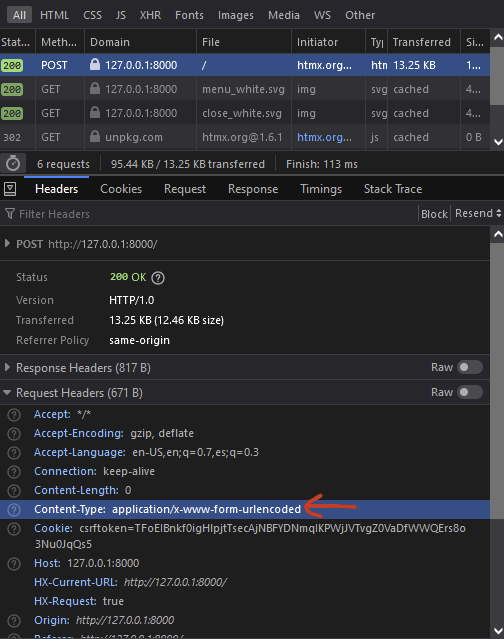
Implementing Conditional Rendering in Express
With this knowledge, we can now implement the core logic in our Express route handlers. We'll use a simple if/else statement to check for the presence of the hx-request header on the incoming request object (req).
The following article provides an excellent walkthrough of this exact scenario. It demonstrates building a contact manager and tackles the problem of a full-page refresh breaking the UI.
Build a Full-stack App with Node.js and htmx - SitePoint
This article from SitePoint directly addresses our current challenge. It uses Pug as a templating engine, but the server-side Express logic is identical for EJS.
Please read the section Dealing with a full page refresh. Pay close attention to the code block that modifies the /contacts/:id route handler. Notice how it uses if (req.headers['hx-request']) to decide whether to send a small HTML string or render the full index template.
Let's translate the core concept from the article into our EJS-based project. Your route handler would look something like this:
app.get('/contacts/:id', (req, res) => {
  // Logic to find the specific contact by its id
  const contact = findContactById(req.params.id);

  if (req.headers['hx-request']) {
    // This is an HTMX request.
    // Send back just the HTML fragment for the contact.
    // Here we're using res.send with a template literal for simplicity,
    // but in the next lesson, we'll use res.render with a partial template.
    res.send(`
      <h2>${contact.name}</h2>
      <p><strong>Email:</strong> ${contact.email}</p>
    `);
  } else {
    // This is a normal browser request.
    // Render the full page layout, passing in the necessary data.
    // The 'index.ejs' template would be responsible for displaying the full UI,
    // including the details for this specific contact.
    res.render('index', { contacts: allContacts, activeContact: contact });
  }
});
This pattern is the cornerstone of building robust hypermedia applications. A single URL (/contacts/:id) now serves two purposes depending on the context, ensuring a seamless user experience whether they are navigating within the app or accessing the URL directly.
The difference in payload size is significant. An HTMX request might receive a few hundred bytes of HTML, while a full-page load could be many kilobytes.
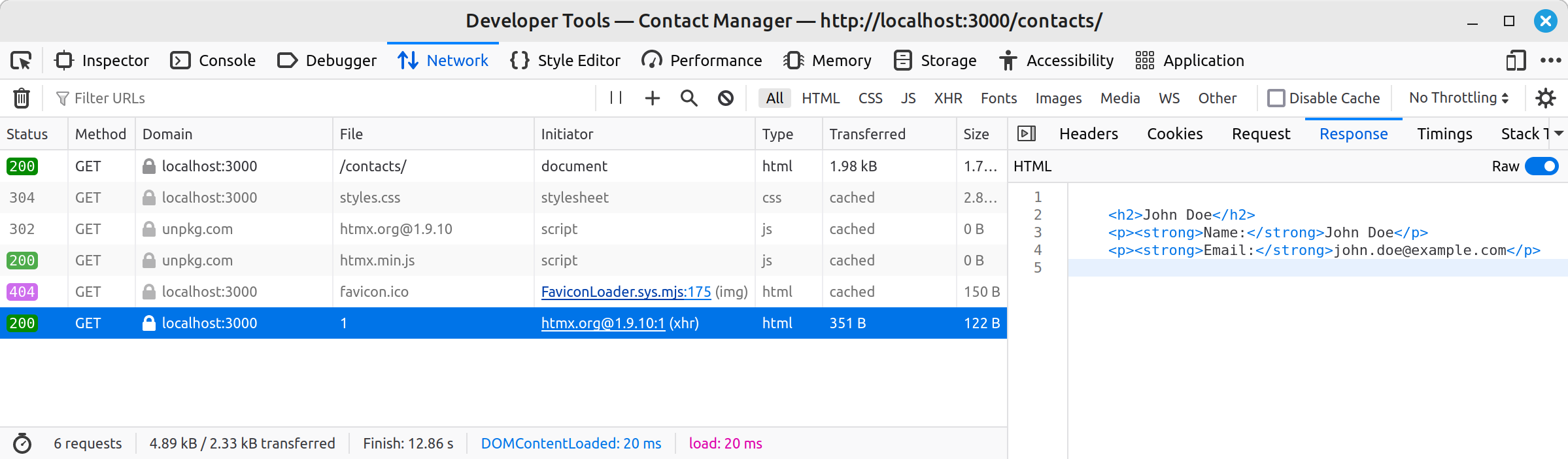
A Glimpse into Partials
You might have noticed a potential issue in the code example above. The HTML for displaying a contact's details could end up being duplicated—once inside the res.send() call and again inside the index.ejs template. As your application grows, this becomes difficult to maintain.
The solution is to extract the reusable HTML fragments into their own template files, often called "partials."
- The HTMX request handler will render just the partial:
res.render('partials/contact-details', { contact }); - The full-page request handler will render the main layout, which in turn includes the partial:
res.render('index', { ..., contact });
The SitePoint article you just reviewed performs exactly this refactoring.
Build a Full-stack App with Node.js and htmx - SitePoint
This section refactors the code to eliminate duplication by creating a separate template file for the contact details.
Now, read the short section titled A quick refactor. This demonstrates how to move the duplicated HTML into a contact.pug partial and use res.render() in both branches of the if/else statement. This is the pattern we will adopt.
This refactoring leads to cleaner, more maintainable code and directly sets the stage for our next topic.
Conclusion
In this lesson, you've learned the fundamental technique for making your Express server "bilingual," capable of speaking both "full page" to the browser and "partial fragment" to HTMX.
Here are the key takeaways:
- The Problem: A single URL might be accessed via a full page load or an HTMX request, requiring different responses (full document vs. HTML fragment).
- The Signal: HTMX automatically includes the
HX-Request: trueheader in all its requests, providing a clear signal to the server. - The Implementation: A simple conditional check
if (req.headers['hx-request'])in your Express route handlers allows you to serve the appropriate response for the given context.
You now possess the core server-side pattern for building dynamic, yet robust, hypermedia-driven applications. In our next lesson, we will build upon this by systematically organizing our project, formally separating full-page layouts from reusable partial templates to create a clean and scalable codebase.