Recommended resources
The freely available resources this lesson will direct you to.
Introduction
Hello and welcome back. In our last lesson, we established a crucial foundation: retrieval practice, the act of actively pulling information from your memory, is far more effective for long-term learning than passively rereading your notes. We saw how this "testing effect" builds stronger, more durable memory pathways, even though it feels more difficult.
Now that you understand why retrieval is so powerful, it's time to move from theory to practice. This lesson is all about the how. Our goal is to equip you with the skills to create low-stakes quizzes or practice tests for new UX concepts and methodologies. This is a core strategy for improving retention and your ability to apply knowledge on demand—two of your key goals.
We'll explore different types of questions you can create, look at practical templates, and even see how modern tools can help you generate practice tests from your own study materials.
Principles of Effective Self-Quizzing
Before we dive into creating questions, it's important to set some ground rules. A "low-stakes quiz" isn't about getting a grade; it's a tool for learning. Its purpose is to give you accurate feedback on what you know and strengthen your memory in the process.
To ensure your self-tests are effective, they should follow a few key principles.
10 Techniques for Retrieval Practice
This article from the blog 'teacherhead' provides an excellent summary of the principles behind effective retrieval practice. These are essential guidelines for designing any self-test.
Please read the first section, which introduces six principles for effective retrieval. Focus on understanding why each one—like being 'generative' and 'time efficient'—is important.
Based on that reading and the principles of cognitive science, here are the core ideas to keep in mind when creating your own quizzes:
- It must be generative. You have to generate the answer from your own mind. This means closing your notes, covering the answers, and truly testing your recall, not just your recognition.
- The stakes must be low. The goal is diagnosis, not judgment. Mistakes are valuable information that tells you exactly where to focus your efforts next.
- Feedback must be immediate and accurate. After you attempt to answer, you must check your response against the correct information. This loop of
retrieve -> checkis what solidifies learning and corrects misunderstandings. - It should be time-efficient. These aren't final exams. They are quick checks that can be done in 5-10 minutes and integrated easily into your study routine.
With these principles in mind, let's explore some practical methods for creating your quizzes.
Methods for Creating Your Own Practice Tests
Creating a practice test doesn't have to be complicated. You can use a variety of formats to test different levels of understanding, from basic definitions to complex applications.
1. Factual Recall Questions
This is the most straightforward method: you create questions that test your memory of core facts, definitions, and concepts. These can be short-answer, fill-in-the-blank, or multiple-choice questions.
- How to create them: Go through your notes or a text you've just read and turn key statements into questions.
- If you read, "Jakob's Law states that users spend most of their time on other sites," your question becomes, "What does Jakob's Law state?"
- If you're learning Nielsen's 10 Usability Heuristics, you could ask, "Which heuristic deals with providing clear and helpful error messages?" (Answer: "Help users recognize, diagnose, and recover from errors").
For inspiration, many technical interview prep guides are essentially banks of factual recall questions.
UX Design Interview Questions (2026 Guide)
Let's look at some examples. This guide from BrainStation lists common UX design interview questions. While designed for interviews, they are perfect examples of the kinds of recall questions you can create for yourself.
Skim through the section 'Common Skills-Based UX Designer Interview Questions'. Notice how questions like 'How would you define design thinking?' or 'What is the difference between information architecture and interaction design?' are designed to test foundational knowledge.
2. Application and Scenario Questions
While factual recall is important, your goal is to apply your knowledge. Scenario-based questions are perfect for this. They bridge the gap between knowing a concept and knowing how to use it.
- How to create them: Start with a concept, then invent a mini-case study or problem that requires you to apply it. Use prompts like "How would you...", "What would you do if...", or "Explain how you would use [concept] to solve [problem]."
Example for UX Design:
Let's say you're learning about A/B testing.
- Factual question: "What is an A/B test?"
- Application question: "You are a UX designer for a travel website. The team wants to increase the number of users who book a flight after searching. Propose an A/B test for the search results page. What is your hypothesis, what would you change for variant B, and what metric would you measure?"
This type of question forces you to move beyond the definition and think through the practical steps of implementation. The interview questions in sections 1 and 2 of the BrainStation article (LINK) under "Technical" and "Situational" questions are excellent models for this.
3. Brain Dumps and Concept Maps
This method is less about specific questions and more about mapping out your knowledge of an entire topic. It's a powerful way to see the big picture and the connections between concepts.
- How to do it:
- Recall: Take a blank page and a topic (e.g., "UX Research Methods"). For 5-10 minutes, write down everything you can remember about it—definitions, examples, processes, related ideas. This is also known as free recall, which we'll explore more in our next lesson.
- Organize: Look at your "brain dump" and start structuring it. Group related items, draw lines to show relationships, and create a visual hierarchy. This turns your list into a concept map.
- Check & Refine: Now, open your notes or source material. What did you miss? What did you mis-categorize? Add the missing information (perhaps in a different color) and correct any errors.
For a topic like UX research methods, you could challenge yourself to recreate the following framework from memory.

Test your understanding!
Imagine you've just read an article about the "Fitt's Law" in UX design. Your goal is to create a mini practice test to make sure you've learned it effectively.
Using the three methods we just discussed, create one question for each type:
- A Factual Recall question.
- An Application/Scenario question.
- A prompt for a Brain Dump/Concept Map (what would you try to map out?).
Show answer
Here are some examples of what you might create:
- Factual Recall: "In your own words, what is Fitt's Law? What are the two variables it says influence the time to acquire a target?" (Answer: Target size and distance to the target).
- Application/Scenario: "You are designing a mobile app checkout screen. How would you apply Fitt's Law to the placement and size of the 'Complete Purchase' button to make it easy for users to tap?"
- Brain Dump/Concept Map Prompt: "On a blank page, map out the concept of Fitt's Law. Connect it to at least two other related UX concepts (e.g., Hick's Law, accessibility, mobile-first design, button design) and explain the relationship."
Tools and Templates to Streamline the Process
While a pen and paper are all you really need, some tools and templates can make creating and organizing your quizzes easier.
A Simple Template: The Challenge Grid
A challenge grid is a simple but powerful way to structure your quizzes. It encourages you to pull from topics you've learned at different times, which is a primer for "spaced repetition," a topic we'll cover soon.
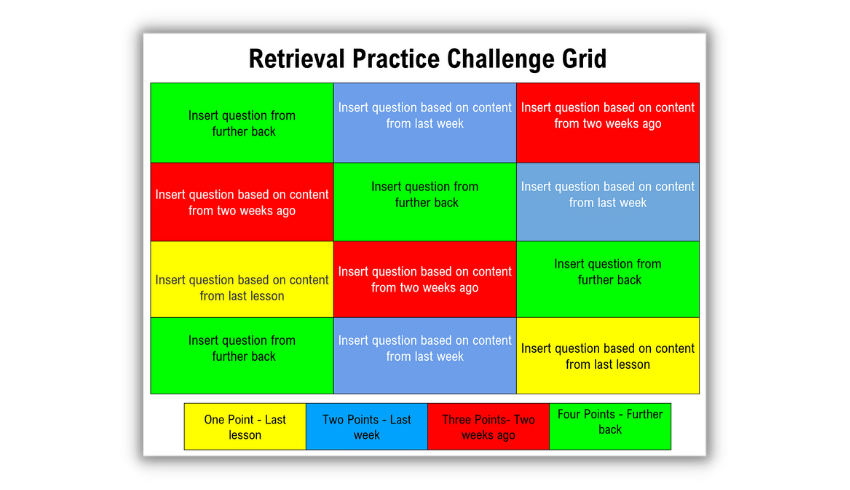
You can easily recreate this grid for your own topics. For example, when learning a new coding language, the columns could be "Syntax," "Functions," "Data Structures," and "Algorithms."
Using AI to Generate Quizzes
Creating questions takes time. One modern, efficient approach is to use AI tools to generate quizzes for you based on your learning materials. This lets you spend less time on question creation and more time on the effortful act of retrieval.
Make practice quizzes ahead of your exam | AI for Students | Google
This short video from Google demonstrates how you can use an AI tool like Gemini to automatically create a practice quiz from your notes or lecture materials.
Watch from the beginning to 02:15. Focus on the process: uploading source material (like notes) and then prompting the AI to generate a quiz. Notice the different types of questions it can create.
The key idea here is powerful: you can take an article about a UX methodology, a transcript from a tutorial, or even your own messy notes, provide it to an AI, and ask: "Create a 10-question practice quiz based on this text. Include multiple-choice, short-answer, and one scenario-based question."
This instantly provides you with a low-stakes test, complete with answers you can check against.
Conclusion
Today, we've moved from the theory of retrieval practice to the concrete actions you can take to implement it. You now have a toolkit for actively testing your knowledge, a practice that is fundamental to building deep, lasting, and applicable skills.
Key Takeaways:
- Effective self-quizzing is generative, low-stakes, and provides immediate, accurate feedback.
- You can create a mix of question types, including factual recall to test foundational knowledge and application scenarios to test practical use.
- Brain dumps and concept maps are powerful visual methods for testing your understanding of an entire topic and its connections.
- Simple templates (like the Challenge Grid) and AI tools can streamline the process of creating practice tests, making it easier to build this habit.
In our next lesson, we will zoom in on one of these techniques: free recall. You will learn how to perform free recall on a recently learned topic to get a brutally honest and incredibly useful assessment of what you've actually retained.