Recommended resources
The freely available resources this lesson will direct you to.
- Improve Your Art With Spaced Repetition - the ultimate step-by-step guidewww.youtube.com
- How to Study for Exams - Spaced Repetition | Evidence-based revision tipswww.youtube.com
- Leitner System Ultimate Guide 2025: All You Need to Knowleitner-box.com
- Spaced Repetition: Remembering What You Learnwww.kpu.ca
Introduction
Hello again! In our last lesson, we explored the "spacing effect" and established why spreading out your learning over time is vastly more effective than cramming. You learned that by strategically interrupting the forgetting curve, you build stronger, more durable memories.
Today, we move from the why to the how. This lesson is all about putting that principle into action. Your learning outcome is to design and implement a spaced repetition schedule for a learning goal, using either manual methods or software.
We will look at three practical systems for scheduling your reviews:
- The Leitner System: A classic manual method using physical flashcards and boxes.
- The Spreadsheet Method: A flexible, digital-manual hybrid.
- Spaced Repetition Software (SRS): An automated approach using apps like Anki.
Mastering this will give you a concrete system to improve your retention, tackling one of the key pain points you identified in your learning process.
The Core Principle: Scheduling for Forgetting
As we discussed, the goal of spaced repetition isn't just to review information, but to review it at the optimal moment: right before you're about to forget it. This forces your brain to work a little harder to retrieve the memory, and that effort is what makes the memory stronger.
A typical schedule of increasing intervals might look like this:
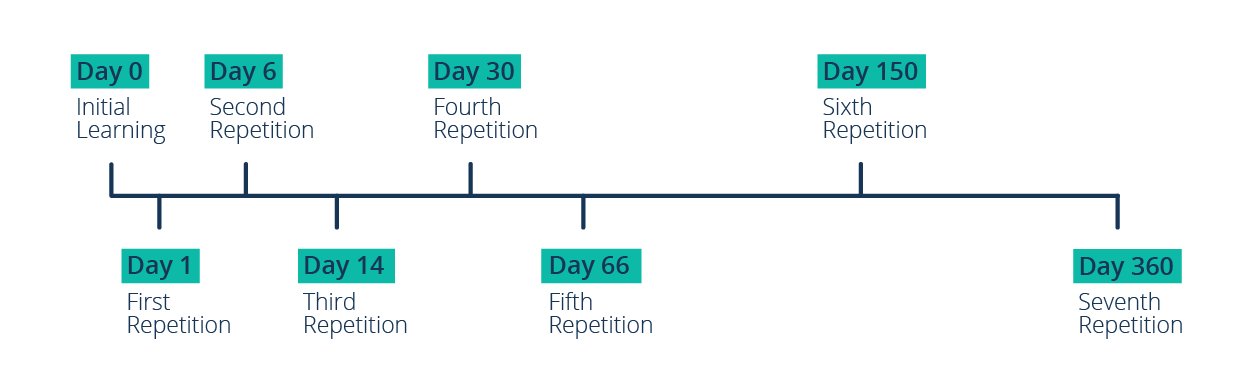
Manually tracking these intervals for dozens of facts or concepts would be a major headache. Fortunately, several systems have been developed to manage this process for you. Let's explore them.
Method 1: The Manual Approach
Understanding the manual systems first is useful because they make the underlying logic transparent. You'll see exactly how the scheduling works before we look at software that automates it.
A. The Leitner System (The "Box Method")
The Leitner System, developed in the 1970s, is an elegant method that uses flashcards and a series of boxes to manage review intervals. It's a physical implementation of a spaced repetition algorithm.
To understand how it works, please read the following guide.
Leitner System Ultimate Guide 2025: All You Need to Know
The 'Leitner System Ultimate Guide' provides an excellent overview of this manual method. We'll focus on the basics, the schedule, and the step-by-step process.
Please read the following parts of the article: Section 1. Leitner System Basics: Read all subsections ('What is the Leitner System?', 'The Science Behind...', and 'Flashcards, Boxes, and Timetable'). This will give you the foundational concept. The 'Study Schedule' subsection: This is within Section 3. Look for the image of a calendar. This provides a concrete example of review frequencies for each box. The 'Learning Process Step by Step' subsection: Also in Section 3. This gives you the 7-step process for using the system.
Here is a visual summary of the process:

From your design perspective, you can think of the Leitner system as a simple user flow for knowledge. An incorrect answer is a friction point that automatically routes the item back to the beginning of the "onboarding" process (Box 1), ensuring it gets the attention it needs.
B. The Spreadsheet Method
If physical cards aren't your style, a spreadsheet offers a flexible digital alternative. This method gives you more manual control than automated software and allows you to track broader topics, not just individual flashcards.
Medical student and YouTuber Ali Abdaal popularized a system using Google Sheets. Watch this segment where he provides a detailed walkthrough of his setup.
How to Study for Exams - Spaced Repetition | Evidence-based revision tips
In this segment from 'How to Study for Exams', Ali Abdaal explains his powerful yet simple spaced repetition system built entirely in a spreadsheet.
Please watch the section from 00:11:40 to 00:18:25. Focus on how he structures the spreadsheet: topics in one column, dates of active recall in subsequent columns, and the use of color-coding to represent confidence levels (Red/Yellow/Green).
The key components of the spreadsheet method are:
- Column A: A list of all topics for a subject (e.g., all the UX laws, all the data analysis functions you want to learn).
- Subsequent Columns: The date of each review session.
- Color-Coding: Each cell with a date is colored based on your self-assessed confidence (e.g., Green for easy, Yellow for medium, Red for difficult).
This system's power lies in its simplicity and flexibility. Each day, you can simply look at your spreadsheet and decide to work on the "red" topics, giving you a clear, data-driven way to prioritize your study time.
Method 2: Spaced Repetition Software (SRS)
The most efficient way to implement spaced repetition is with dedicated software. These programs use algorithms to automatically calculate the optimal review interval for each item based on your feedback. The most well-known SRS is Anki.
While often used for learning facts (like vocabulary or anatomy), Anki can be adapted for procedural and conceptual skills, which is highly relevant for your goals in design and coding. The following video shows a digital artist's sophisticated system for using Anki to learn a creative skill. This is an excellent model for a designer.
Improve Your Art With Spaced Repetition - the ultimate step-by-step guide
This video, 'Improve Your Art With Spaced Repetition,' is a fantastic case study in applying SRS to a non-traditional, skill-based subject. Pay close attention to how the creator structures his cards to practice skills, not just memorize facts.
Please watch these key segments: Introduction to Anki (00:07:36 - 00:08:11): A quick overview of the tool. Creating Cards for a Skill (00:09:19 - 00:11:54): This is the most important part. Notice how he creates cards that have two parts: declarative questions (e.g., 'What is X?') and a procedural challenge (e.g., 'Now create a study using method X'). He also adds his own notes to track his progress. Using the Algorithm (00:17:15 - 00:19:20): Here, he explains how he uses Anki's feedback buttons ('Again', 'Hard', 'Good', 'Easy') to manage the review schedule for these skill-based cards.
The artist's method of combining a knowledge prompt with a practical challenge is a powerful template. For instance, if you were learning about accessibility guidelines:
- Front of Card (Declarative): What is the WCAG 2.1 AA requirement for color contrast?
- Front of Card (Procedural): Challenge: Take a screenshot of our app's login screen and use a contrast checker to identify any elements that fail this requirement.
- Back of Card: The answer (4.5:1 for normal text), along with a link to a contrast checker tool.
This transforms a passive review into an active, applied practice session.
Your Turn: Design Your Schedule
Now it's time to apply what you've learned.
Your task:
- Choose a small, concrete learning goal relevant to your interests (e.g., learning 5 key Gestalt principles, memorizing 10 essential Figma shortcuts, or understanding 3 common data visualization chart types).
- Choose one of the three methods we discussed (Leitner, Spreadsheet, or Anki).
- Outline the first few steps you would take to implement your schedule. Be specific.
Test your understanding!
Post your plan in the space below. Here are some examples to guide you:
-
Example (Leitner System):
- Goal: Learn 5 key Gestalt Principles (Proximity, Similarity, etc.).
- Method: Leitner System with 3 boxes.
- Plan: "I will create 5 physical flashcards. On the front, I'll write the principle's name. On the back, I'll write the definition and a small visual example. All 5 start in Box 1. I'll review Box 1 daily, Box 2 every 3 days, and Box 3 weekly."
-
Example (Spreadsheet Method):
- Goal: Learn key functions in a data analysis library (e.g., Pandas).
- Method: Google Sheets.
- Plan: "I'll create a sheet named 'Pandas'. The first five rows in Column A will be
.groupby(),.merge(),.fillna(),.pivot_table(), and.apply(). I'll study.groupby()today, write a short summary of what it does in my notes, and then mark today's date in the first cell, colored Yellow because I'm not confident yet."
-
Example (Anki):
- Goal: Master Figma's auto-layout features.
- Method: Anki.
- Plan: "I'll create a deck called 'Figma Skills'. My first card will be: Front - 'What is the difference between 'Hug contents' and 'Fill container' in auto-layout? Challenge: Build a simple component that demonstrates both.' Back - 'Hug contents resizes the frame to fit its children... Fill container makes the child expand to fill the available space... [screenshot of correct implementation]'. I'll review my Anki deck daily."
Now, write your plan:
Show answer
There's no single right answer here! The goal is to create a specific, actionable plan. A good plan will clearly state the goal, the chosen method, and the concrete first steps for setting up the system and creating the first piece of learning material. The act of designing the system is the key part of this exercise.
Conclusion
You now have a toolkit of practical methods for implementing spaced repetition. By systematically scheduling your reviews, you are taking direct control over your memory-building process, ensuring that what you learn sticks for the long haul.
Key Takeaways:
- Spaced repetition systems work by scheduling reviews at increasing intervals, just before you forget something.
- Manual systems like the Leitner box method or a spreadsheet are transparent and give you high control. They are excellent for understanding the underlying principles.
- Spaced Repetition Software (SRS) like Anki automates the scheduling, making it highly efficient.
- For skills, you can create powerful review items by combining declarative prompts (what is it?) with procedural challenges (now do it).
What's Next?
So far, we've focused on mastering one topic at a time. But what's the best way to practice when you're learning several related things at once—like different UX methodologies or multiple coding functions? Our next lesson will introduce interleaving, the technique of mixing up your practice to build a more flexible and robust understanding of how concepts differ and when to apply each one.