Recommended resources
The freely available resources this lesson will direct you to.
Hello! In the previous lesson, you imported modules and installed a package in Colab. You also saw why a notebook should run from the top after a fresh runtime: code can fail simply because a setup cell has not run. This lesson is about what to do when Python stops and displays an error.
You’ll learn to read a traceback, identify the line that failed, and correct three common problems: syntax errors, type errors, and indexing errors. Allow about 40 minutes to study the short resources and run the examples. No GPU or additional package is needed.
Read the traceback before changing the code
A traceback is Python’s report of an error that stopped execution. Its last line usually gives you the error’s name and a message. The lines above show where Python was running when it failed, including any functions called along the way.
The labeled example below begins with a call to greet('Chad'). Inside greet, the code refers to someon, a name that was never defined. Notice that the traceback includes both the call to the function and the line inside it where execution stopped.
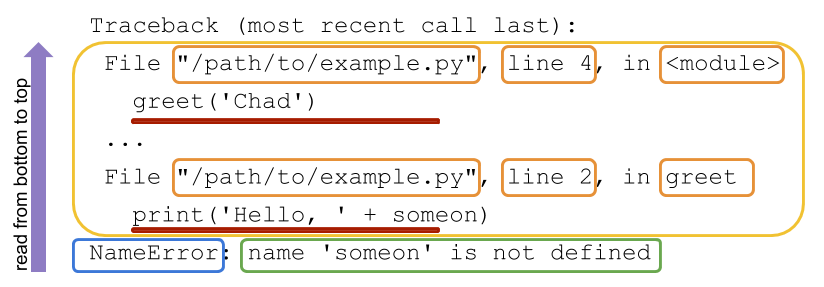
The heading says “most recent call last” because the last frame printed is the function Python reached most recently. A reliable reading order is:
- Read the final line: What error occurred, and what does its message say?
- Look just above it: Which file or notebook cell, line, and function was executing?
- If that line does not explain why the wrong value arrived, inspect the earlier frames—the calls that led there.
Watch Traceback (most recent call last): Python’s tracebacks explained by Python Morsels for a visual account of this reading order. The example also shows an important distinction: the line that fails is not always the best line to fix.
Traceback (most recent call last): Python's tracebacks explained
Watch Python Morsels’ “Traceback (most recent call last): Python's tracebacks explained” to see how the error message and function-call frames fit together.
Watch the bottom line for the error name and message, then the call frames for the failing location. In the TypeError example, notice why the presenter looks at an earlier caller before deciding where to correct the value.
For a written reference, read the opening example and traceback map in Real Python’s Understanding the Python Traceback. You do not need the article’s more advanced discussion of multiple exceptions.
Understanding the Python Traceback – Real Python
Read Real Python’s “Understanding the Python Traceback” for a second view of the labeled example and the bottom-up method.
In “What Is a Python Traceback?”, start with the opening example; stop before “How Do You Read a Python Traceback?”. Then, under “How Do You Read a Python Traceback?” → “Python Traceback Overview,” read the traceback map, stopping before “Specific Traceback Walkthrough.” Focus on the final error line and the location-and-code pairs above it.
Colab’s display may show a notebook cell name rather than the file path in the illustration, and its exact wording may vary by Python version. The useful questions remain the same: what failed, where, and with which values?
Correct code Python cannot parse
A syntax error occurs before Python can run the code in that cell. Try this function definition in its own Colab cell:
def token_count(tokens)
    return len(tokens)
Python will report a SyntaxError and point near the definition. The function needs a colon after its parameter list:
def token_count(tokens):
    return len(tokens)

print(token_count(["plan", "execute", "check"]))  # 3
A syntax error may show a line and a caret (^) without the usual multi-frame traceback: Python could not parse the cell to begin executing it. The caret shows where Python noticed the problem, which might be just after the missing punctuation. Inspect the marked line and, for unclosed quotes or brackets, the line before it.
Watch the syntax-error portion of Top 10 Most Common ERRORS In Python (And How To FIX Them) by Indently. It uses a missing closing parenthesis rather than our missing colon; both prevent Python from understanding the code.
Top 10 Most Common ERRORS In Python (And How To FIX Them)
Watch Indently’s “Top 10 Most Common ERRORS In Python (And How To FIX Them)” for a visual example of code that Python cannot parse.
In syntax errors, focus on how the missing closing parenthesis prevents execution and how correcting the punctuation resolves that specific problem.
Fix syntax first. Until a cell can run, you cannot tell whether it also contains a later type or indexing error.
Correct a mismatch between types
A type error happens during execution when an operation cannot be performed on the kinds of values it received. Here, the function expects a number, but its caller supplies text:
def add_one(number):
    """Return one more than a numeric input."""
    return number + 1

raw_batch_size = "8"
print(add_one(raw_batch_size))
The traceback ends with TypeError and a message about adding a str (string) and an int (integer). Its lower frame points to return number + 1; an earlier frame points to the call. The addition makes sense for a number. The actual mismatch is that "8" is text, despite looking like a number.
If this value is meant to be numeric text, convert it when you pass it into the calculation:
print(add_one(int(raw_batch_size))) # 9
If you wrote the data yourself and meant it to be a number all along, an even simpler correction is raw_batch_size = 8. The right fix depends on what the input represents, not merely on which edit removes the error. Converting arbitrary text without checking its meaning could hide a data problem.
A TypeError can also arise from an indexing attempt, such as 8[0]: an integer is not a sequence you can index. The operation and value types, not just the presence of square brackets, determine the error.
Return to Indently’s video for its short type-error demonstration.
Top 10 Most Common ERRORS In Python (And How To FIX Them)
Continue the previously introduced video for examples of operations applied to incompatible types.
Watch type errors. Notice both the attempt to add unlike types and the attempt to index an integer; compare their error category with the message your Colab cell produced.
Correct an index that is out of range
An IndexError means a sequence supports indexing, but the requested position does not exist. Run this cell:
def read_token(tokens, position):
    """Return the token at a zero-based position."""
    return tokens[position]

tokens = ["plan", "execute", "check"]
print(read_token(tokens, len(tokens)))
The list has length 3, but its positions are 0, 1, and 2. Passing len(tokens) requests position 3. The traceback points to tokens[position] inside the function; the caller shows where position 3 came from.
If your intention was the last token, use a valid last position:
print(read_token(tokens, len(tokens) - 1)) # check
Python also permits tokens[-1] for the last item. Neither expression can retrieve an item from an empty list, so first establish that a token exists when emptiness is possible. If instead your intention was “read the token after the last one,” changing 3 to 2 would silence the error but would not fulfill that intention. Debugging includes checking what the program was supposed to do.
Finish with the index-error portion of Indently’s video; it reinforces why list length and the last valid index are different numbers.
Top 10 Most Common ERRORS In Python (And How To FIX Them)
Continue the same video to see a list lookup outside its valid positions.
Watch index errors. Focus on the zero-based positions of a three-item list and why a larger requested position raises an IndexError.
Verify the correction, not just the absence of an error
A traceback tells you that execution stopped; its disappearance tells you only that this particular failure is gone. After each correction, rerun the input that failed and check a result whose answer you know. For the corrected functions above, these checks should run without output:
assert token_count(["plan", "execute", "check"]) == 3
assert add_one(8) == 9
assert read_token(["plan", "execute", "check"], 2) == "check"
If an assert fails, Python reports an AssertionError: the code ran, but its answer did not meet the stated expectation. That is useful evidence too.
In a notebook, also consider which cells have actually run. A NameError for a function you defined earlier may mean that its definition cell has not run in the current runtime. As in the previous lesson, running your saved notebook from the top helps distinguish a code defect from missing setup.
A compact debugging habit is to read the error and message, locate the failing line and its caller, explain the mismatch in one sentence, make the smallest correction consistent with your intent, and rerun and verify. Avoid changing several unrelated lines at once: it becomes difficult to tell which change mattered.
Takeaway
You can now use a traceback as a map rather than treat it as an opaque failure. A SyntaxError means Python could not parse the code; a TypeError points to an incompatible operation and value; an IndexError points to a position outside a sequence. In each case, the reported line is your starting point, while surrounding code and input values help you choose the right correction.
This completes the Python and Colab foundations module. Next, you’ll begin organizing data and behavior in Python classes—a step toward the larger data, model, and application components you’ll build later.