Recommended resources
The freely available resources this lesson will direct you to.
Hello! In the previous lesson, you used variables to hold individual values and f-strings to display results. Now you’ll work with values that have parts: a string contains characters, and a list contains items. You’ll learn to select those parts, take slices, and use methods to transform text or update a list.
This matters throughout the course. A task-automation program might receive a line of text, turn it into a list of actions, and select the actions it needs. The same Python mechanics will later help you inspect sequences of text tokens—though splitting text on spaces, as we do here, is not how a model tokenizer works.
Allow about 40–45 minutes, including the videos, reading, and Colab examples. Each code cell below can run on its own.
One position or a range?
A string is a sequence of characters. len() tells you how many characters it contains, and square brackets let you retrieve a character by its index. Python starts counting at zero:
word = "foobar"

print(len(word))  # 6
print(word[0])    # f: first character
print(word[3])    # b: fourth character
print(word[-1])   # r: last character
Negative indices count from the end: -1 is the last character, -2 the one before it. In the image, the green characters have positive indices 1, 2, and 3.
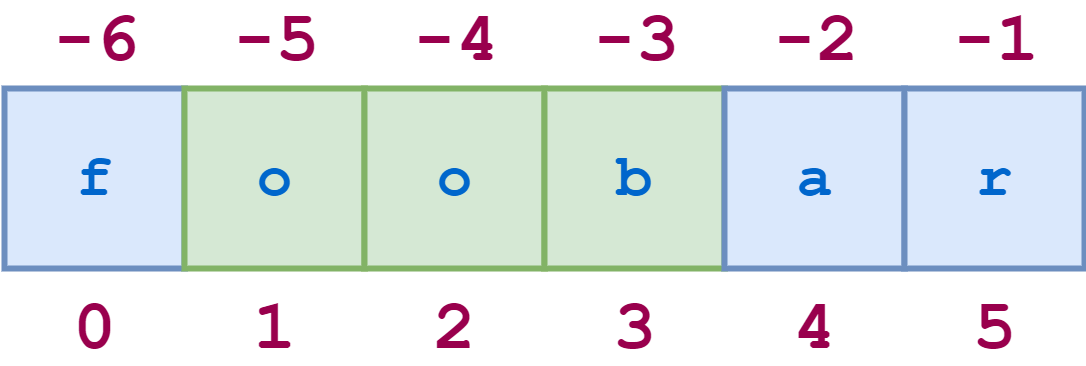
An index selects one element. A slice selects a range, using sequence[start:stop]. The start is included; the stop is excluded:
word = "foobar"

print(word[1:4])  # oob: indices 1, 2, and 3
print(word[:3])   # foo: from the beginning
print(word[3:])   # bar: through the end
print(word[-3:])  # bar: last three characters
Think of stop as the boundary just after the part you want. That convention lets word[:3] and word[3:] fit together without overlap or a gap.
Watch Corey Schafer’s Python Tutorial: Slicing Lists and Strings for the same indexing and slicing rules applied to both kinds of sequence.
Python Tutorial: Slicing Lists and Strings
Corey Schafer's Python Tutorial: Slicing Lists and Strings shows how indices and slice boundaries behave in running code.
Watch indices and slices for positive and negative positions and the excluded stop. In slice boundaries, notice what happens when a boundary is omitted. Continue through steps and reversal, then string examples to see that the same syntax works on text. The video uses a Python script; run the equivalent expressions in Colab cells.
A slice can also specify a step after a second colon. word[::2] takes every second character, while word[::-1] makes a reversed copy:
word = "foobar"

print(word[::2])   # foa
print(word[::-1])  # raboof
Be careful at the boundary. word[6] raises an IndexError because there is no character at index 6; the valid positive indices are 0 through 5. By contrast, word[3:20] safely returns "bar": a slice stops when the sequence ends. An empty string has no valid character index at all, although slicing it is safe.
Lists use the same positions, but can change
A list holds multiple items inside square brackets. The items need not be characters: here they are action labels. Don’t confuse the brackets that create a list with brackets after a variable name that select from it.
actions = ["draft", "schedule", "review"]

print(len(actions))  # 3
print(actions[0])    # draft
print(actions[-1])   # review
print(actions[1:])   # ['schedule', 'review']
The indexing rule is unchanged, but the result of a slice depends on what you sliced: a string slice is a string; a list slice is a new list. Lists have another important difference from strings: they are mutable. You can replace a list item directly.
actions = ["draft", "schedule", "review"]
actions[1] = "summarize"

print(actions)  # ['draft', 'summarize', 'review']
You cannot do the equivalent assignment to a string character. Strings are immutable; to change text, create a different string and, if needed, assign it to the same variable name:
label = "draft"
updated_label = "D" + label[1:]

print(label)          # draft
print(updated_label)  # Draft
Read the “3.1.3. Lists” subsection of the Python documentation’s An Informal Introduction to Python. It demonstrates list selection and modification, then shows why copying a list differs from assigning it another name.
3. An Informal Introduction to Python
Read the Python documentation's “3.1.3. Lists” subsection to connect list indexing with list mutability and copying.
In “3.1.3. Lists,” begin at the paragraph introducing compound data types. Read the list examples, stopping before the paragraph that begins “Assignment to slices is also possible.” Focus on changing an item with an index, adding an item with append(), and the rgb/rgba examples: assignment refers to the same list, whereas [:] creates a separate list. You can leave slice assignment and nested lists for later.
That copying distinction is worth testing. Both names in the first pair below refer to the same list, so an update through either name is visible through both. A full slice, [:], instead makes a new list containing the selected items.
actions = ["draft", "review"]
same_actions = actions
separate_actions = actions[:]

same_actions.append("send")

print(actions)           # ['draft', 'review', 'send']
print(separate_actions)  # ['draft', 'review']
Methods do work on a sequence
A method is called on a value using a dot: text.lower() or actions.append("send"). len(text) uses a different syntax because len is a built-in function, not a method called on text.
First, watch the string-method portion of Corey Schafer’s Python Tutorial for Beginners 2: Strings - Working with Textual Data. It shows an especially important behavior: calling a string method does not change the original string.
Python Tutorial for Beginners 2: Strings - Working with Textual Data
Corey Schafer's Python Tutorial for Beginners 2: Strings - Working with Textual Data demonstrates useful string methods and why you must keep the result of a text transformation.
Watch case and search for lower(), upper(), count(), and find(). Then watch replacement. Pay attention when replace() leaves the original string unchanged until its result is assigned to a variable.
Here are a few methods you can try together. find() returns the index of the first match, or -1 when there is none. The in operator is simpler when you only need a yes-or-no answer.
message = "  Draft Reply  "
clean_message = message.strip()  # Remove surrounding whitespace

print(message)                    # Still has surrounding spaces
print(clean_message)              # Draft Reply
print(clean_message.lower())      # draft reply
print(clean_message.replace("Reply", "Summary"))  # Draft Summary
print(clean_message.find("Reply"))                # 6
print("Reply" in clean_message)                   # True
strip() is another common string method; like replace(), it produces a new string. Search is case-sensitive here: "reply" in clean_message is False. If you want later code to use the cleaned value, store it, as clean_message does.
Two more string methods connect text and lists. split() breaks a string into a list; with no argument, it splits on whitespace. join() combines a sequence of strings, placing the string before .join() between the items:
text = "draft schedule review"
parts = text.split()

print(parts)                # ['draft', 'schedule', 'review']
print(" / ".join(parts))    # draft / schedule / review
Lists have methods suited to changing their contents. append() adds one item at the end; extend() adds the items from another sequence; pop() removes and returns an item (the last one by default). These calls act on the existing list:
actions = ["draft", "review"]
actions.append("confirm")
actions.extend(["schedule", "send"])
removed = actions.pop()

print(removed)  # send
print(actions)  # ['draft', 'review', 'confirm', 'schedule']
print("review" in actions)  # True
For now, remember the practical contrast: string transformation methods return text you can keep; list methods such as append() change the existing list. In particular, don’t write actions = actions.append("send"): append() returns None, so that assignment would replace your list variable with None.
Put the pieces together
A small automation program might receive action words with unwanted spaces, select an initial portion, and prepare a readable display. This cell uses only the sequence operations you’ve learned:
raw_actions = "  draft schedule review  "

actions = raw_actions.strip().split()
actions[0] = "summarize"
actions.append("confirm")

first_two = actions[:2]
display = " / ".join(actions)

print(first_two)  # ['summarize', 'schedule']
print(display)    # summarize / schedule / review / confirm
print(raw_actions)  # The original string is unchanged
Notice where the type changes. raw_actions.strip() is a string, .split() produces a list, and " / ".join(actions) produces a string again. Tracking the type at each point makes the code easier to understand—and prevents trying a list method on a string, or vice versa.
Takeaway
Strings and lists share zero-based indexing, negative indexing, and slices with an excluded stop. Use an index for one element and a slice for a range. Strings cannot be changed in place; lists can. String methods such as strip(), replace(), and split() produce useful new values, while list methods such as append() and pop() update a list.
Next, you’ll meet tuples, sets, and dictionaries: other ways to hold multiple values, each designed for a different kind of retrieval or update.