Recommended resources
The freely available resources this lesson will direct you to.
Hello again! Last lesson, you predicted JavaScript output by tracking each value and the operation applied to it. We’ll keep the same tracing habit, but track when code runs instead of what a value becomes.
This lesson focuses on three places that matter in event-loop interview questions: the call stack, the microtask queue, and the task queue. By the end, you should be able to explain why a timer callback can run after a promise handler even when the timer appears first in the code—and trace less obvious cases where callbacks schedule more work.
What runs now: the call stack
When JavaScript calls a function, that call joins the call stack. If the function calls another function, the new call sits on top. The most recent call finishes first, and execution resumes in its caller. The script itself is also executing as a task; the runtime does not interrupt it halfway through to run a timer callback.
function showResult() {
  console.log("result");
}

function handleRequest() {
  console.log("start");
  showResult();
  console.log("done");
}

handleRequest();
The output is start, result, done. handleRequest pauses while showResult runs, then resumes. No queue is needed for either call: both are ordinary synchronous execution.
Watch Lydia Hallie’s JavaScript Visualized - Event Loop, Web APIs, (Micro)task Queue for a visual account of the stack and why registering asynchronous work does not make its callback run immediately.
JavaScript Visualized - Event Loop, Web APIs, (Micro)task Queue
Watch Lydia Hallie’s “JavaScript Visualized - Event Loop, Web APIs, (Micro)task Queue” to see the stack and timer registration animated separately.
Watch the call stack for nested synchronous calls, then browser APIs for work performed outside the JavaScript stack. Continue through queued callbacks, especially the timer demonstration beginning around 00:04:37. Notice that calling setTimeout registers a callback; it does not execute that callback on the spot.
That distinction matters in a Node route handler or a browser event handler. If synchronous JavaScript occupies the stack for a long time, a ready callback still cannot run until the current work finishes. Asynchronous scheduling does not preempt synchronous code.
What runs later: two different queues
A timer call such as setTimeout(callback, 0) registers a timer and returns. Once eligible, its callback waits as a task (often called a macrotask). A zero delay means “no earlier than the timer permits,” not “run right now.” The current script must finish, and other work may still run first.
Promise handlers use a different queue. When a promise is fulfilled, a registered .then handler is scheduled as a microtask. queueMicrotask schedules a microtask directly. Calling .then on an already-fulfilled promise still does not run its handler synchronously.
After the current task finishes, the event loop runs pending microtasks until that queue is empty. It then takes another task when one is ready. After that task, it drains microtasks again. This is why “the stack is empty” is necessary but not, by itself, a sufficient explanation for which callback runs next.
Return to the video for its comparison of the two queues and a worked example.
JavaScript Visualized - Event Loop, Web APIs, (Micro)task Queue
Continue “JavaScript Visualized” for the distinction between promise-related microtasks and timer tasks, followed by an animated execution trace.
Watch microtask priority, then new microtasks for what happens when a microtask schedules another. Skip to the worked trace and follow each callback’s queue before looking at the final output.
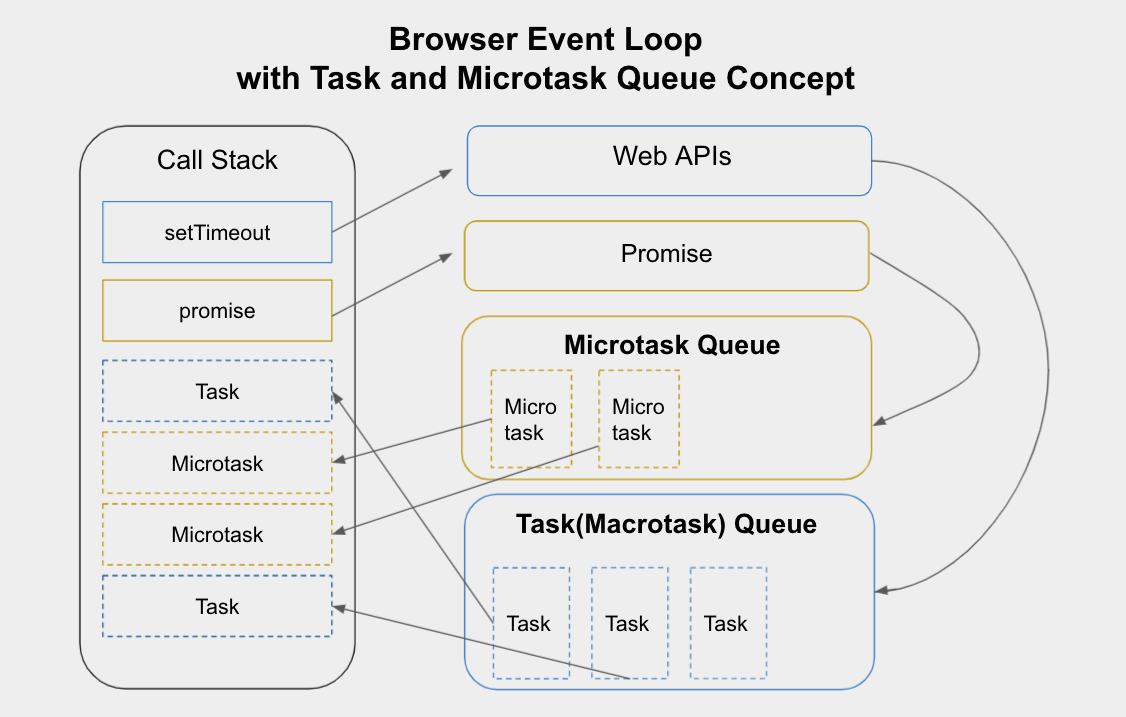
Read the diagram as a map of possible movement, not a snapshot showing several queued callbacks executing on the stack at once. A promise object itself is not “the microtask”: its handler is queued when the promise settles. Likewise, a timer’s callback waits for its turn rather than appearing on the stack merely because the timer has expired.
For a compact written statement of the rule, read the “Macrotasks and Microtasks” and “Summary” subsections of Event loop: microtasks and macrotasks on JavaScript.info.
Event loop: microtasks and macrotasks
Read JavaScript.info’s explanation to consolidate the scheduling rule before applying it to code.
In “Macrotasks and Microtasks,” start with the queue explanation; stop at the sentence stating that all microtasks complete before another macrotask. Focus on what creates a microtask and when the queue is drained. Then, in “Summary,” read the numbered algorithm, from its introductory sentence through step 5. Use it as a tracing procedure, not as a claim that every runtime has identical internal details.
Trace the boundaries, not just the lines
Start with a small example:
console.log("start");

setTimeout(() => console.log("timer"), 0);

Promise.resolve().then(() => console.log("promise"));

console.log("end");
The output is:
start
end
promise
timer
The first and last logs run during the script task. The timer call registers work for later; the fulfilled promise queues its handler as a microtask. Once the script finishes, the microtask runs before the timer task. Source-code position does not override that queue boundary.
There is one further detail worth remembering: the function passed to the Promise constructor runs synchronously. Its later .then handler does not.
console.log("first");

new Promise((resolve) => {
  console.log("executor");
  resolve();
}).then(() => console.log("handler"));

console.log("last");
This prints first, executor, last, handler. When tracing promises, distinguish creating and settling the promise from running its handler.
When a callback schedules another callback
A queue is not frozen when the current script ends. Running a microtask can add another microtask; running a timer task can add one too. Trace each addition at the moment it happens:
console.log("A");

setTimeout(() => {
  console.log("B");
  Promise.resolve().then(() => console.log("C"));
}, 0);

Promise.resolve().then(() => {
  console.log("D");
  queueMicrotask(() => console.log("E"));
});

queueMicrotask(() => console.log("F"));

console.log("G");
During the script task, A and G print. At that point, the microtask queue contains the handler that prints D, followed by the callback that prints F; the timer callback is waiting to become a task.
| When execution reaches… | What happens |
|---|---|
| The first microtask | It prints D and adds the E callback to the end of the microtask queue. |
| The next microtasks | F prints, then E prints. The queue is now empty. |
| The timer task | It prints B and queues the promise handler for C as a microtask. |
| The checkpoint after that task | The new microtask prints C. |
So the complete output is:
A G D F E B C
Notice two points an interviewer may probe. First, E does not jump ahead of F: both are microtasks, and F was already waiting. Second, C runs after B but before any subsequent task, because the event loop checks microtasks again after the timer task completes. If code continually schedules more microtasks, it can delay tasks and browser rendering for a long time.
For these examples, the browser-style model is enough. Node also has a call stack, promise microtasks, and timer callbacks, but it has additional scheduling mechanisms such as process.nextTick; do not apply a browser diagram uncritically to questions involving those Node-specific APIs.
Key takeaways
To predict execution order, first finish the current synchronous task. Then drain all eligible microtasks, including any added while draining. Only then run the next ready task, and check microtasks again afterward. A timer delay determines when its callback can become eligible—not when it is guaranteed to execute.
Next, we’ll move from when a function runs to what state it can retain, using lexical scope and closures.