Recommended resources
The freely available resources this lesson will direct you to.
Welcome back. Last lesson, you used generics to preserve relationships between types. Now we’ll put those types to work at a frontend boundary: the objects a React app receives from an API, displays, and sends back as create or update requests.
By the end of this lesson, you should be able to define a response contract with an interface, derive smaller contracts with utility types, and explain what readonly does—and does not—protect. These distinctions are useful in interviews because a single “issue” can have several legitimate shapes depending on what the application is doing with it.
Start with the object the UI receives
Suppose an API returns an issue for a project dashboard. A useful starting point is the shape of a successfully loaded issue, not a type broad enough to describe every request and every screen:
interface Issue {
  readonly id: string;
  title: string;
  status: "open" | "closed";
  description?: string;
  owner: {
    displayName: string;
  };
  readonly createdAt: string;
}
An interface names an object shape. Here, id and createdAt are required but cannot be reassigned through an Issue-typed reference. description is optional: under strictNullChecks, reading it yields string | undefined, so code must account for its absence. The status union rules out other strings in code that has an Issue.
function issueSubtitle(issue: Issue): string {
  return issue.description ?? "No description";
}
Notice the difference between optional and nullable. description?: string permits an absent property; it does not say that null is a valid description. If an API uses null to mean “no description,” the contract should reflect that—for example, description: string | null.
Read the TypeScript Handbook’s Object Types introduction and Property Modifiers → Optional Properties. The three versions of Person show that an inline object type, an interface, and a type alias can describe the same basic shape; the optional-property example shows why reading a missing field requires care.
Read the TypeScript Handbook’s introduction to object types and its Optional Properties subsection to ground the Issue interface in the language’s object-typing rules.
At the start of “Object Types,” read the three forms through the paragraph following the Person examples. Then, under “Property Modifiers” → “Optional Properties,” read the optional-property example, beginning with why a property might be absent and ending after the explanation of what its type guarantees. Continue through the strictNullChecks discussion and the examples that handle an absent value.
Interfaces can also extend an existing object contract when a second shape genuinely includes everything in the first. For example, a detail view might receive the same issue plus comments:
interface IssueDetail extends Issue {
  comments: readonly string[];
}
IssueDetail must satisfy every property of Issue as well as comments. That is different from a compact card, which needs fewer properties. We’ll derive the card type rather than force it into an inheritance relationship.
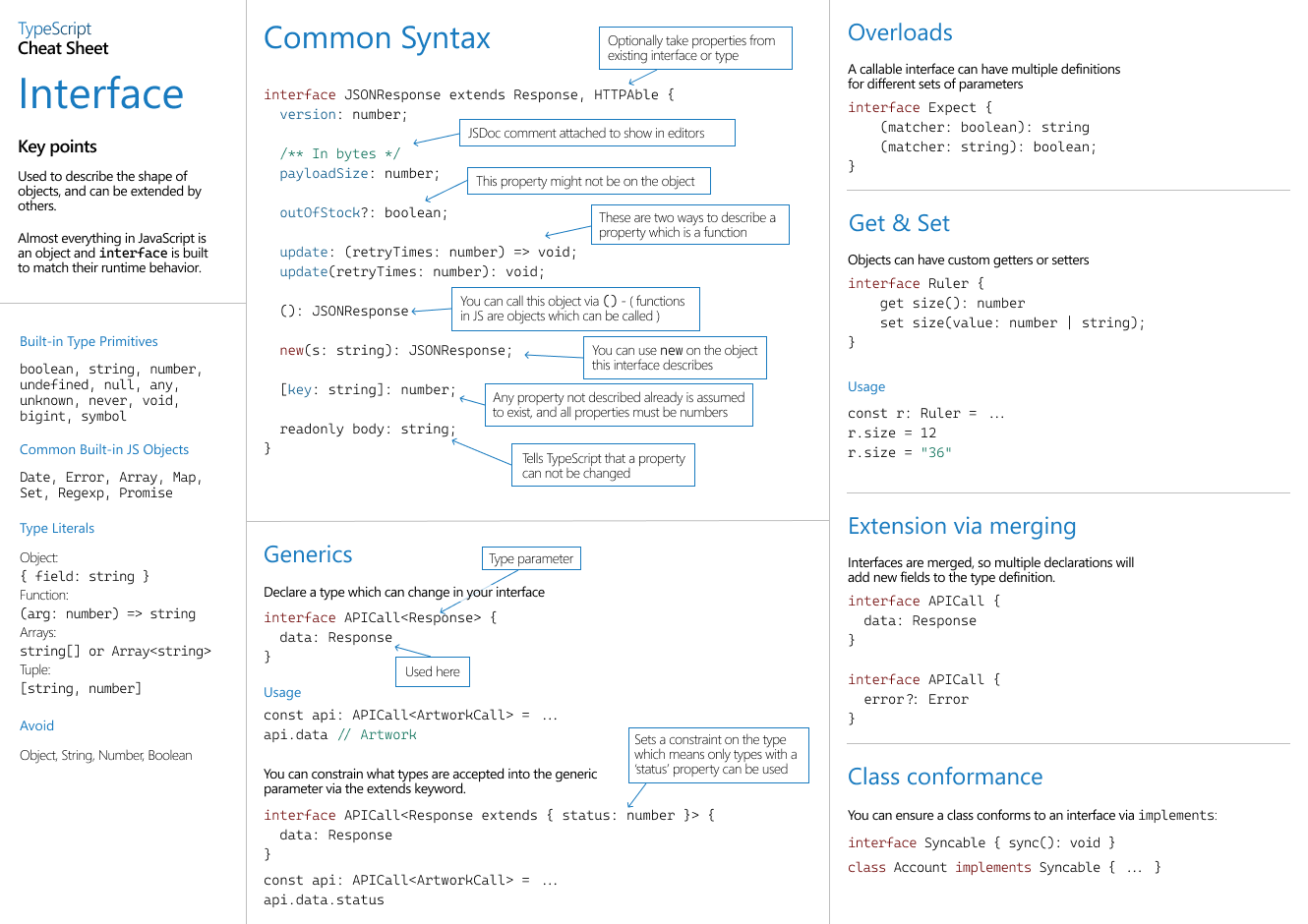
The supplied interface cheat sheet is handy as a syntax reference. Focus on the central “Common Syntax” panel’s optional property and readonly property; its other panels show features such as extension and generics, not requirements to put every feature into one contract.
Derive contracts for create, update, and display
A server-generated id belongs in a response, but not in a create request. Likewise, the server might assign owner, createdAt, and an initial "open" status. Accepting an entire Issue as the create payload would demand values the client should not provide.
TypeScript’s utility types let us derive purpose-specific shapes from the response contract:
type CreateIssue = Pick<Issue, "title" | "description">;

type IssueCard = Pick<Issue, "id" | "title" | "status">;

type IssuePatch = Partial<
  Pick<Issue, "title" | "description" | "status">
>;
Pick keeps only the named properties, including their original types and modifiers. Thus CreateIssue requires a title while leaving description optional. IssueCard describes just what a list item renders. Partial makes every property of its input optional, so a patch may contain only the fields being changed:
const creation: CreateIssue = {
  title: "Fix search filters",
};

const patch: IssuePatch = {
  status: "closed",
};

// const invalidPatch: IssuePatch = { id: "another-id" };
// Error: id is not a permitted property of this patch object.
Why not write Partial<Issue> for the patch? It would also permit id, owner, and createdAt. Making a property optional does not make it appropriate to edit. First select the editable fields, then make those fields optional.
Omit offers the complementary operation: it retains everything except specified keys. This describes the same fields as our current CreateIssue:
type CreateIssueByOmission = Omit<
  Issue,
  "id" | "status" | "owner" | "createdAt"
>;
Which form should you choose? Pick is often safer for an API request allowlist: if someone adds a new response field to Issue, it does not silently become a permitted create field. Omit is convenient when “all fields except these” really is the intended rule. Neither utility changes what the server accepts; the API contract must agree with the type you choose.
Watch the object-based utility examples in You are a Junior Dev if You Don’t Know These 18 TypeScript Utility Types from Web Dev Simplified. Ignore the title’s implied need to master all 18: for this lesson, concentrate on the create, update, and display motivations behind Pick, Omit, and Partial. The later Readonly segment will set up our next distinction.
You are a Junior Dev if You Don’t Know These 18 TypeScript Utility Types
Watch Web Dev Simplified’s demonstrations of object-based utility types to see why one full object type is often unsuitable for every function.
Watch derived contracts for the Pick display shape, Omit create shape, and Partial update shape; stop when the discussion moves to Required. Then watch readonly behavior. Pay particular attention to the observation near the end that Readonly does not protect nested objects recursively.
There are two limits worth retaining. First, Partial<IssuePatch>-style transformations can allow an empty patch; Partial alone does not enforce “at least one field.” Second, an update API’s meaning matters. If the server requires null to clear a description, then description?: string is not enough for that patch; you might use description?: string | null in an explicitly defined patch contract. Derive types where the meanings match, and write a separate contract when they do not.
Treat readonly as a compile-time promise, not a freeze
There are two related ways to prevent reassignment through a type:
interface Issue {
  readonly id: string;
  // ...other properties...
}

type ReadonlyIssue = Readonly<Issue>;
The modifier on id protects that particular property. The utility Readonly<Issue> marks all top-level properties readonly. That can express how code should treat an issue it has received, without changing the definition of an editable request type.
But top-level protection is not deep protection:
declare const issue: Readonly<Issue>;

// issue.title = "Changed";          // Type error
// issue.owner = { displayName: "Jo" }; // Type error

issue.owner.displayName = "Jo";       // Allowed: nested property is mutable
If the nested owner must also resist reassignment through this contract, type that level too—for example, owner: Readonly<{ displayName: string }> in the interface. For arrays, a readonly property prevents replacing the array property, whereas a readonly string[] additionally prevents array mutations such as push through that reference.
The Handbook’s Property Modifiers → readonly Properties subsection makes the shallow distinction explicit with a nested resident object. It also demonstrates aliasing: another writable reference can change an object even while a readonly-typed reference points to it.
Return to the Handbook for the precise scope of readonly, particularly its nested-object and aliasing examples.
In “Property Modifiers” → “readonly Properties,” begin at the readonly explanation. Read from the opening explanation through the Home example and the later writablePerson.age++ example, stopping before “Index Signatures.” Notice why changing home.resident.age differs from replacing home.resident, and why a writable alias can still change the underlying object.
For a React state update, the type restriction and the update technique serve different purposes. Rather than mutate a nested owner, construct a new issue and a new owner:
function renameOwner(issue: Readonly<Issue>, name: string): Issue {
  return {
    ...issue,
    owner: { ...issue.owner, displayName: name },
  };
}
This returns new objects along the changed path. readonly helps flag some accidental assignments during development; it does not itself create copies, freeze values at runtime, or make nested state immutable. We’ll use that distinction when we work on React state in the next module.
Keep the API boundary honest
An interface describes what TypeScript may assume after a value is known to match the contract. It does not inspect a response body. This matters in a full-stack application: the FastAPI response model and the frontend interface can drift apart, even when both were correct when written.
const response = await fetch("/api/issues/42");

if (!response.ok) {
  throw new Error("Could not load issue");
}

const body: unknown = await response.json();
// body.title is not safe to use until body has been checked.
Assigning the result to unknown prevents an unchecked JSON value from acquiring the privileges of Issue. A runtime check or schema parser can establish that its required fields, nested owner, optional description, and allowed status values are actually present. Only then should the rest of the UI treat it as an Issue. A type assertion such as body as Issue does not perform that check.
For a short demonstration of this boundary, watch TypeScript Fundamentals - #21 Adding Types For APIs from Joy of Code. The segment contrasts generated TypeScript types with validation and shows a schema parser rejecting a value of the wrong type. You do not need to learn the library’s full API here; focus on why the runtime check is separate from an interface.
TypeScript Fundamentals - #21 Adding Types For APIs
Watch Joy of Code’s explanation of why a typed API response can still be wrong at runtime, followed by its brief schema-validation demonstration.
Watch runtime validation: begin with the warning about an API changing after types were generated, then follow the simple schema’s parse call and its rejection of an incorrectly typed value. Stop after the presenter shows how a TypeScript type can be obtained from the schema.
The practical separation is straightforward: the backend decides what it sends and accepts; runtime validation establishes what an untrusted response contains; TypeScript contracts make subsequent frontend code consistent with those expectations. Each has a job the others cannot silently perform.
Key takeaways
Use an interface for a clear object contract, including required, optional, and selectively readonly properties. Derive purpose-specific shapes with Pick, Omit, and Partial rather than using the entire response type for every request and view. Use Readonly<T> when callers should not reassign top-level properties, but remember that it is shallow and has no runtime enforcement.
This concludes the JavaScript and TypeScript module. Next, we’ll move into React architecture, beginning with component boundaries that separate presentation, state, and side effects. The distinct response, card, create, and patch contracts from this lesson give those components meaningful data boundaries to work with.