Recommended resources
The freely available resources this lesson will direct you to.
Hello! Welcome back to our advanced course on RxJS.
In our last lesson, we explored the powerful flattening operators—concatMap, mergeMap, switchMap, and exhaustMap. You learned how to use them to manage asynchronous operations triggered by a source stream, a common pattern when making API calls in response to user actions. However, any asynchronous operation, especially a network request, can fail. What happens to our stream then?
This lesson addresses that critical question. Our learning outcome is to: Handle stream errors gracefully using catchError and implement retry logic with retry. We'll explore how to build resilient and robust Observable chains that don't simply break when something goes wrong.
1. The Golden Rule of RxJS Error Handling
Before we dive into the operators, we must understand one fundamental principle of RxJS.
When an Observable emits an error, its execution stops. It will not emit any more values, and it will not send a completion notification. The stream is effectively terminated.
This behavior is by design. RxJS considers a stream that has produced an error to be in an unpredictable state and therefore unsafe to continue.
Angular meets RxJS: Error handling
The article 'Angular meets RxJS: Error handling' by Simon Sougnez provides an excellent explanation of this core concept. Understanding this rule is the first step to mastering error handling.
Read the section 'The golden rule'. It clearly illustrates with a code example why an error is a terminal event for an observable.
This "game over" rule has significant implications. If an error in an inner observable (like a failed HTTP request in a switchMap) is not handled correctly, it can propagate outwards and terminate the entire stream, rendering parts of your application unresponsive.
2. Catching Errors with catchError
The primary tool for handling errors is the catchError operator. It intercepts an error notification from the source observable and gives you a chance to decide what happens next.
The catchError operator takes a function that receives the error and the source observable. This function must return a new observable.
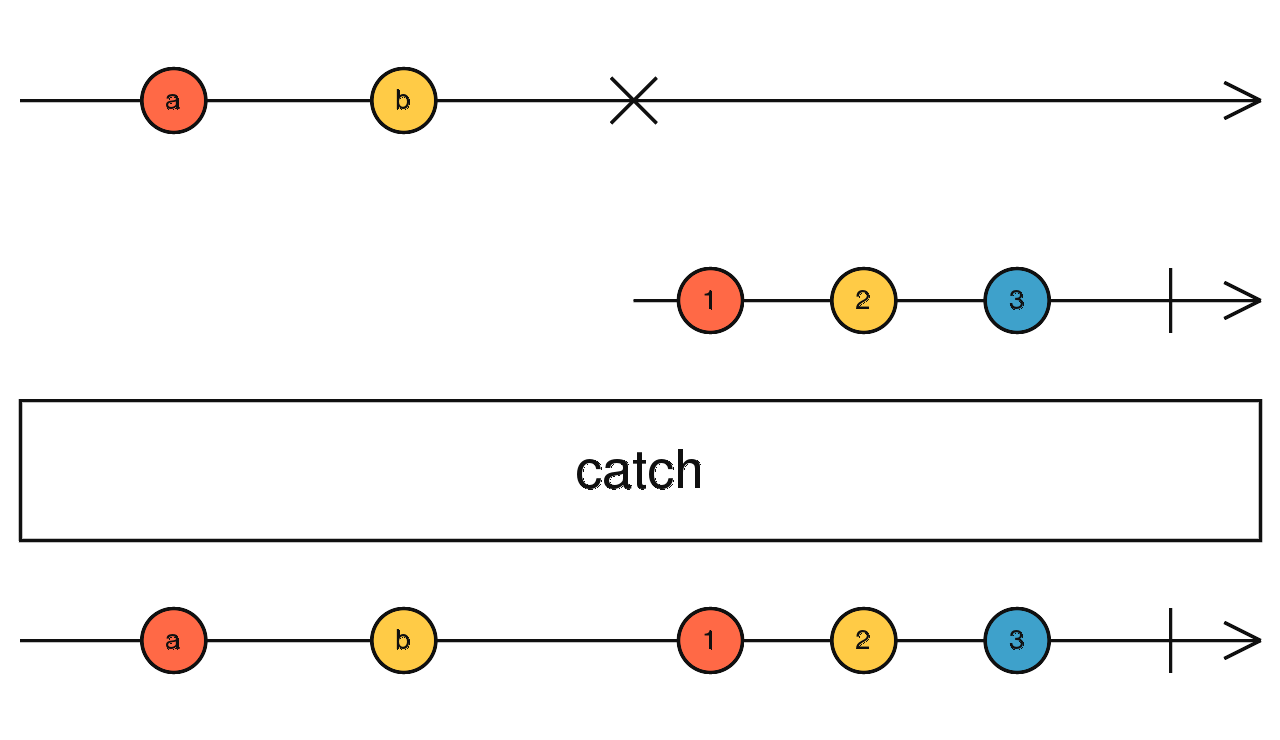
There are two main strategies you can employ within catchError.
Strategy 1: Catch and Replace
This strategy involves catching the error and returning a new observable that provides a fallback or default value. This prevents the error from reaching the subscriber and allows the stream to complete gracefully. It's often used to ensure the UI doesn't break when an optional piece of data fails to load.
For example, if an API call for a list of items fails, you might replace the error with an observable that emits an empty array: of([]).
Error Handling in Angular - Complete Guide (2022)
The video 'Error Handling in Angular' from the Decoded Frontend channel provides a clear, practical demonstration of the 'catch and replace' strategy.
Watch from 23:29 to 26:16. This section shows how to use catchError to replace a failed stream with an observable of an empty array (of([])), preventing the error from propagating and allowing the UI to display a placeholder.
This strategy is particularly crucial when working with flattening operators. If you place catchError on the inner observable, you handle the error locally and prevent the outer stream from dying.
Consider a type-ahead search. If one search query fails, you want to show an empty result for that query, but you still want the user to be able to type and trigger new searches.
import { fromEvent, of } from 'rxjs';
import { switchMap, map, catchError } from 'rxjs/operators';
import { ajax } from 'rxjs/ajax';

const searchBox = document.getElementById('search');

const search$ = fromEvent(searchBox, 'input').pipe(
  map(event => (event.target as HTMLInputElement).value),
  switchMap(query =>
    ajax.getJSON(`/api/search?q=${query}`).pipe(
      // By placing catchError here, we handle errors for each search request individually.
      catchError(error => {
        console.error('Search request failed!', error);
        // Replace the failed request with an empty array.
        return of([]);
      })
    )
  )
);

// The outer stream (search$) remains alive even if an inner ajax request fails.
search$.subscribe(results => {
  console.log('Displaying results:', results);
});
Strategy 2: Catch and Rethrow
Sometimes, you don't want to swallow the error. You might need to perform a side effect (like logging the error to a monitoring service) and then let the error continue its journey downstream to be handled by the component or a global error handler.
To do this, you use the throwError creation function inside catchError.
Angular meets RxJS: Error handling
Let's return to the 'Angular meets RxJS' article to see how to re-throw an error.
Read the section 'throwError'. It explains how you can perform a side effect within catchError and then use throwError to propagate the error, allowing for layered error handling.
This pattern allows different parts of your application to react to the same error. A data service might log the technical details, while the UI component that subscribed to the service might show a user-friendly error message.
3. Retrying Failed Operations with retry
Some errors are transient—a temporary network glitch, a server that's momentarily overloaded. In these cases, simply failing isn't ideal. The best course of action is often to try again. The retry operator is designed for exactly this purpose.
retry(count) will re-subscribe to its source observable up to count times if an error occurs. It does not simply replay values; it triggers a full re-subscription, starting the source observable's logic from the beginning.

It's important to place retry before catchError in the pipeline. The error will only be passed to catchError after all retry attempts have been exhausted.
import { ajax } from 'rxjs/ajax';
import { retry, catchError } from 'rxjs/operators';
import { of } from 'rxjs';

ajax.getJSON('/api/unstable-endpoint').pipe(
  // 1. Attempt the request. If it fails, retry up to 2 more times.
  retry(2),
  // 2. If all 3 attempts (initial + 2 retries) fail, this will execute.
  catchError(error => {
    console.error('Request failed after 3 attempts:', error);
    // 3. Provide a fallback value.
    return of({ data: 'Could not load data. Please try again later.' });
  })
).subscribe(response => {
  console.log(response);
});
For more complex scenarios, such as adding a delay between retries (a strategy known as "exponential backoff"), the retry operator can accept a configuration object.
Error Handling with Observables
The 'Error Handling with Observables' video by Deborah Kurata provides a concise overview of both basic and more advanced retry strategies.
Watch from 06:37 to 08:16. The first part covers the basic retry operator. The second part introduces the more advanced retryWhen (now superseded by retry with a config object), which demonstrates the concept of adding a delay between retries.
4. The Error Flow
It can be helpful to think of an observable pipeline as having two separate channels: a data channel and an error channel.
- Data Channel: Operators like
map,filter, andscanoperate on this channel. - Error Channel: When an error is emitted, it bypasses the data channel operators and travels down the error channel.
Operators like catchError and retry listen on the error channel. retry can send the execution back to the beginning of the source observable. catchError can either resolve the error and switch back to the data channel (by returning a new observable like of(...)) or keep the error on the error channel (by using throwError).
Error Handling in Angular - Complete Guide (2022)
This concept of separate data and error flows is explained very well in the 'Error Handling in Angular' video.
Watch from 38:47 to 40:23. This segment provides an excellent mental model for how values and errors propagate through a chain of operators.
Conclusion
In this lesson, we've equipped you with the essential tools for building resilient, production-ready RxJS code. You've learned that errors are terminal events and must be handled explicitly to prevent your streams from dying unexpectedly.
Key Takeaways:
- Errors Terminate Streams: An unhandled error will stop an observable from emitting any further values or completions.
catchErroris Your Interceptor: This operator is the primary tool for handling errors. It must return a new observable.- Catch and Replace: Use
catchErrorto return a fallback value (e.g.,of([])) to allow the stream to complete gracefully. This is crucial for handling errors in inner observables created by flattening operators. - Catch and Rethrow: Use
throwErrorinsidecatchErrorto propagate an error after performing a side effect, enabling layered error handling. retryfor Transient Failures: Use theretryoperator to automatically re-subscribe to a failing observable, giving it another chance to succeed. Always place it beforecatchError.
In our next lesson, we will delve into Subjects and Multicasting. So far, we've mostly worked with "cold" observables that are created and controlled by RxJS operators. Subjects are a special type of observable that you can control imperatively, pushing values into a stream from anywhere in your application. They are the foundation of RxJS-based state management and a bridge between the reactive and imperative parts of your code.