Recommended resources
The freely available resources this lesson will direct you to.
- Understanding Apache Iceberg architecture | Starburst Academywww.youtube.com
- An Extremely Technical Overview of How Apache Iceberg Planning Actually Works (Russell Spitzer)www.youtube.com
- Spec - Apache Iceberg™iceberg.apache.org
- Getting started with Iceberg tables in Athena SQL - AWS Prescriptive Guidancedocs.aws.amazon.com

Hello again. In the previous lesson, you traced an HMS table record to its metadata_location and then to one particular table metadata JSON file. That JSON is only the top of the storage structure: it names snapshots, which in turn identify other files.
Today we will classify the objects underneath it. The practical question for your backup-service task is: when the code fetches an S3 object, is it reading a table definition, an index of files, table rows, or row-deletion information? We will also distinguish an object that is immutable from an object that is guaranteed to remain in S3—those are not the same thing.
The file structure beneath a table name
Watch this short explanation of the storage hierarchy before examining its individual parts.
An Extremely Technical Overview of How Apache Iceberg Planning Actually Works (Russell Spitzer)
In “An Extremely Technical Overview of How Apache Iceberg Planning Actually Works,” Russell Spitzer, speaking on the CMU Database Group channel, gives a compact account of the metadata structure. Watch for what each level lists, rather than trying to absorb the later query-planning details.
Watch the file hierarchy. In particular, notice that a snapshot refers to a manifest list, while a manifest refers to data or delete files.
The diagram below makes the distinction between objects and references to objects visible. HMS, acting as the catalog in your case, holds a pointer to a current metadata file. The file on the right contains records for snapshots s0 and s1; each snapshot has its own manifest list. Some manifests are shared, so the structure is not a fresh, independent copy of every file for every snapshot.
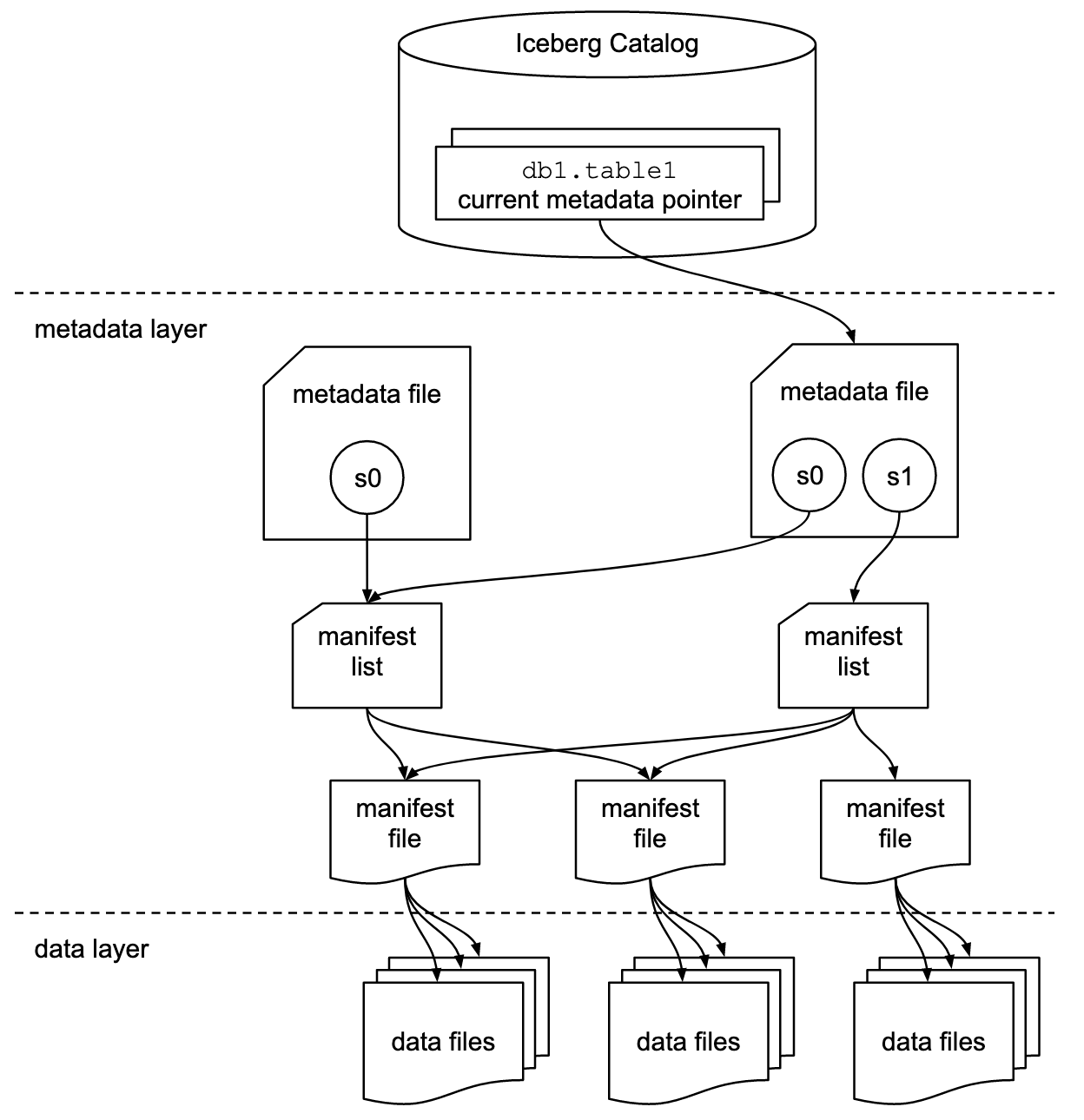
A useful naming distinction: a snapshot is a record of table state, not a single S3 object containing the table’s rows. Its manifest-list location is the starting point for finding the files associated with that state. We will work through precisely which entries count as visible in the next module; for now, focus on identifying the object types.
Five object types, five different jobs
The official Iceberg specification is worth a targeted read here. You do not need its full field-by-field schemas to recognize these files in the repository.
Read the Apache Iceberg specification’s definitions of the storage objects, then its descriptions of manifests and manifest lists. These sections establish what each object contains without requiring you to learn scan-planning algorithms.
In Specification > Terms, read the core terms, from “Schema” through “Delete file”; stop before “Absolute path.” In Specification > Manifests, read the opening explanation; focus on the distinction between a data manifest and a delete manifest. In Specification > Manifest Lists, read the opening paragraphs; stop before the field-by-field manifest_file table. Notice why a snapshot has a manifest list even when it reuses existing manifests.
Here is the resulting classification. “Contains” means what you would expect to obtain by reading the object itself, not everything reachable by following its references.
| Object | What it contains or identifies | What it does not contain |
|---|---|---|
| Table metadata JSON | Table-wide definitions such as schemas, partition specs, properties, and snapshot records, including the current-snapshot ID | The rows of the table |
| Manifest list | The manifests associated with a particular snapshot, with summary information about them | The rows inside the data files |
| Manifest | Entries describing data files or delete files: their paths and information such as partition values and file metrics | The table rows or the contents of the delete files |
| Data file | Stored table rows, commonly in Parquet, Avro, or ORC format | A complete description of which other files belong to a snapshot |
| Delete file | Information used to exclude particular rows when reading applicable data files | A rewritten copy of those data files |
There are two easily confused pairs here. First, a manifest list lists manifests, while a manifest lists data or delete files. The two are different levels of metadata, even though both are commonly stored as Avro files. An .avro extension alone therefore does not tell you which one the service fetched; inspect how its location was obtained and how it is parsed.
Second, a data file contains rows; a delete file describes rows to omit. A manifest dedicated to data files and a manifest dedicated to delete files are also distinct. If the backup code gathers only the paths found in data manifests, it may miss objects needed to reproduce how a snapshot’s rows are read.
The JSON supplies another important distinction from last time: its snapshots field contains snapshot records. A snapshot record’s manifest-list location points to a separate file. Fetching the JSON and deserializing a Snapshot object has not, by itself, fetched that list, its manifests, or their referenced files.
Immutable objects, changing references
At these levels, Iceberg represents changes by writing new files, not by editing an existing JSON, manifest list, manifest, or data file in place. Delete files follow the same principle: once written, their contents are not continually updated as further rows are deleted. HMS’s metadata_location, by contrast, can change to select a new metadata JSON version, as you saw in the previous lesson.
Consider a small table with an initial snapshot s0. Its metadata JSON version V8 records s0, whose manifest list L0 identifies a manifest M0. That manifest describes two data files, F1 and F2.
Now suppose a later update adds data file F3. A new snapshot s1 can have a new manifest list L1 that identifies both the reusable M0 and a new manifest M1 describing F3. A new metadata JSON version V9 records s1 as current while it may also retain the record for s0. Nothing about adding F3 requires rewriting the bytes of F1, F2, or M0.
This gives each object a different replacement pattern:
- A table metadata change produces a new metadata JSON file, even if that change does not create a data snapshot.
- A new snapshot has its own manifest list. Existing manifests may be referenced again, alongside new manifests.
- When a manifest’s set of entries needs to differ, Iceberg writes another manifest rather than editing the old one.
- Data and delete files are written as new objects; changes in which ones matter to a snapshot are expressed through metadata.
Immutable does not mean permanent. Old objects can remain available because retained snapshots still need them. Once snapshots are expired and files are no longer required, cleanup may remove objects from storage. For your backup task, a captured path tells you which object to read, but not that the object will remain available indefinitely. We will examine that lifecycle risk alongside concurrent commits later.
What a delete file does—and does not—delete
Suppose s1 also needs to exclude one row stored in F1. In an Iceberg table using row-level delete files, the writer can create a delete file D1 and a delete manifest describing D1. The manifest list for s1 identifies that delete manifest as well as its data manifests. A reader must consider the applicable delete information when interpreting F1; the bytes of F1 need not change.
Two common forms are position deletes, which identify rows by a data-file path and row position, and equality deletes, which identify rows by values in specified fields. The exact rules for deciding which delete files apply are beyond today’s classification. The point is that a delete file is a stored object needed for reading certain snapshot states, not an S3 request to remove another object.
There is also a different use of the word deleted in manifest metadata. A manifest entry can record that a whole data or delete file has been logically removed from a table state. That is distinct from a delete file excluding rows within a data file. Neither fact alone means that S3 immediately removed the underlying object. Older retained snapshots may still require it.
This distinction matters when reading unfamiliar code. A class or field named delete might refer to a row-level delete file, a manifest entry’s logical file-removal status, or eventual physical cleanup. Check what path it names and which object is being parsed before assigning it a meaning.
Recognizing these objects in the backup service
When you follow an S3 fetch in the repository, identify the source of its URI. A URI taken from HMS’s metadata_location selects table metadata JSON. A URI taken from a snapshot record selects a manifest list. A path read from a manifest-list entry selects a manifest. A path read from a manifest entry selects a data or delete file, according to the manifest and entry’s content information.
That classification is more reliable than guessing from a directory name, filename prefix, or Java class name. It also gives you a useful question at each fetch: does this object contain the information the code needs, or merely point to the next object it must read? In particular, reaching a manifest is not yet the same as copying the files it describes.
Key takeaways
An Iceberg table metadata JSON file describes table-wide state and snapshot records. Each snapshot’s manifest list identifies manifests; manifests describe data files or delete files; data files hold rows, while delete files supply row-exclusion information. These stored objects are immutable, although their references can change and unneeded old objects can eventually be cleaned up.
Next, we will look inside a snapshot record—its ID, parent, sequence number, timestamp, operation, and manifest-list location—so that s0 and s1 become precise states rather than labels on a diagram.