Recommended resources
The freely available resources this lesson will direct you to.
Hello! Last lesson separated Java’s contracts from its installed tools: the language rules govern source code, the JVM rules govern class files and execution, and a JDK provides tools such as javac and java. Now we can follow a class across those boundaries.
The question is not just “How does Java run?” It is which representation exists at each point, who checks it, and when it becomes machine code. We’ll use one small class throughout. The three sections are suitable for separate sessions of about 15 minutes.
From source code to a class file
Consider this Java 21 program:
public class Journey {
    static int score(int limit) {
        int total = 0;
        for (int i = 0; i < limit; i++) {
            total += i;
        }
        return total;
    }

    public static void main(String[] args) {
        int result = 0;
        for (int i = 0; i < 100_000; i++) {
            result += score(i % 100);
        }
        System.out.println(result);
    }
}
javac Journey.java translates this source into Journey.class. That file is not native code for the machine running the compiler. It contains a class-file structure, references to other types and methods, and JVM instructions for methods such as score and main. A different operating system can use the same class file if it has a compatible Java runtime.
Inside score, the loop becomes operations along these lines: store 0 in a local variable, load and compare the loop counter with limit, add the counter to total, increment the counter, branch back, and return the result. Instructions such as iload, iadd, and ireturn operate on JVM local variables and an operand stack. The compiler also emits metadata the JVM needs to interpret and check the class file. This is a translation of the program’s meaning, not a promise that the final processor will execute a literal add-and-branch sequence for every iteration.
main contains references to Journey.score and System.out.println. These are recorded in a form the runtime can resolve against classes it loads. javac must understand the referenced types well enough to compile the source, but compilation does not freeze the entire application and standard library into one native executable.
Watch two short portions of InfoQ’s How the HotSpot and Graal JVMs Execute Java Code. The speaker uses a different example; concentrate on the boundary between source, class file, and a running JVM rather than on the details of the print statement.
How the HotSpot and Graal JVMs Execute Java Code
InfoQ’s “How the HotSpot and Graal JVMs Execute Java Code” shows what javac produces and why loading the resulting class file is a separate runtime step.
Watch source to bytecode for the class-file example, including instructions supplied by the compiler. Then watch class loading for the transition from a file outside the JVM to a class represented inside it. You can skip the subsequent custom-loader demonstration; its mechanics belong later in the course.
One useful distinction from the first clip: a compiler may supply code you did not write explicitly, such as a default constructor. Generated bytecode is still bytecode. Producing machine-specific optimized instructions is a later job for the runtime.
From class file to checked, executable class
When you run java Journey, the launcher starts a JVM and requests the main class. The JVM locates its binary representation and loads it. Loading establishes a runtime representation of the class; it does not mean that every referenced class has already been loaded or every method call resolved.
Before Journey can be used, it must be linked. Linking includes verification and preparation; resolution of symbolic references can be performed when needed rather than all at once. Class initialization is distinct from linking: it runs the class’s initialization code, if any, before specified uses. Our Journey example has no static field initializer or static block to make that last distinction visible. We will investigate the precise lifecycle and its ordering rules in the next module; for now, verification is the crucial stop on this journey.
Read the indicated portions of OpenJDK’s HotSpot Runtime Overview. This is an older implementation overview, so use it for the enduring distinctions among loading, linking, and verification—not for its incidental descriptions of old HotSpot layouts or startup flags.
HotSpot Runtime Overview - OpenJDK
OpenJDK’s “HotSpot Runtime Overview” explains why a JVM checks class files even when an ordinary Java compiler normally produces valid ones.
In “VM Class Loading,” under “Class Loading Phases,” read loading through initialization. Begin with the paragraph describing how a class file is found; stop after the paragraph distinguishing class initialization from preparation. Focus on what verification does before class code runs. Then, under “Bytecode Verifier and Format Checker,” read verification and type states. Start with the reason the JVM cannot trust a class file merely because javac usually emits valid files; stop after the explanation of stack-map frames. Notice that verification checks relationships among instructions, operand-stack values, and local-variable types—not just whether bytes fit a file format.
Why verify a program that compiled successfully? The JVM receives class files, not a certificate that a trusted javac produced them. Files can come from other language compilers, code-generation tools, or bytecode transformers; they can also be malformed. The JVM must re-establish the safety properties it requires at the class-file boundary.
Imagine corrupting score so that one path puts an object reference on the operand stack where iadd expects an integer. The source compiler would not emit that sequence from our Java code, but a damaged or independently generated class file could attempt it. Verification reasons about possible instruction paths and type states and rejects invalid code, typically with a VerifyError, rather than waiting for that path to cause an unsafe operation. Format checking and verification are related but not identical: a file can be structurally readable yet contain invalid bytecode semantics.
Verification also has a limit worth stating precisely. It establishes JVM-level validity and type safety, not business correctness. A perfectly verified score method could still calculate the wrong total. Nor does verification mean that every referenced library class is already present or that every future method call will succeed; loading and resolution can expose separate failures later.
Once the class is ready for use, the JVM invokes main. At this point, our story crosses from validating a representation to executing its instructions.
From interpretation to optimized execution
HotSpot can begin executing a method with its interpreter. The interpreter implements JVM instructions on the current machine, allowing main and score to run without first compiling every method into optimized native code. That avoids spending compilation time on code used only briefly—an important consideration in applications with substantial startup and framework initialization.
During execution, HotSpot can collect information such as how often methods are invoked and how frequently loops run. Our repeated calls to score make it a plausible compilation candidate, but the example does not guarantee that a particular compiler tier, optimization, or compilation moment will occur. Those are HotSpot decisions affected by execution history and runtime configuration.
Watch the next excerpt of the InfoQ talk for the runtime side of the boundary:
How the HotSpot and Graal JVMs Execute Java Code
The InfoQ talk now follows interpreted execution into just-in-time compilation. Use this excerpt for the central idea of selecting frequently executed code; we will examine exact compilation tiers and profiling behavior later.
Watch adaptive execution. Pay attention to why the JVM can start running without compiling everything, what execution counts contribute to the decision to compile, and how newly compiled code can be used while the application remains running. Stop before the discussion moves into the compiler’s implementation history.
A just-in-time (JIT) compiler takes eligible JVM code and produces native instructions for the machine on which the application is currently running. Subsequent executions can use that compiled version. This is a different compilation event from javac Journey.java: javac produced the portable class file; HotSpot may later produce machine-specific code from it.
The distinction matters in Journey. A compiler may consider optimizations across the call to score, rather than mechanically translating each bytecode into a separate native instruction. Runtime observations can inform that work. Nevertheless, you should not infer from a fast loop that HotSpot definitely inlined score, eliminated the loop, or compiled every method: those claims require evidence we will learn to collect later.
The diagram below gives a conceptual view of HotSpot’s adaptive execution. C1 and C2 are compiler tiers, and the code cache holds generated native code. Do not read the picture as a mandatory route that every method traverses, or as a claim that all deoptimization simply restarts a method at its beginning. Which code runs can change over the lifetime of an application; the details are the subject of a later module.
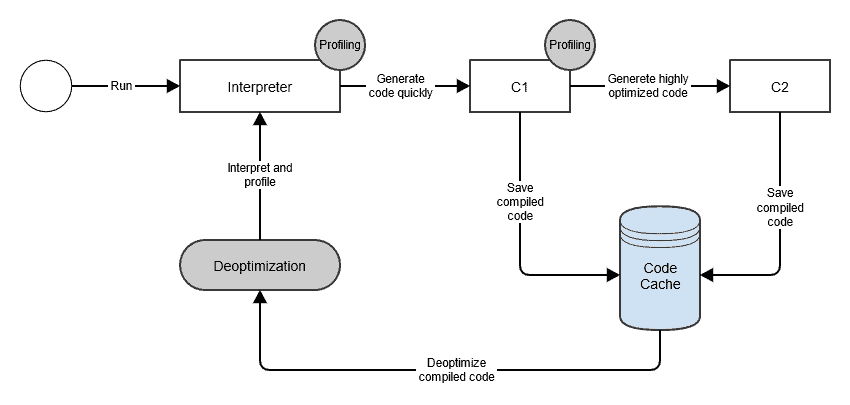
This architecture addresses a tension in Java’s original portability story. Shipping JVM bytecode avoids producing a separate application binary for every processor and operating system, while runtime compilation gives a JVM the opportunity to generate efficient local machine code. The price is runtime work: interpretation, profiling, compilation, and storage for generated code consume time and resources.
For the complete trace of Journey, keep the responsibilities separate:
- Source compilation:
javacchecks and translates Java source intoJourney.class. - Loading and linking: the JVM obtains the class file, checks its validity, verifies bytecode type safety, and prepares the class for use.
- Initial execution: HotSpot can interpret the methods’ JVM instructions.
- Adaptive execution: if execution makes code worth compiling, HotSpot can install native code and use it for later execution.
Those are milestones, not a claim that every class is loaded at startup or every method reaches optimized native code.
Closing perspective
A Java class crosses two compilation boundaries: source to portable bytecode, then—when the running JVM finds it worthwhile—bytecode to machine-specific native code. Between them, loading and verification ensure that the JVM has an acceptable class file to execute. Interpretation lets execution begin without optimizing everything in advance.
Next lesson, you’ll make the first boundary concrete by compiling, running, and inspecting a small class with javac, java, and javap. Later modules will return to class loading and HotSpot’s adaptive execution in greater depth.