Recommended resources
The freely available resources this lesson will direct you to.
Hello! This course begins beneath the component APIs you already use: with the runtime that creates components, delivers their callbacks, and sometimes removes the process containing them. The first module builds that foundation before moving to Context, manifests, and Intents. Later modules examine individual components and UI systems in depth, with a separate track for Android-connected AI features.
In this lesson, you will connect four ideas that are easy to conflate: an app’s security sandbox, its process, that process’s main thread, and the component objects inside it. The distinction matters whenever a screen is recreated, a background component wakes an app, or work that seems independent unexpectedly freezes the UI.
A process hosts components; it is not a component
Start with the platform’s account of what a component is and how one is activated.
Application fundamentals | App architecture - Android Developers
Read Android Developers’ Application fundamentals to establish the boundary between an app, its components, and the system that starts them.
In the opening discussion of the security sandbox, read the sandbox explanation. Under “App components,” read from the entry-point description. Then, immediately before “Activate components,” find the paragraph beginning “When the system starts a component” and read the activation example. Within “Activate components,” also read the provider distinction. Focus on who requests an activation and where the resulting object actually runs.
An Android app has no single component-level main() that you invoke to begin its useful work. The system can enter through an Activity, Service, BroadcastReceiver, or ContentProvider. When an entry point needs to run, Android ensures that an appropriate process exists and creates or uses the component instance there. Opening an Activity in another app does not load that Activity object into your process.
By default, components declared by one app run in one app process. That process supplies an address space and a runtime in which objects, threads, and in-memory state exist. It may contain several Activity objects over time, a Service, and other component instances. Conversely, a process can exist while no Activity is visible. Finishing an Activity therefore does not mean its hosting process immediately exits.
The sandbox answers a different question: what may this app access? Apps normally have distinct Linux identities and private data inaccessible to other apps by default; Android also mediates access through permissions and component interfaces. A separate process provides memory isolation, but process identity alone does not define a permission boundary. An app can deliberately place some of its own components in another process; those processes do not thereby become separate apps with unrelated permissions. We will examine component exposure and permissions more closely later.
A useful way to separate these concepts is to ask three questions when an event occurs:
| Question | Runtime answer |
|---|---|
| Who is allowed to access the operation or data? | The app sandbox, permissions, and component access rules matter. |
| Where do the objects and memory live? | In a particular process. |
| Which execution path runs a callback? | A thread in that process, often its main thread, but not always. |
Suppose your Activity requests an exported Activity in another app. Your Activity makes a request to the Android system; the system arranges the target launch. The target Activity runs in its own app’s process, with that app’s permissions and memory. An Intent is a request carrying information, not a shared reference to the target object. Content providers use a different access path: callers operate through ContentResolver, rather than launching a provider with an Activity-style Intent. We will make these activation paths concrete in the upcoming Intent lessons.
One main thread serves many component callbacks
The next reading supplies the process and threading rules that make the runtime model operational.
Processes and threads overview | App quality | Android Developers
Read Android Developers’ Processes and threads overview for the default process arrangement, main-thread dispatch, and the important exception for remotely called methods.
Under “Processes,” read process placement and lifetime. Under “Threads,” read from the paragraph beginning “When an application is launched” through the main-thread explanation. Finally, under “Thread-safe methods,” read the Binder and provider examples; stop before “Interprocess communication.” Notice the difference between a component lifecycle callback and a method invoked through a component’s cross-process interface.
For ordinary app component lifecycle callbacks, the key default is one main thread per process, not one thread per component. An Activity’s onCreate(), a Service’s onStartCommand(), and a BroadcastReceiver’s onReceive() normally execute on that process’s main thread. Creating a Service alongside an Activity does not give slow Service callback code a private execution lane. Its callback can delay input and drawing for the Activity sharing the process.
The main thread also processes UI events and drawing work. While it is occupied by a blocking database call or expensive computation, it cannot promptly dispatch the next tap or redraw. If unresponsiveness persists, Android may report an Application Not Responding error. UI widgets are generally not thread-safe, so the solution is not to update them from whichever worker happens to finish first: do expensive work away from the main thread and apply UI changes on the UI thread.
Kotlin coroutines do not erase this rule. A coroutine launched on the main dispatcher still runs its non-suspending work on the main thread until it suspends or explicitly changes dispatcher. For example, inside an Activity, assuming button is a UI button:
button.setOnClickListener {
    lifecycleScope.launch {
        val preview = withContext(Dispatchers.IO) {
            File(filesDir, "preview.txt")
                .takeIf(File::exists)
                ?.readText()
                .orEmpty()
        }
        button.text = preview
    }
}
Here the file read runs on Dispatchers.IO; assigning button.text occurs after the coroutine resumes on its main dispatcher. Merely placing readText() inside lifecycleScope.launch { ... }, without moving that blocking operation, would still obstruct the main thread. The lifecycle scope also does not turn this work into durable background work: if its Activity is destroyed, its coroutine is cancelled. Later modules distinguish UI-bound operations from work that must outlive a screen.
There is an important qualification to “component work runs on the main thread.” A Service’s lifecycle callback such as onBind() runs on the service process’s main thread, but methods called on its returned Binder can run on a calling thread in the same process or on Binder pool threads when invoked from another process. Provider methods serving requests from other processes can likewise run concurrently on pool threads. Those methods need thread-safe access to shared state. “This is a Service” or “this is a provider” is not enough information to determine the thread; ask which method is being called, and by whom.
Component lifetime and process lifetime are different clocks
A component instance is an object with its own lifecycle. A process is the container for that object and potentially other components. Android may destroy or recreate an Activity while its process remains alive—for example, during a configuration change. Alternatively, Android may remove a less important process to reclaim resources; then all objects and ordinary in-memory values in that process disappear together.
The Activity diagram provided with this lesson is helpful if you read its process-loss branch separately from its callback paths.
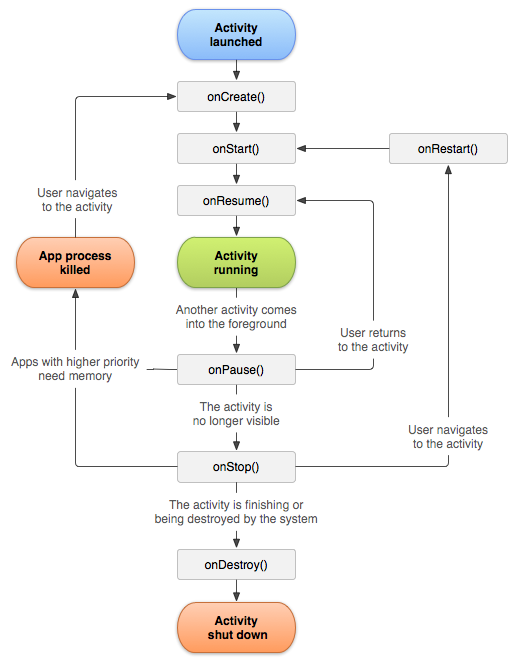
The diagram is a map of possible transitions, not a promise that Android calls every box on every route. In particular, do not rely on onDestroy() to save data when the system kills a process. Nor does an Activity going through onStop() prove that its process has gone away. Android weighs how important a process’s components currently are to the user; a process hosting a visible Activity is generally a less attractive termination candidate than one whose Activities are no longer visible.
Watch the following scenario for the distinction between a user’s navigation history and the particular process and objects currently available to display it.
Androidology - Part 2 of 3 - Application Lifecycle
Watch Androidology – Part 2 of 3 – Application Lifecycle from Android Developers for a visual example of navigating away from an app, losing its process, and returning to newly created Activity objects.
In the multi-app scenario, start at memory pressure, when an earlier app’s process is chosen for removal. Continue with the return journey, where the app needs a new process and Activity instances. Treat the video’s saved-state sequence as a conceptual illustration, not a guarantee that every navigation step saves state or that every previous screen can be restored exactly.
The practical consequence is that an Activity object and the user’s place in a task are not the same thing. Android may retain enough task information to bring the user back to what appears to be the same destination, even when the old process and Activity object no longer exist. Restoring what matters on that destination is partly your app’s responsibility. Temporary UI state, process-local caches, and durable data have different survival requirements; the Activities module will address how to preserve each appropriately.
This also explains why a Service is not a general-purpose method for “keeping the app alive.” Components influence process importance while they are doing relevant work, but a reference held by one component cannot protect process memory indefinitely. A broadcast may even cause a previously absent app process to start, deliver a short-lived receiver callback, and leave the process available for Android to manage afterward.
Trace the identities, not just the screen
When investigating surprising recreation, logging process, thread, and instance identity separately is more informative than logging only “Activity created.” This Kotlin Activity sketch illustrates the distinction:
class TraceActivity : Activity() {
    companion object {
        // A new value when this class is initialized in a new process.
        private val processMarker = UUID.randomUUID().toString()
    }

    // A new value for each TraceActivity object.
    private val instanceMarker = UUID.randomUUID().toString()

    override fun onCreate(savedInstanceState: Bundle?) {
        super.onCreate(savedInstanceState)

        Log.d(
            "RuntimeTrace",
            "pid=${android.os.Process.myPid()}, " +
                "processMarker=$processMarker, " +
                "instanceMarker=$instanceMarker, " +
                "main=${Looper.myLooper() == Looper.getMainLooper()}, " +
                "hasSavedState=${savedInstanceState != null}"
        )
    }
}
After an Activity recreation within the same process, expect a new instanceMarker but the same processMarker. If a new process later initializes the class, expect both markers to be new. The main check verifies where this particular callback is executing. hasSavedState reports whether a bundle was supplied; by itself, it does not tell you why the Activity was created or prove that every piece of its former state is available.
Now consider a single runtime story. A user opens a screen, leaves it, and later returns. If its process survived and the Activity instance remained, the same objects may be used. If the Activity was recreated while the process survived, its instance fields are new even though process-local memory elsewhere may still exist. If the process was removed, both the Activity instance and process-local state are new on return. These cases can look similar on screen but require different explanations when debugging a lost value.
This model will recur throughout the course: system-managed entry points determine when component instances exist; process boundaries determine which memory they share; sandbox rules determine what they may access; and thread dispatch determines whether their work remains responsive and safe.
Key takeaways
An Android app normally has its own sandbox and a default process, but app, process, thread, and component instance are not interchangeable. The system activates components and can start a process to host them. Several components commonly share that process’s main thread, so slow callbacks can freeze an otherwise unrelated screen. Remote Binder and provider methods are important threading exceptions. Finally, an Activity may be recreated without process death, while process death removes all of that process’s in-memory objects without promising an onDestroy() callback.
Next, you will use this runtime model to choose the right kind of Context—particularly when an operation needs a UI-capable Activity rather than a longer-lived application context.