Recommended resources
The freely available resources this lesson will direct you to.
Hello! Welcome to the final lesson in our module on migration strategies.
In our previous lessons, we've systematically refactored a client-side application. We've mapped routes, converted data fetching to server-side loaders, isolated client-dependent code, and even configured static site generation for specific pages. We've built a hybrid application, but there's one crucial step remaining: ensuring the seamless handover from the server to the client.
This lesson addresses the learning outcome: Test the migrated application to validate and resolve hydration errors. This is a common and critical phase in any SSR project. A hydration error means the performance benefits of SSR are lost, and the user experience can be degraded. We will learn what these errors are, how to systematically find them, and the common patterns to resolve them.
1. What is Hydration?
Before we fix errors, let's solidify our understanding of the process where they occur. In an SSR/SSG context, the server sends a fully-formed HTML document to the browser. This provides a fast initial paint. However, this HTML is just static markup; it's not a live React application yet.
Hydration is the process where React, running on the client, "takes over" the server-rendered HTML. It builds its own component tree in memory and attempts to attach event listeners and state to the existing DOM, making the page interactive without re-rendering everything from scratch.
To understand this transition from older rendering models to the modern SSR/hydration flow, the following video provides excellent context.
This video from Builder.io explains the evolution of web rendering, from traditional server-rendered pages to SPAs, and clarifies why pre-rendering led to the concept of hydration.
Watch from the beginning to 04:08. Focus on how the video explains the problem with SPAs (the 'white page'), how pre-rendering solves it, and how hydration is the final step to make the pre-rendered page interactive.
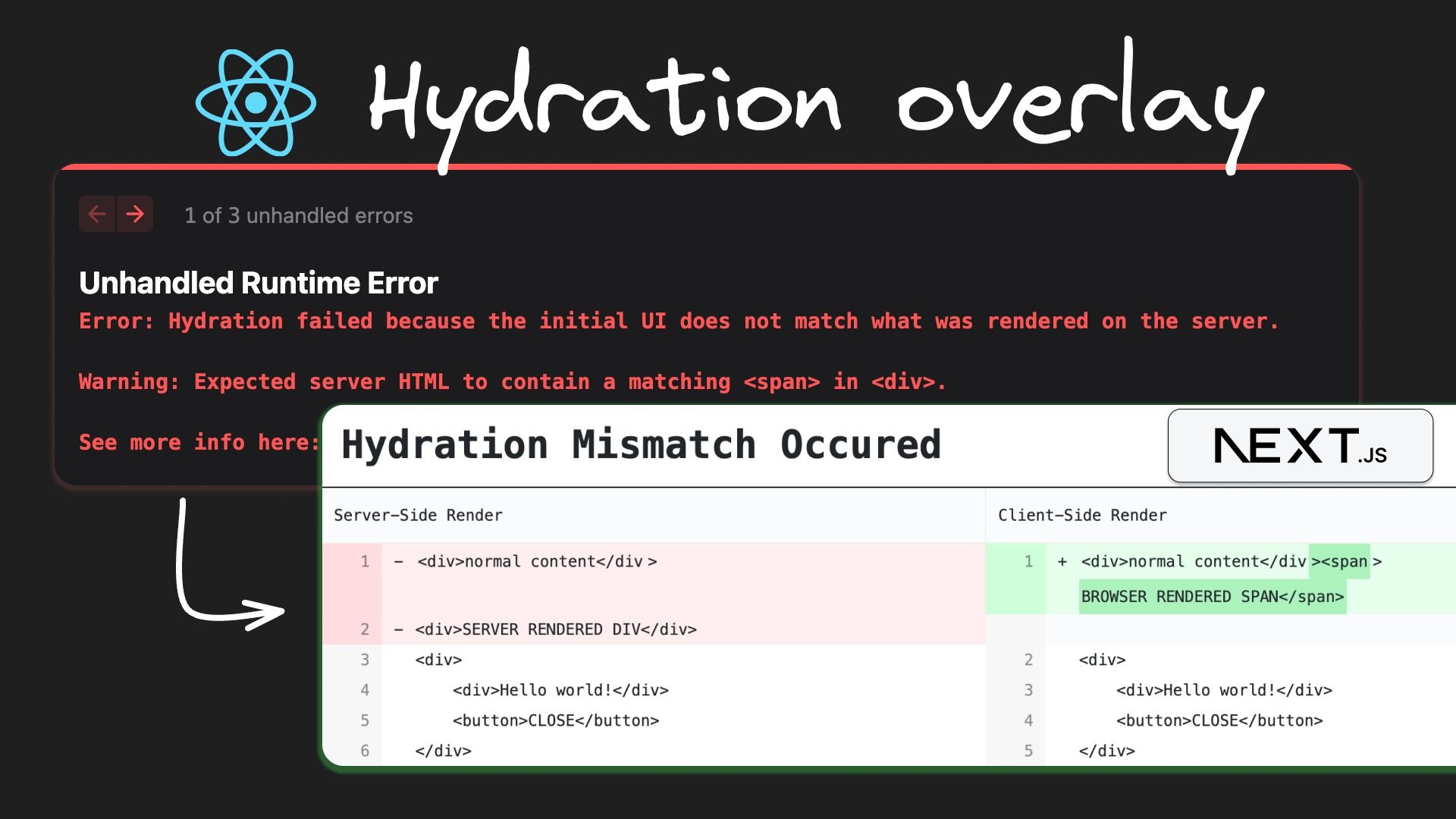
The core principle is this: for hydration to succeed, the component tree React generates on the client during the initial render must be identical to the one that was rendered on the server. If there's any mismatch, React will log an error, discard the server-rendered HTML, and perform a full client-side render. This negates the performance benefits of SSR and can cause a noticeable flicker.
You'll typically see an error message that looks something like this:
2. A Systematic Approach to Validating and Debugging
When you encounter a hydration error, it's essential to have a methodical process to find the root cause rather than guessing.
Step 1: Rule Out External Factors
Browser extensions are a common cause of false positives. Many extensions (like password managers or ad-blockers) inject elements into the DOM, which can cause a mismatch that has nothing to do with your code.
- Action: Before anything else, test your application in an incognito or private browsing window with all extensions disabled. If the error disappears, you've found your culprit.
The article below provides a fantastic, practical guide to debugging these errors. We'll start with its most powerful tip.
Solve React hydration errors in Remix/Next apps
This article by Jacob Paris provides a superb debugging technique for hydration errors. We will focus on the core strategy first.
Read the sections '🔥 Tip: Diff the HTML to find the exact cause' and 'Browser extensions or adblockers'. Focus on the three sources of HTML he identifies and the idea of using a diff tool to compare them.
Step 2: Diff the HTML
As the article suggests, the most reliable way to find a mismatch is to compare the server-rendered HTML with what the client renders.
- Get the Server HTML: Open your browser's DevTools, go to the "Network" tab, find the initial document request (e.g.,
localhost:3000), and look at the "Response" tab. This is the pure HTML sent from your server. Copy it. - Get the Client HTML: In your DevTools, go to the "Elements" tab. This shows the live DOM after React has potentially modified it. Right-click the
<html>element and select "Copy" -> "Copy outerHTML". - Compare: Paste both versions into an online text or code diff tool (like Diffchecker). The differences will point you directly to the component and element causing the mismatch.
This "diffing" technique is the core of validating your application's hydration integrity.
3. Common Causes and Resolutions
Once you've identified where the mismatch occurs, you can resolve it. Here are the most common causes and their solutions.
A. Invalid HTML Nesting
This is arguably the most frequent cause of hydration errors. Your React code might look valid, but it produces an invalid HTML structure. The browser's parser will automatically "fix" the malformed HTML before React gets to it, creating a mismatch.
Common examples include:
- A
<div>or<h1>nested inside a<p>tag. - A
<p>nested inside another<p>. - A
<table>without a<tbody>. - Block-level elements like
<div>inside inline elements like<a>or<span>.
Next.js Hydration failed because the initial ui does not match what was rendered on the server (FIX)
This video from ByteGrad quickly covers several common causes, starting with the most frequent one: incorrect HTML formatting.
Watch the section on 'Incorrect HTML Formatting' (00:10 - 01:57). Notice the specific examples given, such as div in p, missing tbody, and nested anchor tags.
Resolution: Carefully inspect the component identified by your HTML diff. Ensure the JSX structure produces valid HTML. Use a div or span as a wrapper where appropriate instead of a <p> tag.
B. Client-Side Only APIs or Data
As we covered in a previous lesson, some code should only run in the browser. If this code affects the initial render, it will cause a hydration mismatch.
Examples include:
- Accessing
window,localStorage, ornavigator. - Generating random numbers with
Math.random()or unique IDs with libraries likeuuid. - Using
new Date()to display time, which can differ due to server/client timezones.
The server has no access to window and will generate a different random number or date string than the client.
Resolution 1: The useEffect Guard
The standard solution is to prevent the client-dependent code from running during the initial client render. You can do this by using useState and useEffect.
import { useState, useEffect } from 'react';

function MyComponent() {
  const [isClient, setIsClient] = useState(false);

  useEffect(() => {
    // This effect runs only on the client, after the initial render.
    setIsClient(true);
  }, []);

  return (
    <div>
      <h1>My Component</h1>
      {isClient ? (
        // This part is only rendered on the client, after hydration.
        <span>Window width is: {window.innerWidth}px</span>
      ) : (
        // You can render a placeholder or null on the server and initial client render.
        <span>Loading...</span>
      )}
    </div>
  );
}
This pattern ensures that the server render and the initial client render produce the same output (Loading...), preventing a mismatch. The actual client-side value is then rendered in a subsequent update.
The Stack Overflow thread below is a great resource, with the top answers demonstrating this exact pattern.
React 18: Hydration failed because the initial UI does not ...
This Stack Overflow question is a classic. The answers provide a wealth of real-world scenarios and solutions, particularly the useState/useEffect pattern for client-only rendering.
Skim through the answers. Focus on the code examples that use a domLoaded or isClient state variable that is set to true inside a useEffect hook. This reinforces the pattern we just discussed.
Resolution 2: React.useId()
For generating unique IDs for keys or aria- attributes, React 18 provides a dedicated hook, useId(). It is designed to generate stable, unique IDs that are consistent between the server and client. Always prefer useId over Math.random() or uuid() for this purpose.
import { useId } from 'react';

function MyForm() {
  const id = useId();
  return (
    <>
      <label htmlFor={id}>Your Name</label>
      <input id={id} type="text" />
    </>
  );
}
Resolution 3: Dynamic Import with ssr: false
For entire components that are fundamentally incompatible with SSR (e.g., a complex charting library that heavily uses window), you can use the dynamic import technique we discussed previously to prevent them from ever rendering on the server.
C. The Last Resort: suppressHydrationWarning
Sometimes, a mismatch is unavoidable and intentional. A common example is displaying a timestamp like "Posted 5 minutes ago." The server and client will inevitably have slightly different ideas of the current time.
In these specific, controlled cases, you can tell React to ignore a mismatch on a particular element.
<div suppressHydrationWarning={true}>
  {new Date().toLocaleString()}
</div>
Use this with extreme caution. It's an escape hatch, not a solution. It silences the warning but doesn't fix the underlying problem. Only use it when you are certain the difference is expected and harmless.
Next.js Hydration failed because the initial ui does not match what was rendered on the server (FIX)
The same ByteGrad video also explains this 'last resort' option.
Watch the final segment on suppressHydrationWarning (07:18 - 08:28). Note the emphasis that this is not an optimal solution and should be used knowingly.
Conclusion
You have now reached the end of the migration module. By mastering hydration debugging, you've acquired the final skill needed to ensure your migrated application is not just functional, but also robust and performant.
Key Takeaways:
- Hydration is the process of making server-rendered HTML interactive on the client. It requires a perfect match between the server and initial client DOM structure.
- A systematic validation process involves testing in an incognito window and, most importantly, diffing the server and client HTML to pinpoint mismatches.
- Common causes of errors include invalid HTML nesting, rendering based on client-only APIs (
window,localStorage), and environmental differences (Date,Math.random). - The primary resolution patterns are the
useEffectguard for conditional client-side rendering,React.useId()for stable IDs, and dynamic imports withssr: falsefor incompatible components. suppressHydrationWarningis an escape hatch for rare, intentional mismatches and should be used sparingly.
Next Up:
With a correctly functioning, hydrated SSR application as our foundation, we are ready to explore more advanced concepts. In the next module, we will begin by looking at the architecture of React Server Components (RSCs). While Tanstack Start doesn't use RSCs directly, we will see how their core principles can inspire powerful patterns using the tools we've already learned, like server functions.