Recommended resources
The freely available resources this lesson will direct you to.
Hello! Welcome back.
In our last lesson, we designed the blueprints for our CQRS system, creating distinct write and read models for an FX trade lifecycle. We established what we need: a consistent write model (the Trade aggregate) and several query-optimized read models (TradeDetailsView, UserTradeHistoryItem, TradingDeskPositionView).
Today, we build the engine that connects them. This lesson directly addresses the learning outcome: Implement a projection that consumes an event stream to build and maintain a denormalized read model. We will move from design to implementation, writing the Python code that listens to the stream of trade events and populates the read models we designed.
1. What is a Projection?
In the context of Event Sourcing and CQRS, a projection is a specialized component that consumes a stream of events and transforms them into a persistent, queryable state, known as a read model.
Think of it as a materialized, stateful view. In a relational database, a VIEW is a stored query that executes every time you access it. A projection is different: it pre-computes the result and stores it, updating this stored state only when new, relevant events occur. This makes querying the read model extremely fast.
This video provides an excellent conceptual overview.
Projections in Event Sourcing: Build ANY model you want!
Let's start with a clear definition. The video 'Projections in Event Sourcing: Build ANY model you want!' from CodeOpinion explains what projections are and how they transform event streams into various useful models.
Watch the section 'What are Projections?' (01:01 - 03:57). Pay close attention to the analogy of a projection being like a SQL statement or view that transforms data into a different shape.
As the video illustrates, a single event stream can be the source for many different projections, each tailored to a specific use case. This is the one-to-many relationship we discussed in the previous lesson.
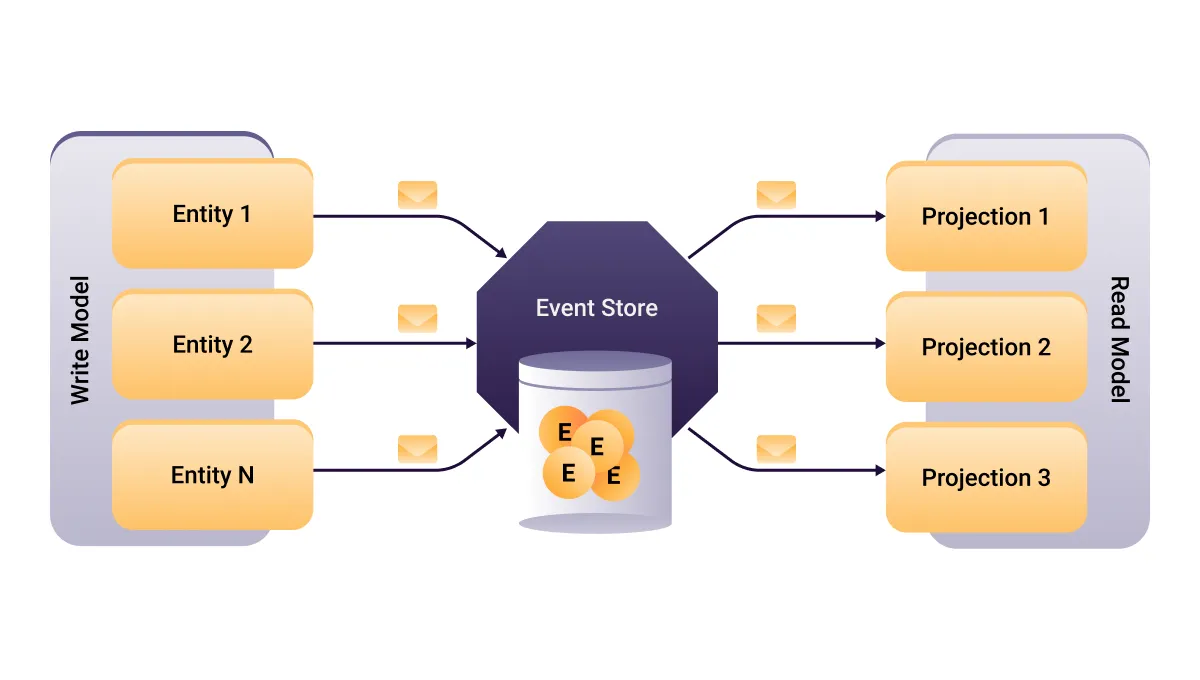
2. The Mechanics of a Projection
At its core, a projection is a consumer in an event-driven system. Its job is to:
- Subscribe to a stream of events.
- Process each event it receives.
- Update its corresponding read model in a separate data store.
- Persist the change to the read model.
There are two primary ways a projection can receive events:
- Persistent Subscription (Push): The projection maintains a live connection to the event store or a message broker. New events are pushed to the projection in near real-time. This is ideal for read models that need to be highly up-to-date.
- Catch-up Subscription (Pull): The projection connects to the event store and requests all events after a specific point (a "checkpoint"). After it has "caught up" to the present, it can either switch to a persistent subscription or periodically poll for new events. This is essential for rebuilding a read model or for a projection to recover after a failure.
The following resource provides a more technical breakdown of this process.
Event Sourcing and CQRS - Event Store Blog - Kurrent.io
The article 'Event Sourcing and CQRS' from Kurrent.io offers a deep dive into the mechanics. It explains why projections are necessary and how they interact with the event store.
Please read the sections 'Projections' and 'Projecting events'. Focus on how a projection subscribes to an event feed and performs CRUD-like operations on its read model based on the event's content.

3. Implementing a Simple Projection in Python
Let's translate this theory into code. We'll implement a projection for the TradeDetailsView read model from our previous lesson. For simplicity, our "event store" and "read model database" will be in-memory Python dictionaries.
Step 1: Define Events and Read Model
First, let's define the data structures for our events and the target read model using Python's dataclasses.
from dataclasses import dataclass, field
from datetime import datetime
from decimal import Decimal
import uuid

# --- Events ---
@dataclass
class TradeExecuted:
    trade_id: uuid.UUID
    user_id: uuid.UUID
    currency_pair: str
    amount: Decimal
    price: Decimal
    executed_at: datetime

@dataclass
class TradeSettled:
    trade_id: uuid.UUID
    settled_at: datetime
    confirmation_number: str

# --- Read Model ---
@dataclass
class TradeDetailsView:
    trade_id: uuid.UUID
    user_id: uuid.UUID
    executed_at: datetime
    settled_at: datetime | None
    currency_pair: str
    amount: Decimal
    price: Decimal
    status: str
    confirmation_number: str | None
Step 2: Create a Mock Event Handler
Now, we'll create the projection itself. It will have methods to handle each specific event type. This pattern is sometimes called an "Event Handler".
class TradeDetailsProjection:
    def __init__(self, read_model_db: dict):
        # The read_model_db is our mock database for storing the views.
        # In a real system, this would be a connection to a database like PostgreSQL or MongoDB.
        self.db = read_model_db

    def handle_event(self, event):
        """Dispatches the event to the correct handler method."""
        handler_name = f"_on_{event.__class__.__name__.lower()}"
        if hasattr(self, handler_name):
            getattr(self, handler_name)(event)

    def _on_tradeexecuted(self, event: TradeExecuted):
        """Creates a new read model when a trade is executed."""
        print(f"PROJECTOR: Handling TradeExecuted for trade {event.trade_id}")
        view = TradeDetailsView(
            trade_id=event.trade_id,
            user_id=event.user_id,
            currency_pair=event.currency_pair,
            amount=event.amount,
            price=event.price,
            executed_at=event.executed_at,
            status="Executed",
            settled_at=None,
            confirmation_number=None
        )
        self.db[event.trade_id] = view
        print(f"PROJECTOR: Created TradeDetailsView for trade {event.trade_id}")

    def _on_tradesettled(self, event: TradeSettled):
        """Updates an existing read model when a trade is settled."""
        print(f"PROJECTOR: Handling TradeSettled for trade {event.trade_id}")
        if event.trade_id in self.db:
            view = self.db[event.trade_id]
            view.status = "Settled"
            view.settled_at = event.settled_at
            view.confirmation_number = event.confirmation_number
            self.db[event.trade_id] = view # Save the updated view
            print(f"PROJECTOR: Updated TradeDetailsView for trade {event.trade_id} to Settled")
Step 3: Run the Projection
Let's simulate a sequence of events and see our projection in action.
# --- Simulation Setup ---
event_store_stream = []
read_model_database = {} # Our mock read model DB (a simple dict)

# Create an instance of our projection
projection = TradeDetailsProjection(read_model_database)

# --- Simulate some business activity ---
trade_id = uuid.uuid4()
user_id = uuid.uuid4()

# 1. A trade is executed
ev1 = TradeExecuted(
    trade_id=trade_id,
    user_id=user_id,
    currency_pair="GBP/USD",
    amount=Decimal("1000.00"),
    price=Decimal("1.2500"),
    executed_at=datetime.utcnow()
)
event_store_stream.append(ev1)

# 2. A different trade is executed
ev2 = TradeExecuted(
    trade_id=uuid.uuid4(),
    user_id=user_id,
    currency_pair="EUR/USD",
    amount=Decimal("500.00"),
    price=Decimal("1.0700"),
    executed_at=datetime.utcnow()
)
event_store_stream.append(ev2)


# 3. The first trade is settled
ev3 = TradeSettled(
    trade_id=trade_id,
    settled_at=datetime.utcnow(),
    confirmation_number="SET-98765"
)
event_store_stream.append(ev3)


# --- Run the projection over the event stream ---
print("--- Starting projection run ---")
for event in event_store_stream:
    projection.handle_event(event)
print("--- Projection run complete ---")

# --- Query the read model ---
print("\n--- Querying Read Models ---")
print("Details for trade 1:", read_model_database.get(trade_id))
print("Details for trade 2:", read_model_database.get(ev2.trade_id))
When you run this code, you'll see the projection creating a TradeDetailsView upon receiving TradeExecuted and then updating that same view when it processes the TradeSettled event. This simple example contains the fundamental logic of any projection.
4. Implementing an Aggregating Projection
Not all projections are a simple 1-to-1 mapping. The TradingDeskPositionView we designed is an aggregating projection. It summarizes data from many different trade aggregates into a single read model.
To build this, a projection often subscribes to a global stream of all events (often called $all) and picks out the ones it cares about, regardless of which aggregate they came from.
Let's implement the projection for our TradingDeskPositionView.
# --- Aggregated Read Model ---
@dataclass
class TradingDeskPositionView:
    currency_pair: str
    net_position: Decimal = Decimal(0)
    total_volume: Decimal = Decimal(0)
    last_updated: datetime | None = None

# --- Aggregating Projection ---
class TradingDeskPositionProjection:
    def __init__(self, read_model_db: dict):
        # This DB stores positions, keyed by currency_pair
        self.db = read_model_db

    def handle_event(self, event):
        if isinstance(event, TradeExecuted):
            self._on_tradeexecuted(event)

    def _on_tradeexecuted(self, event: TradeExecuted):
        """Updates the aggregated position for a currency pair."""
        print(f"POSITION PROJECTOR: Handling TradeExecuted for {event.currency_pair}")

        # Get or create the read model for this currency pair
        position_view = self.db.get(event.currency_pair, TradingDeskPositionView(currency_pair=event.currency_pair))

        # Update the aggregated values (Read-Modify-Write)
        position_view.net_position += event.amount
        position_view.total_volume += event.amount * event.price # Assuming USD quote
        position_view.last_updated = event.executed_at

        # Save the updated view
        self.db[event.currency_pair] = position_view
        print(f"POSITION PROJECTOR: Updated position for {event.currency_pair}: Net={position_view.net_position}")

# --- Run the simulation again with the new projection ---
position_database = {}
position_projection = TradingDeskPositionProjection(position_database)

print("\n--- Starting position projection run ---")
for event in event_store_stream:
    position_projection.handle_event(event)
print("--- Position projection run complete ---")

print("\n--- Querying Position Read Models ---")
print("GBP/USD Position:", position_database.get("GBP/USD"))
This demonstrates the power and flexibility of projections. The same TradeExecuted event is used to create a detailed view for a user and update an aggregated view for an internal trading desk.
This video walkthrough shows a similar concept in action, where a single event is consumed by two different projections to build a "list view" and a "detail view".
CQRS & Event Sourcing Code Walk-Through
To see this concept of multiple projections in action, watch this section of 'CQRS & Event Sourcing Code Walk-Through'.
Watch the section 'Code Walkthrough: Creating Projections' (06:46 - 10:24). Notice how the 'Inventory Item Created' event is handled by two separate projections to create two different read models: one for a list and one for details.
5. From In-Memory to Real-World
Our Python example is synchronous and in-memory for clarity. In a production distributed system, you must account for two critical factors: asynchronicity and resilience.
Asynchronicity:
The process of updating read models should not be part of the same transaction that saves the event. Doing so would couple the write and read sides, defeating a major purpose of CQRS. Projections almost always run in a separate process, consuming events from a message broker (like RabbitMQ) or directly from the event store via a subscription. This makes the system more resilient; if a projection fails, it doesn't stop new trades from being executed.
Resilience and Checkpoints:
If a projection process restarts, how does it know where to resume from? Re-processing the entire event history is often infeasible. Projections must be resilient. They do this by persisting checkpoints—a record of the last event they successfully processed (e.g., its sequence number or timestamp). On startup, the projection reads its last checkpoint and tells the event store, "Give me all events since position X."
Event Sourcing and CQRS - Event Store Blog - Kurrent.io
The Kurrent.io article provides an excellent explanation of why checkpoints are crucial for building robust projections.
Please read the section 'Checkpoints'. It explains the practical problem of restarting a projection and how storing the last processed event's position solves it, preventing costly full replays.
Conclusion
In this lesson, we bridged the gap between our write and read models by implementing the projection mechanism. We saw how this powerful pattern allows us to create multiple, tailored, and performant read models from a single stream of events.
Key Takeaways:
- Projections are Event Consumers: They subscribe to an event stream and transform it into a queryable read model.
- Implementation is a Dispatch Pattern: A projection typically inspects the type of each incoming event and dispatches it to a specific handler method (
_on_tradeexecuted,_on_tradesettled). - Projections are Versatile: They can create simple 1-to-1 views (like
TradeDetailsView) or complex, cross-aggregate summaries (likeTradingDeskPositionView). - Real-World Projections are Asynchronous and Resilient: In production, they run out-of-process and use checkpoints to recover from failures without re-processing all events from the beginning.
Preview of the Next Lesson:
The asynchronous nature of projections introduces a delay between when a command is executed and when the read models are updated. This is known as eventual consistency. In our next lesson, we will explore the implications of this delay and learn about strategies for addressing eventual consistency between write and read models, including how to communicate data staleness to clients.