Recommended resources
The freely available resources this lesson will direct you to.
Introduction
In our last lesson, we developed a high-level storage architecture for a modern AI cluster. We concluded that a disaggregated model—using a scalable object store as the durable data lake and fast, node-local NVMe SSDs as a cache for the active training set—is more cost-effective and performant than relying on a single, monolithic parallel file system. We've successfully staged the data on the compute node.
However, this victory reveals the next battlefield. The journey of data from the node's local storage into the GPU's high-bandwidth memory (HBM) is a "last mile" fraught with its own bottlenecks. If this pipeline stalls, our expensive GPUs sit idle.
This lesson directly addresses the learning outcome: Describe techniques for mitigating data pipeline bottlenecks, such as prefetching, caching, and GPUDirect Storage. We will explore a hierarchy of solutions, from fundamental software patterns to advanced hardware-accelerated features, all designed to ensure a relentless flow of data to the compute cores.
1. The Host-to-Device Bottleneck
The performance gap between GPUs and the CPUs that feed them has been widening for years. While GPUs have seen exponential growth in parallel processing capability, the data storage and ingestion (DSI) pipeline, which is often managed by the CPU, struggles to keep up. This is especially true for workloads with heavy data preprocessing, such as those in computer vision.
This disparity means the DSI pipeline frequently becomes the limiting factor for end-to-end training performance, a phenomenon known as being I/O-bound or CPU-bound. The goal is to make the training GPU-bound, meaning the GPU is the bottleneck because it is always fully utilized.
Let's begin by studying a paper that quantifies this problem and introduces a framework for thinking about solutions.
Enhancing Data Preprocessing for ML Training With Seneca
The paper 'Enhancing Data Preprocessing for ML Training With Seneca' provides an excellent introduction to the data storage and ingestion (DSI) pipeline bottleneck. It clearly illustrates the growing performance gap between CPUs and GPUs that motivates the need for the techniques we'll discuss.
Please read the 'Introduction' section (Section 1). Pay close attention to Figure 1, which visually represents the performance gap, and the authors' argument that the DSI pipeline is a growing bottleneck in modern systems.
As you've just read, the traditional data path—reading from storage, decoding and augmenting on the CPU, and transferring to the GPU—presents multiple opportunities for delay. We will now examine techniques to optimize this path.
2. Software Optimizations: Prefetching and Intelligent Caching
Before turning to specialized hardware, let's explore powerful software techniques that are fundamental to any efficient data pipeline.
2.1 Prefetching and Parallel Data Loading
The most fundamental technique to hide data loading latency is prefetching. The core idea is to overlap the data loading and preprocessing for the next batch (or several future batches) with the GPU's computation on the current batch.
Nearly all modern ML frameworks implement this. For instance, PyTorch's DataLoader uses a num_workers parameter to spawn multiple processes. Each worker process is responsible for independently fetching and preparing a batch of data. While the main process sends batch N to the GPU, workers 1, 2, ... can be busy preparing batches N+1, N+2, etc., in the background.
This parallelization helps ensure that by the time the GPU is finished with its current work, the next batch is ready in system RAM, waiting to be transferred.
2.2 Advanced Caching Strategies
In our previous lesson, we established the value of caching the entire dataset on local NVMe storage. However, this raises a more subtle and critical question: in what form should we cache the data? The answer involves a classic space-time tradeoff.
Let's return to the Seneca paper, which frames this challenge perfectly.
Enhancing Data Preprocessing for ML Training With Seneca
The Seneca paper explores the non-trivial decision of what to cache. Caching raw data saves space but costs CPU cycles for every epoch, while caching fully processed data saves CPU cycles but consumes far more of our limited, fast cache space.
Please read Section 4, 'Challenges for the DSI pipeline'. This section details the space-time trade-off between caching encoded, decoded, and augmented data (Table 2 is particularly insightful) and illustrates how the optimal strategy depends on system resources like cache size.
As the paper highlights, there are three primary forms of data to consider for caching:
- Encoded (Raw): e.g., JPEG, PNG files. Smallest size, highest cache density. Requires full preprocessing (decode + augment) on every use.
- Decoded: Raw pixel data, now in tensor form. Larger than encoded. Saves decoding cost but still requires augmentation.
- Augmented: Fully processed tensors, ready for the GPU. Largest size, lowest cache density. Saves all CPU preprocessing work.
The optimal strategy is not fixed; it depends on the specifics of your system:
- A system with a very fast CPU and limited cache might favor caching encoded data.
- A system with a slower CPU and ample cache might favor caching augmented data.
The Seneca paper proposes a solution called Model-Driven Partitioning (MDP), which uses a performance model of the DSI pipeline to automatically determine the optimal cache split between these different data forms. While we won't delve into their specific mathematical model, the architectural concept is key: an intelligent data loader can and should adapt its caching strategy based on the available hardware resources to maximize throughput.
3. Hardware Acceleration: GPUDirect Storage
Software optimizations like prefetching and caching are essential, but they still operate within the confines of the traditional data path. A typical data transfer from an NVMe drive to the GPU looks like this:
- The CPU initiates a read from the NVMe drive.
- Data is transferred via DMA (Direct Memory Access) from the NVMe drive into a "bounce buffer" in system RAM.
- The CPU may perform preprocessing on this data.
- The CPU initiates a second DMA transfer to copy the data from the system RAM buffer to the GPU's VRAM over the PCIe bus.
This two-step process, especially the intermediate copy to a CPU bounce buffer, consumes system memory bandwidth, adds latency, and burns CPU cycles that could be used for other tasks.
GPUDirect Storage (GDS) is an NVIDIA technology designed to eliminate this inefficiency by creating a direct path between storage and GPU memory.
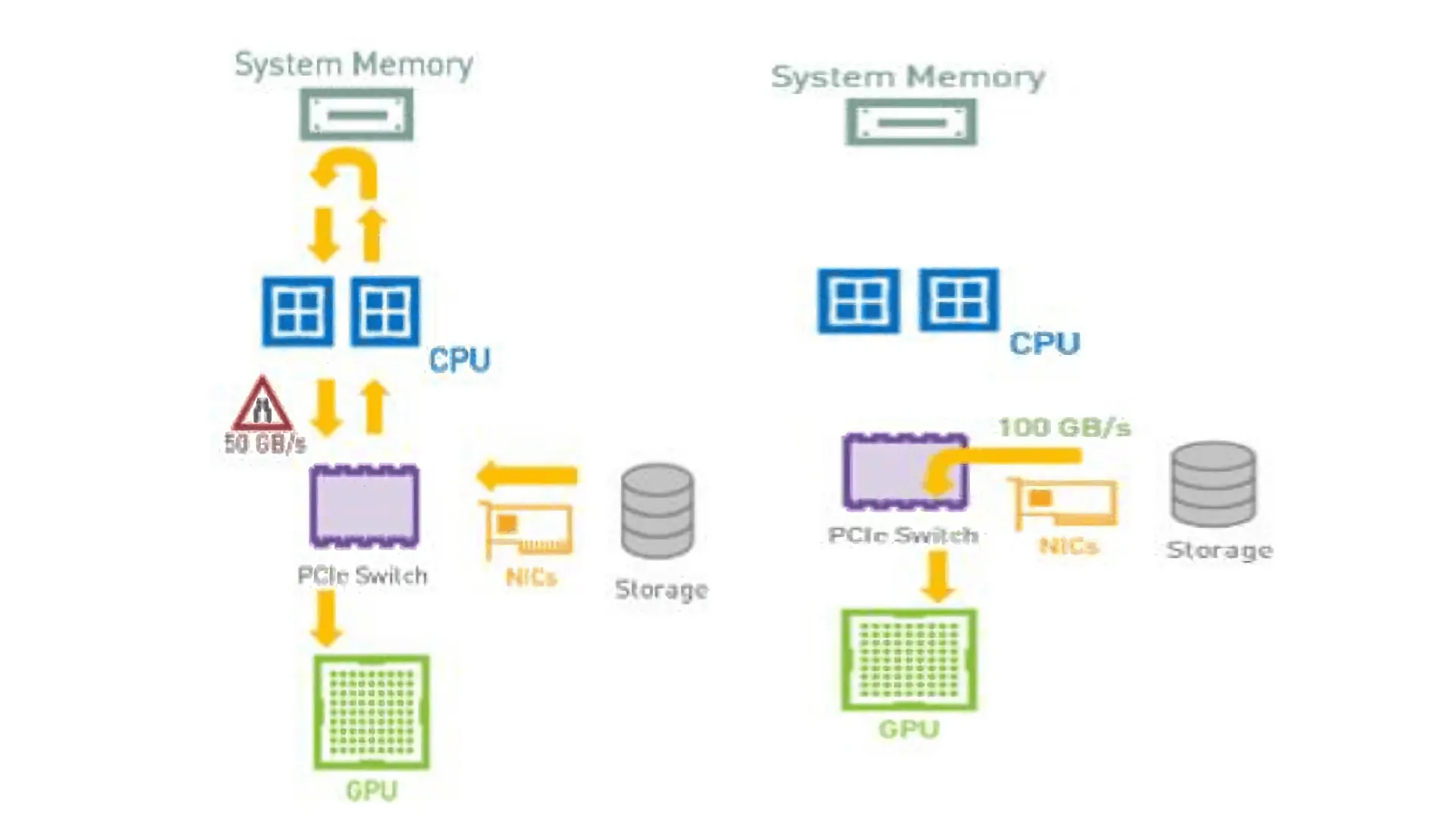
Let's watch a short video that introduces the motivation and high-level benefits of GDS.
Introduction to GPU Direct Storage with NVIDIA and VAST Data
This video from NVIDIA provides a concise explanation of the problem GDS solves and its key benefits.
Please watch from 00:32 to 02:23. Focus on the explanation of the CPU bounce buffer bottleneck and how GDS provides a 'shortcut' to improve bandwidth, reduce latency, and lower CPU load.
3.1 How GDS Works
GDS enables a supported storage driver (e.g., for an NVMe device) to perform DMA transfers directly to a buffer in GPU memory. This is made possible by a kernel module, nvidia-fs.ko, which helps translate GPU memory addresses into a format the DMA engine can understand.
From a programmer's perspective, this is exposed through a new API called cuFile, which provides file I/O operations that can target GPU memory directly.
GPUDirect Storage Overview Guide
To understand the mechanism, let's look at NVIDIA's official documentation. It explains the software architecture and provides a clear comparison between the traditional POSIX I/O code path and the new cuFile API.
Please review the following sections: Section 1.1, Introduction: Read this for a formal definition of GDS. Section 1.2.1, Explicit and Direct: Skim this section and pay close attention to the two code samples under 'Comparing the POSIX APIs and the cuFile APIs'. Notice how the pread followed by cudaMemcpy is replaced by a single cuFileRead call that targets the GPU buffer directly. Section 1.3, Software Architecture: Briefly review Figure 1.2, 'Workflows for GDS Functionality'. This diagram illustrates the interaction between the application, the cuFile library, and the kernel drivers to orchestrate the direct DMA.
3.2 System-Level Implications of GDS
GPUDirect Storage is not just a software library; its effectiveness is deeply tied to the physical layout of the system, specifically the PCIe topology. For GDS to provide maximum benefit, there must be a high-bandwidth path between the storage device (e.g., an NVMe drive) and the GPU that does not require traversing the CPU's internal interconnects.
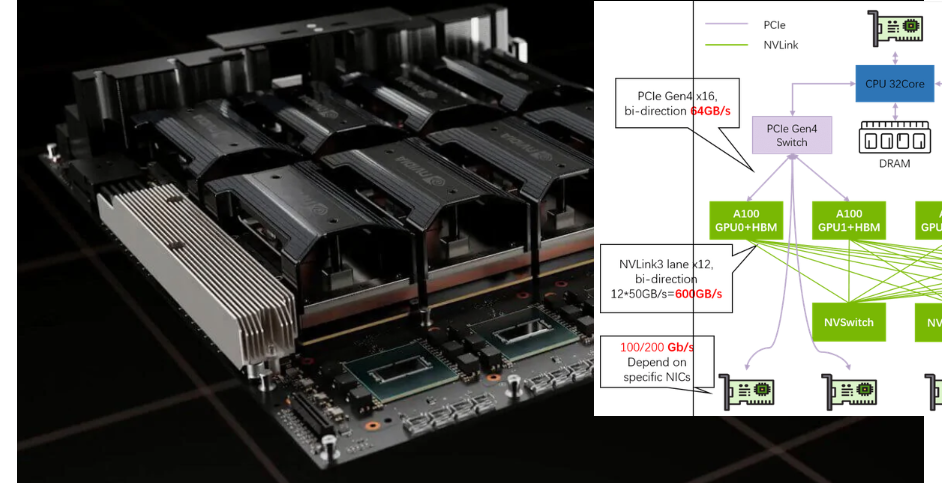
This highlights a crucial point for system design: simply having fast components is not enough. How they are connected is paramount. In systems where the NVMe drives and GPUs are attached to different CPU sockets (a dual-root topology), a GDS transfer might still have to cross the slow CPU-to-CPU interconnect, diminishing its benefits. Architectures that place NICs, NVMe drives, and GPUs under shared PCIe switches are best suited to leverage direct-access technologies like GDS and GPUDirect RDMA.
The following clip reinforces the connection between GDS and the underlying hardware topology.
This clip from the 'Building a GPU cluster for AI' video connects the GPUDirect Storage technology directly to the importance of the underlying PCIe topology.
Please watch the short segment from 21:53 to 22:51. The key takeaway is that GDS functionality depends on having the 'right PCIe topology' to enable direct access between GPUs and local NVMe drives.
4. A Synthesized Approach
These techniques are not mutually exclusive; they form layers of a comprehensive data loading strategy:
- Caching (Strategic): At the highest level, an intelligent caching policy, like the one proposed by Seneca, decides what form of data (encoded, decoded, augmented) to store on the node's fast local storage to best balance cache space and CPU load.
- Prefetching (Temporal): Parallel worker processes run ahead of the GPU, using prefetching to hide the latency of reading data from the local cache and performing any necessary preprocessing.
- GPUDirect Storage (Transport): At the lowest level, GDS accelerates the physical data movement from the local NVMe cache into GPU memory, bypassing the CPU bounce buffer to maximize bandwidth, reduce latency, and free up CPU cycles.
Together, these techniques transform the data pipeline from a potential bottleneck into a highly-tuned, efficient system that keeps the GPUs saturated with data.
Conclusion
In this lesson, we have drilled down from the node level to the "last mile" of the data pipeline. We have seen how a combination of software patterns and hardware acceleration is necessary to feed modern, data-hungry GPUs efficiently.
Key Takeaways:
- The data pipeline from host storage to GPU memory is a common bottleneck due to the growing performance gap between CPUs and GPUs.
- Prefetching, implemented via parallel data loaders, is a fundamental technique for hiding I/O and preprocessing latency by overlapping it with GPU computation.
- Intelligent Caching involves a strategic trade-off. Deciding whether to cache raw, decoded, or augmented data depends on system resources (CPU, cache size) and can be optimized with performance models.
- GPUDirect Storage (GDS) is a key hardware-accelerated technology that creates a direct DMA path from NVMe storage to GPU memory, bypassing the CPU bounce buffer. This reduces latency, increases bandwidth, and lowers CPU utilization.
- The effectiveness of GDS is dependent on the system's PCIe topology, making system architecture a critical consideration for performance.
Preview of the Next Lesson:
Now that we have designed a performant pipeline for training, we must consider its reliability. Large-scale training jobs can run for days or weeks and are susceptible to hardware and software failures. Our next lesson, "Explain strategies for fault tolerance in long-running training jobs, such as distributed checkpointing and restart," will address how to make these massive computations resilient.