Recommended resources
The freely available resources this lesson will direct you to.
Introduction
Welcome to the first lesson of our new module, "GPU Datacenter Systems: Architecture and Management." In our previous module, we concluded by examining activation checkpointing, a sophisticated technique for optimizing memory usage within a single training process. We saw how it allows us to train larger models by trading computation for memory.
Now, we zoom out from the single process to the entire datacenter. State-of-the-art AI models are not trained on a single server but on vast, interconnected systems. This lesson addresses the fundamental learning outcome of this new module: to describe the architecture of a large-scale ML training cluster, including its compute, storage, and networking tiers.
We will deconstruct a modern AI cluster into its core hardware components, exploring the design principles and technologies that enable thousands of GPUs to work in concert. Understanding this physical foundation is crucial for appreciating the challenges of scheduling, data management, and fault tolerance that we will explore in subsequent lessons.
1. A Blueprint for AI Clusters: The Core Components
Before diving into specific hardware, it's useful to establish a conceptual framework. A large-scale AI cluster is not a monolithic entity but a collection of distinct, interacting networks and systems, each with a specialized purpose.
The Open Compute Project (OCP) provides a formal vocabulary for these components, which will be valuable given your background in systems design.
This white paper from the Open Compute Project offers a standardized, architectural view of AI clusters. It defines the different logical networks that make up a cluster, providing a clear and structured way to think about the system as a whole.
Please read Section 4, "Open Cluster Architecture." Pay close attention to Figure 1 and the descriptions of the different network fabrics: Scale-up fabric: Connects accelerators within a single node. Scale-out fabric: Connects different nodes to each other. Storage fabric: Connects nodes to the storage system. In-band and Out-of-band (OoB) management networks: For control, monitoring, and administration. \nThis section establishes the blueprint we will follow.
This reading introduces a crucial layered view. At the highest level, an AI cluster can be broken down into three primary functional tiers built upon these fabrics:
- Compute Tier: The powerful servers that perform the calculations.
- Networking Tier: The high-speed interconnects that allow the servers to communicate.
- Storage Tier: The systems that hold and deliver the massive datasets for training.
Let's look at a real-world example of this structure.
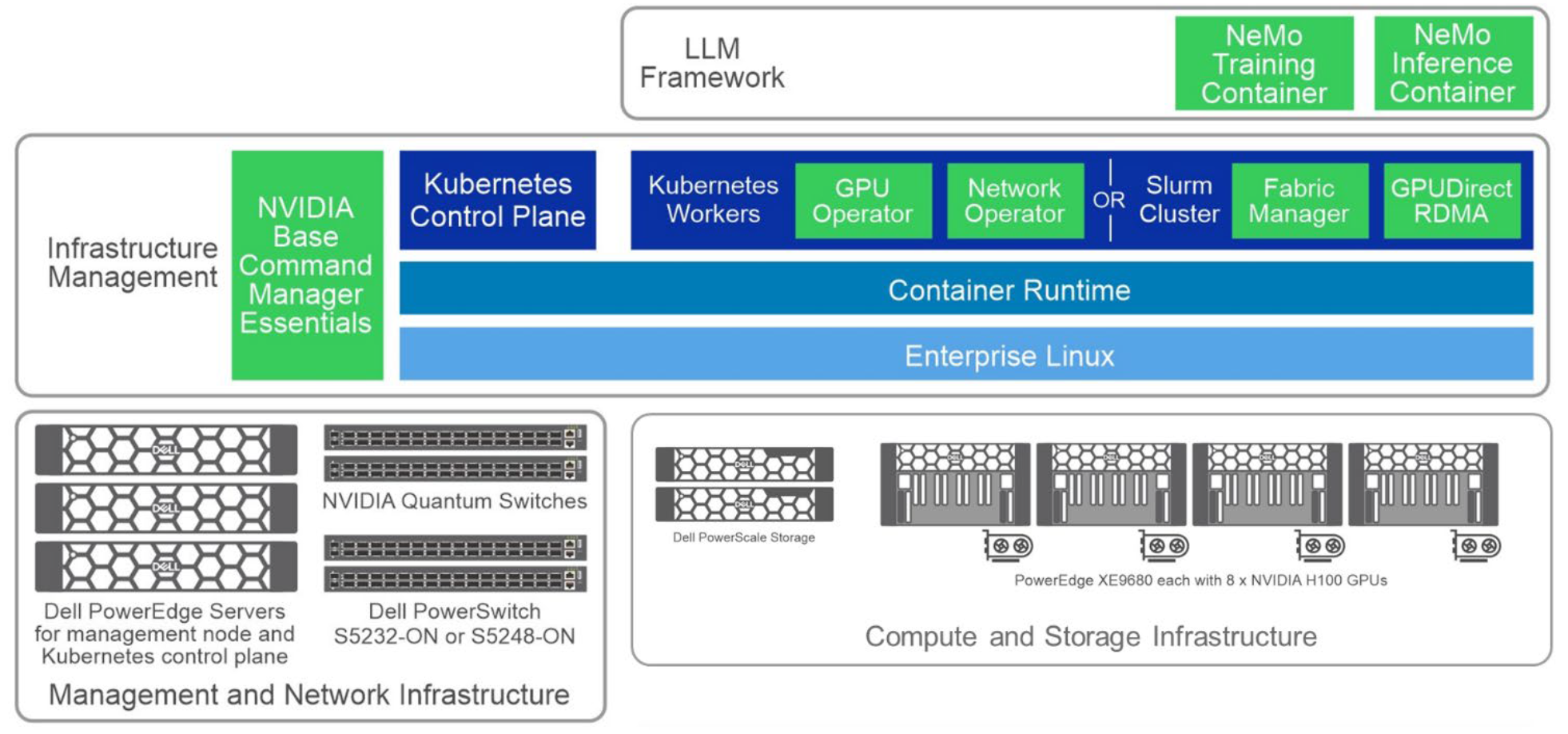
Now, let's dissect each of these tiers in detail.
2. The Compute Tier: The Engine of AI
The compute tier is the heart of the cluster, composed of powerful servers, often called nodes, packed with GPU accelerators. The design of these nodes and how they are aggregated is a primary determinant of the cluster's capabilities.
From CPU to GPU-Dense Nodes
As you know, modern AI workloads are dominated by the massively parallel processing power of GPUs. Cluster design has evolved accordingly, moving from general-purpose CPU clusters to highly specialized, GPU-dense configurations. A single modern AI server can house 8 or more high-end GPUs, each consuming up to 700W. This concentration of power is what drives the extreme performance—and the extreme infrastructure challenges—of AI clusters.
Inside the Node: The Scale-Up Fabric
Within a single compute node, the GPUs need to communicate with each other at extremely high speeds. This is the scale-up fabric we saw in the OCP paper.
- NVIDIA's NVLink and NVSwitch: This is a proprietary high-speed interconnect that provides direct GPU-to-GPU communication, bypassing the much slower PCIe bus. In high-end systems like NVIDIA's HGX platform, multiple GPUs are mounted on a single baseboard and connected via an NVSwitch, which acts as a crossbar switch, enabling all-to-all communication at speeds of up to 900 GB/s. This allows the 8 GPUs in a node to function almost as a single, massive accelerator.
- Form Factors (PCIe vs. SXM): GPUs come in two main form factors. PCIe cards are flexible and fit in standard servers but are limited in power and connectivity. SXM modules are custom mezzanine modules used in HGX/DGX systems. They allow for much higher power (e.g., 700W for an H100 SXM vs. 350W for PCIe) and are directly integrated with the NVLink fabric, enabling maximum scale-up performance.
The video below gives a fantastic tour of a modern, high-end compute node, showing the HGX baseboard, NVLink switches, and the immense networking required to support it.
Inside a MEGA AI GPU Server with the NVIDIA HGX H200
To see what a state-of-the-art compute node looks like, let's watch a segment from this detailed teardown of an NVIDIA HGX H200 server by ServeTheHome.
Watch the following two clips: The GPU and Scale-Up Fabric (02:40 - 04:58): This segment shows the HGX H200 baseboard with 8 GPUs. Pay attention to the description of the NVLink switches that connect the GPUs together. This is the physical implementation of the "scale-up fabric." The Node's Networking (08:40 - 12:03): This part details the incredible amount of networking built into a single node: eight 400 Gb/s network cards (one for each GPU) plus a DPU for management. This highlights how a node is designed to integrate into the broader "scale-out fabric."
3. The Networking Tier: The Cluster's Nervous System
Once we have our powerful compute nodes, we need to connect them. The networking tier, or scale-out fabric, is responsible for all communication between nodes. For distributed training, where gradients and model parameters are constantly exchanged, this fabric is often the performance-limiting factor.
Key Technologies and Topologies
-
InfiniBand vs. Ethernet: The two dominant technologies are InfiniBand and high-speed Ethernet.
- InfiniBand is a high-performance computing interconnect that offers extremely low latency and high bandwidth (currently up to 400-800 Gb/s). It supports RDMA (Remote Direct Memory Access), which allows one node's NIC to write directly into another node's memory (including GPU memory via GPUDirect RDMA) without involving the CPU, significantly reducing latency and CPU overhead.
- High-Speed Ethernet (400/800 GbE) is catching up, often using a protocol called RoCE (RDMA over Converged Ethernet) to provide similar RDMA capabilities. While historically higher latency than InfiniBand, the gap is closing, and it's a popular choice in large, general-purpose datacenters.
-
Fat-Tree (Clos) Topology: To ensure that any GPU can talk to any other GPU in the cluster without hitting a bottleneck, AI clusters are typically built using a non-blocking, fat-tree network topology (also known as a Clos network). In this design, a layer of "leaf" switches connects to the compute nodes, and a layer of "spine" switches connects the leaf switches. The key principle is to provide as much bandwidth going "up" from the leaves to the spines as there is coming "down" to the nodes, creating a fabric where communication paths don't contend with each other.
The following video provides an excellent conceptual and practical overview of these networking concepts.
Let's turn to the "Building a GPU cluster for AI" video, which does a great job of explaining both the 'why' and the 'how' of cluster networking.
Please watch these two sections: Use Case Drives Design (04:50 - 08:35): This part explains why high-speed networking is so critical for large-scale distributed training, contrasting it with other workloads like hyperparameter search. This links the hardware design back to the AI application. Cluster Networking (23:05 - 28:05): This is a practical walkthrough of building a fat-tree topology with InfiniBand switches. It clearly explains how to scale from a single switch to a multi-switch spine-leaf design to achieve a non-blocking fabric.
4. The Storage Tier: Fueling the Compute Engines
A cluster of thousands of GPUs can ingest data at a staggering rate. The storage tier must be able to deliver training data (which can be petabytes in size) and save model checkpoints without becoming a bottleneck. This is the storage fabric.
Modern AI clusters almost always use a tiered storage approach to balance cost and performance.
- Hot Tier (Local NVMe): Each compute node is typically equipped with several terabytes of very fast local NVMe SSDs. This acts as a cache or scratch space. Before a training job starts, the required data shards are often copied from a central repository to the local NVMe drives of the participating nodes. This ensures the lowest possible latency during training.
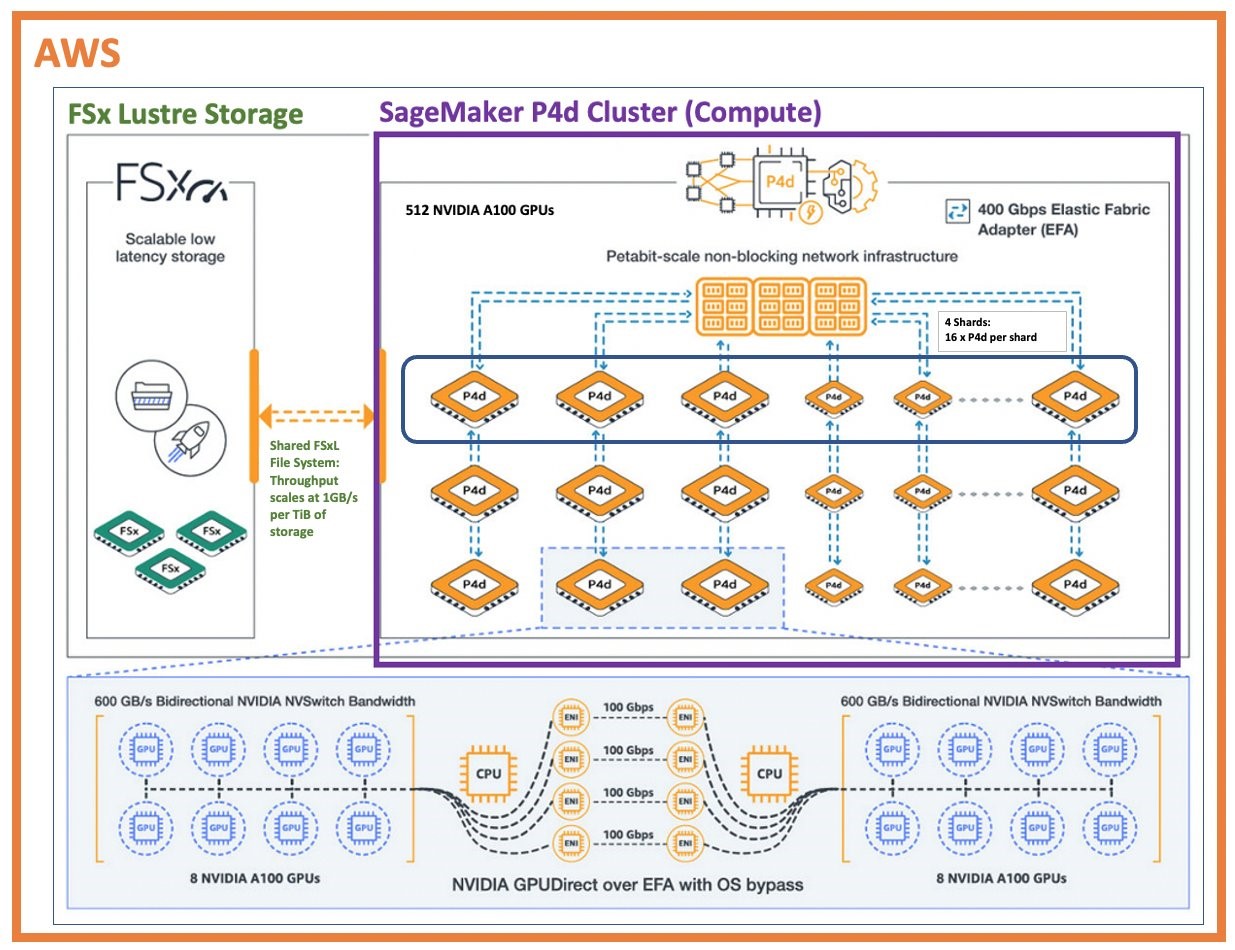
- Warm Tier (Parallel File System): A central, high-throughput parallel file system serves as the primary repository for datasets and checkpoints. Systems like Lustre, BeeGFS, or commercial solutions based on NVMe over Fabrics (NVMe-oF) stripe data across many storage servers to provide extremely high aggregate bandwidth (hundreds of GB/s). All compute nodes mount this filesystem to access shared data.
- Cold Tier (Object Storage): For archival and long-term storage of raw data or old experiments, a cost-effective object store like Amazon S3 or an on-premise equivalent is used. This tier is not fast enough for direct training but serves as the data lake from which datasets are prepared and moved to the warm tier.
The diagram below shows this tiered architecture in an AWS environment, with compute nodes accessing a high-performance FSx for Lustre file system.
This detailed article provides further context on the design of each of the three tiers.
Infrastructure for machine learning and generative AI
For a comprehensive written overview that reinforces these concepts, we'll turn to this excellent article from Medium.
Please read the following three sections, which correspond to the three tiers we've discussed: "GPU Rack Density and Form Factors": Reinforces our discussion of the compute tier. "High-Speed Networks and Interconnects": A great summary of the networking tier. "Storage Architectures for AI": Details the tiered storage approach. \nThis will solidify your understanding of the key design choices and technologies for each component.
5. Physical Reality: Power, Cooling, and Pods
Finally, the architecture of an AI cluster is not just logical; it is deeply physical.
- Power and Cooling: A single rack of 4-8 AI servers can consume 30-100+ kW of power, an order of magnitude more than a traditional enterprise server rack. This has forced a move from traditional air cooling to direct-to-chip liquid cooling, where coolant is pumped through cold plates attached directly to the GPUs and CPUs. This is the only feasible way to dissipate such immense heat density.
- AI Pods: To manage this complexity, datacenters are now designed with dedicated high-density zones or "AI Pods." A pod is a standardized, repeatable unit of infrastructure containing a set of compute racks, their associated network switches, and dedicated power/cooling distribution. For example, an NVIDIA DGX SuperPOD is a reference architecture for a 20-node, 160-GPU cluster. Organizations scale their infrastructure by deploying multiple, identical pods.
Conclusion
In this lesson, we have mapped out the architecture of a modern, large-scale ML training cluster. We've seen that it's a highly specialized system of systems, carefully designed to prevent bottlenecks and feed the voracious appetite of thousands of GPUs.
Key Takeaways:
- A large-scale AI cluster is architected in three primary tiers: compute, networking, and storage.
- The compute tier consists of GPU-dense nodes, where accelerators are connected internally via a high-speed scale-up fabric like NVLink.
- The networking tier connects the nodes using a high-bandwidth, low-latency scale-out fabric, typically an InfiniBand or RoCE network in a non-blocking fat-tree topology.
- The storage tier uses a tiered approach: fast local NVMe for caching, a central parallel file system for active datasets, and object storage for archival.
- These logical tiers have profound physical implications, demanding extreme power densities (100+ kW/rack) and advanced liquid cooling, leading to modular "Pod" designs.
Preview of the Next Lesson:
Having established the hardware blueprint, our next lesson will move up the stack to the software that brings this cluster to life. We will explore how job schedulers like Slurm and Kubernetes are used to manage resource allocation, priorities, and job execution in a multi-tenant GPU cluster, addressing the crucial challenge of efficiently sharing these immensely powerful and expensive systems.