Recommended resources
The freely available resources this lesson will direct you to.
Introduction
Welcome back. In our previous lesson, we examined how job schedulers like Slurm and Kubernetes act as the master conductors of a GPU cluster, managing resource allocation and job execution. A key takeaway was that modern schedulers, particularly Kubernetes, operate on a fundamental unit of work: the container.
This lesson zeroes in on that concept, addressing the learning outcome: to explain the role of containerization (e.g., Docker, Apptainer) in managing dependencies and ensuring reproducibility in GPU environments.
We will start by exploring why containers are indispensable for complex AI workloads. Then, we'll look under the hood to understand what a container is at the kernel level. Finally, we will compare the two leading container technologies in this space—Docker and Apptainer—and dissect the specific mechanisms, like the NVIDIA Container Toolkit, that are required to grant containers access to the powerful GPU hardware they need.
1. The Challenge: Dependency Hell and Reproducibility
Modern deep learning applications are built on a fragile tower of software dependencies. A typical GPU-accelerated training job relies on:
- A specific version of the operating system (e.g., Ubuntu 20.04).
- A specific NVIDIA driver version installed on the host machine.
- A compatible version of the CUDA Toolkit.
- A compatible version of the cuDNN library for deep learning primitives.
- A specific version of Python.
- A specific version of an ML framework like PyTorch or TensorFlow.
- Dozens of other Python libraries (e.g., NumPy, Hugging Face Transformers, etc.).
A mismatch in any of these components can lead to everything from outright crashes to, more insidiously, silent numerical differences that corrupt model training. In a multi-tenant cluster with hundreds of users and thousands of jobs, managing these environments on shared machines would be an intractable problem. How do you run one job that needs CUDA 11.8 and another that needs CUDA 12.2 on the same node?
This is the problem that containerization solves. It allows you to package an entire application, along with all its dependencies—from system libraries to Python packages—into a single, isolated, and portable unit. This packaged unit can then be run consistently on any machine that has a container runtime, regardless of the host's specific software configuration (with the notable exception of the kernel and hardware drivers, which we'll discuss).
The two primary benefits are:
- Dependency Management: Each container has its own private filesystem and environment, completely isolated from the host and other containers. This resolves version conflicts.
- Reproducibility: A container image is an immutable blueprint. Running the same container image will produce the same environment every single time, which is the cornerstone of reproducible research and reliable production deployment.
2. Under the Hood: The Building Blocks of a Container
Given your background in computer science, it's useful to understand that a "container" is not a monolithic entity but rather an abstraction built upon core features of the Linux kernel. A container is simply a standard Linux process that is isolated from other processes.
The following video from Docker's official channel provides an excellent, technically-grounded explanation of the two primary kernel features that make containers possible: namespaces and control groups (cgroups).
Cgroups, namespaces, and beyond: what are containers made from?
This video, titled "Cgroups, namespaces, and beyond: what are containers made from?", explains the fundamental kernel primitives that provide process isolation.
Please watch the following three segments: What is a Container? (02:02 - 04:08): This provides a high-level framing, comparing containers to "chroot on steroids" and clarifying they are just normal processes. Control Groups (cgroups) (04:51 - 07:08): Focus on how cgroups limit what a process can use (CPU, memory, I/O). Namespaces (24:44 - 25:48): Focus on how namespaces limit what a process can see (other processes, network interfaces, mount points).
To summarize this crucial distinction:
- Namespaces create the illusion of having a private system. A process in a PID namespace can only see processes within its own namespace. A process in a network namespace has its own private set of network interfaces and routing tables.
- Cgroups (Control Groups) enforce resource limits. They ensure that a single container cannot monopolize the host's CPU or exhaust its memory, guaranteeing a level of quality of service in a multi-tenant environment.
Together, these kernel features allow us to run multiple isolated application environments on a single host, forming the basis of all modern container technology.
3. Container Runtimes: Docker vs. Apptainer
While namespaces and cgroups provide the building blocks, container runtimes provide the user-friendly tools to build, distribute, and run containers. In the world of AI and HPC, two runtimes dominate: Docker and Apptainer (formerly Singularity). They share the same underlying kernel features but are built with vastly different philosophies and security models.
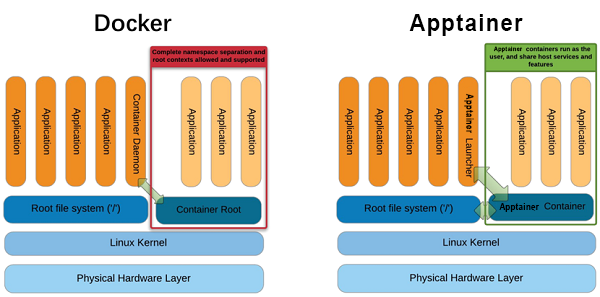
3.1 Docker: Isolation-First
Docker popularized containers and is the standard in the cloud-native and microservices world.
- Architecture: It uses a daemon (
dockerd) that runs as the root user. Users interact with this daemon via a command-line interface (CLI) or API to manage containers. - Philosophy: Isolation. Docker aims to create a highly isolated environment for an application, abstracting away the host as much as possible. This is ideal for web services but presents challenges in HPC settings where you need tight integration with specialized hardware like GPUs and high-speed networks.
- Security Model: The root-running daemon has historically been a point of concern in multi-user HPC environments, as giving a user access to the Docker socket is often equivalent to giving them root access to the host.
3.2 Apptainer (Singularity): Integration and Security for HPC
Apptainer was designed from the ground up for HPC and scientific computing.
- Architecture: It is daemonless. The
apptainercommand is a user-level program that leverages kernel features to create and run containers without needing a privileged, long-running service. - Philosophy: Integration over Isolation. Apptainer automatically makes host resources like the user's home directory and high-performance filesystems available inside the container. This simplifies scientific workflows where code and data live on shared HPC storage.
- Security Model: This is its most defining feature. When you run an Apptainer container, you are the same user inside the container as you are outside. It is impossible to escalate privileges within the container. This "rootless" model is critical for security in shared, multi-tenant academic and enterprise clusters.
The following video provides an excellent deep dive into Apptainer's unique design choices.
Apptainer: Deep Dive, Use Cases, and Examples
The video "Apptainer: Deep Dive, Use Cases, and Examples" explains the core tenets of Apptainer, contrasting it with other runtimes.
Please watch these segments to understand what makes Apptainer different: Introduction to Apptainer (03:47 - 06:16): This part introduces the three key differentiators: the security model, integration over isolation, and the SIF image format. Security Model Explained (14:45 - 19:05): This demonstrates and explains the 'no new privileges' model, showing how Apptainer uses kernel features to prevent privilege escalation. Integration over Isolation (20:53 - 27:56): This section details how Apptainer automatically bind-mounts directories and shares the host network by default, simplifying access to data and services for scientific workflows.
For a quick reference, the paper "Apptainer-Based Containers for Legacy and Platform Dependent Machine Learning Applications on HPC Systems" provides a concise table comparing Docker and Singularity (Apptainer).
Apptainer-Based Containers for Legacy and Platform Dependent ...
This research paper includes a helpful summary table comparing the two container technologies.
Please review Table 1, "Comparison of Docker and Singularity," which summarizes the key differences in their design goals, service models, root access, and image formats.
4. Enabling GPU Access: The Missing Link
By default, the isolation provided by containers prevents them from accessing host devices like GPUs. A specialized toolchain is needed to bridge this gap by selectively exposing the NVIDIA driver and GPU device files to the container at runtime.
4.1 For Docker: The NVIDIA Container Toolkit
NVIDIA provides the NVIDIA Container Toolkit to enable GPU support for Docker and other OCI-compliant runtimes. It works by intercepting the container startup process and injecting the necessary components.
Let's examine its architecture.
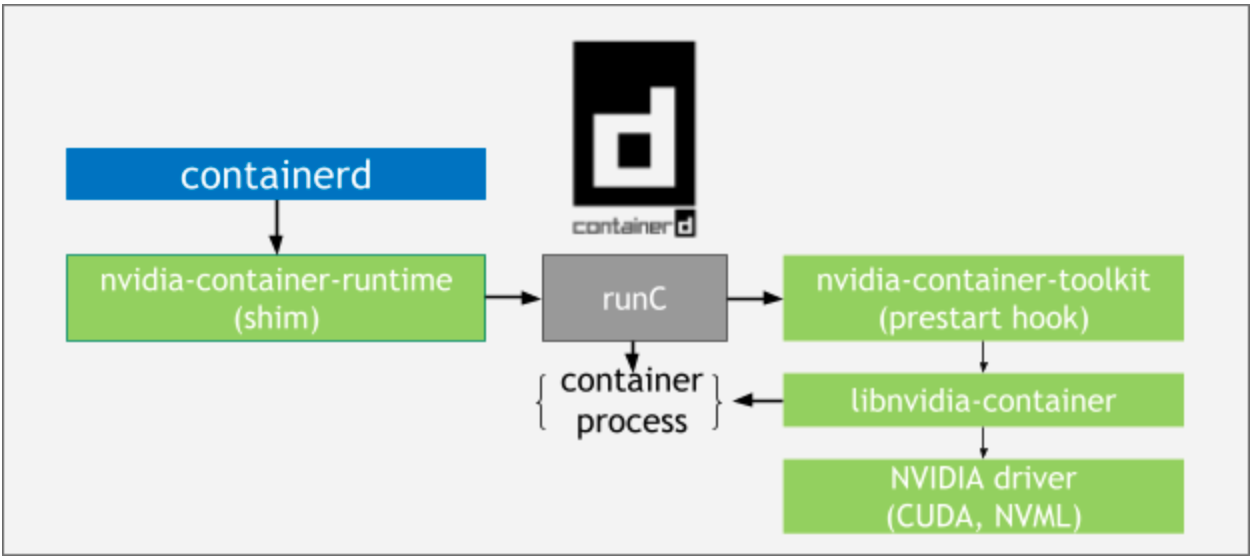
Architecture Overview — NVIDIA Container Toolkit
The official documentation provides a clear architectural overview of the NVIDIA Container Toolkit.
Please read the following three short sections to understand the components: Start with "The NVIDIA Container Library and CLI" to learn about the low-level libnvidia-container. Next, read "The NVIDIA Container Runtime Hook". This is the key mechanism: a prestart hook that is invoked by the container runtime (runC) before the container starts. Finally, read "The NVIDIA Container Runtime". This explains the role of the wrapper that injects the hook into the standard container creation process.
In essence, the toolkit uses a hook to tell the container: "Here are the device files for the GPUs (e.g., /dev/nvidia0) and here are the user-space driver libraries from the host that you need to talk to them."
4.2 For Apptainer: The --nv Flag
Apptainer, true to its philosophy of tight integration, handles this more directly. When you run a container with the --nv flag, Apptainer automatically discovers the necessary NVIDIA driver libraries and device files on the host and bind-mounts them into the container.
This approach relies on the compatibility between the host driver and the CUDA toolkit inside the container, a fundamental constraint for any containerized GPU workflow.
Apptainer-Based Containers for Legacy and Platform Dependent ...
The "Apptainer-Based Containers..." paper demonstrates this process in practice.
Please read the section "Singularity GPU Support with PyTorch and TensorFlow" (Section III, B). Focus on the use of the --nv option and the explanation that the host driver is mounted into the container to work with the container's CUDA toolkit.
5. Ensuring Trust and Reproducibility with SIF
Apptainer's focus on scientific workloads led to the development of the Singularity Image Format (SIF). Unlike Docker images, which are composed of multiple file layers, a SIF image is a single, immutable file.
This single-file approach has several advantages for reproducibility and management:
- Portability: The entire container environment is a single file that can be easily copied, shared, and archived.
- Immutability: The image is read-only by default, ensuring that the environment cannot be accidentally modified at runtime.
- Verifiability: SIF supports cryptographic signing. A developer can sign an image with a private key, and a user (or a cluster's security policy) can verify it with a public key. This creates a chain of trust, guaranteeing that the container is exactly what the developer created and has not been tampered with.
Let's return to the Apptainer video to see how this works.
Apptainer: Deep Dive, Use Cases, and Examples
This final clip from the Apptainer deep dive demonstrates the power of the SIF format for creating trusted, reproducible artifacts.
Please watch the segment on the Singularity Image Format (SIF) from 33:07 to 47:30. Focus on these key concepts: The container is a single, executable file. The demonstration of building from a definition file, which codifies the environment for reproducibility. The workflow for cryptographically signing a container to establish trust and verifying its signature upon download.
This ability to create a single, signed, and verifiable file containing a complete, complex software environment is the ultimate expression of reproducibility for computationally intensive science and AI.
Conclusion
In this lesson, we established the critical role of containerization in managing the complex software dependencies of modern GPU-accelerated AI workloads. Without containers, ensuring consistent and reproducible environments across a large, multi-tenant cluster would be nearly impossible.
Key Takeaways:
- Containers solve the "dependency hell" problem by packaging an application and its entire software stack into an isolated, portable unit, ensuring reproducibility.
- This isolation is achieved using Linux kernel features: namespaces (to limit what a process can see) and cgroups (to limit what it can use).
- Docker is the dominant runtime in cloud environments, prioritizing strong isolation via a root daemon.
- Apptainer (Singularity) is designed for HPC, prioritizing integration with the host and a rootless security model where users cannot escalate privileges.
- Access to host GPUs is not automatic. It requires tools like the NVIDIA Container Toolkit for Docker, which uses runtime hooks, or the
--nvflag in Apptainer, which bind-mounts the necessary drivers. - Apptainer's SIF (Singularity Image Format) provides a single, immutable, and cryptographically signable file, offering a robust solution for verifiable reproducibility in scientific and AI research.
Preview of the Next Lesson:
Now that we have containerized our compute environment, we must turn our attention to the data. A training job is useless without efficient access to massive datasets. In the next lesson, we will analyze data loading bottlenecks and compare the suitability of parallel file systems vs. object stores for ML workloads, moving from the compute stack to the storage stack.