Recommended resources
The freely available resources this lesson will direct you to.
Hello! In the previous lesson, you scheduled HTTP calls concurrently, but a mock handler supplied the replies. Now you’ll make one of those calls against Ollama’s real HTTP API. The aim is not just to print model output: it’s to give your application a clear answer when generation succeeds and a useful failure when the server, model, or response is not what you expected.
Allow about 40 minutes to review the API, run the Python client, and inspect a few failure cases.
From an application request to a model reply
Your Python code sits between the user and the model. It chooses what to send, checks what comes back, and decides whether there is an answer safe to show.
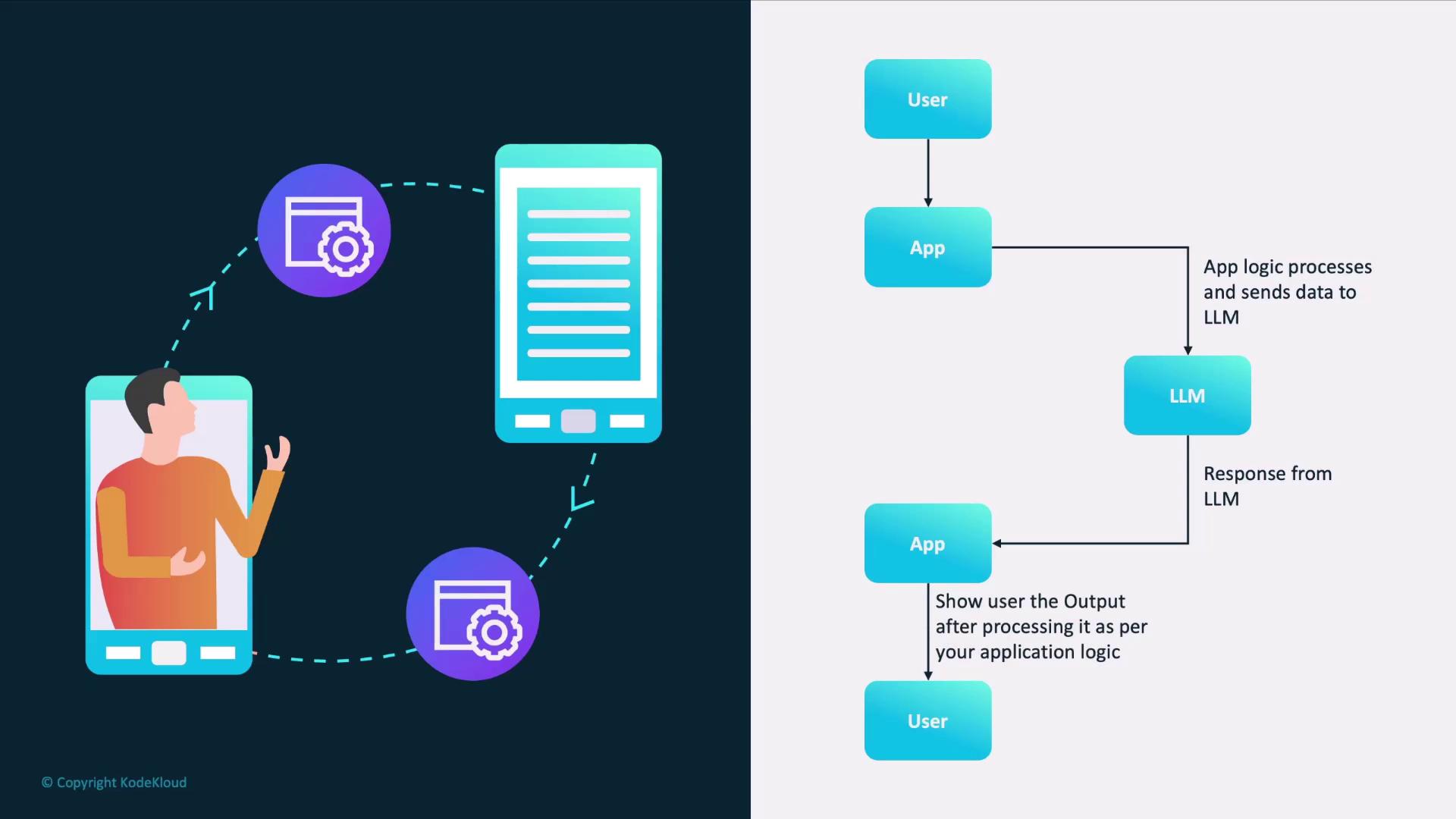
If Ollama is new to you, watch the selected parts of Tech With Tim’s Learn Ollama in 15 Minutes. The clips show how the local service runs and why an application can reach it over HTTP. The later demonstration uses the chat endpoint and streaming; our example will instead use generate with one complete response.
Learn Ollama in 15 Minutes - Run LLM Models Locally for FREE
Watch Tech With Tim’s Ollama setup and HTTP API explanation to see the server your Python client will contact.
Watch service setup for the distinction between installing Ollama and running its background service. Then watch local models for how a model becomes available and how to list installed models; you do not need to use the older model chosen in the video. Finally, watch the HTTP API, ending when the presenter turns to his Python script. Notice the default local port and when ollama serve is needed.
In a terminal, run ollama list and note an installed model name. If none is installed, you’ll need to obtain a model suitable for your machine before making a successful call. Make sure the Ollama application is running; if it is not already running in the background, ollama serve starts the service in a terminal. Don’t start a second server if one is already using the port.
Make the request match the endpoint
Ollama’s Generate a response API reference is the contract for this call. Read the endpoint example, then the model, prompt, and stream body fields and the response and done result fields.
Read Ollama’s generate endpoint reference to identify the exact request and the fields your client must inspect.
At the top of “Generate a response,” read the endpoint description and POST example, from the endpoint example. In “Body,” start at model and read through stream, from request fields; focus on the required model name, prompt, and streaming default. In “Response,” read the entries for response and done, from result fields. The surrounding performance fields are useful later but are not needed to display an answer.
The endpoint is POST http://localhost:11434/api/generate. Its JSON body needs the exact installed model name and a prompt. Set "stream": false explicitly: streaming is the default, but disabling it gives this lesson’s client one JSON document to parse after generation finishes. On success, the generated text is in the JSON field named response; done indicates completion.
That last distinction matters. An HTTP 200 status says the HTTP request succeeded. Your application must still check that the body has the shape it expects before treating it as a completed model answer.
Build an async Ollama client
Use the httpx.AsyncClient pattern from the previous lesson. Save this as ollama_call.py in your uv project. If HTTPX is not already a project dependency, add it with uv add httpx.
import asyncio
import sys

import httpx


class OllamaError(Exception):
    """The application could not obtain a completed Ollama reply."""


async def generate(
    client: httpx.AsyncClient, model: str, prompt: str
) -> str:
    try:
        http_response = await client.post(
            "/api/generate",
            json={
                "model": model,
                "prompt": prompt,
                "stream": False,
            },
        )
        http_response.raise_for_status()

    except httpx.HTTPStatusError as exc:
        try:
            error_body = exc.response.json()
        except ValueError:
            error_body = {}

        detail = (
            error_body.get("error")
            if isinstance(error_body, dict)
            else None
        )
        if not isinstance(detail, str) or not detail.strip():
            detail = "No structured error message"

        raise OllamaError(
            f"Ollama HTTP {exc.response.status_code}: {detail}"
        ) from exc

    except httpx.TimeoutException as exc:
        raise OllamaError("Timed out waiting for Ollama") from exc

    except httpx.RequestError as exc:
        raise OllamaError("Could not reach Ollama") from exc

    try:
        result = http_response.json()
    except ValueError as exc:
        raise OllamaError("Ollama returned invalid JSON") from exc

    if (
        not isinstance(result, dict)
        or not isinstance(result.get("response"), str)
        or result.get("done") is not True
    ):
        raise OllamaError("Ollama returned an unexpected generate response")

    return result["response"]


async def main(model: str) -> None:
    try:
        async with httpx.AsyncClient(
            base_url="http://localhost:11434",
            timeout=httpx.Timeout(120.0, connect=5.0),
        ) as client:
            reply = await generate(
                client,
                model,
                "In one sentence, explain what an API is.",
            )
        print(reply)
    except OllamaError as exc:
        print(f"Generation failed: {exc}", file=sys.stderr)
        raise SystemExit(1) from exc


if __name__ == "__main__":
    if len(sys.argv) != 2:
        raise SystemExit("Usage: uv run python ollama_call.py MODEL_NAME")
    asyncio.run(main(sys.argv[1]))
Run uv run python ollama_call.py MODEL_NAME, replacing MODEL_NAME with a name shown by ollama list. A first call may take longer while the model loads. The 120-second HTTPX setting limits waits in HTTP operations; it is not a guaranteed 120-second wall-clock limit for the entire operation.
Notice where the checks sit. raise_for_status() handles an unsuccessful HTTP status before the success body is parsed. Only after that does the code require valid JSON, a string response, and done set to true. The function returns text on success and raises OllamaError otherwise, so its caller never has to guess whether an error string is actually a model answer.
Distinguish API failures from connection failures
Read Ollama’s Errors reference before diagnosing a failed run. Its status-code list and JSON error field explain what the server can report when it does receive your request.
Read Ollama’s error reference to connect HTTP statuses and server error messages to the client’s exception handling.
In “Status codes,” read from the status list, paying particular attention to 400, 404, 429, and server errors. In “Error messages,” read the explanation from the JSON error rule. Finally, glance at “Errors that occur while streaming,” particularly the status caveat; this explains why checking only the initial status would be insufficient if you later enable streaming.
The client separates three kinds of failure:
| What happened | What the code does |
|---|---|
| Ollama replied with a non-success status, such as 404 for a missing model | Reads the JSON error message when available and reports the status. |
| No usable HTTP reply arrived because of a timeout or connection problem | Reports a timeout or that Ollama could not be reached. There may be no server error body to read. |
| A successful HTTP reply had invalid JSON or lacked a completed generate result | Rejects the body rather than displaying it as an answer. |
For a concrete failure check, run the script with a model name that is not in ollama list while the server is running. Expect a reported HTTP error rather than generated text. If the server is not running, expect a connection failure instead; those two situations have different fixes. As in your earlier pytest lesson, httpx.MockTransport can make these response cases repeatable without depending on a particular installed model.
This implementation deliberately requests a non-streaming response. With streaming enabled, partial replies arrive as separate records, and an error can occur after the initial HTTP status has been sent. A streaming client must inspect those records; merely reusing this JSON parser would be incorrect.
Takeaway
You can now call a local Ollama model through POST /api/generate, request a single complete JSON response, and return its generated text only after checking both HTTP status and response shape. Keep server-reported errors, connection failures, timeouts, and malformed success bodies distinct: they point to different problems.
This completes the Python bridge module. Next, you’ll look inside the model call—beginning with tokenization and next-token prediction—so the behavior behind those API responses becomes easier to reason about.