Recommended resources
The freely available resources this lesson will direct you to.
- Visualising software architecture with the C4 model - Simon Brown, Agile on the Beach 2019www.youtube.com
- How to create C4 diagrams with code (Structurizr DSL)www.youtube.com
- Describing Agentic AI Systems with C4: Lessons from Industry Projectsarxiv.org
- Tessl • The package manager for agent skillstessl.io
Hello! In our previous lesson, we established the crucial non-functional requirements for our agentic engineering assistant. By defining measurable objectives for latency, availability, cost, and clear constraints for privacy and auditability, we've set the quality targets our architecture must meet.
This lesson bridges the gap between those abstract quality targets and concrete implementation. We will now design the high-level architecture of our system using the C4 model. Think of this as creating the first architectural blueprints. These diagrams will provide a clear, shared understanding of the system's structure and its boundaries, which is essential for guiding development and communicating the design to others.
By the end of this lesson, you will have created the two most important C4 diagrams for our project: a System Context (Level 1) view and a Container (Level 2) view. These will map out the users, external dependencies, and the primary building blocks of our application, including the frontend, backend, database, and background worker.
A Map for Your Software: The C4 Model
Before we start drawing, it's important to understand the philosophy behind the C4 model. It's not about rigid, complex notation like UML can sometimes be. Instead, it's a practical approach for creating a set of hierarchical maps for your software, each serving a different audience and purpose.
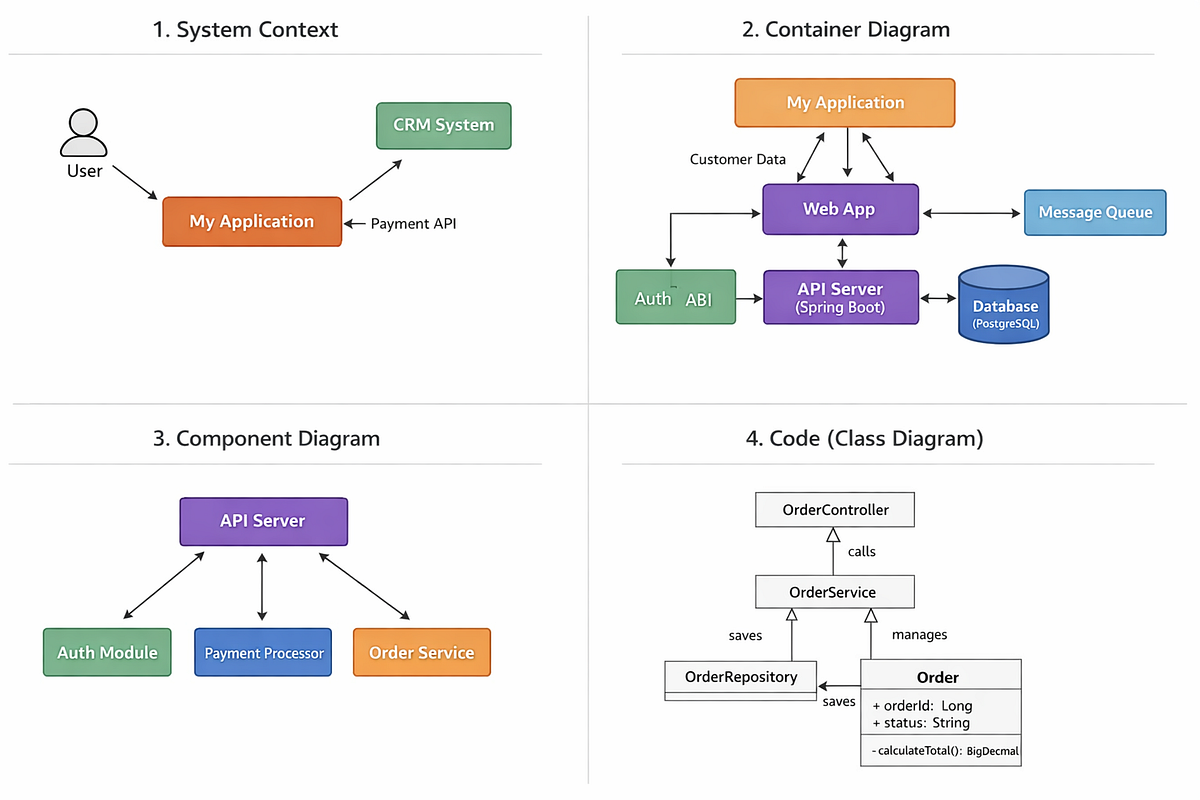
The four levels of the C4 model provide different levels of zoom, much like a digital map.
To get a first-hand introduction from the model's creator, Simon Brown, please watch the following segment from his talk, "Visualising software architecture with the C4 model". He explains the core idea of using diagrams as maps to tell different stories to different audiences.
Visualising software architecture with the C4 model - Simon Brown, Agile on the Beach 2019
Watch the introduction to the C4 model. Pay close attention to the "diagrams as maps" analogy.
Watch from the C4 model introduction.
The key idea is that we can zoom in and out of our architecture to communicate with different levels of detail. For our purposes today, we'll focus on the two highest levels, which provide the most value for general architectural understanding.
Level 1: System Context Diagram
The System Context diagram is the highest level of abstraction—the "world map" view. It shows your system as a single black box, surrounded by its users and the external systems it interacts with. This diagram is for everyone: developers, business stakeholders, and new team members. It answers the question: "What is the system and who/what interacts with it?"
Let's see how Simon Brown builds a System Context diagram.
Visualising software architecture with the C4 model - Simon Brown, Agile on the Beach 2019
Watch this segment to understand what a System Context diagram contains and who its audience is.
Watch the explanation of the System Context diagram.
Now, let's apply this to our Agentic Engineering Assistant. According to our project goals and the learning outcome for this lesson, we need to identify:
- The System: Our agentic assistant itself.
- The Users: The people who will use the system.
- External Systems: The other software systems it depends on.
Here's our list:
- System:
Agentic Engineering Assistant - User:
Developer(the person using the assistant to analyze tasks) - External Systems:
Model Provider(e.g., Anthropic, OpenAI) - The source of the LLM.Source Repository(e.g., GitHub, GitLab) - Where the agent gets code and context from.Deployment Service(e.g., Vercel, Netlify) - Where our frontend is hosted.
A modern and effective way to create and maintain these diagrams is "diagrams as code." Instead of using a drag-and-drop tool, we write a textual description of the diagram, which a tool then renders. This makes it easy to version control your architecture alongside your source code. We'll use the Mermaid syntax for this.
Here is the Mermaid code for our System Context diagram.
This code generates a diagram that clearly shows our system's place in its environment, satisfying the first part of our goal for this lesson.
Level 2: Container Diagram
Now, we zoom in. The Container diagram opens up the "black box" of our system to reveal its main building blocks. In the C4 model, a "container" is a separately deployable or runnable unit, such as a web application, API server, database, or background worker. This diagram is primarily for the technical team. It answers the question: "What are the major technological pieces of our system and how do they communicate?"
Watch Simon Brown explain the Container diagram.
Visualising software architecture with the C4 model - Simon Brown, Agile on the Beach 2019
Focus on how he breaks down the internet banking system into its constituent applications and data stores.
Watch the explanation of the Container diagram.
To make this more concrete for an AI-powered system, look at the example below. It shows a Container diagram for a typical AI chatbot. You'll see familiar patterns like a Web App, an API Backend, a Vector Database, and an LLM Connector.

This example C4 Container Diagram for an AI Chatbot shows the key applications and data stores that make up the system.
For our Agentic Engineering Assistant, the learning outcome specifies the containers we need to model:
- Vue Client: A Single-Page Application (SPA) running in the developer's browser. This is our user interface.
- TypeScript API: The backend service that orchestrates the agent's logic.
- Background Worker: A separate process for handling long-running, asynchronous tasks like agent runs.
- PostgreSQL Database: Our primary data store for users, tasks, agent run history, etc.
These containers live inside the "Agentic Engineering Assistant" system boundary. They also interact with the users and external systems we defined in the Context diagram.
Here is the Mermaid code for our Container diagram.
This diagram provides a clear architectural overview of the system's moving parts, fulfilling the second requirement of our learning outcome.
Best Practices for Clear and Maintainable Diagrams
Creating a diagram is easy; creating a good diagram that is clear and self-explanatory is harder. The goal is to create diagrams that can be understood without the original author present to explain them.
Tessl • The package manager for agent skills
This resource provides excellent, concise rules for creating effective C4 diagrams.
Read the sections on Essential Rules and Clarity Guidelines to understand the small details that make a big difference in clarity.
Here are the most important takeaways to remember:
- Titles are mandatory: Always specify the diagram type and scope (e.g., "Container diagram for System X").
- Every box needs context: Include a Name, Type (e.g., "Container", "Database"), Technology, and a brief Description.
- Label relationships with intent: Use active verbs on the arrows (e.g., "Sends prompts to" instead of just "Uses"). Add the protocol/technology where relevant (e.g., "HTTPS/JSON").
- Prefer unidirectional arrows: Most interactions are request/response. Summarize the intent with a single arrow indicating the initiator of the communication. This keeps diagrams from becoming cluttered.
Adhering to these practices will elevate your diagrams from simple sketches to valuable engineering documents.
Conclusion
In this lesson, you've taken the first concrete steps in designing our agentic assistant. By applying the C4 model, you've created two essential architectural diagrams that define the system's scope and its high-level technical structure. This visual blueprint provides a shared understanding that will be invaluable as we move towards implementation.
Key Takeaways:
- The C4 model provides a simple, hierarchical way to visualize software architecture at different levels of detail, improving communication.
- The System Context (L1) diagram shows the big picture: your system, its users, and the external systems it interacts with.
- The Container (L2) diagram zooms in to show the main, independently deployable or runnable parts of your system, like applications and data stores.
- Using a "diagrams as code" approach with tools like Mermaid allows you to version control your architecture alongside your code, keeping it up-to-date.
In our next lesson, we will directly translate the architecture from our Container diagram into a tangible codebase. We'll create a TypeScript monorepo with packages representing the Vue client, the TypeScript API, and the background worker, bringing our design to life.