Recommended resources
The freely available resources this lesson will direct you to.
Hello! In our last lesson, we explored the ReAct framework, which provides an agent with a structure for problem-solving: Thought -> Action -> Observation. We saw how an agent can reason about what it needs to do next.
Today, we'll zoom in on the Action part of that loop. This lesson addresses the learning outcome: Describe the role of tools (functions) in extending agent capabilities beyond text generation. We'll uncover how an agent moves from simply generating text to interacting with and affecting the world around it.
Specifically, we'll cover:
- Why tools are essential for making agents useful.
- The mechanism of "function calling" that enables tool use.
- The developer's role in defining tools for an agent.
Let's begin by understanding what tools are and why a powerful LLM needs them in the first place.
Beyond Text: Giving Agents Superpowers with Tools
A large language model, by itself, is a powerful text processor. However, its knowledge is static—frozen at the time of its training—and it has no direct connection to the outside world. It can't check today's weather, send an email, query your company's database, or perform a precise calculation.
Tools (also called functions) are the solution to this problem. They are external pieces of code, such as APIs or Python functions, that you make available to the agent. By using tools, an agent can:
- Access Real-Time Information: Get current news, stock prices, or weather forecasts.
- Interact with Private Data: Query internal databases, customer relationship management (CRM) systems, or document stores.
- Perform Actions: Send emails, book calendar appointments, or control smart home devices.
Essentially, tools give an agent capabilities far beyond simple text generation. They are the bridge between the LLM's reasoning and the real world.
To start, let's watch a brief video that introduces this concept and clarifies the terminology.
AI + your code: Function Calling
The video 'AI + your code: Function Calling' from Google Cloud Tech offers a great high-level introduction to what tools are and why they're important.
Please watch the following two segments: Introduction (00:20 - 01:48): This section defines function calling and clarifies the relationship between the terms 'tool' and 'function'. Use Cases (03:21 - 04:39): This part explores practical scenarios where function calling is essential, such as accessing real-time data and enabling the LLM to take actions on a user's behalf.
As the video explains, tools are what transform a passive LLM into an active agent that can perform tasks. Now, let's unpack the mechanism that makes this possible.
The Mechanism: How Function Calling Works
So, how does an LLM, which only processes text, actually use a tool? It doesn't execute the code directly. Instead, it uses a process called function calling.
This process is a conversational loop between the agent's controlling program (which you, the developer, write) and the LLM. It's the "how" behind the Action and Observation steps of the ReAct cycle.
The entire flow is illustrated beautifully in this diagram.
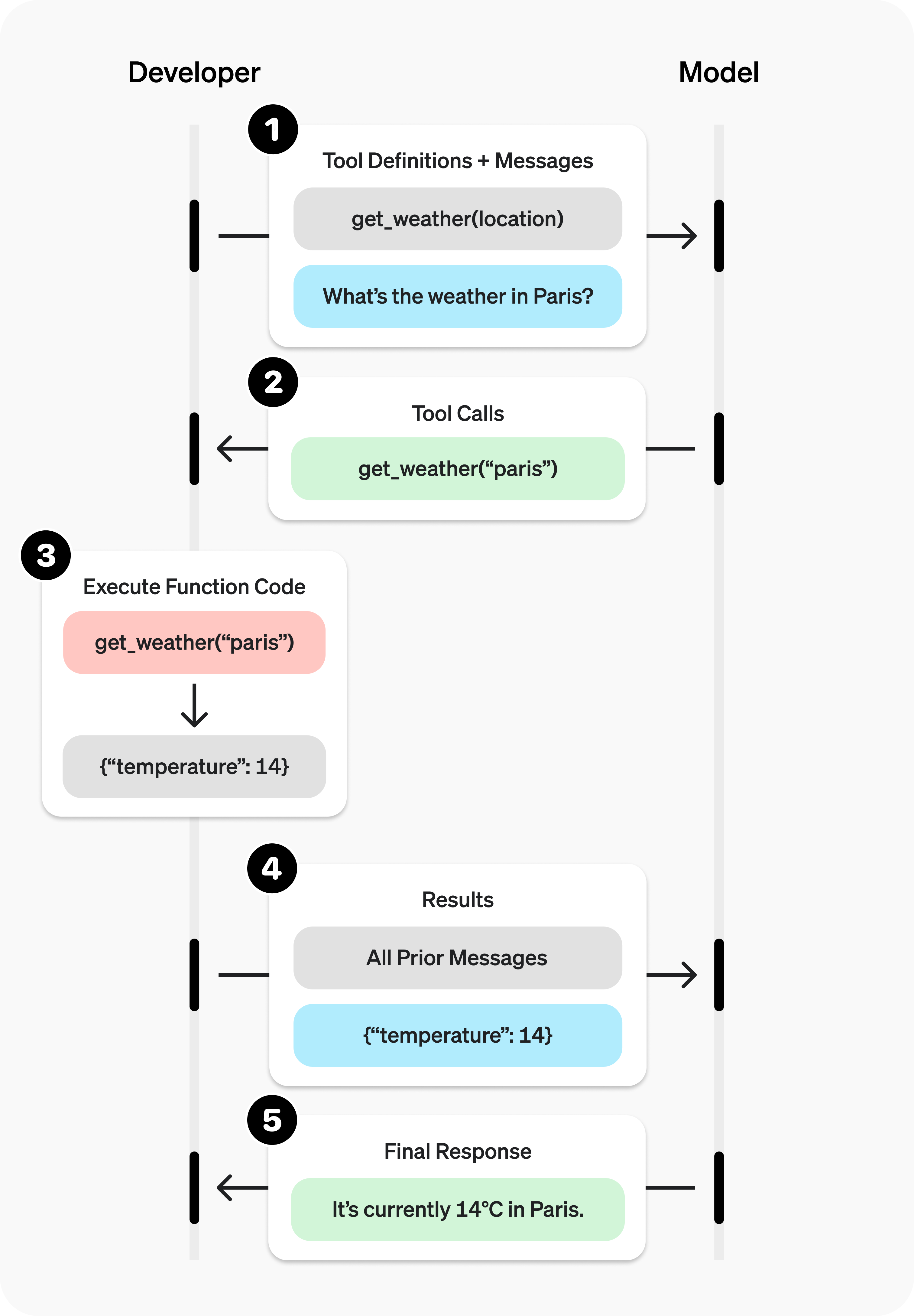
Let's break down these steps:
- Call the Model with Tools: Your application sends the user's prompt to the LLM. Along with the prompt, you provide a list of available tools, each with a detailed description of what it does and what parameters it accepts.
- Model Decides to Call a Tool: The LLM analyzes the prompt. If it determines that it needs one of the tools to answer the request, it doesn't respond with plain text. Instead, it generates a special, structured message (typically JSON) saying, "I want to call function
Xwith argumentsY." This is the tool call. - Execute the Tool in Your Code: Your application parses this message. It sees the model's request to use a tool, so it calls the corresponding function in your own codebase (e.g., your
get_weatherAPI) with the arguments the model provided. - Send the Result Back to the Model: Once your function finishes, your application takes the return value (e.g.,
{"temperature": "72", "unit": "fahrenheit"}) and sends it back to the LLM in a new message. This message is formatted to indicate that this is a tool output. This corresponds to theObservationstep in ReAct. - Model Generates the Final Response: The LLM receives the tool's output. Now equipped with the information it needed, it generates a natural language response for the user (e.g., "The weather in San Francisco is currently 72°F.").
This multi-step dialogue is the fundamental mechanism that allows an agent to leverage external functionalities.
For a more detailed walkthrough, let's turn to this excellent video.
LLM Function Calling - AI Tools Deep Dive
The video 'LLM Function Calling - AI Tools Deep Dive' by Adam Lucek provides a fantastic, code-oriented explanation of this entire process.
Please watch the following two segments: The Sequence of Function Calling (01:07 - 03:12): This part clearly articulates the step-by-step flow we just discussed. Complete Workflow Example (08:23 - 12:43): This is a key section. It puts all the pieces together, showing how the initial prompt leads to a tool call, followed by function execution, and finally the summarized response from the model. Pay close attention to the different messages being passed back and forth (user, assistant with tool_calls, and tool).
The Developer's Role: Defining the "Contract"
As a software engineer, your critical role is to define the tools and implement their logic. Telling the model about your tools is like defining an API specification. You create a "contract" that the model uses to understand what each tool does.
This contract is typically a JSON Schema object that specifies:
name: The name of the function to be called.description: A clear, natural language description of what the function does and when to use it. This is the most important field, as the LLM relies heavily on it to make its decision.parameters: An object describing the arguments the function accepts, including their types (string, integer, etc.), descriptions, and whether they are required.
The following reading selection from Martin Fowler's blog provides a superb example, framing the agent's capabilities as Action classes—a design pattern that should be familiar.
The article 'Function calling using LLMs' by Kiran Prakash on martinfowler.com offers a strong software engineering perspective on building agents.
Please read the section that begins with the line tools=[...] and continues down to the code block defining SEARCH_SCHEMA, PRODUCT_DETAILS_SCHEMA, and CLARIFY_SCHEMA. Focus on how each schema provides a name, description, and parameters to create a clear contract for the LLM.
By providing these well-defined schemas, you are not just giving the agent a tool; you are giving it a user manual for that tool. The agent's ability to effectively solve problems is directly proportional to how well you describe the tools at its disposal.
Conclusion
In this lesson, we've demystified how AI agents perform actions. You've learned that tools are the key to unlocking an agent's potential, allowing it to go far beyond simple text generation.
Key Takeaways:
- Tools Extend Capabilities: Tools connect an LLM to the outside world, providing access to real-time data, private systems, and the ability to execute actions.
- Function Calling is the Mechanism: Agents use tools via a multi-step process where the LLM requests a tool call, your application executes it, and the results are fed back to the LLM for a final answer.
- Clear Descriptions are Crucial: As the developer, your primary responsibility is to write the tool's code and provide a clear, detailed schema (especially the
description) so the agent knows when and how to use it. This process is analogous to defining an API specification.
In our previous lesson, we saw how agents Reason. Today, we saw how they Act. In our next lesson, we'll explore how agents handle more complex tasks by using planning strategies, such as decomposing a large goal into a series of smaller, manageable steps.