Recommended resources
The freely available resources this lesson will direct you to.
Welcome. This module develops the configuration and scripting foundations you will use repeatedly in Azure automation, Docker, Kubernetes, Key Vault integration, and policy-as-code work. Before writing configuration files, it is important to see them as structured data, not merely text.
In this lesson, you will learn to recognize the building blocks shared by JSON and YAML: scalar values, mappings, sequences, and nesting. You will also learn why the same configuration can look quite different in the two formats while representing the same underlying data.
Configuration is a data model expressed in text
A platform configuration usually describes real things and their relationships:
- an application and its settings;
- a list of container images;
- network ports;
- identities and permissions;
- a database connection target;
- a flag enabling a feature.
The important distinction is:
- The data model is the hierarchy of values and relationships.
- The serialization format is the syntax used to write that model into a file.
JSON and YAML are both serialization formats. A REST API may receive JSON, while a Kubernetes manifest or Azure DevOps pipeline commonly uses YAML. In either case, your first task is to identify the data structure being represented.
Consider this platform-service configuration:
service
  name: inventory-api
  port: 8080
  replicas: 3
  enabled: true
  tags
    platform
    internal
  database
    host: inventory-postgres
    port: 5432
  maintenanceWindow: no value
It contains several kinds of data. The names service, database, and host establish relationships; values such as 8080, true, and inventory-api have types; and tags is a list. JSON and YAML give us precise ways to encode all of this.
The four structural ideas
Scalars: individual values
A scalar is a single value rather than a collection of values. The primary scalars you will see in platform configuration are:
| Meaning | JSON representation | YAML representation |
|---|---|---|
| String | "inventory-api" |
inventory-api or "inventory-api" |
| Number | 8080 |
8080 |
| Boolean | true |
true |
| No value | null |
null |
The quotes matter. Compare these two values:
"port": 8080
"port": "8080"
The first is a number; the second is a string containing digits. A human may see little difference, but an API or configuration schema may reject the second form if it expects a number.
Likewise:
enabled: true
is a Boolean value, whereas:
enabled: "true"
is text. This distinction becomes consequential when a deployment tool, policy engine, or script evaluates the configuration.
Mappings: named key-value relationships
A mapping associates a key with a value. In other contexts, you may hear a mapping called a dictionary, hash, map, or object.
For example, a service has a name and port:
name: inventory-api
port: 8080
In JSON, mappings use curly braces and explicit punctuation:
{
  "name": "inventory-api",
  "port": 8080
}
In YAML, a mapping is written as key: value. Indentation establishes which keys belong together:
name: inventory-api
port: 8080
A JSON object corresponds closely to a YAML mapping.
Sequences: ordered collections
A sequence is an ordered list of values. JSON calls it an array; YAML commonly calls it a sequence or list.
A list of tags in JSON:
["platform", "internal"]
The same list in YAML:
- platform
- internal
A sequence can contain scalars, mappings, or other sequences. For example, a list of container definitions is a sequence whose items are mappings.
Nesting: representing hierarchy
Nesting means placing one structure inside another. This is the key to expressing real configuration hierarchies.
For example:
serviceis a mapping.databaseis a mapping nested withinservice.tagsis a sequence nested withinservice.- each tag is a scalar within that sequence.
When reading any configuration file, do not begin with punctuation or indentation. Begin with this question:
What is the parent, what are its children, and is each child a single value, a mapping, or a sequence?
That mental model transfers directly to Azure resource definitions, Kubernetes manifests, API responses, and future Python or JavaScript objects.
JSON: explicit structure and strict syntax
JSON is deliberately limited and strict. Its valid value types are:
- string
- number
- Boolean:
trueorfalse null- object, which is a mapping
- array, which is a sequence
JSON uses visible delimiters:
{ }for objects or mappings[ ]for arrays or sequences:between a key and its value,between sibling entries
Here is the earlier service configuration in JSON:
{
  "service": {
    "name": "inventory-api",
    "port": 8080,
    "replicas": 3,
    "enabled": true,
    "tags": [
      "platform",
      "internal"
    ],
    "database": {
      "host": "inventory-postgres",
      "port": 5432
    },
    "maintenanceWindow": null
  }
}
Read the hierarchy from the outside inward:
- The outermost structure is an object containing one key:
service. - The value of
serviceis another object. tagscontains an array of two strings.databasecontains another nested object.maintenanceWindowis explicitly present but has no value, represented bynull.
JSON’s strictness is useful because it removes ambiguity. Keys must be in double quotes, string values must be in double quotes, sibling items require commas, and comments are not allowed. A missing comma or an extra trailing comma can make the entire document invalid.
Learn JSON - Full Crash Course for Beginners
Watch the relevant parts of “Learn JSON - Full Crash Course for Beginners” from freeCodeCamp.org to see JSON’s supported types and its object-and-array syntax being built step by step.
Start with JSON types for the complete set of scalar and structural types. Then watch object syntax to focus on quoted keys, colons, commas, and objects. Finish with nested arrays, paying attention to how an array can contain objects and how that creates a hierarchy.
To reinforce the syntax rules, use the following MDN reading. The JavaScript access details are not yet a programming requirement; use them simply to see how a nested path corresponds to the configuration hierarchy.
Working with JSON - Learn web development | MDN
Read “Working with JSON” from MDN to connect JSON’s visible syntax with the underlying ideas of mappings, sequences, nesting, and strict validity.
In “No, really, what is JSON?” under “JSON structure,” read the nested example. Trace how the members array contains objects and how each object contains a powers array. Then read the “Arrays as JSON” subsection, including the note that a JSON document can technically be a single primitive value. Finally, in “JSON syntax restrictions,” read the restrictions. Focus especially on double quotes, valid value types, trailing commas, and the absence of comments.
YAML: the same data, expressed through layout
YAML is also structured data, but it aims to be easier for people to write and review. Rather than relying primarily on braces and brackets, YAML uses:
- line breaks;
- indentation;
key: valuemappings;- hyphens for sequence items.
Here is the same data model in YAML:
service:
  name: inventory-api
  port: 8080
  replicas: 3
  enabled: true
  tags:
    - platform
    - internal
  database:
    host: inventory-postgres
    port: 5432
  maintenanceWindow: null
The JSON and YAML documents differ in appearance but represent equivalent structure:
| Concept | JSON | YAML |
|---|---|---|
| Top-level mapping | { "service": { ... } } |
service: followed by an indented block |
| Nested mapping | "database": { ... } |
database: followed by an indented block |
| Sequence | "tags": ["platform", "internal"] |
tags: followed by - platform and - internal |
| String scalar | "inventory-api" |
inventory-api |
| Number scalar | 8080 |
8080 |
| Boolean scalar | true |
true |
| No value scalar | null |
null |
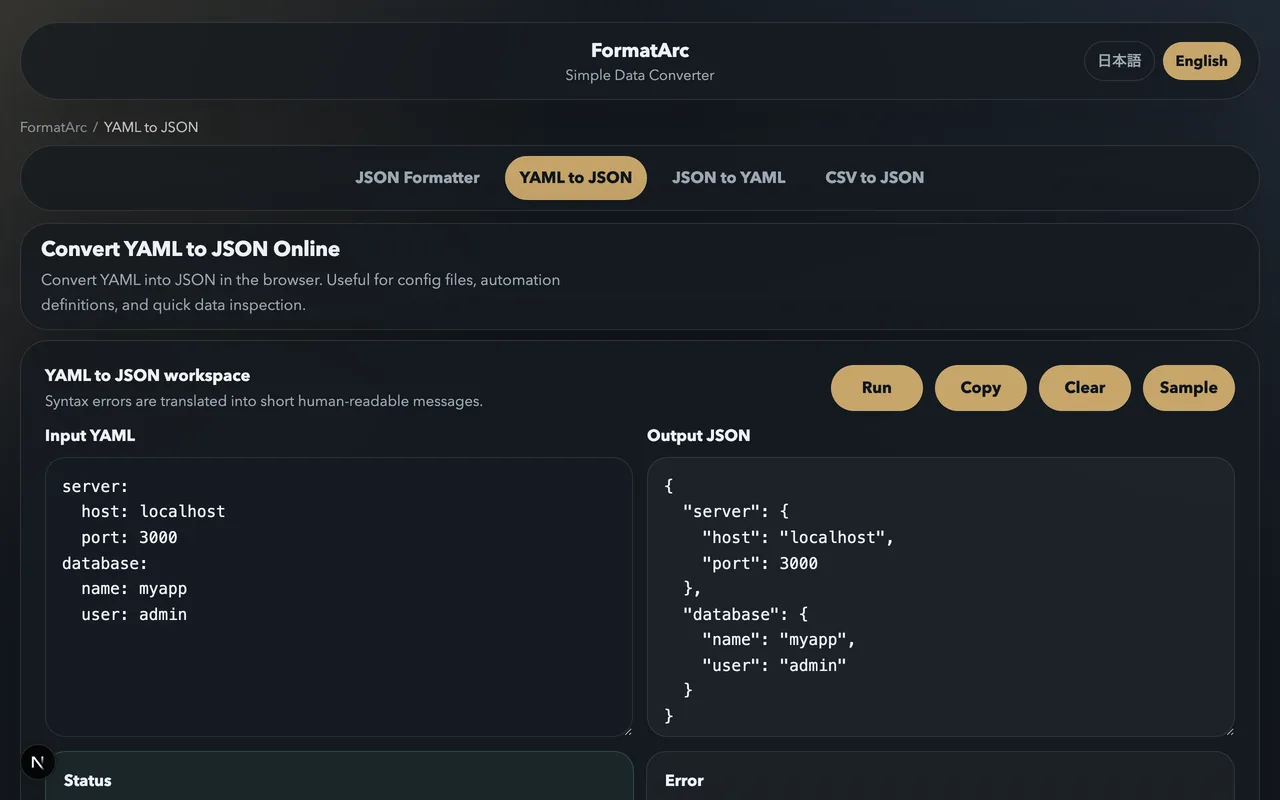
The conversion image makes an essential point: YAML indentation is not decorative. It defines parent-child relationships. The YAML:
user:
  id: 42
  roles:
    - admin
    - editor
  active: true
describes one user mapping containing:
id, a number;roles, a sequence of strings;active, a Boolean.
Without the indentation, id, roles, and active would no longer clearly belong to user.
Reading YAML by indentation level
A reliable way to read YAML is to identify the indentation level before interpreting the words.
application:
  api:
    image: contoso.azurecr.io/inventory-api:1.4.0
    replicas: 3
    ports:
      - 8080
      - 9090
The structure is:
applicationis a mapping.apiis a mapping nested underapplication.imageis a string scalar.replicasis a number scalar.portsis a sequence.8080is the first sequence item.9090is the second sequence item.
YAML sequences can also contain mappings. This is extremely common in Kubernetes, where containers is a list and each container is a structured object:
containers:
  - name: inventory-api
    image: contoso.azurecr.io/inventory-api:1.4.0
    ports:
      - containerPort: 8080
  - name: metrics-sidecar
    image: contoso.azurecr.io/metrics-sidecar:2.1.0
Here:
containersis a sequence.- Each hyphen begins one item in that sequence.
- Each item is a mapping with
name,image, andports. portsis another sequence nested within a sequence item.- Each
containerPortentry is itself a mapping.
This is nesting in practice: a mapping contains a sequence, whose items are mappings, one of which contains another sequence.
Yaml Tutorial | Learn YAML in 18 mins
Watch “Yaml Tutorial | Learn YAML in 18 mins” from TechWorld with Nana for a visual explanation of YAML mappings, indentation, lists, and nested configuration.
Watch basic mappings to see scalar values and key-value pairs. Continue with nested objects, focusing on how indentation creates a child mapping. Then watch lists and nesting to see sequences of scalars, sequences of mappings, and lists nested within list items.
YAML’s convenience also creates type risks
JSON makes strings visually obvious because strings always use double quotes. YAML often lets you omit quotes:
environment: production
This is convenient, but it means YAML parsers must infer the type of an unquoted value. A value that looks like a number, Boolean, date, or null may be interpreted differently from plain text.
For platform configuration, adopt a conservative habit:
- Leave clearly numeric values unquoted when a number is intended.
- Use
trueorfalsefor Booleans. - Use
nullonly when the target schema permits an empty value. - Quote values that must remain text and could be misinterpreted.
For example, quote an environment identifier that must remain a string:
environmentId: "0012"
Without quotes, a parser may treat it as a number rather than an identifier, potentially losing meaningful leading zeroes.
Similarly, configuration values such as version labels, date-like strings, or values containing special characters should be treated deliberately. YAML tooling and schemas can differ in their handling of implicit types, so explicit quoting is often the safest choice when a value is intended to be text.
Also remember these practical syntax rules:
- Use spaces, not tabs, for indentation.
- Keep sibling keys aligned.
- Keep every level consistently indented, commonly by two spaces.
- Place a space after the sequence hyphen:
- item. - YAML permits comments beginning with
#; JSON does not permit comments.
A YAML file may be syntactically valid yet still be rejected by its target system because the resulting data type is wrong. Validation must therefore answer two questions:
- Can a YAML or JSON parser read the file?
- Does the resulting structure satisfy the schema expected by the API, deployment tool, or application?
The next two lessons will make this operational by having you author and validate JSON, then YAML configurations.
A format-independent inspection method
When a configuration becomes large, avoid trying to understand it line by line. Instead, inspect it as a tree.
For every field, determine:
- Its parent: What mapping or sequence contains it?
- Its name or position: Is it a key in a mapping, or an indexed item in a sequence?
- Its type: Is it a scalar, mapping, or sequence?
- Its expected meaning: Should the consuming system see text, a number, a Boolean, or no value?
For example, in the earlier YAML:
service:
  database:
    host: inventory-postgres
the location of the scalar is conceptually:
service
  database
    host
In a program, this path is often written as service.database.host. In JSON, the braces make this nesting explicit; in YAML, indentation does the same job.
This approach is particularly useful when reviewing Kubernetes manifests or Azure DevOps pipelines. A configuration review should check not only whether the values look reasonable, but whether every value sits at the correct location in the structure and has the correct type.
Key takeaways
JSON and YAML are different textual forms for structured data. Their core concepts are the same:
- Scalars are individual values such as strings, numbers, Booleans, and nulls.
- Mappings associate named keys with values. JSON calls these objects.
- Sequences are ordered lists. JSON calls these arrays.
- Nesting combines mappings and sequences into a configuration hierarchy.
JSON is explicit and strict: braces, brackets, commas, double-quoted keys and strings, and no comments. YAML is more compact and human-oriented: indentation defines structure, hyphens create sequence items, and unquoted values require careful attention to type interpretation.
Next, you will author and validate a JSON document for a cloud-resource configuration, applying the structural model and strict syntax rules from this lesson.