Recommended resources
The freely available resources this lesson will direct you to.
Hello! Let's dive into our next lesson on advanced optimization.
In our last session, we implemented streaming SSR with React Suspense. This was a major step in improving perceived performance by sending a usable HTML shell to the browser immediately, and then streaming the rest of the content as it becomes ready. We optimized how the page is delivered.
Today, we'll address a more fundamental question: can we avoid rendering the page on the server altogether? This lesson focuses on the learning outcome: Configure HTTP caching headers (e.g., Cache-Control) for server-rendered pages. We will instruct browsers and intermediate caches (like CDNs) on how to store and reuse the HTML generated by our server, dramatically reducing latency and server load for subsequent visits.
1. The Fundamentals of HTTP Caching
Before we write any code, it's crucial to understand the mechanics of HTTP caching. When a server sends a response, it can include headers that provide caching instructions. Caches, which can exist in the user's browser (a private cache) or on the network between the user and your server (a shared cache, like a CDN), read these instructions to decide whether to store the response and for how long.
When a user requests a URL:
- The browser first checks its local cache.
- If a valid, "fresh" response is found (a cache hit), it's used immediately, and no network request is made to your server. This is the fastest possible outcome.
- If no response is found, or the cached response is "stale" (expired), the request proceeds. This is a cache miss.
- The request may then hit a shared cache (like a CDN). If the CDN has a fresh copy, it returns it, saving a trip to your origin server.
- If all caches miss, the request finally reaches your server, which generates a new response. This response is then sent back and may be stored in the shared cache and the browser cache on its way to the user, ready for the next request.
This video provides an excellent visual overview of these core concepts.
Deep Dive into HTTP Caching: cache-control, no-cache, no-store, max-age, ETag and etc.
This video from Software Developer Diaries introduces the client-server-cache relationship and the fundamental concepts of cache hits and misses.
Watch from 00:46 to 03:43. Focus on the diagram illustrating the flow of a request through the cache to the server and back.
2. The Cache-Control Header: Your Caching Rulebook
The primary tool for defining caching behavior is the Cache-Control HTTP response header. This header contains one or more directives that tell caches how to handle the response.
Let's explore the most important directives for an SSR application. The MDN documentation is the authoritative source here, and we'll use it as a reference.
Cache-Control header - HTTP - MDN Web Docs
The MDN Web Docs for the Cache-Control header provide a comprehensive and detailed explanation of every directive. We'll focus on the directives most relevant to server responses.
Read the section titled 'Response Directives'. As you read, pay special attention to public, private, max-age, s-maxage, no-store, no-cache, and must-revalidate. We will discuss these next.
Based on that reading, let's consolidate the key directives into two categories: those that control where content can be cached (storability) and those that control how long it can be cached for (freshness).
Storability Directives
public: Indicates the response can be stored by any cache, including shared caches like CDNs. This is suitable for pages that are the same for all users (e.g., a marketing homepage, a blog post).private: The response is user-specific and must only be stored by the user's browser (a private cache). It must not be stored by a CDN. This is critical for any personalized page, like a user dashboard or account settings page, to prevent leaking one user's data to another.no-store: The most restrictive directive. It tells all caches not to store the response at all. This is reserved for highly sensitive data, like a page displaying a one-time banking transaction confirmation.
Freshness and Validation Directives
max-age=<seconds>: This is the core freshness directive. It tells caches that the response is considered fresh for the specified number of seconds. For this duration, caches can serve the response without consulting the server.s-maxage=<seconds>: (s for shared). This directive overridesmax-agespecifically for shared caches (like CDNs). This is powerful, as it lets you set different caching policies for browsers and CDNs. For example, you might want the browser to re-check content frequently, but let the CDN hold onto it for longer.no-cache: This is perhaps the most misunderstood directive. It does not mean "do not cache". It means the response can be stored, but the cache must revalidate with the origin server before using it. This is useful for content that needs to be fresh but can benefit from fast validation (which we'll cover next).must-revalidate: Once a response becomes stale (i.e., itsmax-agehas passed), the cache is not allowed to use it. It must successfully revalidate with the origin server. This prevents serving stale content during network issues.
3. Efficient Revalidation with ETag
What happens when a cache holds a response with no-cache or when a max-age expires? The cache needs to revalidate with the server. A naive implementation would mean re-downloading the entire resource. HTTP provides a much more efficient mechanism using conditional requests.
The flow works like this:
- When your server generates a page, it can create a unique identifier for that specific version of the content. This is often a hash of the response body. It sends this identifier in the
ETag(Entity Tag) response header. - The browser (or CDN) caches both the response body and its
ETag. - When the browser needs to revalidate, it makes a request to the server but includes the
ETagit has in anIf-None-Matchrequest header. - Your server receives this request. It computes the
ETagfor the current version of the resource and compares it to theIf-None-Matchvalue from the client.- If they match, the content hasn't changed. The server responds with a
304 Not Modifiedstatus code and an empty body. The browser then knows its cached version is still valid and uses it. This saves re-downloading the entire page. - If they don't match, the content has changed. The server responds with a
200 OKstatus and the new page content, along with a newETag.
- If they match, the content hasn't changed. The server responds with a
This 304 Not Modified flow is fundamental to efficient caching for dynamic content.
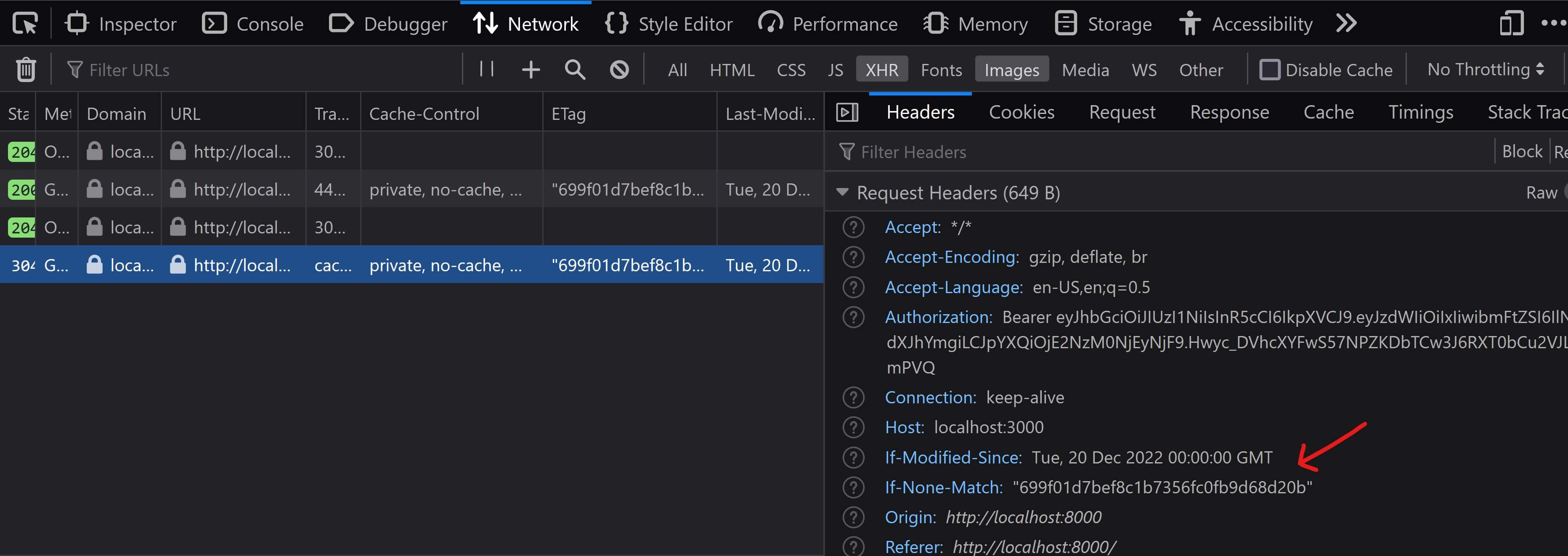
This video provides a clear walkthrough of the validation process using ETag.
Everything you need to know about HTTP Caching
This video from the roadmap channel explains how validation headers like ETag and Last-Modified are used to make conditional requests, leading to efficient 304 Not Modified responses.
Watch from 08:48 to 11:43. Focus on the request/response flow involving the ETag and If-None-Match headers.
4. Caching Strategies for Tanstack Start
Now, let's translate this theory into practical strategies for your SSR application. In a Tanstack Start application, you can set response headers within your route loaders or in server middleware.
Strategy 1: Public, Infrequently Updated Pages
Think of marketing pages, documentation, or blog posts. These pages are the same for everyone and don't change often. They are perfect candidates for aggressive caching.
Example Cache-Control Header:public, max-age=300, s-maxage=3600, stale-while-revalidate=86400
public: Safe to store on a CDN.max-age=300: A user's browser will consider the content fresh for 5 minutes. After that, it will revalidate.s-maxage=3600: The CDN can serve the cached content for 1 hour without contacting your server. This significantly reduces server load.stale-while-revalidate=86400: If the CDN's content becomes stale (after 1 hour), it can still serve the stale version to the user immediately while it fetches a fresh copy from your server in the background. This provides the performance of a cache hit while ensuring the content gets updated.
Strategy 2: Personalized, Dynamic Pages
Consider a user's dashboard. The content is specific to the logged-in user and must always be up-to-date.
Example Cache-Control Header:private, no-cache
private: This is non-negotiable. It prevents a shared cache from storing this personalized response and serving it to another user.no-cache: Instructs the browser to always revalidate with the server before showing the page. This ensures the user sees the latest data. Combined with a correctly implementedETag, this is still very fast, as the server can often return a304 Not Modifiedresponse.
Strategy 3: Static Assets (with Cache-Busting)
While our focus is on server-rendered pages, it's worth noting the strategy for assets like JavaScript and CSS bundles. Modern build tools generate filenames with a hash (e.g., main.a1b2c3d4.js). Since the filename changes whenever the content changes, you can cache these assets "forever."
Example Cache-Control Header:public, max-age=31536000, immutable
max-age=31536000: Cache for one year.immutable: An extra hint to the browser that this file will never change, so it shouldn't even bother revalidating it, even on a user-initiated page reload.
The MDN guide on HTTP Caching provides an excellent summary of these patterns.
HTTP caching - MDN Web Docs - Mozilla
This guide from MDN consolidates these ideas into common, practical patterns for caching different types of web resources.
Read the section 'Common caching patterns'. It provides clear recipes for cache-busting static assets and handling main resources (your server-rendered pages).
Conclusion
You now have the knowledge to implement a robust caching strategy for your SSR application. By sending the correct Cache-Control headers, you can leverage browser and CDN caches to make your application faster, more scalable, and more resilient.
Key Takeaways:
- The
Cache-Controlheader is the primary mechanism for controlling HTTP caching. privateis essential for personalized content to prevent data leaks, whilepublicis for shared content.max-ageands-maxagedefine freshness, telling caches how long they can serve a response without revalidating.no-cacheforces revalidation for every request, ensuring freshness while still allowing for efficient304 Not Modifiedresponses.ETagheaders enable conditional requests, allowing servers to validate cached content without re-transmitting the entire payload.
Next Up:
We've now optimized how responses are delivered (streaming) and how they are reused by clients and CDNs (HTTP caching). Our next step is to look at optimization within the server itself. In the next lesson, we will implement a server-side in-memory cache for frequently requested data in route loaders. This will help us avoid repeatedly fetching the same data from a database or external API, speeding up the generation of the initial response itself.