Recommended resources
The freely available resources this lesson will direct you to.
Welcome back! In the last few lessons, we took a deep dive into the Stack data structure. You learned about its Last-In, First-Out (LIFO) behavior, implemented a dynamic stack from scratch, and even used it to solve the classic balanced parentheses problem.
In this lesson, we shift our focus to another fundamental linear data structure: the Queue. While a stack is like a pile of plates, a queue is like a line at a ticket counter. Our goal is to describe the Queue Abstract Data Type (ADT), its First-In, First-Out (FIFO) behavior, and its primary operations, enqueue and dequeue. We will explore what a queue is conceptually, how it differs from a stack, and where it's used in computing.
1. From LIFO to FIFO: The Core Idea of a Queue
You'll recall that a stack follows the LIFO (Last-In, First-Out) principle. The last item you push is the first item you pop.
A queue works on the opposite principle: FIFO (First-In, First-Out). The first item to enter the queue is the first item to leave. This is intuitive because we encounter queues every day—in traffic, at a grocery store, or waiting for a service.
The mycodeschool channel, which you've seen before, has a great video that introduces this concept clearly.
Data structures: Introduction to Queues
Watch the introduction of the video "Data structures: Introduction to Queues" by mycodeschool.
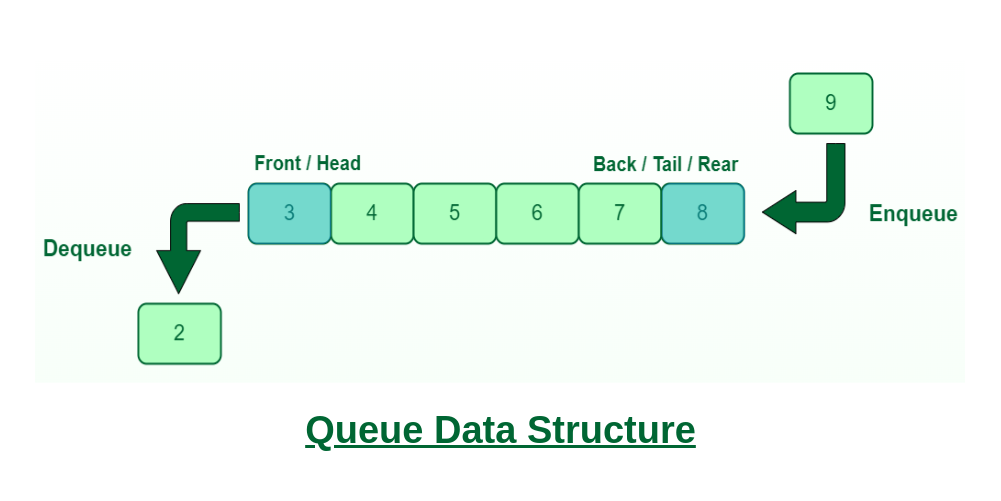
This segment, from the introduction, defines the queue as a FIFO structure and formally contrasts it with the LIFO behavior of a stack. Pay close attention to the new terminology: rear (or tail) for insertions and front (or head) for removals.
To visualize this, think of a simple pipeline. New items go in one end (the rear) and are removed from the other end (the front).
2. The Queue Abstract Data Type (ADT)
Just like the stack, the queue is an Abstract Data Type (ADT). This means we define it by its behavior and the operations it supports, not by its underlying implementation (which we'll tackle in the next lesson). By focusing on the "what" instead of the "how," we can understand the queue's role and purpose.
The primary operations for a queue are:
enqueue(item): Adds an item to the rear of the queue.dequeue(): Removes and returns the item from the front of thequeue.
There are also a few essential helper operations:
peek()(orfront()): Returns the item at the front without removing it.isEmpty(): Returns true if the queue contains no elements.isFull(): An optional operation, useful for fixed-size queues, that returns true if the queue has reached its capacity.
The following article provides a clear, structured definition of the Queue ADT and its interface.
Introduction to Queues - Jyotiprakash's Blog
Please read the section "Queue ADT: Interface and Descriptions" from Jyotiprakash's blog.
This section formally defines each operation (enqueue, dequeue, peek, isEmpty, isFull), including its purpose, preconditions, and postconditions. This is a great reference that clearly outlines the contract of a Queue ADT. You can find it by searching for the heading "Queue ADT: Interface and Descriptions".
To see these operations in action, let's return to the mycodeschool video, which provides a great visual simulation.
Data structures: Introduction to Queues
Continue with the video "Data structures: Introduction to Queues".
Watch these two key parts: Operations: This segment details the enqueue and dequeue operations, along with helpers like front and isEmpty. The presenter also mentions alternate names you might see in different programming language libraries. Simulation: Here, the video walks through a simulation, showing how the queue's state changes as elements are enqueued and dequeued.
Here is a summary table of the core queue operations:
| Operation | Description | Analogy |
|---|---|---|
enqueue(item) |
Adds an item to the rear of the queue. | A person getting in line at the back. |
dequeue() |
Removes the item from the front of the queue. | The person at the front of the line being served. |
peek() |
Views the item at the front without removing it. | Seeing who is next to be served. |
isEmpty() |
Checks if the queue has any items. | Checking if there is anyone in line. |
3. Real-World Applications of Queues
Queues are ubiquitous in software engineering, especially for managing tasks or resources in an orderly fashion. Since you have a background as a software developer, you've likely encountered systems that use these principles, even if you weren't aware of the underlying data structure.
Common use cases include:
- Operating Systems: Managing processes waiting for the CPU. The scheduler often uses a queue to give processor time to processes in the order they requested it.
- Printers: A print spooler queues up documents, printing them in the order they were received.
- Networking: Routers queue up data packets before forwarding them to maintain order.
- Web Servers: Handling incoming requests from multiple users. Requests are placed in a queue and processed one by one.
The final section of the mycodeschool video discusses some of these very applications.
Data structures: Introduction to Queues
Watch the final segment of "Data structures: Introduction to Queues".
This part, covering use cases, explains how queues are essential for managing shared resources like printers and processors.
Conclusion
In this lesson, you've been introduced to the Queue data structure, a foundational element in computer science. You now have a conceptual grasp of its core principles and operations.
Key Takeaways:
- A queue is a linear data structure that operates on the First-In, First-Out (FIFO) principle.
- It is an Abstract Data Type (ADT) defined by its operations, abstracting away the implementation details.
- The primary operations are
enqueue(to add to the rear) anddequeue(to remove from the front). - Helper operations like
peek,isEmpty, andisFullare used to inspect the queue's state. - Queues are essential for managing tasks and resources fairly, such as in process scheduling, print jobs, and network packet handling.
Preview of the Next Lesson:
Now that you understand what a queue is and what it does, our next step is to learn how to build one. In the next lesson, you will implement a queue in C. We will see that a simple array implementation has a significant drawback, which we can solve using a clever technique to create a circular array. This will allow us to build a memory-efficient and fast queue.