Recommended resources
The freely available resources this lesson will direct you to.
Hello! Welcome back.
In our last lesson, we learned how to use asyncio.Semaphore to control the number of concurrent tasks. This is a powerful tool for rate limiting and preventing system overload. We also noted a key limitation: a semaphore controls the producers of work but does nothing to manage the data they produce. If the part of your system consuming the data is slow, you can still run into memory issues as results pile up. This is a problem of backpressure.
Today, we address that directly by exploring one of the most fundamental patterns in concurrent programming, one you're likely very familiar with from your work in Rust: the producer-consumer pattern. Our goal is to re-implement the producer-consumer pattern using asyncio queues and tasks.
This pattern decouples the task of work creation (producing) from work execution (consuming) using a shared buffer, which in our case will be an asyncio.Queue.
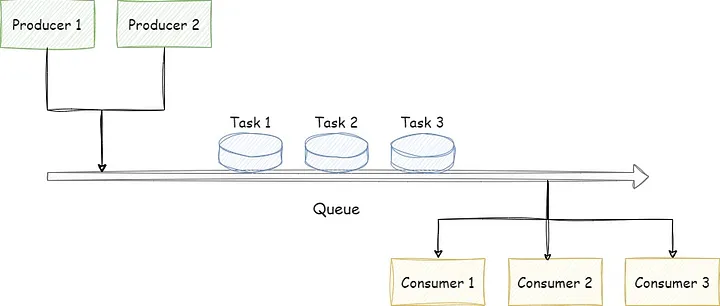
This should feel similar to using Multi-Producer, Single-Consumer (MPSC) channels in Rust with tokio, where you send work into a channel and a task receives it for processing.
1. The Core Components in asyncio
The producer-consumer pattern in asyncio is built on a few key components that are managed by the event loop.
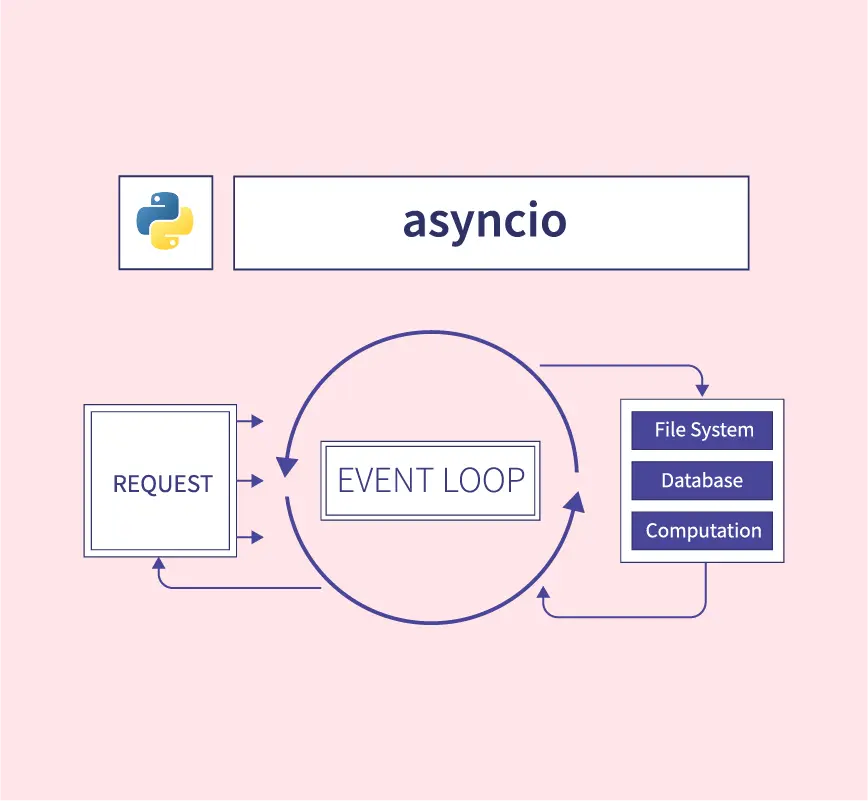
The essential components are:
-
asyncio.Queue: This is the thread-safe (or rather, task-safe) queue forasyncio. It's the backbone of our pattern.await queue.put(item): Adds an item to the queue. If the queue is full (i.e., it was created with amaxsize), this call will pause until a slot becomes available. This is how backpressure is implemented.await queue.get(): Removes and returns an item from the queue. If the queue is empty, it will pause until an item is available.queue.task_done(): A crucial method called by a consumer to indicate that a retrieved item has been fully processed.await queue.join(): Blocks until all items that have ever beenputinto the queue have been processed. For every itemput, it waits for a correspondingtask_done()call.
-
Producers: Asynchronous functions (coroutines) that create work and place it onto the queue using
await queue.put(). -
Consumers: Coroutines running in an infinite loop, pulling work from the queue with
await queue.get(), processing it, and then signaling completion withqueue.task_done(). -
Orchestration: A main coroutine that sets up the queue, creates the producer and consumer tasks using
asyncio.create_task(), and manages their lifecycle, including graceful shutdown.
2. A Basic Implementation with a "Poison Pill"
Let's start with a straightforward implementation. A common technique for shutting down consumers is the "poison pill" or "sentinel value," where producers add a special value (like None) to the queue to signal that no more work is coming.
The following resource provides a clean, self-contained example of this pattern.
Coroutine and Queue Integration
This article from Real Python demonstrates a basic producer-consumer implementation. It's a great starting point for understanding the fundamental mechanics before we move to a more complex structure.
Please read this section and study the queued.py code example. Focus on: How producer() adds user data to the queue. How it then adds None values to the queue as "sentinels" to signal the end. How consumer() runs in a while True loop, breaking only when it receives a None. How asyncio.gather() is used to run all the producer and consumer tasks.
This "poison pill" approach is simple and effective. The main trade-off is that the producer must know exactly how many consumers are running to send the correct number of None values.
3. A More Structured, Production-Style Implementation
Now, let's build on that foundation and explore a more robust and extensible implementation. This approach, which you'll find is common in larger services, separates concerns even further. It uses:
- A
work_queuefor jobs to be done. - A
result_queuefor completed job results. - Separate
worker(consumer) andresult_handlertasks. - A
controllerto orchestrate the entire lifecycle.
This separation is powerful. For instance, your workers can focus purely on I/O-bound tasks, while result handlers can perform CPU-bound post-processing or database writes without blocking the workers. This design mirrors the kind of service architecture you've built with Rudi, where different components have distinct responsibilities.
The following video walks through building this system from scratch.
AsyncIO: Implementing a Producer-Consumer Model
This video from MathByte Academy provides an excellent, detailed walkthrough of building a complete producer-consumer system. It's a fantastic example of structuring an asyncio application for clarity and scalability.
This is the core of our lesson. Please watch these segments carefully to understand how all the pieces fit together. I recommend having an editor open to follow along with the code structure. System Architecture (01:54 - 06:26): Pay close attention to the diagram and explanation of the different components: producer, work queue, workers, result queue, and result handlers. Understand why the result handling is separated. Producer Implementation (14:26 - 17:47): See how the producer iterates through data and uses await work_queue.put(). Consumer (Worker) Implementation (17:47 - 23:18): This is a key part. Notice the while True loop, await work_queue.get(), the simulated work, and importantly, await result_queue.put() and work_queue.task_done(). Result Handler Implementation (23:18 - 25:40): A simple consumer for the result_queue. Controller and Shutdown Logic (25:40 - 36:50): This is the most critical section. It shows how to orchestrate everything. Focus on the graceful shutdown sequence: await producer_completed.wait(), await work_queue.join(), await result_queue.join(), and finally task.cancel().
4. Trade-offs and Key Considerations
You have a preference for understanding trade-offs, so let's compare the two shutdown mechanisms we've seen and discuss other production-level concerns.
Shutdown Strategies
-
Sentinel Value ("Poison Pill"):
- Pro: Conceptually simple. The consumer logic is a clear
if item is None: break. - Con: The producer needs to know the number of consumers to send the right number of pills. This creates coupling. If consumers can be scaled dynamically, this pattern becomes difficult to manage.
- Pro: Conceptually simple. The consumer logic is a clear
-
queue.join():- Pro: Decouples producers from consumers. The producer doesn't need to know anything about the consumers. It simply finishes its work. The
controllercoordinates the shutdown by waiting for the queue to be fully processed. This is more robust for scalable systems. - Con: It requires every consumer to reliably call
task_done()for every item it gets. A forgottentask_done()call will causequeue.join()to hang forever, creating a deadlock.
- Pro: Decouples producers from consumers. The producer doesn't need to know anything about the consumers. It simply finishes its work. The
In your work on systems like Bedrock, where components are often managed and scaled independently, the queue.join() pattern is generally more applicable as it reduces the coupling between services.
Bounded Queues and Backpressure
In both examples, the asyncio.Queue can be initialized with a maxsize.queue = asyncio.Queue(maxsize=10)
This creates a bounded queue. When a producer tries to put() an item into a full queue, it will pause until a consumer get()s an item and frees up a slot. This is the fundamental mechanism for backpressure in asyncio. It prevents a fast producer from overwhelming a slow consumer and exhausting system memory. This is the direct parallel to the request throttling and load-shedding logic you've implemented in Rust.
Memory-Aware Queues
Standard asyncio.Queue limits the number of items. But what if your items have vastly different memory footprints, like in LLM applications where a request might contain a small prompt or a large document? A queue with 10 small items uses far less memory than one with 10 large items.
For such scenarios, you might need a more sophisticated, memory-aware queue.
This Elastic blog post discusses exactly this problem and proposes a custom MemQueue that tracks memory size instead of item count. You don't need to study the implementation in depth, but understanding the concept is valuable.
Skim through this section to understand the problem with standard queues and the idea behind a memory-aware queue. Notice how the producer-consumer pattern (pull_data, push_data) is easily adapted to use this new queue type.
This is an advanced consideration but is highly relevant to building robust, high-throughput data processing systems, especially in the ML/LLM space.
Conclusion
Today we've broken down the producer-consumer pattern and seen how to build it with asyncio. This pattern is a cornerstone of concurrent programming, enabling you to build scalable, decoupled, and resilient systems.
Key Takeaways:
- The producer-consumer pattern decouples work generation from work execution using
asyncio.Queue. - A bounded queue (
maxsize) is the primary mechanism for applying backpressure, preventing fast producers from overwhelming slow consumers. - Graceful shutdown is critical. We explored two methods: sentinel values (simple but coupled) and
queue.join()(more robust and decoupled). - For production systems, structuring your application with a
controllerto manage the lifecycle of producers and consumers leads to cleaner, more maintainable code.
Next Lesson Preview
The producer-consumer pattern, when used correctly, helps prevent many common concurrency bugs. However, as systems grow in complexity, the risk of subtle bugs like race conditions and deadlocks increases. In our next lesson, we will focus on how to systematically identify and resolve race conditions and deadlocks in concurrent Python code, equipping you with the diagnostic skills needed to maintain robust, production-grade concurrent applications.