Recommended resources
The freely available resources this lesson will direct you to.
Introduction
Welcome to the final lesson of our course on building Telegram bots with Bun.js and grammY. In our previous lesson, we made a significant leap towards production-readiness by implementing structured logging. Your bot is no longer a black box; it now generates rich, machine-readable data about its operations, which is essential for monitoring and debugging a live service.
Now, we'll address the final piece of the production puzzle: ensuring smooth, reliable deployments. When you push new code, how does the cloud platform know that your new version is actually working before it directs user traffic to it? The answer is a health check.
This lesson will guide you through setting up a basic health check endpoint for your bot service. This simple but powerful mechanism allows your deployment platform to automatically verify that your application is healthy and ready to serve requests, enabling zero-downtime deployments and increasing the overall resilience of your service.
Why Health Checks Matter for Deployments
In modern cloud environments, deployments are highly automated. When you deploy a new version of your service, the platform typically spins up a new instance with your updated code alongside the old one. The critical question is: when is it safe to switch traffic over to the new instance and terminate the old one?
A health check provides a definitive signal. The platform repeatedly queries a specific URL on your new instance (e.g., /health). Only after it receives a successful response (typically an HTTP 200 OK) does it consider the deployment successful and make the switch. If the new instance fails to respond correctly within a certain timeout, the deployment is rolled back, and user traffic is never interrupted.
This process is fundamental to achieving zero-downtime deployments. Let's review the documentation from Railway, a typical cloud platform, to see how they describe this process.
This document explains the role and mechanism of health checks in the context of a deployment platform.
Please read the introduction and the How it works section. Pay attention to the core principle: the platform queries your service and waits for a 200 response before making the deployment live.
As you've read, the contract is simple: your service needs to expose an endpoint that the platform can query. Now, let's build that endpoint.
Anatomy of a Health Check
At its core, a health check endpoint is a simple HTTP route within your application. The most basic form, often called a "liveness" probe, just confirms that the server process is running and can respond to HTTP requests.
More advanced health checks, sometimes called "readiness" probes, can perform deeper checks, such as verifying connectivity to essential dependencies like databases or external APIs.
The diagram below illustrates this concept. An external system (like the deployment platform) calls a health endpoint on a service. The service then performs its checks—which could be as simple as returning "I'm alive" or as complex as verifying its connection to a database—before responding.
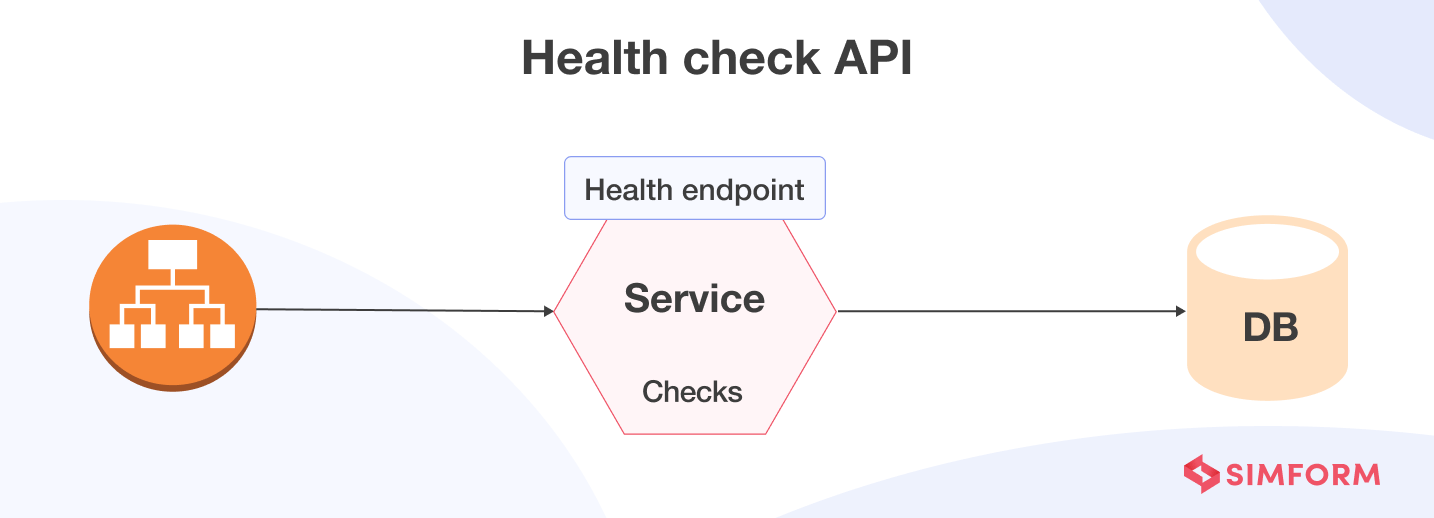
For our bot, a simple liveness check is sufficient to enable safer deployments. We'll create a GET /health endpoint that simply returns a 200 OK with a JSON payload.
Implementing the Health Check Endpoint in Bun
We can add this new endpoint directly into our main server file, src/index.ts. We'll modify the Bun.serve configuration to handle this new route. This involves adding a new condition to our fetch handler to check for GET requests to /health.
Bun's Response object has a convenient static method, Response.json(), which simplifies returning JSON by automatically stringifying the object and setting the Content-Type header to application/json.
The official Bun documentation provides a clear example of this pattern.
The Bun documentation includes examples of setting up various API routes.
In this complete server example, find the route handler for /api/health. Notice its simplicity: it's a GET handler that uses Response.json() to return a status object. We will implement a similar pattern.
Now, let's update src/index.ts. We will add a new if block to our fetch handler to specifically manage the /health route.
// src/index.ts
import { webhookCallback } from "grammy";
import { bot } from "./bot";
import logger from "./logger";

const secret = process.env.TELEGRAM_WEBHOOK_SECRET;
if (!secret) {
  logger.fatal("TELEGRAM_WEBHOOK_SECRET is not set");
  process.exit(1);
}

const handleUpdate = webhookCallback(bot, "std/http", {
  secretToken: secret,
});

const port = Number(process.env.PORT) || 3000;

Bun.serve({
  hostname: "0.0.0.0",
  port: port,
  fetch: async (req) => {
    try {
      const url = new URL(req.url);

      // New: Health check endpoint
      if (req.method === "GET" && url.pathname === "/health") {
        logger.info("Health check endpoint was called.");
        return Response.json({ status: "ok", timestamp: new Date().toISOString() });
      }

      // Webhook endpoint for Telegram updates
      if (req.method === "POST" && url.pathname === "/") {
        return await handleUpdate(req);
      }

      // Default response for any other route
      return new Response("Not Found", { status: 404 });
    } catch (err) {
      logger.error(err, "Error in fetch handler");
      return new Response("Internal Server Error", { status: 500 });
    }
  },
  error(err) {
    logger.error(err, "Bun.serve error");
    return new Response("Internal Server Error", { status: 500 });
  },
});

logger.info(`Bot server listening on port ${port}...`);
This change is small but significant. Our server now has two distinct responsibilities:
- Handling
POSTrequests at the root (/) for Telegram webhooks. - Handling
GETrequests at/healthfor platform health checks.
We've also added a log message so you can see in your logs when the platform is performing its check.
Configuring the Platform
With the code in place, the final step is to inform your deployment platform about this new endpoint. The process is straightforward:
- Commit and push your changes to
src/index.ts. - Your cloud platform (e.g., Railway) will automatically trigger a new deployment.
- Navigate to your service's settings on the platform's dashboard. Find the "Healthchecks" or "Networking" section.
- In the "Healthcheck Path" input field, enter
/health.
The Railway documentation provides more detail on this configuration step.
This section details the practical steps for configuring a health check.
Read the section Configure the healthcheck path. It shows exactly where you tell the platform which endpoint to use. Also, note the important clarification later in the document: Railway's health check is used to guarantee deployment success, but it is not used for continuous monitoring after the deployment is live.
Once you've configured this, the next time you deploy, you'll see the platform's logs indicating that it is "waiting for health checks to pass." You can then check your own application logs and see the "Health check endpoint was called" message appear. Once your service returns 200 OK, the deployment will complete, and traffic will be switched. Your bot is now deployed with an extra layer of safety.
Conclusion
Congratulations! You have successfully implemented a health check, completing the final module of our course and establishing a fully production-grade workflow for your Telegram bot. You have journeyed from initializing a Bun project to deploying a robust, observable, and resilient service.
Key Takeaways from this Lesson:
- Health Checks Enable Zero-Downtime Deployments: They provide a crucial signal for deployment platforms to know when a new service instance is ready for traffic.
- Implementation is Simple: A basic health check is just a standard HTTP
GETendpoint that returns a200 OKstatus. - Bun.js Makes it Easy: Adding a new route to
Bun.serveand usingResponse.json()is a clean and efficient way to create the endpoint. - Configuration is Key: Your code must be paired with the correct configuration on your cloud platform to complete the feedback loop.
With this lesson, you've completed the entire lifecycle of bot development. You have the skills to set up a project, write bot logic using the powerful grammY framework, handle user interactions, integrate external APIs, and deploy your creation to the world using modern best practices for logging and health checks.
The foundation you've built here is solid and extensible. You are now well-equipped to bring your own creative and ambitious bot ideas to life. Happy coding