Recommended resources
The freely available resources this lesson will direct you to.
- Creating a Multi-Project Jira board Step by Step Tutorial – Jira How-to's Series by Jexowww.youtube.com
- Release Planning in Jira - Managing Projects with Jirawww.youtube.com
- Link work items | Jira Cloud | Atlassian Supportsupport.atlassian.com
- How Veronica uses Plans for cross-space planning | Jira Cloud | Atlassian Supportsupport.atlassian.com
Hello. In the previous lesson, you used board reports and issue history to investigate where work was waiting. A product release adds another question: what happens when work in one project cannot finish until work in another project is ready? A single board’s flow chart cannot answer that on its own.
This lesson builds a practical cross-project tracking approach for an older Jira Server installation or current Jira Cloud. You’ll connect dependent issues, assign each project’s work to a release version, and bring the resulting risks into a shared board, filters, and dashboard. The aim is not merely to display a launch date; it is to make the work that could change that date visible.
Make the dependency explicit
Imagine a release involving three Jira projects: API, WEB, and MOB. WEB cannot complete its integration work until an API endpoint is ready. An epic containing both pieces of work would obscure which team is waiting for which deliverable. Instead, keep each issue in its owning project and link the issues.
From the WEB issue, choose “is blocked by” and select the API issue. Viewed from the API side, the relationship is “blocks” WEB. Direction matters: “relates to” records an association, but does not tell a release manager that one deliverable gates another. A link also differs from an epic–child relationship: hierarchy groups work; a blocking link records a delivery constraint.
Atlassian’s “Link work items” guide shows the current Cloud terminology and where to find these controls.
Link work items | Jira Cloud | Atlassian Support
Read this Atlassian guide to distinguish blocking links from other relationships and see how linked work can appear on a Cloud board.
In the opening text below the page title, read the link types. Then, in “Show linked work items on the board,” read the visibility steps. In the “Link work items” subsection, start at “To link a work item directly on the board” and continue through the paragraph explaining how to link from the work item detail view; the board steps show the main action. Focus on the difference between creating a link and choosing to display links on cards.

On older Jira Server, look for Link in an issue’s actions or More menu rather than expecting the Cloud board controls to match. Linking must also be enabled and available to your account. If you cannot add a link, ask an administrator about the relevant permissions and link configuration; do not replace a missing link with an untraceable comment.
A useful dependency record answers three questions on the linked issues: What must the supplier deliver? When does the consumer need it? What evidence will show it is ready? For example, “API endpoint available in the test environment and contract checks passing before WEB integration testing” is more actionable than “waiting on API.” Review the supplier’s issue as well as the waiting issue: a consumer issue can retain an old “blocked” note after its supplier has finished, or appear unblocked while the supplier’s target date has slipped.
Give each project a release target
A version groups issues intended for a release within a project. Suppose the coordinated launch is called Launch 3.2. Its work might use three project versions: API-3.2, WEB-3.2, and MOB-3.2. Set each issue’s Fix Version/s field to its project’s intended version. The launch name is your coordination convention; it is not, by itself, one native version spanning those three projects.
Watch the selected portions of “Release Planning in Jira” from iZenBridge Consultancy. Its interface may differ from your installation, but the version-to-issue relationship is the important part.
Release Planning in Jira - Managing Projects with Jira
Watch how a project version is established, assigned to backlog issues, and inspected as a release.
Watch creating a version, then assigning issues through Fix Version/s. Skip ahead to release details for the status overview. Focus on what belongs to the release even when its issues are in different stages of work. Treat the video’s screen layout and statements about required dates as instance-specific; check which date fields your Jira version actually requires.
A version’s target date helps you compare project milestones with the coordinated launch date. It does not prove readiness. Before treating API-3.2 as ready for WEB, check the linked API deliverable and its agreed acceptance evidence. Before marking any version Released, check outstanding scope and defects against the team’s release decision; a release label and an issue’s Done status answer different questions.
For a manager-level account, the practical first step is often to use existing versions and request missing ones from someone with project administration access. If naming differs across projects, maintain a small mapping from the coordinated launch name to each project version. Without that mapping, a cross-project query can silently omit one team’s work.
Put the work in one board view
A cross-project board is useful for a daily delivery conversation: it lets you see issues from several projects without moving them out of their owning projects. Watch “Creating a Multi-Project Jira Board” from Monday Coffee by Appfire for the board setup and project quick-filter demonstration.
Creating a Multi-Project Jira board Step by Step Tutorial – Jira How-to's Series by Jexo
Watch this demonstration for the distinction between a board that includes several projects and quick filters that temporarily narrow its view.
In board creation, follow the selection of multiple existing projects. Skip to quick filters to see project-specific views on that board. Focus on which projects are included in the board’s underlying scope; a quick filter cannot reveal an issue excluded from that scope.
For release coordination, include all relevant projects in the board’s underlying filter, then use quick filters to focus a discussion on API, WEB, or MOB. Verify status-to-column mapping before interpreting a shared “In Progress” or “Done” column: different projects may use different workflows. Also remember that a board view can hide completed work or issues excluded by its filter. It is a working view, not necessarily a complete release inventory.
Cloud may offer a personal setting to show linked items on board cards, as the reading describes. Otherwise, open the issue to inspect its links. Creating or changing a shared board, its filter, quick filters, or column mapping may require board-owner or administrator access. You can still use cross-project issue search and saved filters if those controls are unavailable.
Turn release scope and blockers into reviewable filters
You have already worked with saved filters and JQL. Here, the design choice is to maintain one complete scope filter before making narrower management views. For the example launch, a saved filter called Launch 3.2 scope could use:
(project = API AND fixVersion = "API-3.2")
OR (project = WEB AND fixVersion = "WEB-3.2")
OR (project = MOB AND fixVersion = "MOB-3.2")
ORDER BY project ASC, status ASC
Adapt the project keys and version names to your instance. Keep this inventory broad enough to include completed issues: it answers “What is currently assigned to this launch?” A second filter can answer “What remains open?”
filter = "Launch 3.2 scope" AND statusCategory != Done
ORDER BY project ASC, priority DESC
Check that each project’s completed statuses have the expected status category. If they do not, adjust the query to match your workflows rather than trusting a misleading count.
Standard links are the evidence for which issue blocks which. Do not assume an ordinary saved filter can automatically enumerate every unresolved cross-project blocking relationship or calculate its effect on a launch date. One workable manager-level convention is to put the label cross-team-blocked on the waiting issue, alongside its actual blocking link, and maintain it during dependency review. A Launch 3.2 blockers filter could then narrow the open-release view:
filter = "Launch 3.2 scope"
AND labels = cross-team-blocked
AND statusCategory != Done
ORDER BY updated ASC
That label is a review queue, not a substitute for the link. It can become stale, and updated ASC identifies issues with older updates—not necessarily those blocked longest. Open each flagged issue, inspect the supplier and consumer, and remove the label when the constraint is resolved. A supplier issue outside these three projects can still be linked; if it matters to the launch, make sure the review covers it even though it will not appear in the launch-scope filter.
On a dashboard, place a Filter Results gadget for open launch work beside one for the blockers queue; use columns such as project, issue key, status, assignee, due date, and Fix Version/s where available. A project-by-status statistics gadget can provide a compact distribution of remaining work. Share the underlying filters with the intended viewers, subject to their issue permissions. The dashboard supplies a repeatable agenda; the linked issues supply the dependency detail. Neither a low blocker count nor a mostly green status chart is, alone, a release-readiness decision.
A short weekly review can therefore ask, in order: Is the version scope still accurate? Which waiting issues have active blocking links? Have supplier dates or acceptance evidence changed? Does a change leave enough time for integration and QA before the coordinated launch? Record any decision to move an issue to a later version so the filters continue to reflect the plan.
Recognize the Cloud Premium option without depending on it
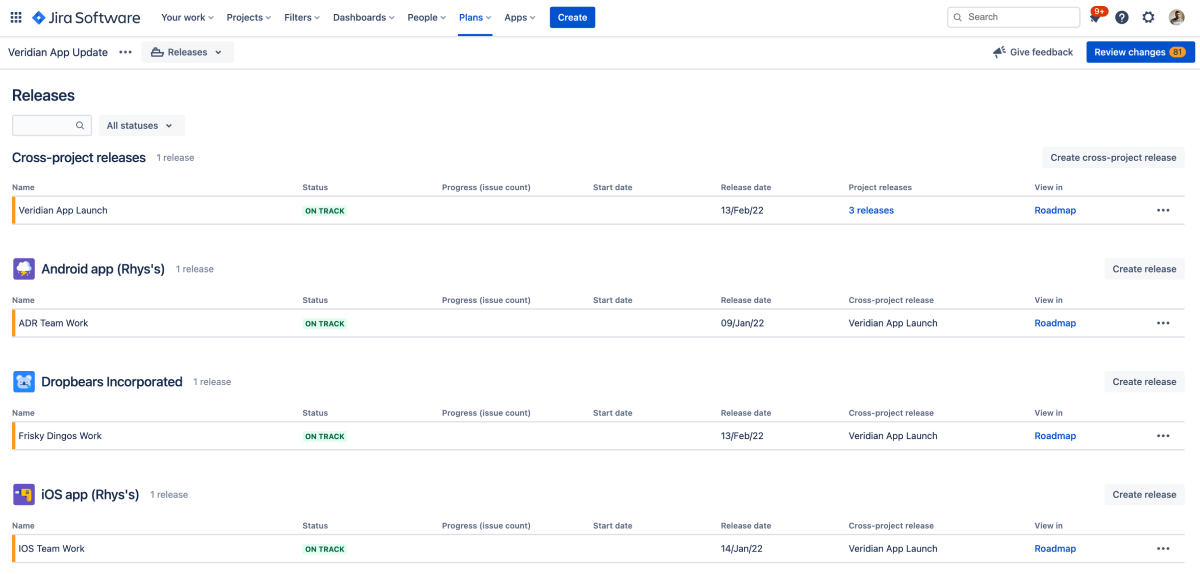
Current Jira Cloud Premium and Enterprise plans can add a purpose-built cross-project release view. Atlassian’s “How Veronica uses Plans for cross-space planning” illustrates dependencies and a cross-space release encompassing individual project releases. Read it as an optional capability comparison, not as instructions for recreating the same screen on an older Server installation.
How Veronica uses Plans for cross-space planning | Jira Cloud | Atlassian Support
Read Atlassian’s example to see what a Cloud Premium or Enterprise plan adds beyond the board-and-filter approach.
First, read the availability note in the introduction, just below the page title. Then find “How Veronica creates her plan.” Start at the paragraph beginning “Next, Veronica assigns dependencies to her issues” and read through the releases, ending at the first sentence after the Releases-tab illustration. Notice that the cross-space release encompasses separate team releases; it does not eliminate their individual planning.
The underlying management questions remain the same with or without Plans. The board, filters, and dashboard approach gives you a viable baseline; the additional planning view can consolidate milestones and surface schedule warnings where your edition and access permit it.
Conclusion
Use directional issue links to record delivery constraints, project versions and Fix Version/s to define each team’s release scope, and a cross-project board to inspect active work. Use saved filters and dashboard gadgets for a repeatable inventory and blockers review, while checking the linked issues before making a schedule or readiness decision. In older Server, these practices do not depend on Cloud Premium planning features; in current Cloud, Plans can add a consolidated release view.
Next, you’ll apply the same traceability discipline to testing and defects, connecting what was required, what was tested, and what must be fixed before release.