Recommended resources
The freely available resources this lesson will direct you to.
Hello. This first module is about controlling software delivery in Jira: organizing work, monitoring it, and tracing it across teams and releases. Later modules will cover advanced Jira practices and hands-on work in other project-management tools.
We’ll begin with the model underneath everything else. By the end of this lesson, you should be able to represent a delivery process using projects, epics, stories, tasks, bugs, sub-tasks, links, statuses, and versions—and explain what each contributes to traceability. The examples apply to an older Jira Server installation as well as current Jira Cloud, with interface differences called out where they matter.
1. Separate the kinds of structure Jira provides
A delivery process has several questions to answer. Who owns this work? Which larger outcome does it support? What other work does it depend on? Where is it in the process? Which release is it intended for? Jira does not answer all five questions with one hierarchy.
A project is a container for issues, typically chosen around a product, service, or team’s area of responsibility. An issue belongs to a project and receives a key from it. A project is not a workflow stage: creating separate “Development” and “Testing” projects solely to move the same work between stages can make ownership and history harder to follow. Statuses are usually the better way to represent those stages.
Inside a project, Jira’s familiar software-work hierarchy has three levels:
| Level | Common issue types | What the level answers |
|---|---|---|
| Larger body of work | Epic | What broader capability or outcome are we delivering? |
| Independently trackable work | Story, task, bug | What requirement, activity, or defect needs its own record? |
| Breakdown of one issue | Sub-task | What smaller piece belongs specifically to that story, task, or bug? |
A story commonly describes a user need and its acceptance criteria. A task is a standard issue for work that does not fit neatly as a user story, such as an investigation or a delivery activity; it can still be valuable work. A bug records observed behavior that differs from expected behavior. These three types occupy the same standard level: a bug does not automatically sit under the story whose behavior it affects.
Watch the short portions of Jira Epics 101 – Learning the Basics from Modus Create. The interface shown may differ from yours, but the distinctions between an epic, its work items, and their appearance in a backlog remain useful.
Jira Epics 101 - Learning the Basics
Watch how an epic is created and used to organize work, then consider the advice on giving epics a clear boundary.
Start with epic hierarchy and creating an epic. In roadmap and backlog, notice how the same epic groups issues without replacing their individual records. Finish with shared definitions and epic boundaries: an epic needs a finishable scope, not merely a convenient label for an enduring category.
Current Jira Cloud documentation often says work item, work type, and sometimes space, where an older Jira Server interface will generally say issue, issue type, and project. Read the type descriptions in Atlassian’s Set up work types in team-managed spaces for the underlying distinctions. This is a description of a team-managed Cloud setup, not an instruction to change your Server project settings.
Set up work types in team-managed spaces | Jira Cloud | Atlassian Support
Read Atlassian Support’s descriptions to compare epics, the three standard work types, and sub-tasks. Focus on their place in the hierarchy rather than the setup instructions, which may require permissions you do not have.
In “Add suggested work types to your team-managed software space,” skip the opening numbered setup steps. Under “Parent work types,” begin at “Epic. Agile teams use epics…” and read the type descriptions through the end of “Subtask work types.” Pay particular attention to the fact that bugs, tasks, and stories are all standard work types, while a sub-task belongs to one of them.
2. Model a feature without losing the QA trail
Suppose a team is adding account recovery to a software product. A workable model might use one epic, “Enable self-service account recovery,” because it names a bounded capability. Beneath it, a story could state that a user can request a recovery link; another could cover setting a new password. A task might cover a necessary technical investigation. A bug discovered during testing might report that an expired link is still accepted.
The hierarchy gives each issue an appropriate scope. The story should retain its expected behavior and acceptance criteria; the bug should retain its own reproduction steps, actual behavior, and impact. Putting everything in the epic’s description would obscure who owns each piece and whether it is complete.
Sub-tasks are useful when a standard issue needs a tightly coupled internal breakdown. A story about requesting a recovery link might have sub-tasks for implementing the endpoint and checking its error handling. Those sub-tasks belong to that story; they are not a general-purpose way to group unrelated deliverables.
Tasks vs Subtasks in Jira from Apetech Tech Tutorials clarifies an easily missed naming distinction. Its suggested rule of thumb about which work counts as a task is not a Jira restriction: choose types according to what the record must communicate and how independently it needs to be tracked.
Watch the distinction between a Jira Task—a standard issue—and a Sub-task, which has a parent issue. This prevents an implementation checklist from being mistaken for an independently tracked delivery item.
Watch the distinction, standard tasks, and subtask ownership. Focus on whether the work can stand on its own and be prioritized separately, or whether its meaning depends on one parent issue. Backlog and board presentation can vary by configuration.
The backlog image below shows the distinction between a list of issues on the left and a selected issue’s details on the right. The details include status, assignee, Epic Link, and Fix Version/s. An empty Epic Link or Fix Version/s means that particular relationship has not been recorded on the selected issue; its place in a backlog does not fill in those fields.

For a traceable QA record, decide what relationship the bug needs to preserve. It may belong to the same epic as the affected story, and have an explicit issue link to that story. Epic membership answers “which capability?”; the link answers “which requirement or work item does this defect affect?” Neither answer substitutes for the other. A testing activity can likewise be represented by an existing task or sub-task if that suits the team’s process; a dedicated “Test” issue type should not be assumed to exist without configuration.
3. Add dependencies, lifecycle, and release intent
A parent-child relationship means this work is part of that work. An issue link means two separate issues are related in a specified way. Use links when hierarchy would give the wrong answer.
For example, if account recovery cannot be completed until a separately owned email-service change is available, a blocks / is blocked by link can express the dependency. Check the link direction when adding it: the issue waiting for the email-service change should say it is blocked by that change. For a defect affecting a story, a relates to link may be sufficient; use a more specific link type if your Jira configuration and team conventions provide one. Links can connect issues in different projects when permissions and configuration allow, which makes them especially useful where no natural parent-child relationship exists.
Status answers a different question: where is this individual issue in its lifecycle? Consider the workflow illustration below. Its labels distinguish Open, In Progress, Resolved, Closed, and Reopened; the named transitions determine which moves are possible in that example. Your project may use different statuses or routes.
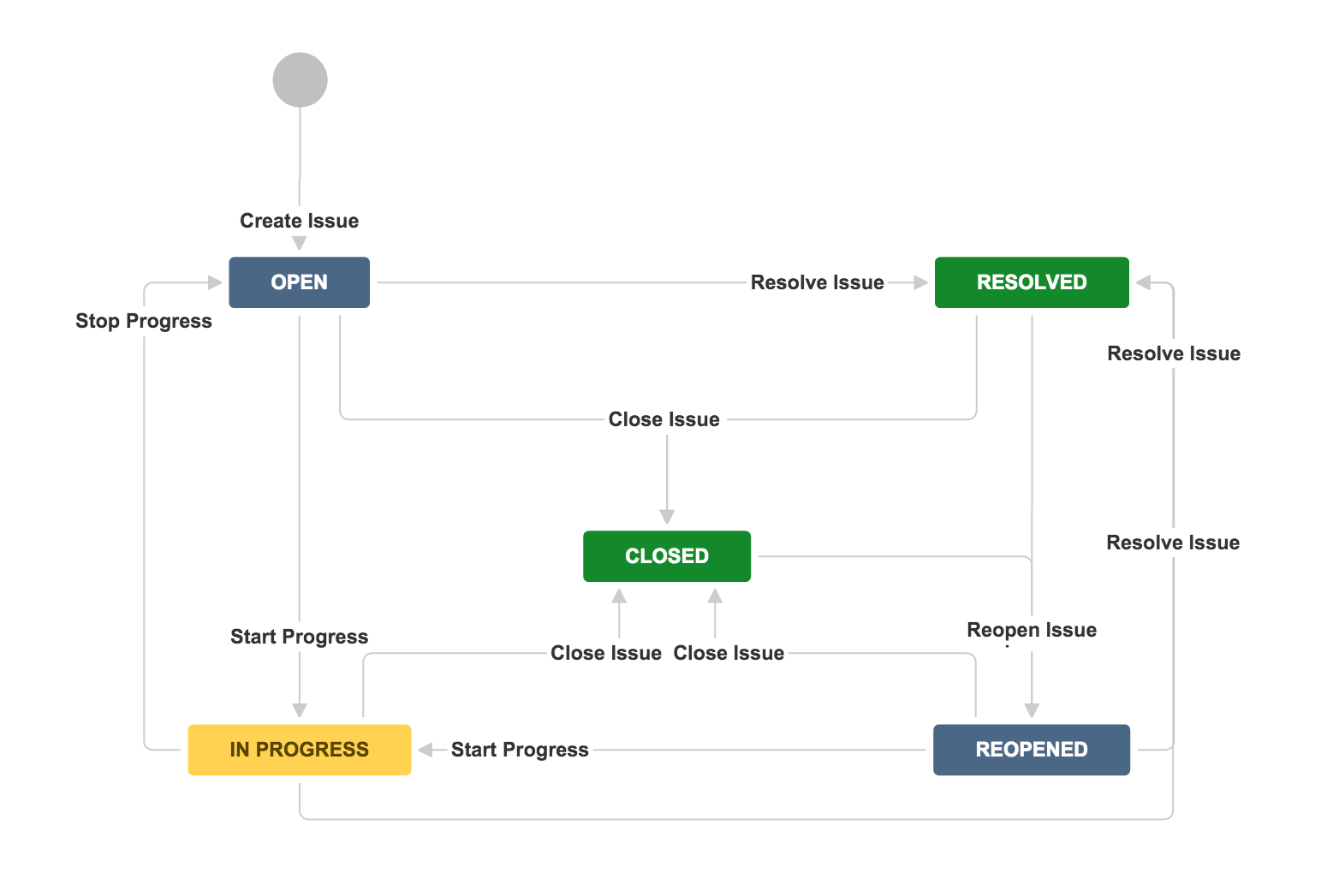
For a QA manager, that distinction matters. A story can be In Progress while its testing sub-task is still Open; a bug can be Reopened after a failed verification. Neither issue’s status automatically proves the entire epic is ready. Treat Resolved and Closed according to the meanings agreed in your project, rather than assuming that either always means “tested and releasable.”
Finally, versions attach release context. Fix Version/s ordinarily expresses the release in which a fix or piece of work is planned to ship. Affects Version/s records versions affected by a bug, when your team uses that field. A bug can therefore affect one released version while targeting a later fix version. These fields are not workflow statuses: assigning a fix version does not mean a fix has been completed or verified.
Versions are ordinarily managed within a project. If work spans projects, teams need an agreed way to match their release names or milestones rather than assuming one project’s version automatically groups every other project’s issues. We will build on that distinction in the later cross-project tracking lesson.
4. Make the model usable with manager-level access
Before creating records, make a small set of conventions explicit. For the account-recovery example, that might mean an epic scoped to the capability, stories with testable acceptance criteria, tasks for separately managed work, sub-tasks only for work owned by a particular standard issue, and bugs with evidence plus a link to the affected story. Record genuine dependencies as directional links. Use statuses to show each issue’s actual state and Fix Version/s to show intended release placement.
This yields several complementary routes through the work:
- From an epic, you can identify the work contributing to the capability.
- From a story, you can find its smaller pieces and any linked defects.
- From a bug, you can find the affected requirement, affected release where recorded, and intended fix release.
- From a blocked issue, you can identify the separate work holding it up.
The point is not to populate every field on every issue. It is to preserve the relationships needed to answer delivery and quality questions without reconstructing them from comments or memory.
On an older Jira Server installation, look for terms such as Issue Type and Epic Link when inspecting or editing an issue. In current Jira Cloud, you may instead encounter work type and a Parent field; available controls also depend on whether a project is team-managed or company-managed. Use the fields and issue-link options actually available to your account. Creating or changing issue types, workflows, or versions may require project or Jira administrator permissions. You can still specify a sound model, create and relate permitted issues, and identify configuration changes to request rather than attempting to administer the project yourself.
Conclusion
A traceable Jira model uses several structures together: projects establish ownership boundaries; epics, standard issues, and sub-tasks establish work hierarchy; links express relationships the hierarchy cannot; statuses show lifecycle state; and versions show release context. For quality control, preserving the direct relationship between a defect and the requirement it affects is particularly valuable.
Next, we’ll use this issue model to prepare and maintain a Scrum backlog and sprint from a manager-level account.