Recommended resources
The freely available resources this lesson will direct you to.
Hello! Last lesson, you tested what a function returns and which calls it makes. As work becomes asynchronous, there is another contract to consider: who owns work that is still running? If a request is abandoned or one operation fails, its related operations should not continue unnoticed.
In this final lesson of the Kotlin module, you’ll implement concurrent work with suspend functions, coroutineScope, async, and launch. You’ll also choose dispatchers deliberately and make cancellation part of the design. The example uses two independent data fetches, much like work a backend service might perform for one request.
Suspension is not a blocked thread
A coroutine lets code pause at a suspension point and resume later. While it is suspended, its thread can do other work. That differs from Thread.sleep() or a blocking read, which occupies a thread for the duration of the wait.
The suspend modifier says a function may suspend and can call other suspending functions. It does not, by itself, start a coroutine, move work to a background thread, or make blocking code non-blocking. Those distinctions are worth keeping clear as you read the Kotlin documentation.
Coroutines basics | Kotlin Documentation
Read Kotlin’s “Coroutines basics” for the relationship between suspending functions, scopes, and the two builders used below. If you want to run the examples, the page also shows the kotlinx-coroutines-core Gradle dependency under “Add the kotlinx.coroutines library to your project.”
In “Suspending functions,” begin with coroutine basics, then read the examples from the suspend fun greet() declaration through suspending functions. Notice that marking a function suspend has not yet created concurrent work. In “Coroutine scope and structured concurrency,” read parent-child lifecycles. Continue into “Create a coroutine scope with the coroutineScope() function,” from scope completion through its example. Finally, under “Coroutine builder functions,” read the subsections “CoroutineScope.launch(),” “CoroutineScope.async(),” and “runBlocking().” Focus on what each builder gives its caller: a Job, a result-bearing Deferred, or a blocking bridge into suspending code.
A scope is a boundary around work. When a suspending function uses coroutineScope { ... }, it does not finish until the work launched inside that scope finishes. Its child coroutines have a parent, rather than becoming independent tasks that a caller must somehow find and stop later.
The diagram makes that ownership visible:
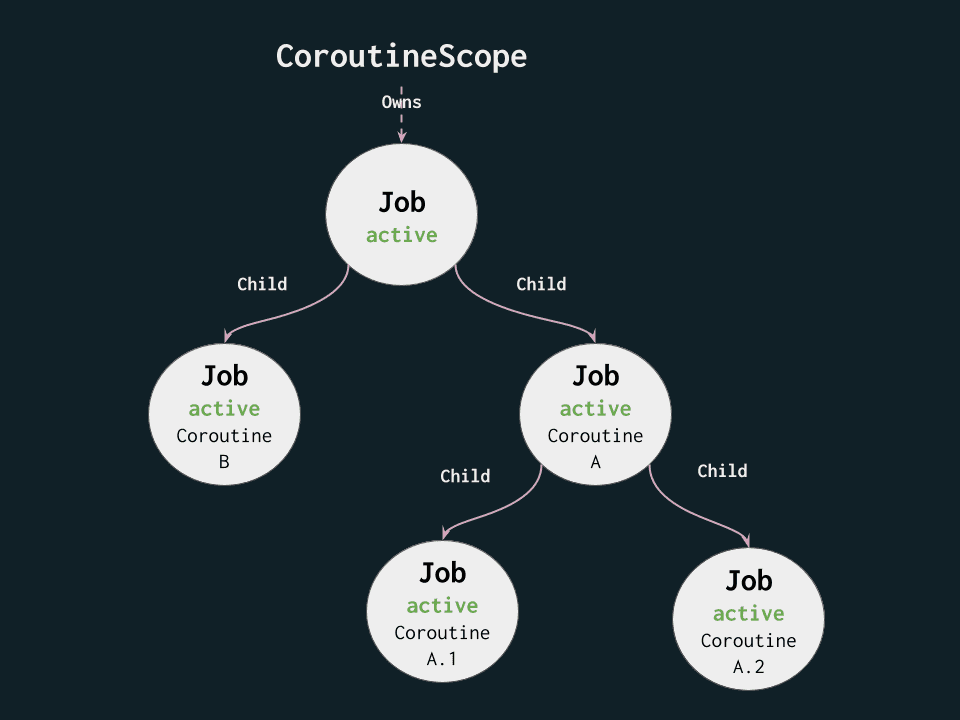
A Job tracks a coroutine’s lifecycle, including completion and cancellation. You usually do not need to construct this tree yourself: launching a coroutine in the current scope establishes the parent-child relationship. Where you launch matters. Launching into an unrelated scope breaks the relationship, even if the code appears inside the same function.
Implement a bounded concurrent operation
Suppose a service needs both the stock count and the reserved count before it can report availability. Neither fetch depends on the other, so starting one only after the other finishes would add unnecessary waiting.
The following is a runnable JVM example after adding kotlinx-coroutines-core. delay() stands in for a suspending data source; it does not perform real network or disk I/O.
import kotlinx.coroutines.*

data class StockSnapshot(
    val stock: Int,
    val reserved: Int,
    val available: Int
)

interface StockSource {
    suspend fun fetchStock(itemId: String): Int
    suspend fun fetchReserved(itemId: String): Int
}

class DemoStockSource : StockSource {
    override suspend fun fetchStock(itemId: String): Int {
        delay(300)
        return 12
    }

    override suspend fun fetchReserved(itemId: String): Int {
        delay(450)
        return 3
    }
}

suspend fun loadSnapshot(
    source: StockSource,
    itemId: String
): StockSnapshot = coroutineScope {
    val stock = async { source.fetchStock(itemId) }
    val reserved = async { source.fetchReserved(itemId) }

    val stockCount = stock.await()
    val reservedCount = reserved.await()

    StockSnapshot(
        stock = stockCount,
        reserved = reservedCount,
        available = stockCount - reservedCount
    )
}

fun main() = runBlocking {
    println(loadSnapshot(DemoStockSource(), "item-1"))
}
async starts each fetch as a child of loadSnapshot’s scope and returns a Deferred<Int>. Both fetches are started before either result is awaited. await() suspends until its value is ready; it does not block a thread just to wait. In this example, the waits can overlap, so the operation takes roughly as long as the slower fetch rather than the sum of both delays. Do not rely on an exact elapsed time or execution order.
If you have encountered Dart’s Future, a Deferred is a useful point of comparison: both represent an eventual value. The important Kotlin distinction here is that async creates a child in a particular scope. A suspend fun alone does not return a Deferred or start work concurrently.
Use launch when a child has no value to return; it gives you a Job that you can cancel or join(). “No returned value” does not mean “untracked fire-and-forget”: a launch child inside coroutineScope still belongs to that scope, and the scope waits for it. Use async when you need a result, and call await() to obtain it.
runBlocking serves a different purpose. Here it bridges the ordinary main function to suspending code and blocks its calling thread until its scope completes. Do not put runBlocking inside an already-suspending service function merely to call another suspending function; call that function directly.
Choose where the work runs
A scope governs lifetime; a dispatcher governs execution threads. By default, the two async children above inherit their parent’s context. They can still make progress concurrently because their delay() calls suspend. Coroutines do not require a separate thread per fetch.
Watch the following explanation with that distinction in mind. It uses a UI example, but its treatment of suspending calls and dispatcher choice also applies to service code.
Kotlin Coroutines 101 - Android Conference Talks
Watch “Kotlin Coroutines 101” from Android Developers for a concrete explanation of suspension and withContext.
Watch suspension and dispatchers. Focus especially on the network-request example beginning around the discussion of withContext: the caller can suspend while blocking work, if any, runs on an appropriate dispatcher. Translate the UI-thread concern into a backend concern: avoid tying up a thread that could serve other work.
For a blocking API, withContext(Dispatchers.IO) moves that call to a dispatcher intended for blocking I/O:
suspend fun readLegacyFile(path: String): String =
    withContext(Dispatchers.IO) {
        java.io.File(path).readText() // Blocking call
    }
This does not turn readText() into a non-blocking operation; a thread in the IO pool is still occupied while it reads. It lets the calling coroutine suspend instead. Conversely, do not add an IO switch automatically around every already-suspending data-source call. First establish whether its implementation blocks a thread.
For substantial CPU computation, use Dispatchers.Default. A CPU-heavy loop may have no natural suspension points, so it should check for cancellation periodically:
suspend fun countMatches(values: List<Int>, target: Int): Int =
    withContext(Dispatchers.Default) {
        var matches = 0

        for ((index, value) in values.withIndex()) {
            if (index % 1_024 == 0) ensureActive()
            if (value == target) matches++
        }

        matches
    }
ensureActive() stops the loop by throwing a cancellation exception if its coroutine has been cancelled. This is cooperative cancellation: cancelling a Job signals the coroutine, but uninterrupted CPU code will not stop promptly unless it checks that signal. By contrast, suspending functions such as delay() already respond to cancellation.
Cancellation belongs to the same boundary
A request may end before its work does. To see what the parent-child relationship buys you, add this function to the earlier example and call cancellationDemo(DemoStockSource()) from its main block:
suspend fun cancellationDemo(source: StockSource) = coroutineScope {
    val work = launch {
        try {
            println(loadSnapshot(source, "item-2"))
        } finally {
            println("Request work finished or was cancelled")
        }
    }

    delay(100)
    work.cancelAndJoin()
    println("Cancelled work has stopped")
}
work is the parent of the two fetches started by loadSnapshot. Cancelling it cancels those descendants. cancelAndJoin() also waits for the cancellation to finish, so the final message comes after the work has stopped. The finally block runs during cancellation, making it suitable for ordinary, non-suspending cleanup. The snapshot is not printed because neither delayed fetch has completed after 100 milliseconds.
Structured concurrency also defines a useful failure boundary. In the normal coroutineScope used by loadSnapshot, an unhandled exception from one fetch fails the scope and cancels its other child. await() can report the failed result to its caller; it does not turn that failure into a successful value. This matters if, for example, a stock lookup fails while a reservation lookup is still in progress.
From the previous lessons, you know how to turn an expected failure into null or a result-style value. Keep cancellation separate from such business failures. In particular, a broad catch—or runCatching, which catches Throwable—can accidentally intercept CancellationException. If you catch it while handling a specific recoverable exception, rethrow it so the coroutine can stop:
suspend fun optionalStock(
    source: StockSource,
    itemId: String
): Int? =
    try {
        source.fetchStock(itemId)
    } catch (cancelled: CancellationException) {
        throw cancelled
    } catch (failure: java.io.IOException) {
        null // Only if an I/O failure means "stock unavailable" here
    }
The last choice is a contract decision, not a general rule that I/O failures should become null.
For a visual account of scope ownership and why a busy computation needs to cooperate with cancellation, finish with these short segments:
Kotlin Coroutines 101 - Android Conference Talks
Return to “Kotlin Coroutines 101” to connect the Job hierarchy to cancellation behavior.
In structured lifetimes, focus on why a scope owns launched work and what cancelling that scope means for its children. Then watch cooperative cancellation for the distinction between signalling cancellation and actually stopping a long-running operation.
Key takeaways
Use a suspend function for work that may pause; use coroutineScope to keep its concurrent children within a clear lifetime. Start independent, result-bearing tasks with async, then await their values. Use launch for child work without a returned value, not as a way to discard ownership.
Choose Dispatchers.IO for blocking I/O and Dispatchers.Default for CPU work; neither dispatcher replaces a sound scope. Cancellation propagates through the parent-child tree, but CPU loops must cooperate, and failure handling must not silently swallow cancellation.
This completes the Kotlin foundations module. Next, the course turns to algorithmic reasoning, where you’ll analyze the time and space costs of code like the loops and data transformations you can now write in Kotlin.