Recommended resources
The freely available resources this lesson will direct you to.
Hello! Last lesson focused on what Kotlin’s types and null checks let you safely do. Now you’ll use those values to make decisions and repeat work. Kotlin often lets you write a decision as an expression that produces a value, while ranges and destructuring make loops easier to read.
By the end, you should be able to choose between if and when, use range boundaries correctly, and unpack values while iterating—all in a small piece of program logic.
Make the decision produce a value
In Kotlin, if can do more than control which statement runs. It can produce the value you assign:
val higher = if (first > second) first else second
This plays the role of Dart’s conditional expression, first > second ? first : second. Kotlin has no separate ternary operator. When you use if to produce a value, you need an else: without one, there is no value to use when the condition is false.
A branch can contain several statements. Its last expression supplies the branch’s value:
val description = if (attempts == 0) {
    println("Nothing has been tried")
    "not started"
} else {
    println("At least one attempt was made")
    "in progress"
}
Both branches produce a String, so description is a String. The println calls happen along the way; they are not the value assigned to description.
Read the official Kotlin documentation for the if examples and the introduction to when. The key question is not “Which syntax is shortest?” but “Am I choosing a value, or merely performing an action?”
Read “Conditions and loops” in the Kotlin documentation to see how if and when work both as decisions and as expressions.
In “If expression,” start with the paragraph beginning “You can also write if as an expression.” Read the expression explanation, including the examples immediately following its two explanatory paragraphs. Then, in “When expressions and statements,” read the opening example and the expression-versus-statement table. Continue through subjects and matching, including “Statements,” “Expressions,” and “Other ways to use when.” Focus on first-match order, when else is required, and the examples using in and is. Also inspect the subjectless when example immediately after that passage.
Use when when several cases concern the same value:
fun accessLabel(role: String): String =
    when (role) {
        "viewer" -> "read only"
        "editor", "admin" -> "can edit"
        else -> "unknown role"
    }
The branches are checked in order; the first match supplies the result. A comma groups alternatives in one branch. Because an arbitrary String could contain anything, this when expression needs else. If you only use when to perform an action, such as printing a message, it can be a statement and need not cover every case.
When each branch is a different Boolean condition rather than a match against one subject, omit the subject:
fun sizeLabel(bytes: Int): String =
    when {
        bytes < 0 -> "invalid"
        bytes == 0 -> "empty"
        bytes < 1_000 -> "small"
        else -> "large"
    }
Order matters: a value of 0 also satisfies bytes < 1_000, but the earlier "empty" branch wins. This is a concise alternative to an if–else if chain, not a reason to replace every two-way if. Notice also that when uses else, rather than Dart’s default switch branch.
Ranges state where the boundary is
A boundary error often comes from a tiny difference: whether the endpoint is included. Kotlin makes that distinction visible. 1..4 includes 4; 1..<4 stops before it. You can use a range both to test membership and to drive a for loop:
println(4 in 1..4)    // true
println(4 in 1..<4)   // false

for (number in 1..<4) {
    println(number)   // 1, 2, 3
}
Watch the selected parts of the video for a demonstration of forward, stepped, and descending loops. It uses until for an excluded endpoint; the documentation and examples here also use ..< for that purpose.
#15 Kotlin Tutorial Loops and Range
Watch “#15 Kotlin Tutorial Loops and Range” from Telusko to see the loop syntax run and produce output.
Watch ranges and for for inclusive endpoints, then step sizes. In descending loops, focus on why downTo is needed rather than writing a descending .. range. Finally, excluded endpoints shows until, useful when a collection’s size is the boundary but not a valid index.
Here are the principal forms together:
for (i in 1..4) print(i)             // 1234
for (i in 1..<4) print(i)            // 123
for (i in 4 downTo 1) print(i)       // 4321
for (i in 0..<8 step 2) print(i)     // 0246
step changes the distance between visited values; it does not guarantee that the specified endpoint will be visited. For example, 1..8 step 2 visits 1, 3, 5, 7.
The same in keyword works in a when branch. The screenshot below chooses a description for 78 by checking number ranges:
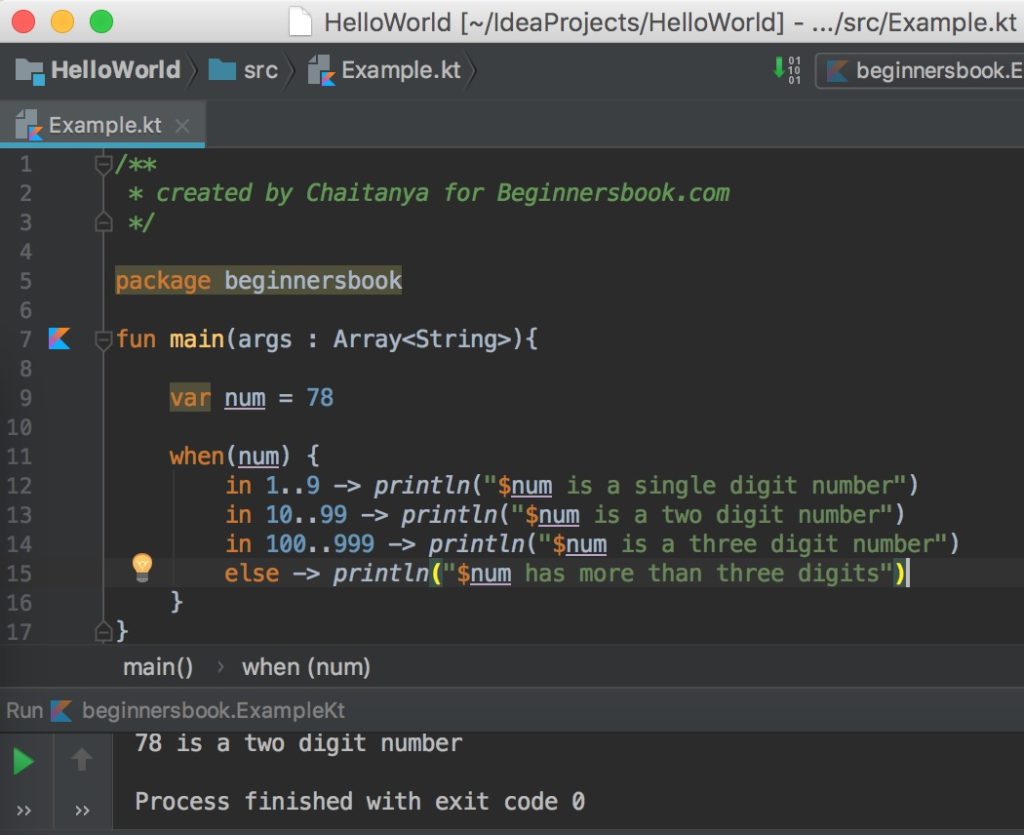
The displayed result for 78 is correct, but the fallback message, “has more than three digits,” is not true for 0 or -1. else means none of the earlier branches matched, not necessarily “larger than the last range.” In application code, make sure that a fallback accurately describes all remaining inputs, or handle the missing cases explicitly.
For a list, the valid indexes start at 0 and end before list.size. This makes 0..<list.size suitable; 0..list.size goes one index too far. Kotlin’s list.indices expresses the same intended set of indexes without spelling out the boundary.
Destructuring names the parts you use
Suppose you need both a list item and its position. Kotlin’s withIndex() supplies pairs of information that you can destructure directly in the loop header:
val stages = listOf("received", "checked", "sent")

for ((index, stage) in stages.withIndex()) {
    println("${index + 1}. $stage")
}
The first iteration binds index to 0 and stage to "received". The parentheses say that the value being iterated has parts to unpack; they are not a request to look up stages[index].
Return briefly to the documentation for its indexed-loop example and the earlier range examples, particularly the distinction between ..< and ...
Use the Kotlin documentation to check the precise range syntax and see destructuring in a loop.
In “For loops,” find the “Ranges” subsection. Read the range examples and their printed outputs, stopping before “Arrays”; compare the included and excluded endpoints. Then, in “Arrays,” move from the indices example to the indexed example, reading through its final output line. Focus on what each name in (index, value) receives.
Destructuring also works when you assign a value whose type supplies multiple components:
val response = Pair("accepted", 202)
val (message, statusCode) = response

println("$message: $statusCode")
It is not a general way to unpack any object or list by position. The value’s type must provide components that Kotlin can extract. If you know Dart records, the binding syntax may look familiar; Kotlin’s Pair and withIndex() are specific types that support this form. Later, you’ll see how your own data classes support destructuring too.
For repetition governed by a condition rather than by items to visit, while remains available:
var retries = 0
while (retries < 3) {
    retries++
}
A do–while checks after its body, so it runs at least once. Use a for loop when you are visiting a range or collection; use while when continuing depends on a condition that must be rechecked.
Put the pieces together
Imagine classifying measured response times. Negative measurements are invalid; non-negative measurements fall into increasingly slower bands. The loop below gives each measurement a readable position, uses a range for the first band, and assigns the chosen label from a when expression:
fun reportDurations(durationsMs: List<Int>): String {
    var slowCount = 0

    for ((index, ms) in durationsMs.withIndex()) {
        val label = when {
            ms < 0 -> "invalid"
            ms in 0..<200 -> "fast"
            ms < 1_000 -> "normal"
            else -> "slow"
        }

        if (label == "slow") slowCount++
        println("Sample ${index + 1}: $label")
    }

    return if (slowCount == 0) {
        "No slow samples"
    } else {
        "$slowCount slow samples"
    }
}
For listOf(75, 240, 1_200, -3), the printed labels are fast, normal, slow, and invalid, and the returned summary is "1 slow samples". More importantly, the branches have a defensible meaning: after the negative check, values below 200 are fast; after that branch fails, values below 1_000 are normal; everything remaining is at least 1_000. That reasoning is what makes the final else safe.
The code is concise because each construct has one job: destructuring names the position and value, when chooses a label, and if chooses the final summary. Brevity is useful only when those decisions remain clear at their boundaries.
Key takeaways
Use if or when as an expression when a decision should yield a value; cover every possible outcome when that value is required. Use .. for an included endpoint, ..< for an excluded endpoint, and downTo or step when iteration calls for them. Use destructuring—especially with withIndex()—to name the parts of a value directly, and check that every fallback branch truly describes the cases left over.
Next, you’ll model the values that flow through this logic using Kotlin classes, interfaces, data classes, sealed classes, and enums.