Recommended resources
The freely available resources this lesson will direct you to.
Hello! In the previous lesson, you saw that UEFI variables can remain accessible to the operating system even after Boot Services end. Now we can give those variables a concrete purpose: telling firmware which program to start on the next boot.
This lesson takes about 40 minutes. You will connect four pieces that are easy to confuse—the GPT partition table, the EFI System Partition, boot variables, and the firmware boot manager—so you can explain where a loader lives and why a particular loader starts.
Where the loader lives
A disk’s partition table describes how the disk is divided. On a GPT-partitioned disk, each partition has a type GUID describing its intended role and a unique partition GUID identifying that particular partition. These are different identifiers: “this is an EFI System Partition” is a type; “this specific partition on this disk” is an identity.
The EFI System Partition, or ESP, is a partition intended to hold files used for UEFI boot. It normally contains a FAT filesystem and can hold several loaders, commonly under directories such as \EFI\ubuntu\ or \EFI\BOOT\. The operating system itself may reside on another partition with a different filesystem. The ESP does not have to be partition 1, and one ESP can hold loaders for more than one operating system.
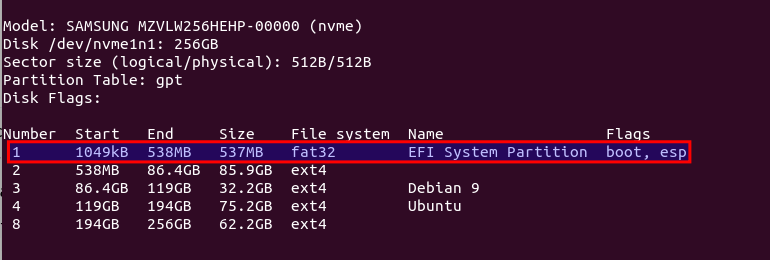
This example partition table highlights a GPT disk’s first partition: it has a FAT32 filesystem and is marked as an EFI System Partition. The other partitions use ext4. The screenshot illustrates the layout, not a rule that every UEFI disk must have this exact arrangement.
For a short visual account, watch UEFI boot explained (for Linux users) by Diego Sandoval. Follow the distinction between a file on the ESP and a boot entry stored as a firmware variable. One wording correction: NVRAM holds boot settings and entries; the boot-manager code itself is part of firmware, not a list of programs stored in NVRAM.
UEFI boot explained (for Linux users)
Watch UEFI boot explained (for Linux users) for a visual model of how partition identifiers and file paths lead firmware to a loader.
Watch entries and ESPs for the relationship between a boot entry and a loader file. Continue through loader selection, where an unavailable target prompts another attempt. In entry inspection, focus on what the verbose Linux listing reveals, then use disk layout to distinguish the ESP from the OS partition. Treat the video's examples as typical layouts, not as claims that every installation or firmware behaves identically.
GPT and UEFI are closely associated, but they are not synonyms. GPT identifies partitions; it does not contain a list saying “boot Ubuntu first.” Conversely, a loader file sitting on an ESP is not, by itself, the normal boot-order policy. That policy is the next piece.
Where the boot choice lives
After platform initialization, the firmware boot manager decides which UEFI application to load. For a typical installed OS, that application is an OS loader on the ESP. The manager uses UEFI variables, commonly stored non-volatilely, to describe choices and their priority.
The UEFI specification calls each numbered boot choice a Boot#### variable, where the four characters are hexadecimal digits—for example, Boot0001 or Boot000A. A boot option includes a human-readable description and a device path identifying the target device, partition, and UEFI image file. BootOrder lists the numbers of those options in the order the firmware should try them for a normal boot. Creating a Boot#### entry does not alone put it into BootOrder.
Read the opening and “3.1.1. Boot Manager Programming” in the official UEFI Specification 2.10. You do not need to study its binary data structures.
3. Boot Manager — UEFI Specification 2.10 documentation
Read the UEFI specification to see the boot manager's role and how numbered options relate to BootOrder.
At the start of Chapter 3, “Boot Manager,” read the opening explanation. Then, in “3.1.1. Boot Manager Programming,” start at “Programmatic interaction with the boot manager is accomplished through globally defined variables” and read through the example of adding an option. Focus on the difference between an entry and its position in BootOrder; skip the later maintenance rules.
Consider a simplified configuration:
BootOrder: 0002,0001
Boot0002* Linux A  HD(1,GPT,...)/File(\EFI\linuxa\loader.efi)
Boot0001* Linux B  HD(1,GPT,...)/File(\EFI\linuxb\loader.efi)
On a normal boot, the manager tries Boot0002 first. Its path identifies a partition and the file \EFI\linuxa\loader.efi relative to the root of that partition. Both options could point to different files on the same ESP; they need not represent different disks. The asterisk in this style of efibootmgr output indicates an active option, not the option currently running.
How does firmware know which GPT partition an option means? A hard-drive device path can include the partition number and its unique partition GUID. The firmware matches that identity to a GPT partition entry and then resolves the file path. The ESP’s type identifies its role; the unique partition GUID helps identify the particular target. This is more precise than saying “firmware boots whichever partition is marked bootable.”
The next screenshot shows what a real verbose listing can look like. Its Boot0012 entry targets \EFI\ubuntu\shimx64.efi; other entries target different files. Notice that BootOrder begins with 0013, while BootCurrent is 0012. That difference alone does not tell us why 0012 was selected: a previous attempt might have failed, or a one-time or interactive selection might have occurred. Also, this screenshot and the partition-table screenshot above are from separate examples; their partitions must not be assumed to match.

What changes the choice for one boot?
Three variables answer different questions:
BootOrder: Which numbered options should firmware try, and in what order, for normal boot?BootNext: Which numbered option should it try first on the next boot only?BootCurrent: Which numbered option was selected for this boot?
If BootOrder is 0002,0001 but BootNext is 0001, firmware tries Boot0001 first on the next boot. It removes BootNext before handing control to that option so the override does not repeat indefinitely. If that attempt fails, normal BootOrder processing remains available. On a later boot without another override, Boot0002 is again first. BootCurrent reports a selection; it does not set the future order.
Read the specification’s focused passages on these rules and on GPT partition matching:
3. Boot Manager — UEFI Specification 2.10 documentation
Return to the specification for the one-time override, the partition-matching rule, and the precise meanings of the three boot variables.
In “3.1.2. Load Option Processing,” find the paragraph beginning “Otherwise, the boot manager is also required to initiate a boot” and read the BootNext rule through its explanation of deletion before control transfers. Later in the same subsection, find “The boot manager must also support booting from a short-form device path that starts with the first element being a hard drive media device path” and read the GPT matching passage; focus on the partition number and unique GUID, not the MBR details. Finally, in “3.3. Globally Defined Variables,” go below Table 3.1 to the paragraphs defining BootOrder, BootNext, and BootCurrent. Read those definitions, ending with the BootCurrent description.
This also connects to the previous lesson. BootOrder, BootNext, and Boot#### are non-volatile variables with runtime access. An OS running in UEFI mode can therefore request a boot-setting change through firmware variable services without retaining Boot Services. The firmware boot manager acts on that setting during a subsequent startup; a change made at OS runtime is not a command for firmware to abandon the OS immediately.
What if a configured file or device cannot be used? Firmware can try another option, and UEFI also defines recovery behavior. There is a common default path for removable x64 media, \EFI\BOOT\BOOTX64.EFI, which helps explain why a bootable USB can work without first installing a machine-specific Boot#### entry. Do not generalize this into “firmware always scans every ESP for that filename before following BootOrder.” The circumstances and platform behavior matter.
For that limited fallback case, read the “Default boot path for removable drives” subsection of the ArchWiki’s Unified Extensible Firmware Interface page:
Unified Extensible Firmware Interface - ArchWiki
Read the ArchWiki subsection to distinguish a removable-media default path from an explicitly configured NVRAM boot entry.
Under “UEFI boot loader does not show up in firmware menu,” find the smaller subsection “Default boot path for removable drives.” Read the path examples through the note about fixed drives. Focus on which claim is specified for removable media and which is described as common firmware behavior.
Key takeaways
GPT describes partitions, including an ESP’s type and each partition’s unique identity. The ESP stores UEFI loader files. Boot#### variables describe boot choices, while BootOrder normally prioritizes them and BootNext can temporarily change the first choice. The firmware boot manager resolves the selected option’s device and file path, then loads the UEFI application. BootCurrent records the option selected for the current boot; it does not explain the entire selection history.
A concise interview explanation is: “The firmware boot manager reads its boot variables, normally tries active entries in BootOrder order, identifies the target partition and .efi file from an entry’s device path, and starts that loader. GPT identifies the partitions, while the ESP contains the file being loaded.”
Next, you will inspect these relationships on Linux yourself, using the partition table, ESP contents, and UEFI boot-entry listing as evidence.