Recommended resources
The freely available resources this lesson will direct you to.
Hello! Welcome to your first lesson on Zustand.
Given your extensive background as a Front-End Lead, you've likely navigated the complexities of state management in large React applications. This course is designed to give you a deep, practical understanding of Zustand, a library that has gained significant traction for its simplicity and performance.
Today's lesson focuses on a core feature that makes Zustand so efficient. We will analyze how Zustand's selective subscriptions prevent unnecessary component re-renders. This is a fundamental concept that addresses common performance bottlenecks found in other state management patterns.
By the end of this lesson, you will be able to explain:
- Why some state management approaches cause components to re-render too often.
- The mechanism Zustand uses to subscribe components to specific state changes.
- How to write selectors that optimize performance.
Let's get started.
1. The Challenge of Unnecessary Re-renders
In any React application, managing performance is key. A common source of performance degradation is components re-rendering when they don't need to. This often happens when a component is sensitive to a broad state object, even if it only uses a small part of it.
React's built-in Context API, for example, exhibits this behavior. A component consuming a context will re-render whenever any value in that context changes.
Upgrading React state management with zustand
To see a clear example of this issue with React Context, please read the following section from the article 'Upgrading React state management with zustand' from BigBinary.
Read the first part of the article, starting from the beginning down to the section titled 'Enter Zustand: A Breath of Fresh Air'. Focus on the explanation of why the UserProfile component re-renders even when unrelated data like city changes.
Zustand is designed to solve this, but if used without care, it can fall into a similar trap. If you subscribe a component to the entire store object, it will re-render on every state change, defeating the purpose.
How to Prevent Unnecessary Re-renders in Your React App
This article from dev.to demonstrates how a component can re-render unnecessarily even with Zustand. It uses a simple bearStore to make the point.
Read the section titled 'The problem'. It clearly explains how updating the cats state can cause a component that only cares about bears to re-render.
2. The Root Cause: Referential Equality
So, why does this happen? The answer lies in how JavaScript and React determine if something has "changed": strict equality comparison (===), also known as referential equality for objects and arrays.
Zustand uses Object.is (which is very similar to ===) to check if the selected state has changed.
- For primitive types (numbers, strings, booleans), this works as you'd expect.
5 === 5istrue. - For objects and arrays,
===checks if two variables point to the exact same object in memory, not if their contents are the same.
This means {} === {} is false, because they are two separate objects in memory, even though they are both empty.
When you update state in Zustand (or Redux), you typically create a new state object using the spread syntax: set(state => ({ ...state, bears: state.bears + 1 })). This creates a new object with a new reference.
If a component is subscribed to the entire store object, Zustand sees that the reference to the store has changed and triggers a re-render, even if the data that component actually uses is identical.
Fixing Redux/Zustand Re-Renders
The video 'Fixing Redux/Zustand Re-Renders' by Jack Herrington has an excellent demonstration of this exact problem. The 'do nothing' action is a clever way to isolate and show how referential equality causes re-renders.
Watch the section 'Understanding Referential Identity and Re-renders' from 09:59 to 16:48. Pay close attention to why the 'do nothing' button still causes a re-render and the explanation using the Quokka scratchpad.
3. The Solution: Selective Subscriptions
This is where Zustand's primary optimization feature comes into play: the selector function.
The useStore hook accepts an optional selector function as its first argument: useStore(selector). This function receives the entire state and returns just the piece of data the component needs.
Zustand subscribes the component only to the return value of this selector. On each state change, Zustand runs the selector and compares its new return value to the previous one. A re-render is only triggered if previousValue !== newValue.
The Best Case: Selecting Primitive Values
The most efficient way to use selectors is to select a single primitive value.
// Store setup
const useBearStore = create(set => ({
  bears: 0,
  color: 'brown',
}));

// Component
function BearCounter() {
  // This component subscribes ONLY to the 'bears' number.
  const bears = useBearStore(state => state.bears);

  // It will NOT re-render if the 'color' changes.
  return <h1>{bears} bears.</h1>;
}
Because bears is a number (a primitive), the comparison is by value. The component will only re-render when the number of bears actually changes.
Upgrading React state management with zustand
The 'Upgrading React state management with zustand' article touches on this under its performance strategies.
Read the section 'Selective Data Usage'. It provides a concise example of selecting a single primitive value (city) and correctly notes that this is the most straightforward way to optimize.
The Tricky Case: Selecting Objects and Arrays
What if your component needs multiple values? A common but incorrect approach is to build a new object inside the selector:
// Anti-pattern: Avoid this!
const { bears, color } = useBearStore(state => ({
  bears: state.bears,
  color: state.color
}));
This selector creates a new object every time it runs. Because {...} !== {...}, the component will re-render on any state change, just like when subscribing to the whole store.
The correct approach is to either use multiple selectors for each primitive or use an equality function, which we will cover in the next lesson.
// Correct approach for multiple values
const bears = useBearStore(state => state.bears);
const color = useBearStore(state => state.color);
This might seem like more code, but it is far more performant as each hook creates an independent, optimized subscription.
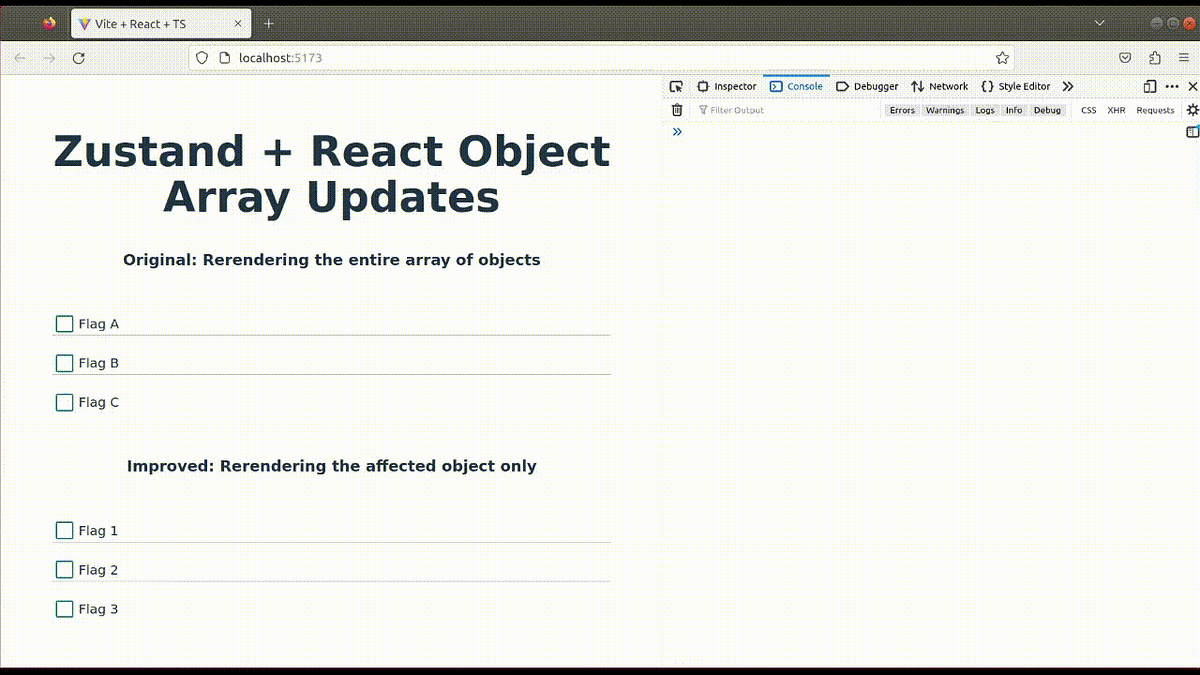
This visual illustrates the performance gain. The "Original" shows an entire list re-rendering when one item changes. The "Improved" version, using selective subscriptions, re-renders only the component for the specific item that was updated.
4. Best Practices for Selectors
To consolidate what we've learned, here are two key best practices for performant selectors in Zustand.
5 Zustand BEST Practices in 5 Minutes
The video '5 Zustand BEST Practices in 5 Minutes' from Better Stack provides a rapid, clear summary of these points.
Watch the first two best practices: 'Only Export Custom Hooks' (00:59 - 01:42) and 'Use Atomic Stable Selectors' (01:42 - 02:34). These reinforce the ideas of encapsulating selection logic and avoiding object creation within selectors.
-
Select atomically: Always select the smallest piece of state your component needs. If you need
user.name, selectstate => state.user.name, notstate => state.user. -
Selectors should be stable: A selector should return the same reference if the underlying data hasn't changed. Avoid creating new objects or arrays inside a selector.
Conclusion
In this lesson, we've analyzed how Zustand's selective subscriptions work to prevent unnecessary re-renders.
Key Takeaways:
- Unnecessary re-renders are often caused by components subscribing to more state than they need.
- The root of the issue is referential equality (
===), where newly created objects/arrays are considered "different" even if their contents are the same. - Zustand's selector function (
useStore(state => state.piece)) is the primary tool for optimization. It subscribes a component only to the specific data it returns. - The most performant selectors are those that return primitive values.
- Creating new objects or arrays within a selector is an anti-pattern that causes re-renders on every state change.
You now have a solid grasp of the "why" behind Zustand's performance. However, we've identified a challenge: what's the best way to select multiple values or a slice of an array without causing re-renders?
In our next lesson, we will tackle this head-on by exploring the shallow equality function, Zustand's built-in tool for intelligently comparing objects and arrays.