Recommended resources
The freely available resources this lesson will direct you to.
Hello! In our previous lesson, we established the "what" and "why" of the Model Context Protocol (MCP), understanding its architecture and purpose as a standardized "USB-C for AI." You now know that MCP uses a stateful, client-server model to solve the complex N-x-M integration problem.
Today, we're moving from the architectural blueprint to the technical specification. We'll define the core API endpoints that an MCP-compliant server exposes. Think of this as learning the specific commands and data structures that are sent over the MCP "wire." For you as a software engineer, this is where the protocol becomes tangible—we'll be looking at the specific methods, parameters, and JSON structures that make communication possible.
By the end of this lesson, you will be able to describe the exact API contract for discovering and retrieving context and metadata from an MCP server, setting the stage for you to implement these very endpoints in our next session.
The Language of MCP: JSON-RPC 2.0
Before diving into the specific endpoints, it's important to understand the language they're spoken in. MCP doesn't reinvent the wheel; it builds upon a well-established standard: JSON-RPC 2.0.
As an engineer, you're familiar with REST APIs that use HTTP methods (GET, POST, etc.) and URLs to define operations. JSON-RPC is a Remote Procedure Call protocol that uses JSON for its data format. Instead of URLs, you call a named method and pass params. This maps very cleanly to function calls in programming.
There are three fundamental message types in JSON-RPC, which form the basis of all MCP communication.
Building Standardized AI Tools with the Model Context Protocol (MCP)
This article provides a concise introduction to the underlying protocol. We'll use it to understand the basic message structures.
First, read the section The MCP Protocol to see how MCP is founded on JSON-RPC 2.0. Pay attention to the description of a Request object. Then, examine the TypeScript definitions in Listing 1. This clearly lays out the four key message structures: Request: A call to a method that expects a response. Note the id field, which is used to correlate requests with responses. Notification: A "fire-and-forget" call that does not expect a response. It has no id. Successful Response: The reply to a successful request, containing the original id and a result object. Error Response: The reply to a failed request, containing the id and an error object with a code and message.
This request/response/notification pattern is the foundation for every interaction in MCP. A client sends a Request with a method like resources/list, and the server sends back a Response with the corresponding result.
The Handshake: initialize and Capability Negotiation
A key principle of MCP is extensibility. Not all servers support all features. So, how does a client know what a server can do? This is handled during the very first step of the connection: the initialize handshake.
When a client first connects, it sends an initialize request. This message serves two purposes:
- It tells the server what protocol version the client is using.
- It announces the client's own capabilities (e.g., "I can handle being asked to run an LLM query").
The server then replies to the initialize request, announcing its own capabilities. This negotiation establishes the "API contract" for the rest of the session, preventing runtime errors by ensuring both parties only use features they mutually support.
This is the most critical endpoint for understanding the server's API surface.
MCP Message Types: Complete MCP JSON-RPC ...
This guide from Portkey.ai provides an excellent technical breakdown of every MCP message, which we will use as our primary reference for the API endpoints.
First, read the section on Understanding Capabilities. This explains the negotiation process and how both client and server capabilities are advertised. Then, review the initialize request and response structure under the Lifecycle Messages section. Look at the capabilities object in both the request and response. Notice how the server responds with the features it provides, such as tools: {} or resources: { "subscribe": true }.
Core API Endpoints for an MCP Server
Once the connection is initialized, the client can start making requests to the server's advertised endpoints. These endpoints are simply JSON-RPC method names, conventionally namespaced with a /. Let's explore the core methods related to context and metadata.
1. Resource Endpoints (Context & Data)
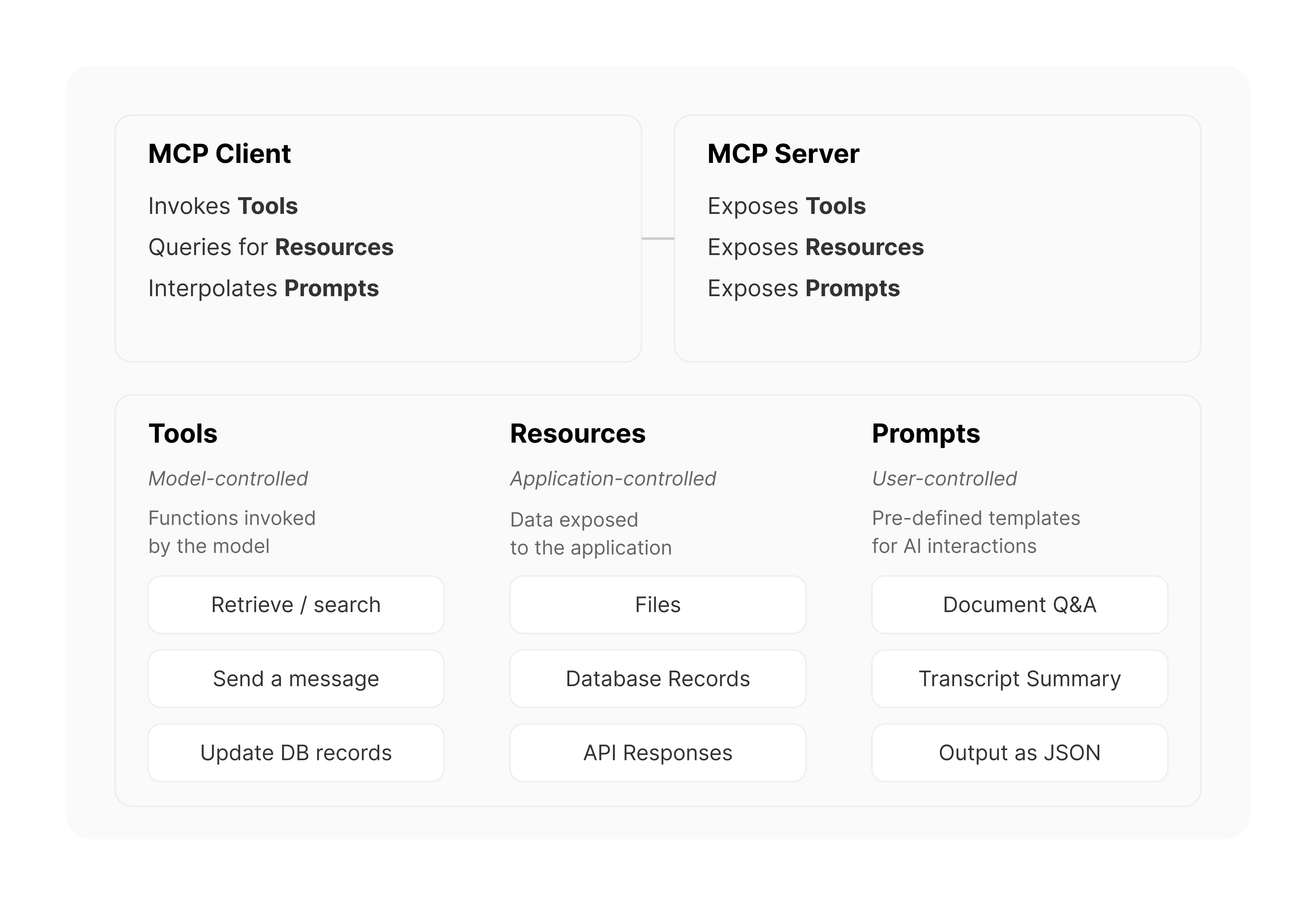
Resources are the read-only data sources the server exposes. This is the primary mechanism for context retrieval.
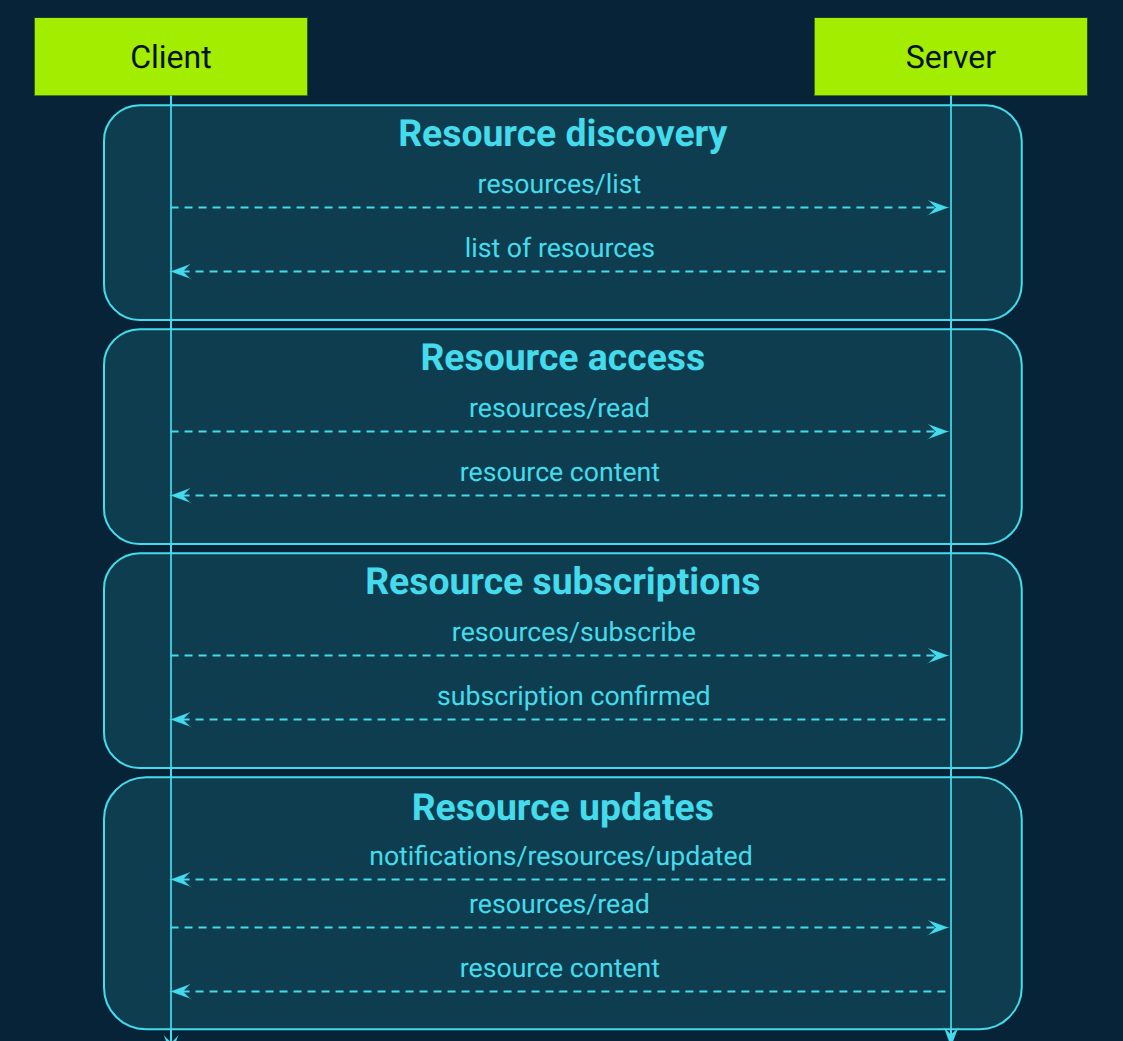
The main resource endpoints are:
-
resources/list: Discovers available resources.- Purpose: To get a list of all data resources the server offers, including metadata like their name, URI, and description. This is how a client knows what data it can ask for.
- Client Request: A request with the
method"resources/list" and usually emptyparams. - Server Response: A
resultobject containing an array ofresources, each with auri,name,description, etc.
-
resources/read: Retrieves the content of a specific resource.- Purpose: To fetch the actual data of a resource identified by its URI.
- Client Request: A request with
method"resources/read" andparamscontaining theuriof the desired resource. - Server Response: A
resultobject containing thecontentsof the resource.
-
resources/subscribe: Subscribes to updates for a resource.- Purpose: To ask the server to send a notification whenever a specific resource changes. This leverages the stateful nature of MCP and avoids constant polling.
- Client Request: A request with
method"resources/subscribe" andparamscontaining theuriof the resource to watch. - Server Notification: When the resource changes, the server sends a
resources/updatednotification (noid, fire-and-forget) to the client.
2. Tool Endpoints (Actions & Capabilities)
Tools are the actions or functions the server can perform. While not strictly "context retrieval," discovering tools is a key part of understanding the server's metadata.
-
tools/list: Discovers available tools.- Purpose: To get a list of all functions the server can execute on the client's behalf. The response includes the tool's
name,description, and importantly, itsinputSchema. - Client Request:
method: "tools/list" - Server Response: A
resultobject containing an array oftools.
- Purpose: To get a list of all functions the server can execute on the client's behalf. The response includes the tool's
-
tools/call: Executes a specific tool.- Purpose: To invoke a function on the server with specific arguments.
- Client Request:
method: "tools/call", withparamsspecifying the toolnameandarguments. - Server Response: A
resultobject containing the output of the tool execution.
3. Prompt Endpoints (Reusable Templates)
Prompts are predefined prompt templates the server offers to guide the AI's behavior.
prompts/list: Discovers available prompt templates.prompts/get: Retrieves the content of a specific prompt template, optionally with arguments filled in.
To see the exact JSON structure for all these endpoints, let's return to our reference guide.
MCP Message Types: Complete MCP JSON-RPC ...
This is a deep dive into the API definitions. We will use this as a reference throughout the course.
First, quickly look at the Quick Reference Table to get a complete overview of all possible client-to-server requests. This is your API map. Next, carefully study the JSON examples for the following sections: Tool Messages: Pay attention to how tools/list returns a schema for the tool's input, and tools/call uses that schema. Resource Messages: This is the core of context retrieval. Examine the request/response flow for list, read, and subscribe. Prompt Messages: See how a client can discover and then retrieve a formatted prompt.
By studying these JSON examples, you are effectively reading the API documentation for any MCP server. The structure is consistent and predictable, which is the entire point of a protocol.
Conclusion
In this lesson, we've dissected the anatomy of MCP communication. You've learned that MCP is not magic, but a well-defined protocol built on JSON-RPC 2.0. You can now define the core endpoints that a server must implement to be useful.
Key Takeaways:
- Protocol Foundation: MCP communication uses the JSON-RPC 2.0 standard, with its
Request,Response, andNotificationmessage types. - Capability Negotiation: The
initializemethod is the critical first handshake where the client and server exchange capabilities, defining the API contract for the session. - Core Endpoints: An MCP server's functionality is exposed through namespaced methods. The key ones for context and metadata are:
- Resources:
resources/list,resources/read,resources/subscribe - Tools:
tools/list,tools/call - Prompts:
prompts/list,prompts/get
- Resources:
- Standardized Structure: Every request and response follows a predictable JSON format, making it possible for any compliant client to talk to any compliant server.
We've moved from the high-level architecture to the low-level API definition. Now that you understand what these endpoints are and what they look like, you're ready for the next logical step: building them. In our next lesson, you will implement your first basic MCP server that responds to these very requests.