Recommended resources
The freely available resources this lesson will direct you to.
Introduction
In our last lesson, we established a system for short-term, single-request memory using a SharedState "blackboard" and an active memoryTool. While powerful, this memory is ephemeral—it vanishes the moment a request completes. For any meaningful, ongoing interaction with a user, this is a significant limitation.
Today, we will address this by implementing a persistent memory layer. This lesson focuses on the crucial next step: implementing conversation history storage and retrieval for multi-turn interactions. You will learn how to design a database schema to store conversations, and how to integrate this persistence layer into your application's lifecycle, enabling your agents to remember interactions across sessions. This moves us from single-transaction intelligence to building long-term contextual understanding, a cornerstone of your goal to create a production-grade agentic system.
The Shift from Stateless to Stateful Conversation
In our previous explorations, we've relied on a common pattern where the client maintains the full conversation history and sends it with every request. This is the simplest way to provide context to the LLM.
A Complete Guide To Vercel’s AI SDK // The ESSENTIAL Tool For Shipping AI Apps
As a brief refresher, recall Matt Pocock's explanation of how the Vercel AI SDK handles conversation history.
Watch this segment from the beginning to understand the CoreMessage array structure. This client-managed state is the foundation upon which we will build our persistence layer. The stateless server pattern he then demonstrates from this point is what we are about to evolve.
This client-managed, stateless server approach is excellent for prototypes but has two major drawbacks for a production system:
- Lack of Persistence: If the user refreshes their browser, the entire context is lost.
- Inefficiency: As the conversation grows, the JSON payload sent from the client to the server on every turn becomes increasingly large, adding network latency and cost.
The professional standard is to move this responsibility to the server. The server stores the authoritative conversation history, and the client simply references it using a unique identifier (a chatId or sessionId).

Your experience with databases like PostgreSQL makes you well-equipped for this task. We'll use a database to store chat messages, creating a stateful backend that can recall past interactions.
Designing the Persistence Schema
To store conversations effectively, we need a clear database schema. A conversation is a collection of messages, and each conversation should be distinct. This naturally leads to a relational model with two primary tables: Session (or Chat) and Message.
- Session: Represents a single, continuous conversation. It primarily needs a unique
id. - Message: Represents a single turn in a conversation. It contains the
content, therole('user' or 'assistant'), and a foreign key linking it back to itsSession.
The Prisma documentation provides an excellent guide for creating such a schema, which is perfectly suited for our Node.js environment.
AI SDK (with Next.js) - Prisma
This guide demonstrates building a chat application with persistence using Prisma, a modern ORM you'll find very intuitive.
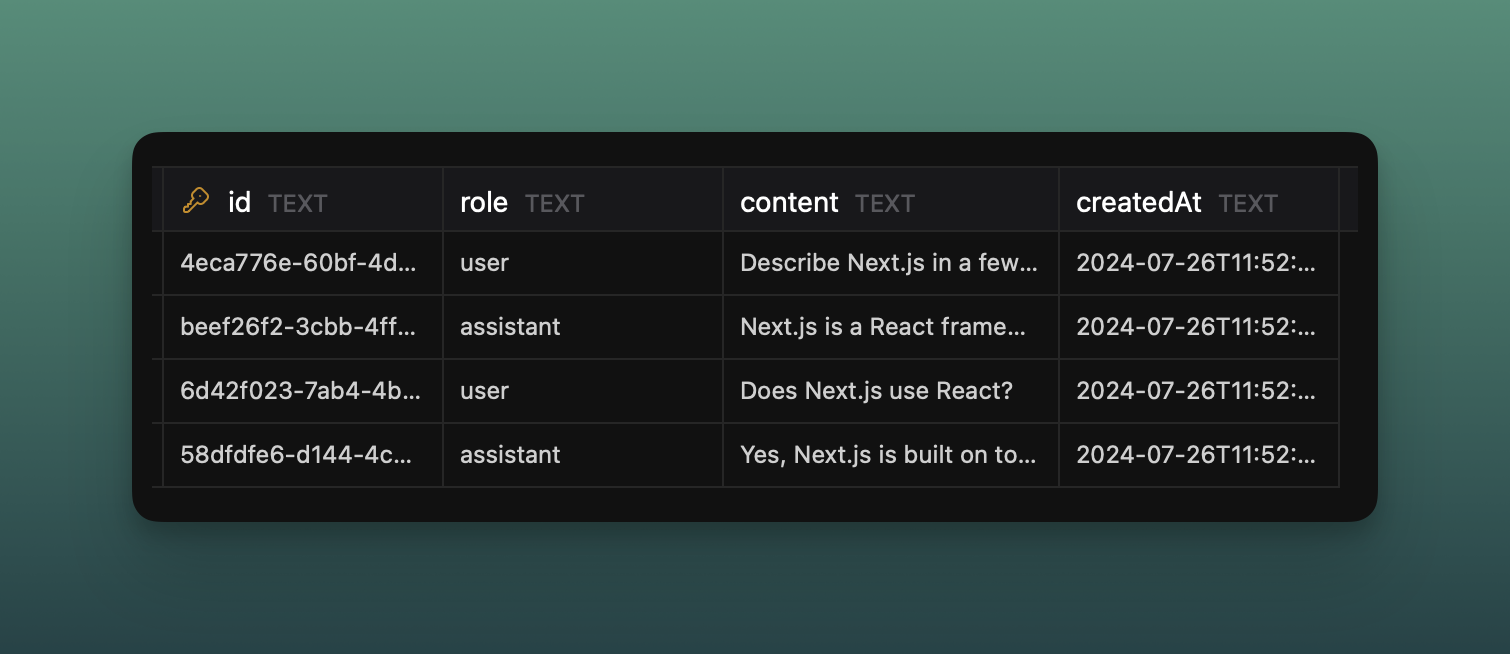
Focus on the section defining the schema. This introduces the Session and Message models. Note how the Message model has a role, content, and a sessionId to link it back to a Session.
The resulting Message table in your database would look something like this:
Implementing the Persistence Flow: Saving and Loading
With our schema defined, we can now implement the two core operations: saving a new message and loading an existing conversation.
Saving the Conversation History
The Vercel AI SDK provides a clean and convenient hook for persisting data: the onFinish callback within streamText. This function is executed on the server after the AI model has finished generating its response, making it the perfect place to write the latest messages to our database.
AI SDK (with Next.js) - Prisma
Let's continue with the Prisma guide to implement the "write" path.
First, examine how to set up the route handler that receives messages from the client. Then, study the enhanced version that includes the onFinish callback. This callback invokes a saveChat function. Finally, read the implementation of the saveChat function itself. Pay attention to how it uses prisma.session.upsert to create a session if it doesn't exist and prisma.message.create to save the new messages.
Here is a conceptual summary of the server-side API route:
// app/api/chat/route.ts
import { openai } from '@ai-sdk/openai';
import { streamText, UIMessage } from 'ai';
import { saveChat } from '@/lib/save-chat'; // Our database logic

export async function POST(req: Request) {
  const { messages, id }: { messages: UIMessage[]; id: string } = await req.json();

  const result = streamText({
    model: openai('gpt-4o'),
    messages,
  });

  // The 'onFinish' callback is the key to persistence.
  // It runs after the stream is complete.
  return result.toUIMessageStreamResponse({
    onFinish: async ({ messages: finalMessages }) => {
      // `finalMessages` includes the user's prompt and the AI's full response.
      await saveChat(id, finalMessages);
    },
  });
}
The saveChat function, using Prisma, would handle the database interaction, ensuring the conversation is durably stored. This pattern is also endorsed in the official Vercel AI SDK documentation.
Chatbot Message Persistence - AI SDK
The official AI SDK documentation confirms this is the recommended approach.
Quickly review the section on storing messages. It shows the exact same pattern: using the onFinish callback to call a saveChat function, solidifying this as a best practice.
Loading the Conversation History
To achieve persistence, a returning user must be able to see their previous conversation. This "read" path is typically initiated by the client-side UI when the chat component loads. The client requests the history for a given chatId from a dedicated API endpoint.
AI SDK (with Next.js) - Prisma
Now, let's implement the "read" path using the same Prisma guide.
First, look at how to create an API endpoint (/api/messages) to fetch all messages for a conversation from the database. Next, see how the client-side UI uses a useEffect hook to load these messages when the component mounts, populating the useChat hook's state via setMessages.
The flow is straightforward:
- The React chat component mounts.
- A
useEffecthook fires, making a GET request to an endpoint like/api/messages?chatId=.... - The server-side endpoint queries the database for all messages associated with that
chatId. - The messages are returned to the client.
- The client uses the
setMessagesfunction from theuseChathook to populate the chat history, instantly displaying it to the user.
Production-Ready Considerations
While the above implementation is functional, your goal is a production-grade system. Here are three critical refinements to consider as you build out this feature.
-
Server-Side ID Generation: By default, the
useChathook generates message IDs on the client. For a persistent system, this is risky as it can lead to ID collisions. The server should be the source of truth. The AI SDK allows you to enforce this. -
Performance Optimization: Sending the entire chat history from the client is inefficient. A better pattern is to send only the new message along with the
chatId. The server is then responsible for loading the previous messages from the database, combining them with the new message, and then proceeding with the LLM call. -
Handling Disconnects: What if the user closes their browser tab while the AI is generating a response? By default, the stream might be aborted, and the
onFinishcallback might not run. To ensure the full response is generated and saved regardless, you can useresult.consumeStream().
Chatbot Message Persistence - AI SDK
The AI SDK documentation provides solutions for these production challenges.
Briefly look over these advanced concepts: Server-side IDs to ensure data integrity. Optimizing performance by loading history on the server. Ensuring resilience against network issues with consumeStream. We won't implement these optimizations just yet, but keep them in mind as they will be essential for scaling your system.
Conclusion
In this lesson, you have bridged the gap between ephemeral, single-request context and durable, multi-turn memory. By moving state management from the client to the server and leveraging a database, you've laid the foundation for agents that can build relationships and maintain context over time.
Key Takeaways:
- For production systems, server-managed state is superior to client-managed state for persistence and efficiency.
- A relational database with
SessionandMessagetables is a robust way to model and store conversation histories. - The
onFinishcallback in the Vercel AI SDK'sstreamTextfunction is the ideal server-side hook for saving conversation history after a response is generated. - The "read" path involves a client-side
useEffecthook that fetches history from a dedicated API endpoint to populate the UI on load. - Production systems should eventually incorporate server-side ID generation, performance optimizations, and resilient stream handling.
You now have a mechanism to remember every turn of a conversation. However, as conversations grow longer, they will inevitably hit the token limits of AI models. In our next lesson, we will confront this challenge directly by learning to implement a token-aware truncation strategy to manage conversation history size, ensuring your agents can have long conversations without breaking.