Recommended resources
The freely available resources this lesson will direct you to.
Hello again. Last lesson, you checked an AI-generated sales message against its source notes before deciding whether it was fit to send. This lesson moves one step earlier: what should be allowed into the AI tool at all? A well-written prompt can still create a problem if it contains a prospect’s private details, a client’s confidential plans, or your organisation’s commercial terms.
You’ll learn how to make a useful working copy of sales material before submitting it to a public AI tool. The aim is to preserve enough context for the task while removing details that identify people or reveal information you are not authorised to share.
Start with the task, not the document
Suppose you want AI to draft a reply to a prospect who requested an outline of your research method. You may need to tell the tool that the prospect is assessing two markets, has concerns about its forecasts, and wants an indicative scope. You probably do not need to supply the contact’s name, email address, your internal pricing limits, or the prospect’s unannounced expansion plans in full.
That distinction is easier to see when you start by asking, “What must the tool know to perform this task?” rather than, “Which document should I paste?” MeetGeek’s short video gives examples of routine AI tasks that can expose information and shows how a prompt can retain its purpose with less detail.
How to Keep Company Data Secure When Using AI (Top Strategies)
Watch “How to Keep Company Data Secure When Using AI (Top Strategies)” from MeetGeek for the practical distinction between providing useful context and pasting a confidential record.
In everyday risks, notice how summaries, spreadsheets, and recordings can carry information beyond what the task requires. Then watch masked prompts for examples of replacing details or requesting a method rather than submitting a full customer table. Treat these as ways to reduce exposure, not proof that every masked prompt is safe.
A good default for public tools is minimum necessary context. If you only need an email structure, ask for a structure using a fictional scenario. If you need help analysing a spreadsheet, you may be able to provide column descriptions and ask for a method you can apply to the real data yourself. When the task genuinely requires confidential source material, changing a few names may not make a public tool appropriate.
What needs protection?
Personal information is not limited to names. The UK Information Commissioner’s Office (ICO) explains that a person can be identified directly or indirectly. A job title, location, unusual event, and approximate date may together point to one buyer even after their name has gone.
Introduction to anonymisation | ICO
Read the ICO’s “Introduction to anonymisation” to establish what personal data is and what effective anonymisation is intended to achieve.
Under “In detail,” read “What is personal data?” from the definition. Focus on direct and indirect identification. Then read “What is anonymisation?” from the explanation, noting that merely changing the appearance of data does not establish that people are no longer identifiable.
For a sales prompt, it helps to run two separate checks:
- People: Could the text identify a prospect, client employee, colleague, or other individual—on its own or alongside information someone could reasonably obtain?
- Business confidentiality: Does it reveal information you are not authorised to share, even if no individual can be identified? Examples include a client’s undisclosed plans, contract terms, internal messages, account strategy, pricing boundaries, or margins.
These checks overlap but are not identical. A company’s confidential budget may require protection without being personal data. Conversely, a buyer’s work email may be personal data even if the company name is public. The ICO material explains UK data-protection concepts; your organisation’s rules, contracts, and applicable law may impose additional requirements.
A public-sector AI policy from Harrow Council illustrates why organisations often protect both categories. Its rules apply to its own users; use the examples to inform your judgment, not as a substitute for your employer’s policy.
Use of Artificial Intelligence including Generative ...
Read the examples in Harrow Council’s AI guidance to see how an organisation distinguishes personal details from internal and commercial information when setting rules for AI use.
In section “3.6 Privacy, security and data protection,” go to the “Mitigation” paragraph following the discussion of online-tool risks. Read the restriction and examples, stopping after the list item about commercial contracts. Notice that replacing a person’s name would not, by itself, protect an internal message or contract detail.
Removing a name is not the finish line
Consider a note that says, “The sole operations lead at the town’s recently announced battery plant requested a proposal on Tuesday.” Removing the person’s name might change very little: the role, event, location, and timing could still make them easy to identify. Similarly, replacing a client name with “Client A” does not conceal the client if you leave in a distinctive acquisition, exact contract value, and launch date.
The ICO distinguishes anonymisation from pseudonymisation. Replacing a name with a reference label can lower risk, but if the person can still be identified using a separate key or other available information, the data has not necessarily become anonymous.
Introduction to anonymisation | ICO
Continue the ICO guidance to understand why identifiability must be assessed after details have been removed, not assumed.
Read “Is anonymisation always necessary?” and “Is anonymisation always possible?” from the discussion and example. The example ends by explaining how remaining details can be linked with other sources. Then, in “What is the difference between anonymisation and pseudonymisation?”, read the distinction. Focus on what a retained reference key—or identifying context—means for a label such as “Prospect A.”
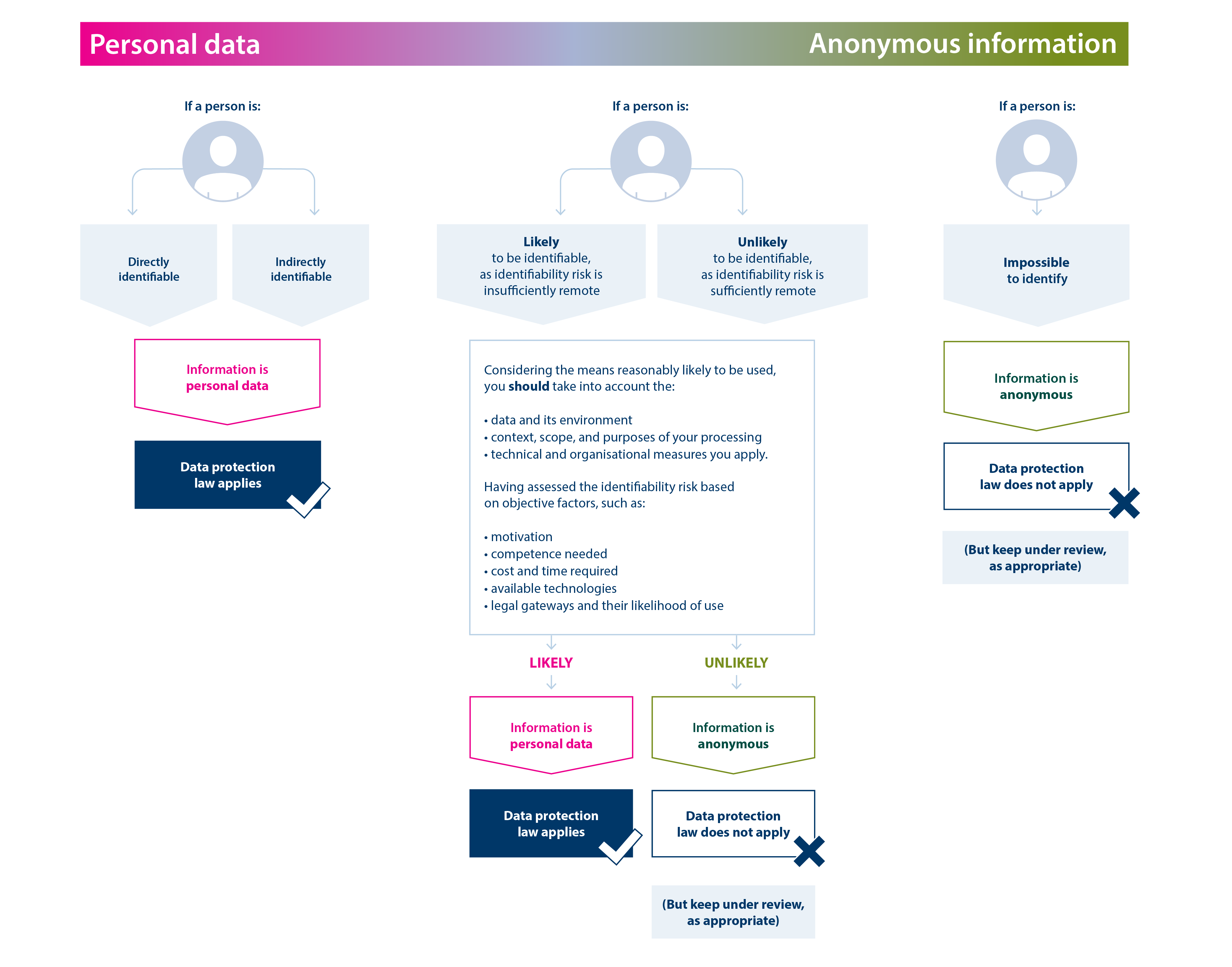
The practical test is therefore not “Did I delete the names?” It is: Could someone reasonably work out who or what this is about from the details that remain? Also ask whether those details reveal a sensitive business fact even when the subject cannot be identified. If either risk remains, generalise further, leave the fact out, or do not use a public tool for that task.
A workable pre-submission method
Do the editing in an approved workspace before opening the public AI tool. Do not paste the original into that tool and ask it to anonymise the text for you; by then, you have already submitted it. Use this sequence:
- Define the output. Decide exactly what you want—an outline, a draft reply, a set of questions, or instructions for analysing data. This tells you which facts are necessary.
- Remove direct identifiers. Look beyond the main text for names, email addresses, phone numbers, account IDs, links, document titles, attachment names, and screenshot details.
- Check indirect identification. Re-read combinations of roles, locations, dates, figures, rare events, and company descriptions. Replace precise details with broader ones where the task permits.
- Remove or generalise confidential business facts. A client’s plans and your organisation’s pricing limits need their own review. Do not assume that renaming the client protects the underlying fact.
- Read the resulting prompt as a stranger would. Could someone infer the person, account, or confidential plan? Does the prompt still contain enough accurate context to do the job? If not, choose a different way to complete it.
A placeholder such as “the operations lead” can preserve a person’s role in a drafting task. A broad description such as “a manufacturer assessing potential markets” may preserve the business problem. Neither is automatically anonymous: context determines whether the subject remains recognisable. Avoid inserting made-up figures or events merely to fill gaps; a general description is preferable to a false factual premise.
If you keep a private list linking placeholders to real people or accounts so you can finish a draft later, protect that list in an approved location and do not submit it with the prompt. Such a working copy reduces what the tool sees, but the existence of a key—and any identifying context left in the prompt—means you should not casually claim the underlying data has been legally anonymised.
Rework a Harborline prompt
Return to the fictional Harborline opportunity from the previous lesson. Imagine that, for this demonstration only, an internal note also contains an invented contact name and email, an unannounced market plan, a precise client budget, and Northstar’s internal margin limit. None of these added details is needed to ask for help drafting a response to the operations lead’s request.
| Detail in the fictional internal note | Treatment before a public-tool prompt |
|---|---|
| Contact’s name and email | Omit; describe the recipient as “an operations stakeholder.” |
| “Harborline Components” | Omit; use a broad company description only if it helps the draft. |
| Two markets under consideration | Keep only if necessary; “potential regional markets” may be enough. |
| Exact budget and Northstar’s margin limit | Omit; neither is needed to respond to the request. |
| Request for a method and indicative-scope outline | Keep; it determines what the reply should address. |
| Concern about forecasts based on older reports | Keep in general terms; it explains the relevant business question. |
Instead of pasting the note, you could submit:
Draft a concise, professional reply to an operations stakeholder at a manufacturer assessing potential regional markets. The stakeholder requested a short outline of a research provider’s method and indicative scope because the team is concerned that its demand forecasts rely on older reports. The provider offers market-sizing research and buyer interviews. Acknowledge the request, say that an outline can be prepared, and ask one useful scoping question. Do not imply that a project, budget, or timetable has been agreed. Use no names, contact details, prices, or invented results.
This prompt still specifies the task, context, source facts, format, and constraints you have practised in this module. It withholds details the draft does not require. Before using a resulting message, a human would review it against the real, approved source notes—as in the previous lesson—and add any necessary names or details outside the public tool.
The example is not a guarantee that the same wording would be safe for every real account. If a niche market description or combination of events points unmistakably to a client, make it broader or stop. If an assignment requires the actual contract, identifiable interaction history, or confidential pricing to be analysed, use an appropriately approved workflow rather than trying to force the work into a public prompt. Privacy settings are worth checking, but they do not replace permission to submit the data in the first place.
Conclusion
Before using a public AI tool for sales work, decide what the task truly requires. Remove direct identifiers, test whether remaining details could identify someone indirectly, and protect confidential client and organisational information separately from personal data. A changed name is not necessarily anonymisation, and a useful prompt does not need to reproduce the entire source document. When you cannot make a working copy safe enough without losing what the task requires, do not submit it to a public tool.
That completes this module’s progression from constructing prompts to reviewing outputs and protecting inputs. Next, you’ll use source material to create a concise decision brief while keeping unsupported claims out of the result.