Recommended resources
The freely available resources this lesson will direct you to.
Welcome back! In our first session, we successfully set up your complete Tidal Cycles environment. You now have the "brain" (Tidal running in your editor) and the "voice" (SuperCollider and SuperDirt) installed and ready to communicate.
Today, we get to the exciting part: making sounds. This lesson is all about creating your first rhythmic patterns. By the end of our 60 minutes, you'll be able to construct basic drum beats using sample packs and Tidal's powerful mini-notation. This is a foundational skill for building the complex, long-form electronic music you're interested in.
We'll start with the absolute basics of triggering a sound, then explore how Tidal interprets sequences, and finally dive into the special syntax—the mini-notation—that makes writing intricate rhythms so efficient.
Your First Beat
Let's begin. Make sure you have SuperCollider running with SuperDirt.start executed, and a new .tidal file open in your editor, just as we did at the end of the last lesson.
In your .tidal file, type the following line:
d1 $ s "bd"
Now, execute this line of code. In Pulsar, Atom, or VSCode with the Tidal plugin, this is typically done with Ctrl+Enter or Cmd+Enter. You should hear a bass drum sound repeating steadily. Congratulations, you've just written your first pattern!
Let's break down what this line does. Given your background in programming, you can think of this as a pipeline.
d1: This is one of several available connections (fromd1tod16) that route your patterns to the SuperDirt audio engine. For now, we'll just used1.$: This is a Haskell operator for function application. It takes the function on its left (s) and applies it to the argument on its right ("bd"). It's a convenient way to write code without needing lots of parentheses.s: This is a Tidal function, short forsound. It takes a pattern of strings and converts it into a control pattern that SuperDirt understands. Specifically, it tells SuperDirt which sample folder to use."bd": This is a string representing the simplest possible pattern: the "bd" (bass drum) sample.
The Cycle
By default, the pattern s "bd" plays once per cycle. The cycle is the fundamental unit of time in Tidal. Think of it as a single bar in 4/4 time.
To create a classic four-on-the-floor kick drum pattern, common in house and techno, we need to fit four bass drum hits into that one cycle. We do this by listing them in the string:
d1 $ s "bd bd bd bd"
Execute this line. You'll hear the bass drum now plays four times per cycle, with each bd taking up one-quarter of the cycle's duration.
You can visualize this division of the cycle. Each event in your string gets an equal slice of time.
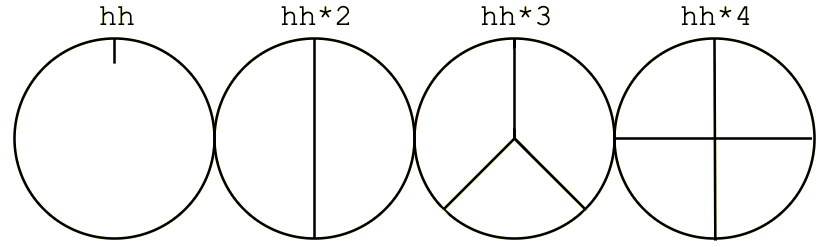
The sounds themselves are short names for folders of samples that come with SuperDirt. Some common ones to start with are:
bd: bass drumsd: snare drumhhorhat: hi-hatcporclap: clap
Activity (5 minutes):
Try replacing the pattern above. Experiment with different sequences of these samples to get a feel for how the timing works. For example:
d1 $ s "bd sd bd sd"d1 $ s "hh hh hh hh"d1 $ s "cp ~ cp ~"(The~creates a rest or silence, which we'll cover next).
An Introduction to Mini-Notation
The string "bd sd bd sd" is our first encounter with Tidal's mini-notation. This is a compact, powerful "domain-specific language" (DSL) embedded within Haskell, designed specifically for expressing musical patterns. Mastering it is key to live coding.
Let's explore some of the most essential operators for creating rhythms.
Silence: ~
As you saw above, the tilde character ~ creates a rest. It holds a place in the sequence but triggers no sound.
-- A typical synth-pop or disco beat
d1 $ s "bd ~ sd ~ bd ~ sd ~"
Subdividing Steps: [ ]
Square brackets allow you to fit multiple events into the time of a single step. This is how you create faster rhythms like 16th notes.
-- Plays two hi-hats in the time of the first step, and one in the third.
d1 $ s "[hh hh] ~ hh ~"
You can nest these indefinitely to create very rapid, complex subdivisions.
Repeating Steps: *
The asterisk * is a multiplier. It subdivides a single step into multiple, repeated events. This is a shorthand for writing out subdivisions in brackets.
-- These two lines produce the exact same rhythm:
d1 $ s "[hh hh hh hh]"
d1 $ s "hh*4"
Combining these gives you a lot of rhythmic power. A classic "Amen break" can be sketched out like this:
d1 $ s "bd ~ [bd sd] sd ~ bd ~ [sd sd]"
Selecting Different Samples: :
Most sample folders (bd, sd, etc.) contain multiple variations of that sound. You can select a specific one using a colon : followed by a number. The numbering starts from 0.
-- Plays four different hi-hat samples from the 'hh' folder
d1 $ s "hh:0 hh:1 hh:2 hh:3"
Tidal is forgiving; if you ask for a sample that doesn't exist (e.g., hh:99), it will "wrap around" and pick one that does. This is useful for creating variation without knowing exactly how many samples are in a folder.
Now is a good time to read the official documentation for the concepts we've just discussed. This will solidify your understanding and serve as a reference for your own experiments.
To get a comprehensive overview of the mini-notation, let's turn to the official documentation. This is your primary reference for all the symbols you can use to build patterns.
Read the introduction and then focus on the following sections under 'The mini-notation in depth': 'Rests' (~), 'Pattern grouping' ([]), 'Step repetition' (*), and 'Sample Selection' (:). The 'Mini-notation table' at the top is also an excellent quick reference.
Activity (10 minutes):
Now it's your turn to compose. Using bd, sd, hh, and the mini-notation operators ~, [], *, and :, try to create a beat for one of your target genres:
- Techno/House: Start with a four-on-the-floor kick (
bd bd bd bd) and add off-beat hi-hats. - Drum and Bass: These beats are often faster and more syncopated. You'll likely use more subdivisions with
[]and*.
Try to create a one-bar loop that you find interesting. Don't worry about layering sounds yet; we'll cover that in the next lesson. For now, put all the sounds on the single d1 line.
Example idea: d1 $ s "[bd hh] hh sd hh"
Under the Hood: From String to Pattern
Given your background, you're probably curious about what's really happening when Tidal processes a string like "bd sd". The mini-notation is syntactic sugar; it's parsed by a component of Tidal into a more fundamental Haskell data structure called a Pattern.
A line like d1 $ s "bd sd" gets turned into a ControlPattern. This is essentially a pattern of dictionary-like objects called ValueMaps. Each ValueMap holds key-value pairs that correspond to the parameters of a sound event.
The s function creates a ValueMap for each event with a single key, "s", whose value is the sample name you provided.
s "bd sd"becomes a pattern containing two events.- First event's
ValueMap:{"s": "bd"} - Second event's
ValueMap:{"s": "sd"}
- First event's
This structure is what allows you to add other parameters like volume (gain) or panning (pan), which we'll explore in detail later.
The following reading provides a deeper, code-level explanation of this process. It's not essential for making music, but it provides a solid conceptual model of the system's architecture.
Your background in computer science and programming languages might make you curious about what's happening behind the scenes. This resource gives a great explanation of how the mini-notation strings are parsed into Haskell's core pattern structures.
Read the sections 'Mini-Notation' and 'ControlPattern and ValueMap'. Pay attention to how a string like "bd sd" is parsed and how the s function maps this to a ControlPattern where each event is a dictionary-like ValueMap containing the key 's'. This is analogous to how a compiler's frontend parses source code into an abstract syntax tree.
Understanding this underlying model of patterns as streams of events with associated data is incredibly powerful and is a core concept in functional reactive programming (FRP), which heavily influences Tidal's design.
Conclusion
In this lesson, you've taken the first and most important step from setup to creation. You can now compose and play your own rhythmic ideas in Tidal Cycles.
Key Takeaways:
- The
d1 $ s "..."syntax is the primary way to play sequences of drum samples. - A cycle is the main unit of time, and events in a mini-notation string are distributed evenly across it.
- The mini-notation is a powerful DSL for expressing rhythm, using operators like
~(rest),[](subdivision),*(repetition), and:(sample selection). - Under the hood, mini-notation strings are parsed into a
ControlPattern, which is a sequence of events, each with aValueMapof parameters.
You've built a solid foundation. You can already create a wide variety of beats with just these simple tools.
Next Lesson Preview:
In our next session, we'll break free from the single pattern limitation. You'll learn how to layer multiple patterns using stack to build a full drum kit with independent parts. We'll also introduce functions like fast and slow to manipulate pattern speed and the $ operator to control effects and parameters, bringing your beats to life.