Recommended resources
The freely available resources this lesson will direct you to.
Hello! Welcome back to our course on real estate investment analysis.
In our previous lessons in this module, we've systematically broken down investment risk. We started with sensitivity analysis to see how individual variables affect our returns, visualized this with tornado diagrams, and created best/base/worst-case scenarios. Most recently, we built a Monte Carlo simulation to generate a full probability distribution of outcomes.
Today, we'll consolidate these concepts in a practical capstone exercise. Our learning outcome is to write Python code to perform sensitivity and scenario analysis on a property's returns. While the Monte Carlo simulation gave us a broad view of possibilities, today's analysis will provide targeted insights into which specific factors drive risk and what happens under a few key "stories" about the future. This integrated script will be a powerful tool in your analysis arsenal.
1. Setting the Stage: From Concepts to Code
Before we write any code, it's crucial to have a clear framework. Sensitivity and scenario analyses rely on a core financial model and a structured set of assumptions. As a software engineer, you know the value of well-defined inputs and reusable functions.
Let's review a great guide on how to structure this type of analysis.
How to Do Sensitivity Analysis with ChatGPT
This article from Graphed, 'How to Do Sensitivity Analysis with ChatGPT', provides an excellent, practical walkthrough. While it uses an e-commerce example, the methodology is universal. It outlines the exact steps we'll be implementing in Python.
Please read 'Step 1: Define Your Core Model' and 'Step 2: Generate Scenarios with ChatGPT'. Focus on how a base model is defined and then expanded with best-case and worst-case scenarios for key variables. This is the logical foundation for our script.
As the article demonstrates, the first step is to establish our base case. We'll use the same property parameters from our previous lessons to maintain continuity.
2. Building the Analysis Script in Python
Let's start by setting up our core components in Python: the financial model function and our input assumptions, structured for easy manipulation. We'll use a dictionary to hold our base case assumptions, which makes it simple to modify them for our different analyses.
import numpy as np
import matplotlib.pyplot as plt

# --- 1. Core Financial Model ---
def calculate_npv(assumptions):
    """
    Calculates NPV based on a dictionary of assumptions.
    """
    annual_rent = assumptions['monthly_rent'] * 12
    # Operating expenses are a percentage of Gross Rental Income (pre-vacancy)
    op_ex = assumptions['opex_ratio'] * annual_rent

    # Calculate NOI
    noi = annual_rent * (1 - assumptions['vacancy_rate']) - op_ex

    # Cash flows for the holding period
    cash_flows = [noi] * assumptions['hold_period']

    # Reversion value (sale price)
    sale_price = noi / assumptions['exit_cap_rate']
    cash_flows[-1] += sale_price

    # Combine initial investment with future cash flows
    all_cash_flows = [-assumptions['purchase_price']] + cash_flows

    return np.npv(assumptions['discount_rate'], all_cash_flows)

# --- 2. Base Case Assumptions ---
base_case = {
    'monthly_rent': 5000,      # €
    'vacancy_rate': 0.05,      # 5%
    'opex_ratio': 0.35,        # 35% of GRI
    'exit_cap_rate': 0.06,     # 6%
    'purchase_price': 1_000_000, # €
    'discount_rate': 0.08,     # 8%
    'hold_period': 5           # years
}

# Calculate and print the base case NPV
base_npv = calculate_npv(base_case)
print(f"Base Case NPV: {base_npv:,.2f}€")
2.1. Scenario Analysis
Now, let's implement the scenario analysis. We'll create two new dictionaries, one for a "worst case" and one for a "best case", by modifying the base case assumptions. This directly mirrors the process described in the article you just read.
# --- 3. Scenario Analysis ---

# Define Best and Worst Case scenarios by overriding base case values
# Using .copy() ensures we don't alter the original base_case dictionary
worst_case = base_case.copy()
worst_case.update({
    'monthly_rent': 4500,     # Rent is lower
    'vacancy_rate': 0.10,     # Vacancy is higher
    'exit_cap_rate': 0.07     # Exit cap rate is higher (lower sale price)
})

best_case = base_case.copy()
best_case.update({
    'monthly_rent': 5500,     # Rent is higher
    'vacancy_rate': 0.03,     # Vacancy is lower
    'exit_cap_rate': 0.05     # Exit cap rate is lower (higher sale price)
})

# Calculate NPV for each scenario
worst_npv = calculate_npv(worst_case)
best_npv = calculate_npv(best_case)

# Print a summary table
print("\n--- Scenario Analysis Results ---")
print(f"{'Scenario':<12} | {'NPV (€)':>15}")
print("-" * 30)
print(f"{'Worst Case':<12} | {worst_npv:15,.2f}")
print(f"{'Base Case':<12} | {base_npv:15,.2f}")
print(f"{'Best Case':<12} | {best_npv:15,.2f}")
This simple analysis gives you a clear, quantitative range of potential outcomes based on three plausible narratives for the future.
3. Sensitivity Analysis and Tornado Diagrams
While scenario analysis is useful, it doesn't tell us which of those variables is the most critical. Is our project's success more sensitive to a change in rent or a change in the exit cap rate? This is where sensitivity analysis shines.
Our goal is to create a Tornado Diagram, which visually ranks the variables by their impact on our final NPV.
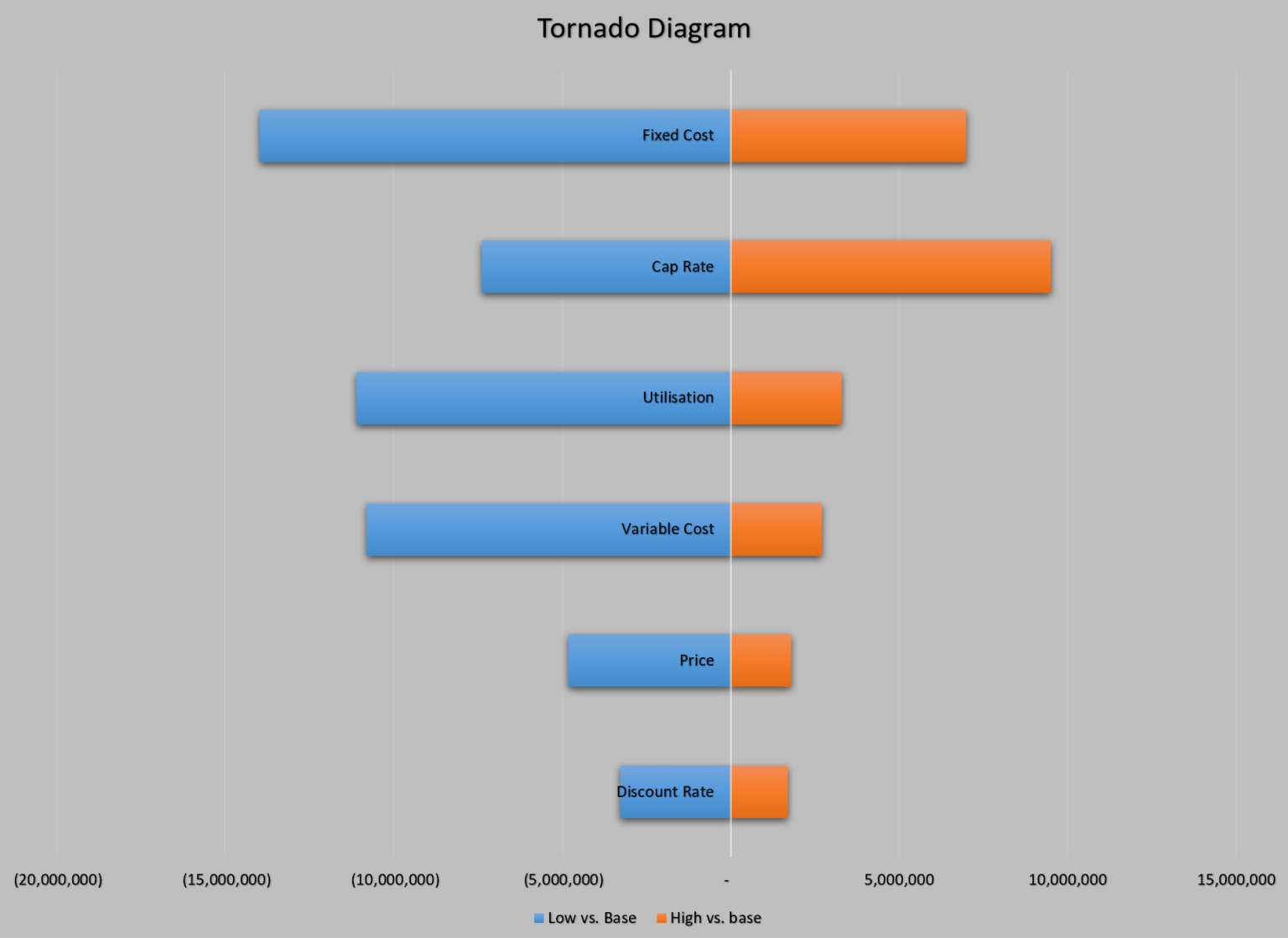
To build this, we'll systematically "flex" each key variable up and down from its base case value, holding all others constant, and record the change in NPV.
How to Do Sensitivity Analysis with ChatGPT
Let's return to the 'How to Do Sensitivity Analysis with ChatGPT' article. This time, we'll focus on the part that explains how to create a Tornado Chart using Python.
Please read 'Step 4: Go Deeper with Two-Way and Tornado Charts'. Pay close attention to the description of a Tornado Chart and the sample prompt for generating a Python script. This is the exact logic we will now implement.
Now, let's write the code to perform this analysis and generate the plot.
# --- 4. Sensitivity Analysis & Tornado Chart ---

print("\n--- Performing Sensitivity Analysis ---")

# Variables to test and the percentage to flex them by
variables_to_test = {
    'monthly_rent': 0.10,   # +/- 10%
    'vacancy_rate': 0.20,   # +/- 20% (relative, e.g., 5% -> 4% or 6%)
    'exit_cap_rate': 0.10,  # +/- 10% (relative, e.g., 6% -> 5.4% or 6.6%)
    'opex_ratio': 0.10      # +/- 10%
}

sensitivity_results = {}

for var, flex in variables_to_test.items():
    # Low scenario
    low_assumptions = base_case.copy()
    low_assumptions[var] *= (1 - flex)
    low_npv = calculate_npv(low_assumptions)

    # High scenario
    high_assumptions = base_case.copy()
    high_assumptions[var] *= (1 + flex)
    high_npv = calculate_npv(high_assumptions)

    # Store the NPV swing (difference between high and low)
    sensitivity_results[var] = high_npv - low_npv
    print(f"NPV swing for {var}: {sensitivity_results[var]:,.2f}€")

# Sort the results by the magnitude of the swing
sorted_sensitivity = sorted(sensitivity_results.items(), key=lambda item: abs(item[1]))
labels = [item[0] for item in sorted_sensitivity]
swings = [item[1] for item in sorted_sensitivity]

# Create the Tornado Chart
fig, ax = plt.subplots(figsize=(10, 6))
# This is a horizontal bar chart
y_pos = np.arange(len(labels))
ax.barh(y_pos, swings, align='center')

ax.set_yticks(y_pos)
ax.set_yticklabels(labels)
ax.invert_yaxis()  # labels read top-to-bottom
ax.set_xlabel('Impact on NPV (€)')
ax.set_title('Tornado Diagram: Sensitivity of NPV to Key Variables')
ax.grid(axis='x', linestyle='--', alpha=0.6)

# Add a vertical line at zero
ax.axvline(0, color='black', linewidth=0.8)

plt.show()
When you run this complete script, the Tornado Chart will immediately show you which variable has the most significant impact on your investment's NPV. This is invaluable for knowing where to focus your due diligence efforts. For example, if rent is the most sensitive variable, you should spend more time validating your market rent assumptions.
Test your understanding!
Looking at the generated Tornado chart from the Python script, suppose the bar for exit_cap_rate is one of the longest, indicating high sensitivity. However, a higher cap rate is bad for your sale price, while a higher rent is good. How does our Tornado chart code handle this difference? Does a positive swing always mean a "good" impact?
Show answer
The code calculates the swing as high_npv - low_npv.
- For monthly rent, a higher rent (
high_assumptions) leads to a higher NPV, so the swing is positive. - For exit_cap_rate, a higher cap rate (
high_assumptions) leads to a lower sale price and thus a lower NPV. Thelow_assumptions(with a lower cap rate) produce a higher NPV. Therefore, the swinghigh_npv - low_npvwill be negative.
The chart correctly visualizes both positive and negative impacts relative to the base case. The length of the bar (its absolute value) indicates the magnitude of sensitivity, while its direction (positive or negative) shows whether the relationship is direct or inverse. So no, a positive swing does not always mean a "good" impact from the variable itself, but that increasing the variable has a positive impact on NPV.
For Further Exploration
The script we built today is a functional tool for analysis. To see how these concepts are applied in a more complex, interactive application, I encourage you to explore the following open-source project. Your software engineering skills will allow you to appreciate its structure and even contribute if you wish.
YannickBroich/Real-Estate-Cash-Flow-Simulator
The 'Real-Estate-Cash-Flow-Simulator' on GitHub is a fantastic example of a practical tool built with Python. It allows users to input various parameters and see multi-scenario analyses visually.
First, read the 'Overview' and 'Features' sections to understand what the application does. Note the 'Multi-Scenario Rent Analysis' feature. Then, read the 'How to Run Locally' section. I highly recommend you clone the repository and run the Streamlit app yourself. Experimenting with it will provide great practical insight.
Conclusion
Congratulations on completing this capstone lesson and Module 8! You've now built a comprehensive Python script that serves as a powerful decision-support tool, allowing you to quickly perform both scenario and sensitivity analysis on a potential real estate investment.
Key Takeaways:
- Scenario Analysis lets you compare a few distinct, plausible future outcomes (e.g., Worst, Base, Best Case) to understand the range of potential returns.
- Sensitivity Analysis isolates the impact of individual variables, identifying the key drivers of profit and risk for your investment.
- A Tornado Diagram is the standard visualization for sensitivity analysis, ranking variables by their impact on your target metric (like NPV).
- By structuring your code with a core model function and dictionaries for assumptions, you can create a flexible and powerful analysis script.
Preview of the Next Lesson:
We have now concluded our deep dive into pre-tax risk modeling. However, all the returns we've calculated so far are theoretical until the tax authority takes its share. In our next module, "Taxation of Spanish Real Estate Operations," we will begin the crucial work of modeling after-tax returns. We will start by learning to distinguish between IVA and ITP on property purchases in Spain and how to calculate these initial tax costs. This will be our first step in building a truly realistic financial model tailored to the Spanish market.