Recommended resources
The freely available resources this lesson will direct you to.
Hello! Welcome back to our course on asyncio.
In our previous lesson, we established the fundamental distinction between concurrency and parallelism. We saw that concurrency is about structuring a program to manage multiple tasks in overlapping time periods, while parallelism is about the simultaneous execution of those tasks.
Today, we build directly on that foundation. The goal of this lesson is to answer the critical question: When should you use a concurrency model like asyncio? To do this, we will learn to categorize computational tasks as either I/O-bound or CPU-bound. Understanding this distinction is the single most important factor in deciding whether asyncio is the right tool for the job.
1. Defining I/O-Bound and CPU-Bound Tasks
Every task a program performs is ultimately limited by some resource. The two most common limiting resources are the speed of input/output (I/O) devices and the processing power of the CPU.
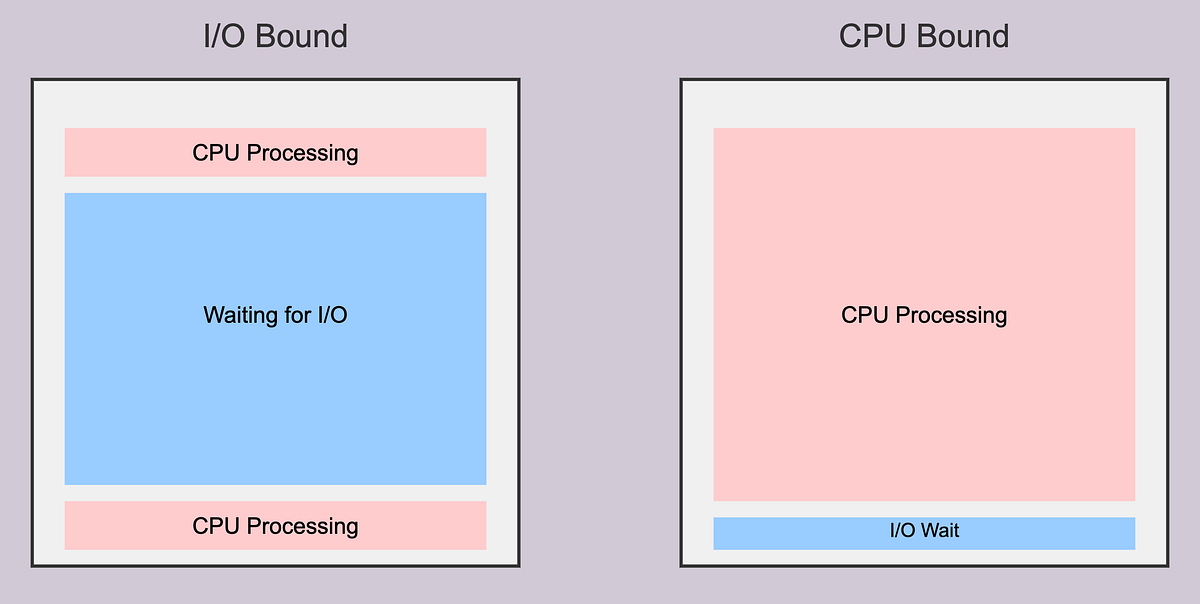
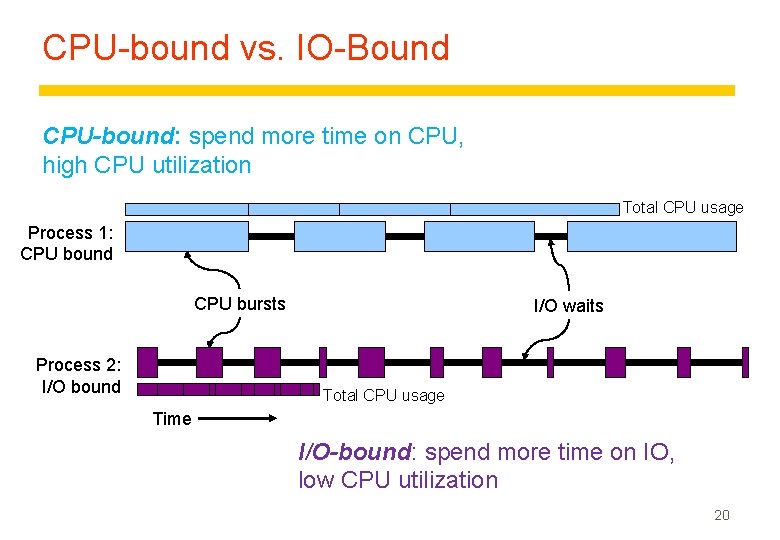
- I/O-Bound Tasks: These are tasks that spend the majority of their time waiting for an input/output operation to complete. The program's execution speed is bound by the speed of the I/O subsystem (e.g., network, disk, database).
- CPU-Bound Tasks: These are tasks that spend the majority of their time performing computations. The program's execution speed is bound by the speed of the CPU.
To start, please read the brief introductory section of the following article, which provides clear definitions.
Demystifying Python Concurrency: IO-Bound vs. CPU- ...
This article, 'Demystifying Python Concurrency' by Shane Zhang, begins with a concise definition of I/O-bound and CPU-bound tasks.
Read the section titled 'Understanding IO-Bound and CPU-Bound Tasks'.
The images below provide a clear visual representation of this difference.
In the context of your experience:
- I/O-bound operations are ubiquitous in financial systems: waiting for a FIX message acknowledgement, fetching data from a Bloomberg API, querying a time-series database like Kdb+, or writing trade logs to a disk.
- CPU-bound operations would include pricing a derivative with a Monte Carlo simulation, running a large-scale econometric model for risk analysis, or backtesting a high-frequency trading strategy on historical tick data.
2. The asyncio Model: Excelling at "Hurry Up and Wait"
asyncio is designed to optimize the performance of I/O-bound applications. It achieves this through a model called cooperative multitasking, managed by an event loop.
When an asyncio task encounters an I/O wait (like a network request), it can explicitly tell the event loop, "I'm going to be idle waiting for data. You can pause me and run something else in the meantime." The event loop then switches to another task that is ready to run. Once the I/O operation is complete, the event loop is notified and can resume the original task.
This is fundamentally different from a standard, synchronous program, where an I/O wait would block the entire application, wasting valuable CPU cycles.
The following article provides an excellent analogy and a concrete code example to illustrate this.
Python's asyncio: A Hands-On Walkthrough
The article 'Python's asyncio: A Hands-On Walkthrough' from Real Python explains the async model with a great analogy and a practical code comparison.
Please read two sections: 'Async I/O Explained': Focus on the Judit Polgár chess exhibition analogy. This perfectly illustrates how a single worker (the event loop) can handle many tasks efficiently by not waiting idly. 'Async I/O in Python With asyncio': Study the countsync.py and countasync.py code examples. Note how time.sleep() (blocking) leads to a 6-second execution, while await asyncio.sleep() (non-blocking) allows the tasks to run concurrently, finishing in just 2 seconds.
The key insight here is that asyncio doesn't make the I/O operations themselves faster. A network request still takes the same amount of time. Instead, asyncio makes the program more efficient by allowing it to do other useful work during those inevitable waiting periods.
3. The Bigger Picture: asyncio vs. Threading vs. Multiprocessing
So, if asyncio is for I/O-bound tasks, what about Python's other concurrency tools, threading and multiprocessing? Your MSc course on Multi-Agent AI likely touched on these, but let's place them in context, especially considering Python's Global Interpreter Lock (GIL).
Watch this short video for a primer on the GIL and its implications.
The Python Global Interpreter Lock - Explained
This video from Tech With Tim, 'The Python Global Interpreter Lock - Explained', is essential for understanding why Python's concurrency models behave the way they do.
Watch the segment from 00:00 to 04:39. Pay close attention to: How the GIL prevents multiple threads from executing Python code in parallel on multiple CPU cores. Why threading is still effective for I/O-bound tasks (the GIL is released during blocking I/O calls). How multiprocessing is used to bypass the GIL for true parallelism on CPU-bound tasks.
The video clarifies a critical point:
- For CPU-bound tasks,
threadingoffers no performance gain (and can even add overhead) because of the GIL. The only way to achieve true parallelism is withmultiprocessing. - For I/O-bound tasks, both
threadingandasyncioare effective. When a thread blocks on I/O, the OS can switch to another thread (pre-emptive multitasking). Withasyncio, the code explicitly yields control to the event loop (cooperative multitasking).asynciois generally more efficient and scalable for a very large number of I/O tasks due to its lower memory and context-switching overhead compared to threads.
A Practical Benchmark
Let's see this in action. The following resource runs benchmarks for both I/O-bound and CPU-bound tasks using all three concurrency models. The results are illuminating.
Demystifying Python Concurrency: IO-Bound vs. CPU- ...
The 'Demystifying Python Concurrency' article provides excellent code and benchmark results that empirically demonstrate which model is best for which task type.
Please read the following sections: 'IO-Bound Tasks: Downloading Multiple Web Pages': Review the code and the 'Expected Results'. Note how asyncio is by far the fastest. 'CPU-Bound Tasks: Calculating Squares of Numbers': Again, review the code and results. See how multiprocessing is the clear winner, while threading and asyncio perform no better than the single-threaded version. Finally, read 'When to Use Each Approach', the 'Summary Table', and the 'Conclusion' to solidify your understanding.
The benchmarks provide undeniable evidence for the main principle: use the right tool for the job. Using asyncio for a CPU-bound task or multiprocessing for a simple I/O-bound task will result in more complex code with worse performance.
Conclusion
In this lesson, we have dissected the critical difference between I/O-bound and CPU-bound tasks and mapped Python's concurrency models to each.
Key Takeaways:
- I/O-Bound tasks are limited by waiting for external resources (network, disk). Examples include API calls and database queries.
- CPU-Bound tasks are limited by computation speed. Examples include complex mathematical simulations and data processing.
asynciois the optimal choice for high-throughput I/O-bound applications. It uses a single-threaded event loop and cooperative multitasking to efficiently manage thousands of concurrent connections with low overhead.multithreadingis also suitable for I/O-bound tasks but is generally less scalable thanasyncio. It is ineffective for CPU-bound tasks due to the GIL.multiprocessingis the correct choice for CPU-bound tasks. It bypasses the GIL by creating separate processes, enabling true parallelism across multiple CPU cores.
Preview of the Next Lesson:
We now know why and when to use asyncio. The next logical step is to learn how. In our next lesson, we will write our first piece of asynchronous code by defining a coroutine with async def. We will explore its properties and see how it serves as the fundamental building block for all asynchronous operations in Python.