Recommended resources
The freely available resources this lesson will direct you to.
Welcome back. In our previous lesson, you successfully initialized a master orchestrator agent, dynamically equipping it with a set of tenant-specific sub-agents by treating them as tools. This was a critical step in establishing our hierarchical architecture. We created the connections but haven't yet passed any meaningful information through them.
Today, we will complete that wiring. The goal is to enable the orchestrator to not only invoke the correct sub-agent but also to pass the complete, resolved tenant context down the line. This ensures that every agent in the hierarchy, no matter how deep, operates with the correct permissions, configurations, and instructions for the specific tenant making the request. We'll explore the patterns that govern these interactions and implement the final code to make our agent hierarchy fully functional and context-aware.
The Missing Link: Propagating Tenant Context
In the orchestrator.ts file from our last session, we left a crucial piece of logic unfinished. Take a look at the execute function within the dynamic tool wrapper:
// from the previous lesson...
execute: async ({ input }) => {
  console.log(`Orchestrator delegating to ${agentInfo.name} with input: "${input}"`);

  // --- CRUCIAL ---
  // Here, you would pass the tenantContext down to the sub-agent's `run` call
  // if the sub-agent itself needs to be tenant-aware.
  // For now, we'll keep it simple.
  const { finalResponse } = await agentDefinition.run({ input }); // Sub-agent is context-free!

  return finalResponse;
},
As the comment indicates, the sub-agent is invoked in a vacuum. It receives the task (input) but has no idea which tenant it's working for. This is a significant limitation. What if the researchAgent needs to use a web search tool that requires a tenant-specific API key? Or what if its instructions need to change based on the tenant's subscription plan?
To solve this, we must pass the tenantContext object from the orchestrator's scope down to the sub-agent's run call. The Vercel AI SDK is designed for exactly this kind of context propagation.
Implementing Context-Aware Sub-Agents
The process involves two main changes:
- Orchestrator: Modify the
executefunction to pass thetenantContextin theoptionsparameter of the sub-agent'sruncall. - Sub-Agent: Modify the sub-agent's definition to accept these options via
callOptionsSchemaand use them within its ownprepareCallfunction.
This creates a chain of context-awareness. Let's see it in code.
First, we update the execute block in orchestrator.ts. The tenantContext is already in scope within prepareCall, so we just need to pass it along.
// src/agents/orchestrator.ts (inside prepareCall)

// ... inside the loop creating tools ...
execute: async ({ input }) => {
  console.log(`Orchestrator delegating to ${agentInfo.name} with input: "${input}"`);

  // Pass the tenantContext down to the sub-agent's run call
  const { finalResponse } = await agentDefinition.run({
    input,
    options: tenantContext, // <<< THE CRUCIAL ADDITION
  });

  return finalResponse;
},
// ...
Next, we update the researchAgent in sub-agents.ts to receive and use this context.
// src/agents/sub-agents.ts (New implementation)

import { ToolLoopAgent } from 'ai';
import { openai } from '@ai-sdk/openai';
import { z } from 'zod';
import { TenantContext } from '@/services/TenantService';

// Define the schema for the options the sub-agent will receive
const tenantContextSchema = z.custom<TenantContext>();

export const researchAgent = new ToolLoopAgent({
  model: openai('gpt-4-turbo'), // A default model
  callOptionsSchema: tenantContextSchema, // Tell the agent to expect tenant context

  // Give the sub-agent its own prepareCall to become tenant-aware
  prepareCall: async ({ options: tenantContext, ...settings }) => {
    console.log(`ResearchAgent preparing for tenant: ${tenantContext.tenantId}`);

    // Example of dynamic configuration inside the sub-agent:
    // Maybe enterprise tenants get a more powerful model for research.
    const model = tenantContext.plan === 'enterprise'
      ? openai('gpt-4o')
      : openai('gpt-4-turbo');

    // The sub-agent's instructions could also be dynamically loaded
    const instructions = `You are a world-class research analyst for tenant ${tenantContext.tenantId}. Use your tools to find and synthesize information to answer the user query. Adhere to all policies for the ${tenantContext.plan} plan.`;

    // In a future lesson, this is where the sub-agent would load its own tenant-specific tools.
    const tools = { /* ... web search tools etc. based on tenantContext ... */ };

    return {
      ...settings,
      model,
      instructions,
      tools,
    };
  },
});

// The dataAnalysisAgent would be structured similarly
export const dataAnalysisAgent = new ToolLoopAgent({
  // ... similar implementation with callOptionsSchema and prepareCall
});

export const agentRegistry = {
  researchAgent,
  dataAnalysisAgent,
};
Now, the tenantContext flows from the initial API call all the way down to the deepest worker agent, allowing every level of the hierarchy to adapt its behavior accordingly.
Understanding Multi-Agent Workflow Patterns
What you've just built is a practical implementation of a common and powerful design pattern in agentic systems. Let's put a name to it and explore the concepts behind it.
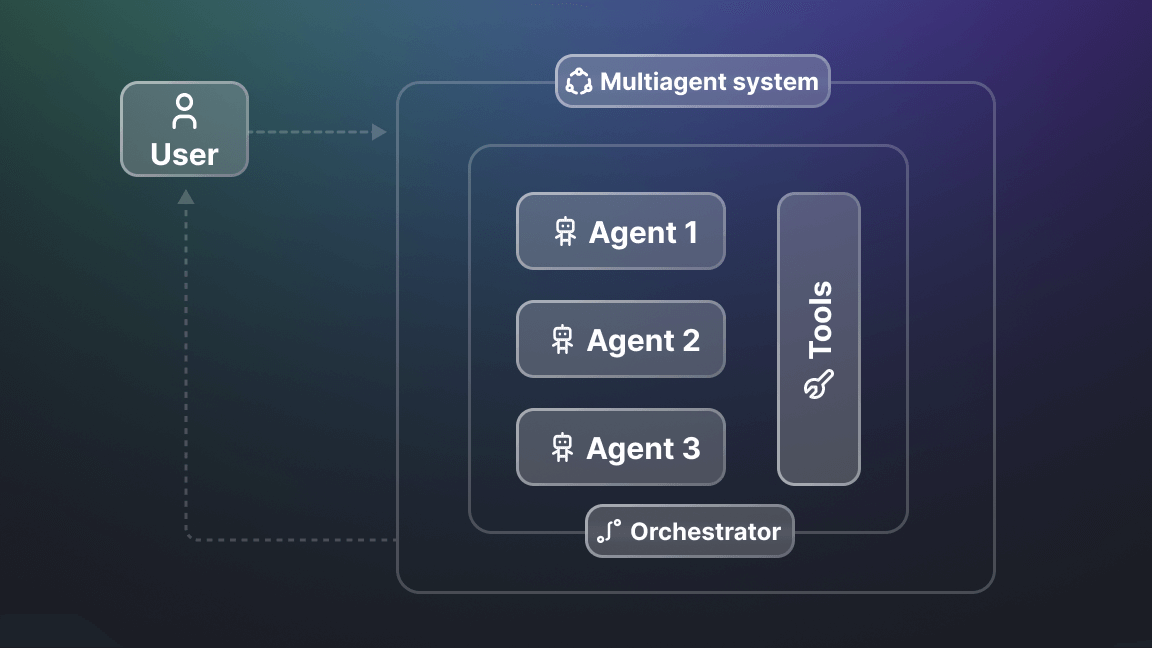
This architecture is often called the Orchestrator-Worker pattern. The orchestrator's job is not to perform tasks but to understand the overall goal and delegate sub-tasks to specialized workers.
The Vercel AI SDK documentation provides a concise overview of the Orchestrator-Worker pattern.
Please read the section Orchestrator-Worker. Notice how the orchestrator first generates an implementationPlan (its routing decision) and then the workers execute the file changes. This is analogous to our orchestrator deciding which sub-agent to call.
A key function of the orchestrator is routing or dispatching. Based on the user's prompt, it must select the correct sub-agent. The dynamic system prompt you created in the last lesson, which lists the available agents and their descriptions, is what enables the orchestrator's underlying LLM to make this routing decision effectively.
Building AI Agent Workflows With Vercel's AI SDK
This guide offers a great analogy for the routing pattern.
Read the section on Routing. The author compares the dispatcher agent to a call center operator who routes you to the correct department (Tech, Account, or Finance). Our orchestrator performs this same function for our tenant's available sub-agents.
This concept of a coordinator managing a team of specialists is a fundamental pattern, implemented across various agent-building frameworks. Seeing it in another context can solidify your understanding.
OpenAI's New TypeScript Agents SDK
This video on OpenAI's Agents SDK demonstrates the exact same hierarchical pattern we are building.
Watch the segment from teams of agents. The presenter creates a coordinator agent and provides it with specialist agents (a Data Collector and an Analyst). The coordinator's instructions explicitly define when to hand off tasks to each specialist. This mirrors how our orchestrator uses its system prompt to decide which "tool" (sub-agent) to invoke.
The Vercel AI SDK provides the primitives to build these complex systems. The term "harness engineering" is sometimes used to describe this process of building the infrastructure around the LLM to guide it, which is precisely what we are doing.
The "Build an Agent with Vercel" video touches on this broader concept of "harnessing" the model.
Watch the clip from harness engineering. The speaker discusses how we're moving beyond just prompt engineering to building a "harness" that orchestrates multiple model calls to achieve a task in a reliable way. Our orchestrator is the central piece of this harness.
The Complete End-to-End Flow
Let's trace a request through our fully wired system:
- A POST request hits
/api/chatcontaining a user message and atenantId. - Your API route code calls
TenantService.resolveContext(tenantId), fetching thetenantContext(e.g., plan, available sub-agents). - The API route invokes the main agent:
orchestrator.run({ messages, options: tenantContext }). - Orchestrator
prepareCallruns: It uses thetenantContextto generate a system prompt like "You are an orchestrator. You have access toresearchAgentanddataAnalysisAgent..." and dynamically creates the correspondingtooldefinitions. - The orchestrator's LLM processes the user message and the system prompt. It decides the
researchAgentis the best tool and outputs a tool-call request with the appropriate input query. - The orchestrator's
tooldefinition forresearchAgentis executed. Itsexecutefunction callsresearchAgent.run({ input: '...', options: tenantContext }). The context is passed down! - Sub-agent
prepareCallruns: TheresearchAgentreceives thetenantContext. ItsprepareCallfunction runs, potentially selecting a more powerful model or loading tenant-specific tools based on the context. - The
researchAgentexecutes its own agentic loop to fulfill the research task. - The
researchAgentproduces afinalResponse. - This response is returned from the
executefunction and becomes the result of the tool call for the orchestrator. - The orchestrator receives this result and continues its process, which is the focus of our next lesson.
You have now fully connected the dots, enabling context to flow seamlessly through your agent hierarchy.
Conclusion
In this lesson, you have successfully wired the orchestrator's task routing to its sub-agents, completing the delegation mechanism. You addressed the critical missing piece from the previous lesson by propagating the tenantContext from the orchestrator down to the worker agents, making the entire hierarchy tenant-aware. You also contextualized your implementation by exploring established multi-agent patterns like Orchestrator-Worker and Routing.
Key Takeaways:
- Context Propagation is Key: For a hierarchical system to be truly multi-tenant, the tenant context must be passed down at each level of delegation.
- Recursive Agent Design: Worker agents can be designed just like orchestrators, using
callOptionsSchemaandprepareCallto dynamically configure themselves based on the context they receive. - Orchestration as Routing: A primary function of the orchestrator is to act as a smart router, using its instructions and tool descriptions to delegate tasks to the appropriate specialist.
The sub-agent now executes and returns a result to the orchestrator. But what happens next? In our next lesson, we will focus on the final step of the workflow: processing the aggregated result from the orchestrator and returning it as the final API response.