Recommended resources
The freely available resources this lesson will direct you to.
- What is RAG? Build a Local AI Agent with LangChain + Ollama (Full Tutorial)www.youtube.com
- How to build AI-apps with React + FastAPI (full beginner tutorial)www.youtube.com
- # I Built a RAG Document Assistant with FastAPI, React, FAISS and Ollama - DEV Communitydev.to
- Agentic Retrieval and Agents and Tools with Foundry Local Overview - Azure Arc | Microsoft Learnlearn.microsoft.com
Hello again. Last lesson traced sensitive data through files, extracted text, embeddings, logs, and answers. Now we can give those data flows a concrete home: an architecture for a document assistant that runs on your Mac.
By the end of this lesson, you should be able to diagram six connected parts—React, a Python API, a document pipeline, a search index, an agent runtime, and a local language model—and explain what crosses each connection. We’ll design the system rather than implement it today. Allow about 40 minutes, including the short resource study and time to inspect the diagram.
Separate preparing documents from answering questions
A document assistant does two different kinds of work. Ingestion prepares a file so it can be found later. Querying uses that prepared material to find evidence and, when appropriate, generate an answer. Keeping these paths distinct prevents a common architectural mistake: drawing a user’s question as though it must pass through PDF extraction and indexing every time.
The short account below gives you a reference point for those two paths.
# I Built a RAG Document Assistant with FastAPI, React, FAISS and Ollama - DEV Community
Read this DEV Community project's brief workflow to distinguish document preparation from answering a question. We will use its shape, not copy its choice of search index.
In “What does it do?”, read the explanation, then inspect the simplified flow immediately below it, ending at “Answer + sources.” Notice that extraction and embeddings prepare searchable material; relevant chunks are selected before Ollama receives context.
Here is the same distinction in a local illustration. Inspect where documents enter, where a query enters, and where the two meet.
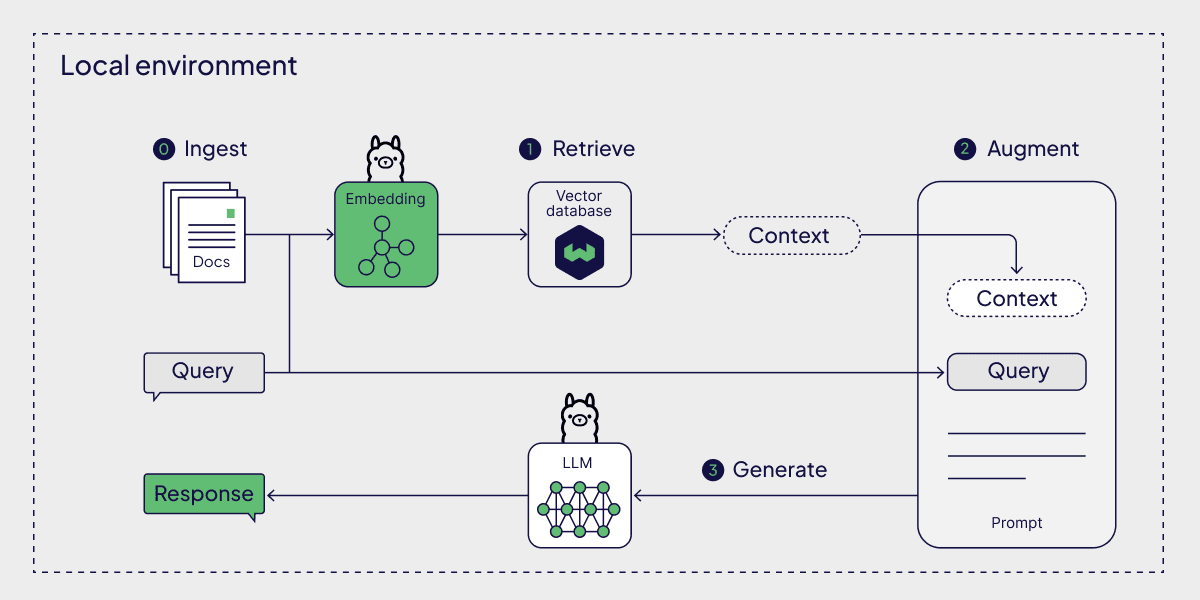
The picture simplifies an important detail: an embedding model is used to represent document chunks and to represent a query for semantic search. That model need not be the same as the language model that writes an answer. Neither model should be mistaken for the search index: the index stores searchable representations and their associated records; the language model generates text from the prompt it is given.
Give each component a job
The following architecture is a proposed topology, not a claim that its protections already exist. Its connections show who may communicate; the ingestion and query behavior will be described separately beneath it.
                     LOCAL DEVICE: ONE MAC
  +------------------------------------------------------------+
  |  [React client in browser]                                 |
  |              | local HTTP                                   |
  |  [Python FastAPI: request and response boundary]           |
  |              | internal dispatch                            |
  |         +----+--------------------------+                   |
  |         |                               |                   |
  |  [Document pipeline]              [Agent runtime]          |
  |         |       |                       |       |           |
  |  [Managed    [Chroma search index]------+   [Ollama:        |
  |   library]    chunks, vectors, pages         local LLM]      |
  |         |       and document IDs                             |
  |  [Manifest: identity, provenance, status]                 |
  +------------------------------------------------------------+

  Inputs to the document pipeline: explicitly selected PDFs and photos.
  Shared local service: an embedding model for chunks and search queries.
This diagram draws logical responsibilities. The pipeline and agent runtime could initially be Python modules inside one API process; drawing them separately does not require separate servers. The boundary between their jobs still matters. The pipeline is allowed to prepare selected documents and update the index. The runtime is allowed to request searches and assemble answers, but should not gain unrestricted access to the Mac’s filesystem merely because a model suggests it.
Here is what each box means for this course:
| Component | Responsibility | Important limit |
|---|---|---|
| React client | Accept a selected file or question; show processing status, document matches, answers, and citations. | It does not read the index or call Ollama directly. A browser-supplied path is not authority to open a file. |
| FastAPI service | Receive requests, validate them, dispatch work, and return limited results. | It is the application’s gate to private data, not a pass-through for arbitrary model requests. |
| Document pipeline | Import files into a controlled library; extract text or run local OCR; retain page references; prepare chunks and embeddings. | It processes selected inputs and records failures rather than silently treating every file as valid. |
| Search index | Persist searchable chunks, vectors, and metadata such as document IDs and page numbers. | A match is evidence to inspect, not permission to disclose every stored chunk. |
| Agent runtime | Coordinate a query, permitted search operations, evidence selection, and response construction. | This can start as a deterministic workflow; a model does not need to choose every step. |
| Local language model | Generate text from a question and permitted retrieved context. | It neither searches disk on its own nor grants access to a document. |
The managed library and manifest are drawn alongside the required six components because the index cannot be the only record of a document. A manifest records what was imported, where the managed copy is, and whether processing succeeded. The library retains the document itself so a cited page can eventually be previewed. Later modules will define their fields and implementation.
A second architecture image shows how some of these pieces are often deployed together:

Treat that image as a comparison, not a specification. In particular, its Ollama connection does not mean every API request needs language-model inference. A request for matching document cards might use search alone.
Trace the two paths through the diagram
Consider importing a photographed receipt. The React client supplies the selected file to an import endpoint; the API checks the request and hands the file to the document pipeline. The pipeline keeps a controlled copy and records its identity and processing status. Because a photo has no embedded PDF text to extract, local OCR may be needed. The resulting text is associated with the correct source and page or image; chunks and their local embeddings are then written to Chroma with document identifiers.
That is the ingestion path. The exact validation, OCR, chunking, and index-writing methods belong to later modules. What matters in today’s diagram is that both the managed file and its derived searchable records have a place, and that failed processing can be represented rather than mistaken for a successfully indexed document.
Now consider a question such as, “Find the receipt for the glasses I bought last spring.” The React client sends the question to FastAPI. The runtime prepares a search request; semantic search can use the local embedding model, while metadata or keyword constraints may narrow candidates. The index returns matches with document and page references. The runtime can return ranked documents directly or provide selected evidence to Ollama for a written answer. FastAPI returns a structured response that React can distinguish as retrieved documents, generated text, and citations.
The short video below shows the React–FastAPI connection and an API handing a question to RAG logic. Its demonstration indexes websites and uses a different vector store, so focus on component responsibilities rather than reproducing its endpoints or payloads.
How to build AI-apps with React + FastAPI (full beginner tutorial)
Watch “How to build AI-apps with React + FastAPI” by Johannes Jolkkonen | Funktio AI for the boundary between the browser, API routes, and retrieval code.
Watch API and RAG for the question endpoint and its returned answer and documents. Then watch React to API for the local HTTP request and browser-origin discussion. The example returns full text chunks and discusses CORS as though it grants client privileges; for private records, design a narrower response. CORS is a browser restriction, not authentication or authorization.
Notice why the API sits between React and the runtime even when everything runs on one Mac. It decides which operation is requested and what the browser receives. A useful response contract could include a request ID, ranked document IDs with safe display metadata, and any generated answer with citations to verified document-page references. It need not send raw vectors, an unrestricted file path, or every retrieved passage to the browser.
Mark the boundaries your diagram must not hide
“Local-first” means that normal document processing, storage, retrieval, and inference are designed to run on the device. It does not mean there are no trust boundaries. The browser can send malformed requests. A selected PDF can contain hostile instructions. Extracted text can be highly sensitive even without its source file. Ollama’s output can be wrong or propose an action that the application must not perform.
On your diagram, the most consequential boundaries are these:
- Browser to API. Use a loopback-bound API for this single-device design. Validate requests at FastAPI; do not infer permission from the fact that a call came from a local browser or passed a CORS check. Authentication and session controls are planned for a later module.
- Selected file to document pipeline. Import an explicitly selected file into the controlled library. The pipeline should not treat a user-supplied path, extension, or document text as trustworthy. Its working files, failures, and logs also belong inside the privacy design.
- Pipeline and runtime to index. The pipeline writes derived records; the runtime reads matches through constrained search operations. Each match needs enough provenance—at minimum a document identity and page reference—to reconnect it to its source.
- Retrieved text to model prompt. A passage is evidence, not an instruction with application authority. The runtime controls the prompt and available operations; Ollama receives only the context selected for the request.
- Model output to browser or action. The API must not assume a generated citation is real or execute a proposed file operation simply because the model wrote it. Grounding and citation checks come later, but the architecture needs a place for them: the runtime and API, not React alone.
These boundaries connect directly to last lesson’s threat register. Restricted file access addresses T1; keeping document instructions out of tool authority addresses T2; limiting logs and response data helps with T5 and T6. T8 remains an operational check: “local” boxes in a diagram do not prove that dependencies, diagnostics, model downloads, or future integrations make no network requests. The no-egress requirement must eventually be tested.
One further connection is worth adding to a fuller project diagram: document preview. React should request a preview by managed document ID and page number. FastAPI should resolve that ID against permitted library records before serving the page. React should not receive a general-purpose endpoint that opens whichever absolute filesystem path it submits. The implementation of those checks comes later; today, reserve the API-to-library connection for this controlled purpose.
Carry this blueprint forward
You now have a local-first architecture with two distinct paths: document preparation populates a managed library, manifest, and searchable index; question handling searches that index and optionally asks a local model to produce a grounded answer. React presents the experience, while FastAPI mediates access. The agent runtime coordinates permitted work; it is not a synonym for the language model or a grant of filesystem authority.
Keep this diagram as a design blueprint rather than marking its planned controls as complete. In the next lesson, you’ll move from boxes to a running component: launching a quantized model with Ollama on the Mac and measuring memory use, latency, and output quality. That experiment will make the diagram’s “local model” box a concrete engineering choice.