Recommended resources
The freely available resources this lesson will direct you to.
Welcome back. Last lesson you ran a quantized model through Ollama and measured its memory use, latency, and answers. This lesson puts a small application boundary around that model: a FastAPI endpoint will request generation from Ollama, and your existing React project will display the response as it arrives.
Allow about 40–50 minutes. You’ll use only an invented prompt. By the end, you should be able to submit it in React, see output appear incrementally, and distinguish a completed response from an interrupted one. This is a connectivity demonstration—not yet a document-search or citation system.
One request, three components
The browser should talk to your Python API, not directly to Ollama. That gives the application one place to choose the model, validate input, and later add document retrieval and access controls. For now, the API will accept a short prompt and forward it to Ollama’s local /api/generate endpoint.
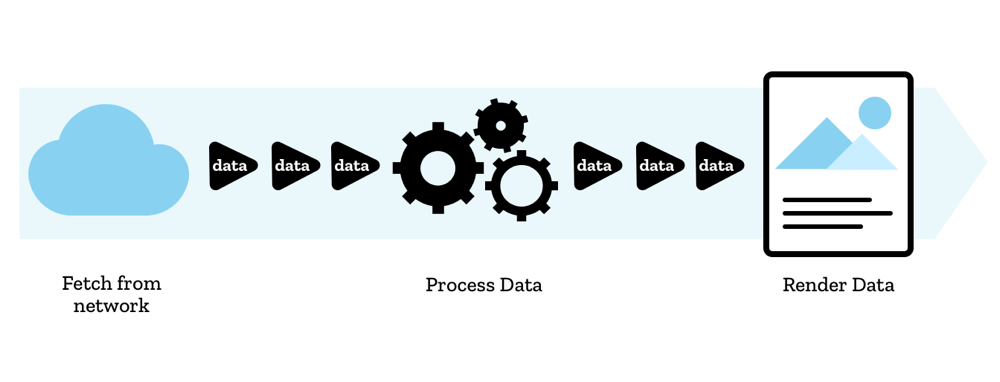
Streaming changes when the browser can use the answer. Rather than wait for Ollama to finish and return one large response, the API passes along pieces of generated text. The browser reads and renders those pieces while generation continues.
Watch the endpoint portion of Tech With Tim’s How To Build an API with Python (LLM Integration, FastAPI, Ollama & More). It establishes the basic FastAPI-to-Ollama boundary. His example returns a complete answer and passes a prompt in the URL; ours will stream and send the prompt in a JSON request body instead.
How To Build an API with Python (LLM Integration, FastAPI, Ollama & More)
Watch Tech With Tim create a minimal FastAPI endpoint that calls a locally running Ollama model. Focus on which component receives the HTTP request and which component actually runs the model.
Watch the endpoint, from the creation of main.py through extracting the model’s response. You can skip his Ollama installation steps; you completed those last lesson.
We’ll use newline-delimited JSON (NDJSON) for the response. Each line is one small event, such as generated text, completion, or an error. A line boundary matters because a browser network read is not guaranteed to contain exactly one event.
Build the local FastAPI endpoint
First, read FastAPI’s streaming guidance. Its example yields strings directly; our endpoint will yield complete JSON lines so that the client can recognize both text and completion. The note about blocking I/O explains why the code below uses a regular Python generator rather than blocking an async function while waiting for Ollama.
Read FastAPI’s Stream Data guidance for the reason to stream LLM output and the mechanics of yielding response chunks.
In “Use Cases,” read the use cases. In “A StreamingResponse with yield,” read the opening explanation, inspect the first /story/stream example, and note that FastAPI passes chunks through rather than turning them into JSON. Then, under “Files and Async,” read the blocking-I/O note. You can skip the custom PNG examples.
In a new backend directory—or an existing Python API directory that does not already define main.py—set up a virtual environment:
python3 -m venv .venv
source .venv/bin/activate
python -m pip install fastapi "uvicorn[standard]"
Create main.py there. Set OLLAMA_MODEL to the same model tag you tested last lesson; the code defaults to qwen2.5:7b, so you will need to change the environment variable if you chose qwen2.5:3b.
import json
import os
import urllib.error
import urllib.request

from fastapi import FastAPI, HTTPException
from fastapi.middleware.cors import CORSMiddleware
from fastapi.responses import StreamingResponse
from pydantic import BaseModel, Field

app = FastAPI()

# Change this to the exact origin shown by your React dev server if needed.
frontend_origin = os.getenv("FRONTEND_ORIGIN", "http://localhost:5173")
app.add_middleware(
    CORSMiddleware,
    allow_origins=[frontend_origin],
    allow_methods=["POST"],
    allow_headers=["Content-Type"],
)

model = os.getenv("OLLAMA_MODEL", "qwen2.5:7b")
ollama_url = "http://127.0.0.1:11434/api/generate"


class GenerateRequest(BaseModel):
    prompt: str = Field(min_length=1, max_length=500)


def frame(event_type: str, **fields: object) -> bytes:
    event = {"type": event_type, **fields}
    return (json.dumps(event, ensure_ascii=False) + "\n").encode("utf-8")


def generate_events(prompt: str):
    payload = {
        "model": model,
        "prompt": prompt,
        "stream": True,
        "keep_alive": "10m",
        "options": {
            "temperature": 0,
            "num_ctx": 2048,
            "num_predict": 120,
        },
    }
    request = urllib.request.Request(
        ollama_url,
        data=json.dumps(payload).encode("utf-8"),
        headers={"Content-Type": "application/json"},
    )

    try:
        # This is blocking network I/O, so the response uses a regular
        # generator, not an async generator that blocks the event loop.
        with urllib.request.urlopen(request, timeout=120) as upstream:
            for raw_line in upstream:
                if not raw_line.strip():
                    continue

                event = json.loads(raw_line)
                if not isinstance(event, dict) or event.get("error"):
                    raise ValueError("Invalid upstream event")

                text = event.get("response", "")
                if not isinstance(text, str):
                    raise ValueError("Invalid upstream text")

                if text:
                    yield frame("delta", text=text)

                if event.get("done") is True:
                    yield frame("done")
                    return

            raise ValueError("Upstream ended without completion")

    except (urllib.error.URLError, OSError, ValueError):
        # Do not send upstream diagnostics or prompt contents to the browser.
        yield frame(
            "error",
            message="Local model unavailable or stream interrupted.",
        )


@app.post("/api/generate")
def generate(body: GenerateRequest):
    prompt = body.prompt.strip()
    if not prompt:
        raise HTTPException(status_code=422, detail="Prompt cannot be blank")

    return StreamingResponse(
        generate_events(prompt),
        media_type="application/x-ndjson",
        headers={"Cache-Control": "no-store"},
    )
The API consumes Ollama’s streamed JSON lines, extracts each response fragment, and emits a simpler application-level event. Ollama’s final event signals done; our API passes that completion signal on separately. The React client therefore does not have to know Ollama’s response format.
Start Ollama as you did last lesson. From the directory containing main.py, run FastAPI bound to the loopback interface:
# Use the model you actually installed; change the value if necessary.
export OLLAMA_MODEL=qwen2.5:7b
python -m uvicorn main:app --host 127.0.0.1 --port 8000
In another terminal, test the API before involving React:
curl -N -sS http://127.0.0.1:8000/api/generate \
  -H "Content-Type: application/json" \
  -d '{"prompt":"Write three short sentences welcoming a user to a local app."}'
You should see lines resembling {"type":"delta","text":"..."} and, at the end, {"type":"done"}. The exact wording and number of lines depend on the model. curl -N prevents curl from buffering its display, making incremental arrival easier to observe.
A limitation worth noticing: once FastAPI has started a streamed response, a later Ollama failure cannot be converted into a new HTTP error status. This endpoint instead emits an error event and does not emit done. The client must treat that stream as incomplete even if it received some text.
Read the stream in React
MDN’s Fetch guide supplies the browser-side pieces: a POST with a JSON body, an explicit check of the HTTP status, and incremental decoding of the response body. Read those parts before adding the component.
Using the Fetch API - MDN Web Docs
Read MDN’s Using the Fetch API for how a browser sends the prompt and processes a response without waiting for its entire body.
Under “Making a request,” inspect “Setting the method,” then read Setting a body and “Setting headers” for JSON POST requests. Under “Streaming the response body,” read the streaming explanation, especially its decoded-stream example. Finally, under “Checking response status,” read the status warning: a failed HTTP status does not automatically make fetch() reject.
Add the following component to your existing React project as LocalModelDemo.jsx, adjusting its import location to match your project. This is plain React JavaScript; if your project uses TypeScript exclusively, adapt the file to your project’s TypeScript conventions.
import { useEffect, useRef, useState } from "react";

export default function LocalModelDemo() {
  const [prompt, setPrompt] = useState("");
  const [output, setOutput] = useState("");
  const [status, setStatus] = useState("idle");
  const [error, setError] = useState("");
  const [busy, setBusy] = useState(false);
  const controllerRef = useRef(null);

  useEffect(() => {
    return () => controllerRef.current?.abort();
  }, []);

  async function handleSubmit(event) {
    event.preventDefault();
    if (busy || !prompt.trim()) return;

    const controller = new AbortController();
    controllerRef.current = controller;
    setBusy(true);
    setOutput("");
    setError("");
    setStatus("streaming");

    let completed = false;

    try {
      const response = await fetch(
        "http://127.0.0.1:8000/api/generate",
        {
          method: "POST",
          headers: { "Content-Type": "application/json" },
          body: JSON.stringify({ prompt }),
          signal: controller.signal,
        }
      );

      if (!response.ok) {
        throw new Error(`API rejected the request (${response.status}).`);
      }
      if (!response.body) {
        throw new Error("The browser received no response stream.");
      }

      const reader = response.body
        .pipeThrough(new TextDecoderStream())
        .getReader();

      let pending = "";

      while (true) {
        const { value, done } = await reader.read();
        if (done) break;

        pending += value;

        // A network read may contain half a line or several lines.
        let newline;
        while ((newline = pending.indexOf("\n")) !== -1) {
          const line = pending.slice(0, newline).trim();
          pending = pending.slice(newline + 1);
          if (!line) continue;

          const message = JSON.parse(line);

          if (message.type === "delta") {
            setOutput((current) => current + message.text);
          } else if (message.type === "done") {
            completed = true;
          } else if (message.type === "error") {
            throw new Error(message.message || "The local model failed.");
          } else {
            throw new Error("Unexpected stream event.");
          }
        }
      }

      if (pending.trim()) {
        throw new Error("The stream ended with an incomplete event.");
      }
      if (!completed) {
        throw new Error("The stream ended without model completion.");
      }

      setStatus("complete");
    } catch (err) {
      controller.abort();
      setStatus("incomplete");
      setError(
        err.name === "AbortError"
          ? "Request cancelled; any displayed text is incomplete."
          : err.message || "The stream failed."
      );
    } finally {
      controllerRef.current = null;
      setBusy(false);
    }
  }

  return (
    <section>
      <h2>Local model test</h2>
      <form onSubmit={handleSubmit}>
        <label htmlFor="local-prompt">Prompt</label>
        <textarea
          id="local-prompt"
          value={prompt}
          onChange={(event) => setPrompt(event.target.value)}
          maxLength={500}
          rows={3}
        />
        <button type="submit" disabled={busy || !prompt.trim()}>
          {busy ? "Generating…" : "Generate"}
        </button>
        {busy && (
          <button
            type="button"
            onClick={() => controllerRef.current?.abort()}
          >
            Cancel
          </button>
        )}
      </form>

      <p>
        {status === "complete"
          ? "Finished — model output is still unverified."
          : status === "incomplete"
            ? "Incomplete draft — do not rely on this output."
            : "Model output (unverified)"}
      </p>
      {error && <p role="alert">{error}</p>}
      <pre style={{ whiteSpace: "pre-wrap" }}>{output}</pre>
    </section>
  );
}
Render <LocalModelDemo /> from an appropriate screen in your existing app, then start its usual development server. The component keeps a pending string because transport chunks and JSON-line boundaries are different things: the browser might deliver half of one event in a read, or multiple events together. It updates React state only after it has a complete line to parse.
The cancel button aborts the browser request. It makes the UI stop waiting, but it is not a guarantee that Ollama immediately stops work already in progress. Also, although output may appear incrementally, network and rendering buffers can combine several small fragments into one visible update.
Verify the boundary and diagnose failures
Open the React development page and submit the same harmless prompt used with curl. Look for these observable results:
- The browser’s Network panel shows a POST to
127.0.0.1:8000, not a request from React to Ollama’s port11434. - Text appears while the request is active, followed by “Finished — model output is still unverified.” Completion means the stream ended normally; it does not mean the answer is factually correct.
- Cancelling a longer response marks any displayed text incomplete. Stopping Ollama and trying again should also produce an error or incomplete state, not a silently “finished” answer.
If curl works but React reports a CORS error, compare your page’s exact origin—scheme, hostname, and port—with FRONTEND_ORIGIN. For example, http://localhost:5173 and http://127.0.0.1:5173 are different origins. Restart FastAPI with the origin your development server actually displays:
FRONTEND_ORIGIN=http://127.0.0.1:5173 \
  python -m uvicorn main:app --host 127.0.0.1 --port 8000
Use your actual port instead of 5173 if necessary. If curl fails too, check that FastAPI is running on port 8000, Ollama is running on port 11434, and OLLAMA_MODEL names a model you have pulled. A model that takes time to load may also delay the first visible fragment, as your cold-request measurement suggested last lesson.
Keep this demonstration local and use invented prompts. A loopback address limits where these particular services listen, but this endpoint does not yet provide authentication or permission checks. It has no document evidence to cite, and the unverified output should not be presented as an answer about personal records.
What you built
You now have a working path from a React form through FastAPI to a local Ollama model and back as a streamed response. The important contracts are explicit: a bounded JSON prompt goes in; delta, done, or error events come out; and the UI does not mistake a partial stream for a completed answer.
This completes the module’s local-AI foundation. Next, the course turns to document inventory and controlled ingestion—establishing which files belong in the managed library before any document text is sent through this model boundary.