Recommended resources
The freely available resources this lesson will direct you to.
Welcome back! In our last lesson on combinations, we developed a powerful backtracking template to generate unique subsets of a certain size. We touched upon the idea of stopping a recursive path early—for example, when a combination's sum already exceeded the target. Today, we're going to formalize and expand on that crucial concept: pruning.
This lesson is all about making our backtracking algorithms intelligent and efficient. Instead of blindly exploring every single possibility, we'll learn how to "prune" or cut off entire branches of the search tree as soon as we can prove they won't lead to a valid solution. This technique is often the difference between a solution that runs in seconds and one that times out. By the end of this lesson, you will be able to identify opportunities for pruning and integrate this optimization into your backtracking code.
The Essence of Pruning
Backtracking, at its heart, is a systematic exploration of a decision tree. A naive brute-force approach would explore this entire tree, generating every possible candidate solution, and only then checking if each one is valid. This is incredibly inefficient.
Pruning transforms this process. It introduces a validation check at every step of building a solution. If a partial candidate already violates a problem constraint, we know with certainty that no matter what choices we make from this point on, we will never arrive at a valid final solution. So, we simply abandon that path and backtrack immediately.
The article "Understanding Backtracking in JavaScript" introduces this concept well.
Understanding Backtracking in JavaScript
This article explains how backtracking differs from brute force and introduces optimization techniques.
Start by reading the section What Makes Backtracking Different?. Then, jump down to the table under the "Performance Considerations" heading and focus on the first row, which describes Early pruning.
As the article notes, this "early termination" can dramatically reduce the search space. Let's see how to fit this into our general backtracking template.
The Backtracking Template with Pruning
In our previous lessons, we established the "choose, explore, un-choose" pattern. Pruning fits right before the "choose" step, acting as a guard that prevents us from even considering invalid choices.
The "Backtracking Pattern" resource from Dev Weekends provides an excellent, language-agnostic skeleton that highlights exactly where pruning occurs.
Backtracking Pattern - Dev Weekends
This resource provides a clear definition of backtracking and a universal code template.
First, read the section What is Backtracking? to solidify the definition of pruning. Pay attention to how it relates to depth-first search. Next, examine the general code skeletons provided. Notice the if is_valid(choice, path): line. This is the pruning check. The choose, explore, and un-choose steps only happen if a choice is deemed valid. You can focus on the JavaScript version of the template.
This isValid check is the core of pruning. Its logic is entirely dependent on the problem's specific constraints. Let's explore this with a couple of concrete examples.
Case Study 1: Optimizing Combination Sum
Let's revisit the Combination Sum problem: find all unique combinations from a list of candidates that sum up to a target. A simple pruning check is to see if our currentSum has exceeded the target. If it has, we backtrack.
We can do even better. If we first sort the candidates array, we unlock a more powerful pruning strategy. When we are iterating through our choices, if we find that the current candidate number is already greater than the remaining target sum we need, we know that every subsequent candidate in the sorted array will also be too large. Therefore, we don't just skip the current choice; we can break out of the loop entirely and abandon all remaining choices at this level of recursion.
This video provides a great visual explanation of pruning in the context of Combination Sum.
BackTracking Visually Explained | Combination Sum Leetcode 39
This video visually demonstrates backtracking and pruning for the Combination Sum problem.
Watch from the beginning up to the end of the visualization. Observe how the tree is built. When a path leads to the target becoming negative (e.g., 5 -> 2 -> 2 -> 2 results in target = -1), that branch is abandoned. This is pruning in action. Then, pay close attention to the code explanation from this timestamp, where the presenter describes the crucial line: "If the current candidate exceeds the remaining sum, we break the loop to prune unnecessary checks."
This sort-and-break strategy is a classic backtracking optimization pattern. The "Backtracking Pattern" article you looked at earlier also contains an excellent implementation and explanation of this specific technique.
Backtracking Pattern - Dev Weekends
This resource provides a concrete example of the sort-and-break pruning technique.
Find the section titled LC 39: Combination Sum and read the explanation and the Python/JavaScript code. The key line is if candidates[i] > remaining: break. Also, it's worth reading mistake #5 in the "Common Mistakes" section, titled Pruning too late, which emphasizes the performance impact of this optimization.
Case Study 2: Pruning by Design in N-Queens
Some problems are virtually impossible without pruning. The N-Queens puzzle is the canonical example. The goal is to place N chess queens on an N×N board so that no two queens can attack each other.
A brute-force approach might try placing N queens in any N squares and then check for attacks. The number of possibilities is astronomical. A backtracking approach is far more structured:
- Place a queen in the first row.
- Recursively try to place a queen in the second row.
- ...and so on, until N queens are placed.
The pruning happens at each step. Before placing a queen at a given square, say (row, col), we check: "Is this square attacked by any queen we've already placed in the rows above?" This check involves looking at the current column and both diagonals. If the square is under attack, we don't place a queen there and we don't recurse. We simply move on to the next square in the current row.
This video gives a fantastic high-level overview of this process, framing it as limiting the "candidate" states.
Solve Coding Interview Backtracking Problems - Crash Course
This video from freeCodeCamp.org introduces backtracking concepts using N-Queens.
Watch the segment from this timestamp. Notice how placing the first queen immediately makes many other squares unavailable. Placing the second queen restricts the choices even further. This restriction of "candidate states" based on prior choices is pruning.
The isValidPlacement or is_safe function embodies this pruning logic. Let's look at a concrete implementation.
Understanding Backtracking in JavaScript
This article provides a full JavaScript implementation for N-Queens.
Return to the "The N-Queens Problem: A Classic Example" section. Examine the solveNQueens function. You'll see that inside the loop, it calls isValidPlacement(board, row, col) before making the recursive call. This is the pruning check. Now, read the implementation of the isValidPlacement function itself to see how it checks for column and diagonal attacks from previously placed queens.
In this case, pruning isn't just an optimization; it's fundamental to the algorithm's design. The search space is constrained at every step.
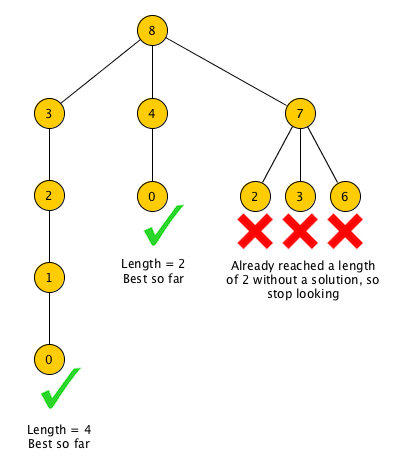
To help you visualize the effect of pruning, look at this diagram. It shows a backtracking search for an optimization problem (finding the shortest path to a solution).
Conclusion
You've now seen how pruning is the essential technique that makes backtracking a practical and powerful algorithmic tool. By checking for constraint violations on partial candidates, we can avoid exploring vast, fruitless regions of the search space.
Key Takeaways:
- Pruning is the practice of abandoning a path in a backtracking search as soon as it's determined that it cannot lead to a valid or optimal solution.
- It is implemented as a guard condition (
isValid,isSafe) that is checked before making a recursive call. - Pruning strategies are problem-specific. Common patterns include:
- Checking against explicit constraints (e.g., no two queens can attack each other).
- Checking if a running total exceeds a target (e.g.,
currentSum > target). - Sorting the input to enable more powerful pruning (e.g.,
breaking from a loop ifcandidate > remainingTarget).
In our next lesson, we will cover the final core component of the backtracking pattern: correctly restoring state after exploring a recursive branch. This "un-choose" step is just as critical as choosing and exploring, ensuring that each branch of our search starts from a clean slate.