Recommended resources
The freely available resources this lesson will direct you to.
In our previous lesson, we implemented linear search and analyzed its O(n) time complexity, noting that it works on any array, sorted or not. This raises a crucial question: if we have the guarantee that an array is sorted, can we devise a search method that is significantly faster than checking every single element?
This lesson answers that with a firm "yes." We will explore binary search, a powerful and highly efficient algorithm for searching in sorted arrays. You will learn its core "divide and conquer" strategy, implement it in C, and understand why its logarithmic time complexity makes it a cornerstone of efficient programming.
1. The "Divide and Conquer" Strategy
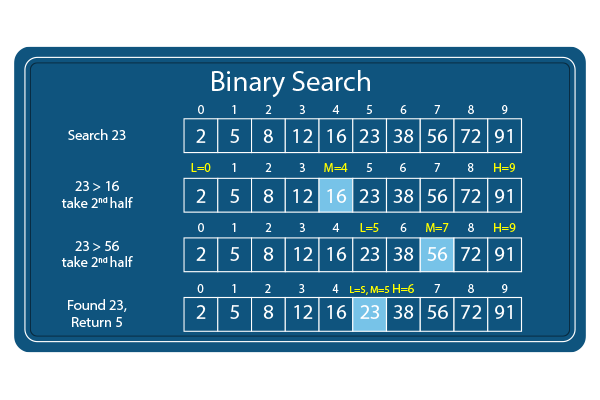
Imagine looking for a name in a phone book. You wouldn't start at the first page and read every name until you find the one you're looking for. Instead, you'd open the book somewhere in the middle. If the names on that page come alphabetically after your target, you know you only need to search the first half of the book. If they come before, you search the second half. You repeat this process, halving the search area each time, until you quickly zero in on the right page.
This is the exact logic behind binary search. It works by:
- Identifying the start (
low), end (high), and middle (mid) of the current search area. - Comparing the target value to the element at the middle index.
- If the target matches the middle element, the search is over.
- If the target is smaller than the middle element, we discard the entire right half of the search area.
- If the target is larger than the middle element, we discard the entire left half.
- Repeating this process on the remaining, smaller search area until the value is found or the search area becomes empty.
To see this powerful idea in action, let's watch a short animation.
The "Binary Search Animated" video from Dreams of Code provides a great visual introduction to the algorithm's core mechanism.
Watch from the demonstration. Focus on how the algorithm repeatedly discards half of the array, dramatically narrowing down where the target element could be.
As the video shows, for binary search to work, two conditions are essential:
- The array must be sorted.
- We need random access to elements (the ability to jump to any index in constant time), which is a natural feature of arrays in C.
2. The Power of Logarithmic Time: O(log n)
In the previous lesson, we learned that the worst-case for linear search is O(n), meaning for an array of 1 million items, we might need 1 million comparisons. How does binary search compare?
Each step in binary search cuts the number of elements to check in half. This "halving" process is incredibly powerful.
Let's watch the next segment of the video, which quantifies this efficiency.
This part of the "Binary Search Animated" video explains the dramatic efficiency gains and introduces the concept of logarithmic time complexity.
Continue watching from the complexity analysis. Pay close attention to the example with 1 million items and how this relates to Big-O notation.
As the video memorably explains, searching for an item in a sorted array of 1 million elements with binary search will take at most 20 steps in the worst case! This is the power of logarithmic growth.
The time complexity of binary search is O(log n) (read as "Order log n"). This is because if you have elements, the number of times you can halve the set before you're left with just one element is approximately .
Let's put this into perspective:
| Number of Elements (n) | Linear Search (n) | Binary Search (log n) |
|---|---|---|
| 1,024 | 1,024 | 10 |
| 1,048,576 | 1,048,576 | 20 |
| 1,073,741,824 | ~1 billion | 30 |
For any large-scale application, the difference is astronomical. This is why understanding and using binary search is so critical.
3. Implementing Binary Search in C
Now, let's translate this algorithm into C code. We will use an iterative approach, which relies on a while loop to manage the search space.
We need three variables to keep track of our search boundaries:
low: The starting index of the current search space.high: The ending index of the current search space.mid: The middle index, calculated in each iteration.
The loop continues as long as our search space is valid (low <= high). Inside the loop, we calculate mid, compare arr[mid] with our target, and then update either low or high to shrink the search space for the next iteration.
The following video provides an excellent walkthrough of creating a C function for binary search.
Binary Search - Iterative Implementation and common errors
This video from mycodeschool clearly demonstrates the logic and C implementation of an iterative binary search, including common pitfalls.
Start with the recap of the search logic. Then, watch the core implementation section carefully. Finally, review the section on common errors, as it contains an important professional insight.
The video highlighted a subtle but important detail for calculating the middle index:
This is preferred over the more direct (low + high) / 2 because for extremely large arrays, low + high could overflow the maximum value an int can store. This version avoids that risk.
For a textual reference, the following article provides a clean, commented implementation.
C Program for Binary Search - GeeksforGeeks
This GeeksforGeeks article provides a concise summary and a complete C program for iterative binary search.
Focus on the section titled "Iterative Implementation of Binary Search in C". Review the code and the step-by-step explanation. Notice that it confirms the Time Complexity is O(log N) and the Auxiliary Space is O(1) (constant), since the iterative version doesn't use extra memory that scales with the input size.
4. Practice: Your Binary Search Program
It's time to put theory into practice. Below is a complete C program that implements and tests the binarySearch function. Your task is to compile, run, and experiment with it.
#include <stdio.h>

// Function to perform iterative binary search on a sorted array
// arr: the sorted array to search in
// size: the number of elements in the array
// target: the value to search for
// Returns the index of the target if found, otherwise returns -1
int binarySearch(int arr[], int size, int target) {
    int low = 0;
    int high = size - 1;

    // Loop until the search space is empty (low > high)
    while (low <= high) {
        // Calculate mid-point to avoid potential overflow
        int mid = low + (high - low) / 2;

        // Check if target is present at mid
        if (arr[mid] == target) {
            return mid; // Target found
        }

        // If target is greater, ignore the left half
        if (arr[mid] < target) {
            low = mid + 1;
        }
        // If target is smaller, ignore the right half
        else {
            high = mid - 1;
        }
    }

    // If we reach here, the element was not present
    return -1;
}

int main() {
    // Binary search requires a SORTED array
    int numbers[] = {2, 5, 8, 12, 16, 23, 38, 56, 72, 91};
    int size = sizeof(numbers) / sizeof(numbers[0]);

    int target1 = 23;
    int target2 = 7; // A value not in the array

    // --- Test Case 1: Element is in the array ---
    int result1 = binarySearch(numbers, size, target1);

    if (result1 != -1) {
        printf("Target %d found at index: %d\n", target1, result1);
    } else {
        printf("Target %d was not found in the array.\n", target1);
    }

    // --- Test Case 2: Element is NOT in the array ---
    int result2 = binarySearch(numbers, size, target2);

    if (result2 != -1) {
        printf("Target %d found at index: %d\n", target2, result2);
    } else {
        printf("Target %d was not found in the array.\n", target2);
    }

    return 0;
}
Your Task:
- Copy, compile, and run this code in your development environment.
- Verify the output:
23should be found at index 5, and7should not be found. - Modify the
mainfunction to search for the first element (2) and the last element (91). Observe how the algorithm finds them. - Challenge Question: What do you think would happen if you tried to run
binarySearchon an unsorted array like{56, 12, 91, 2, 38}? Explain why the algorithm would fail to produce a correct result.
Conclusion
In this lesson, you have added a powerful and efficient algorithm to your toolkit. By leveraging the "divide and conquer" method on sorted data, binary search provides a dramatic performance improvement over linear search.
Key Takeaways:
- Binary search operates on sorted arrays by repeatedly dividing the search interval in half.
- Its time complexity is O(log n), making it exceptionally fast for large datasets.
- The iterative implementation uses a
whileloop withlowandhighpointers to manage the search space. - The iterative approach has a space complexity of O(1), as it uses a constant amount of extra memory.
- A key prerequisite is a sorted collection with random access.
Preview of the Next Lesson:
The immense efficiency of binary search underscores the value of having sorted data. But how do we get our data into a sorted order in the first place? In the next lesson, we will begin our journey into sorting algorithms, starting with one of the most straightforward and intuitive methods: bubble sort.