Recommended resources
The freely available resources this lesson will direct you to.

Hello! Welcome to your next lesson.
In our last session, we established a robust framework for evaluating your RAG pipeline using metrics like faithfulness and relevance. A key insight from that process is that the quality of your final answer is heavily dependent on the quality of your retrieval. If your retriever pulls irrelevant documents—a situation flagged by low "Context Relevance" or "Context Precision" scores—the generator has no chance of producing a good answer.
Today, we'll tackle this problem head-on. Our learning outcome is to implement metadata filtering to refine RAG search results. This is one of the most powerful and common techniques for improving retrieval accuracy. You'll learn how to combine the "fuzzy" power of semantic search with the "exact" precision of traditional database filtering.
This lesson will cover:
- The "why" and "what" of metadata filtering.
- How to design a metadata schema and implement filtering in a vector database.
- The performance trade-offs involved, a critical consideration for any application.
- An advanced technique for creating filters dynamically from natural language.
Let's begin by looking at the overall workflow.

Why Vector Search Isn't Enough
As you've seen, vector search is incredibly powerful for understanding semantic meaning. A query for "how to make a model learn better" can find documents about "optimization algorithms" even if the exact words don't match.
However, it struggles with queries that require exact, non-negotiable constraints. For example:
- "Show me customer support tickets from Q4 2023."
- "Find all documents related to the 'Project Titan' source code."
- "Retrieve articles written by Dr. Emily Carter."
A pure vector search might return documents that are semantically similar but don't meet these strict criteria (e.g., a paper from 2022, or one by a different Dr. Carter). This is where metadata filtering comes in. It allows us to apply structured, rule-based filters alongside our semantic search.
To understand the concept and its importance, let's start with a short video.
Metadata Filtering for Vector Search + Latest Filter Tech
This segment from James Briggs provides a clear introduction to what metadata filtering is and why it's necessary in modern search systems.
Watch from 02:53 to 05:35. Focus on the core idea: associating structured data (metadata) with each vector to enable precise filtering.
Pre-filtering vs. Post-filtering: A Key Architectural Decision
When you apply a metadata filter, you have two main strategies, and the choice has significant performance and accuracy implications.
- Pre-filtering: First, filter the entire dataset based on the metadata, then run the vector search on the smaller, filtered subset of documents.
- Post-filtering: First, run the vector search to get the top-k most semantically similar documents, then apply the metadata filter to that small set of results.
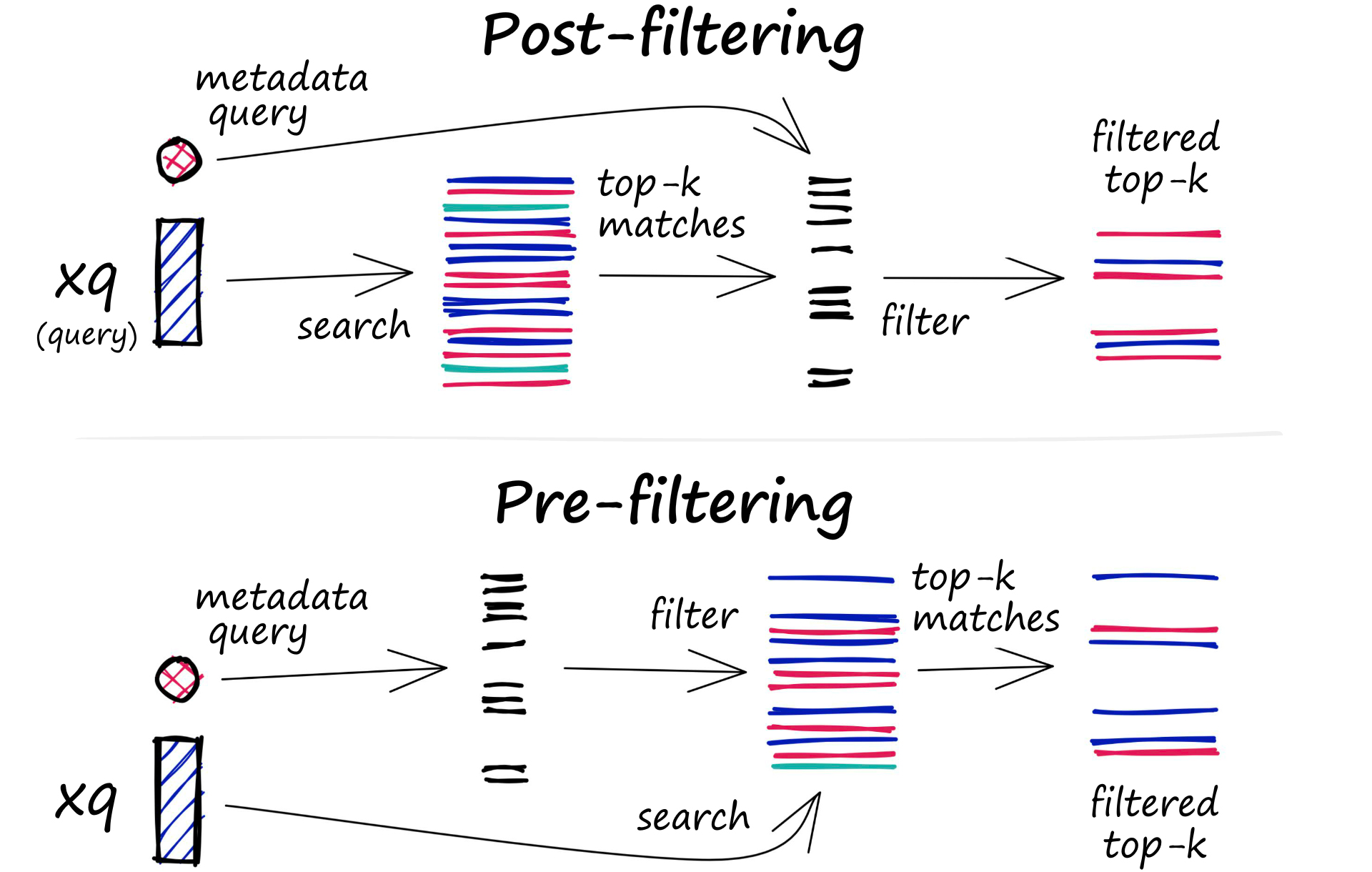
This choice involves a classic engineering trade-off:
- Pre-filtering is more accurate. It guarantees that you are searching across all documents that match your filter, so you won't miss a relevant result. However, it can be much slower because filtering a massive index before the search can be costly, and it often prevents the use of optimized search indexes (like HNSW), forcing a brute-force search on the filtered subset.
- Post-filtering is faster. It uses the highly optimized vector search index first. However, it can be inaccurate. If the initial top-k results don't contain any documents that match your metadata filter, you will get zero results, even if relevant documents exist elsewhere in the database.
The following video segment explains this trade-off in more detail.
Metadata Filtering for Vector Search + Latest Filter Tech
Let's continue with the James Briggs video. This part clearly explains the mechanics, pros, and cons of pre- and post-filtering.
Watch from 05:35 to 11:24. Pay close attention to the discussion of the speed vs. accuracy trade-off for each method.
Many modern vector databases have developed hybrid or "single-stage" filtering approaches that aim to provide the accuracy of pre-filtering with the speed of post-filtering. When you use a managed vector database, it's helpful to understand which approach it takes, as this affects performance and cost.
Implementing Metadata Filtering
Now let's get practical. As a software engineer, you know that good design precedes implementation. The same applies here.
Step 1: Design Your Metadata Schema
Before you can filter, you need to decide what metadata to store. This is analogous to designing a database schema.
Metadata Filtering and Hybrid Search for Vector Databases
This article from Dataquest provides excellent, practical guidelines for designing a metadata schema for a vector database. It highlights best practices and common anti-patterns.
Read the section 'Designing Metadata Schemas'. Focus on the principles of what makes good metadata (e.g., atomic, consistent) and what to avoid (e.g., long text, nested structures). This is fundamental for building a robust system.
Key takeaways from this are:
- Keep it atomic: Store
yearas an integer (2024), not as part of a string ("Published on March 15, 2024"). - Be consistent: Use the same data types and formats for all documents. Ensure all documents have the same set of metadata keys to avoid surprises where documents "disappear" from filtered searches.
- Don't store content as metadata: The abstract of a paper is
documentcontent, not ametadatafield.
Step 2: Ingest and Query with Filters
Once you have a schema, you can add documents with their metadata to your vector store and then use a where clause in your query. We'll use ChromaDB for this example, as it's a popular choice for local development.
The following resource provides a complete, self-contained walkthrough.
Metadata Filtering and Hybrid Search for Vector Databases
Let's continue with the Dataquest article. The next sections show you exactly how to ingest data with metadata and then perform various filtered queries using ChromaDB's Python client.
Read the sections 'Creating a Collection with Rich Metadata' and 'Metadata Filtering in Practice'. This will show you the end-to-end code for: Creating a collection and adding documents with their corresponding metadatas. Querying using a where clause for equality ({"category": "cs.LG"}). Using comparison operators for range queries ({"year": {"$gte": 2024}}). Combining filters with logical operators ($and, $or).
The syntax is quite intuitive, especially with your background. A typical filtered query looks like this:
# Example of a combined filter in ChromaDB
results = collection.query(
    query_texts=["image recognition"],
    n_results=5,
    where={
        "$and": [
            {"category": "cs.CV"},         # Exact match on a string
            {"year": {"$gte": 2023}}      # Range query on a number
        ]
    }
)
Step 3: Understand the Performance Cost
Filtering is powerful, but it's not free. Applying filters adds computational overhead. Understanding this cost is crucial for designing scalable applications.
Metadata Filtering and Hybrid Search for Vector Databases
The final section of the Dataquest article we'll review provides a practical benchmark of filtering overhead. This is exactly the kind of analysis needed for production systems.
Read the section 'Measuring Filtering Performance Overhead' and the 'Key Takeaways' at the end. Focus on the relative cost of different filter types (e.g., category filter vs. year range filter) and the summary of when the overhead is justified.
The core finding is that filtering can add significant latency (3-10x in their test), with numeric range queries often being the most expensive. This is a trade-off you must consciously make: is the increased precision worth the potential performance hit for your specific use case?
Advanced Technique: Intelligent Metadata Filtering
So far, we've assumed the user provides structured filters. But what if the user asks a natural language query that implies a filter? For example: "Tell me about strategy games released in the last two years."
A powerful, emerging pattern is to use an LLM to extract these implied filters from the user's query and dynamically construct the where clause.
This involves two LLM calls in your RAG pipeline:
- First LLM call: Analyze the user query to extract structured metadata (e.g.,
{"genre": "strategy", "year_start": 2022}). - Second LLM call (the RAG part): Use the extracted metadata to perform a filtered retrieval, then generate the final answer based on the retrieved context.
The following video showcases a real-world example where this exact technique dramatically improved retrieval performance.
2 Methods For Improving Retrieval in RAG
This video from Funktio AI presents a case study where naive RAG failed and was fixed by implementing intelligent metadata filtering. It's a perfect example of this pattern in action.
Watch from 05:47 to 08:44. Focus on the two key changes they made: During indexing: Using an LLM to extract structured 'services' from unstructured text. During querying: Using an LLM to transform a natural language query into a structured filter for those services. Also, note the discussion of trade-offs like increased indexing cost and query latency.
This "intelligent filtering" approach, often implemented using an LLM's function/tool-calling ability, makes your RAG system much more powerful and intuitive for the end-user. It's a great example of how different components of the LLM ecosystem can be chained together to build sophisticated applications. For a deeper dive, this pattern is well-documented in production guides like the AWS blog post, "Streamline RAG applications with intelligent metadata filtering using Amazon Bedrock," which uses Pydantic models to ensure the extracted filters are valid—a practice you'd appreciate as an engineer.
Conclusion
In this lesson, you learned how to significantly enhance your RAG system's retriever by implementing metadata filtering. This technique gives you the best of both worlds: the semantic understanding of vector search and the precision of structured queries.
Key Takeaways:
- Metadata filtering is essential for queries requiring exact matches on attributes like dates, categories, or sources.
- Designing a clean, consistent metadata schema is the first and most critical step.
- There is a fundamental trade-off between pre-filtering (accurate but slow) and post-filtering (fast but can be inaccurate).
- Implementation in libraries like ChromaDB is straightforward, using a
whereclause with logical and comparison operators. - Filtering has a measurable performance cost, which you must account for in your system design.
- You can use LLMs to dynamically extract filters from natural language queries, creating a more "intelligent" and user-friendly RAG system.
In our last session, you learned how to spot a weak retriever. Now, you have a powerful tool to fix it.
In our next lesson, we will explore another method to improve retrieval: applying hybrid search to combine keyword-based and vector-based retrieval. While metadata filtering helps with structured attributes, hybrid search addresses a different weakness: the failure of vector search to handle rare keywords, acronyms, or specific product codes.