Recommended resources
The freely available resources this lesson will direct you to.
- How to Build a Local AI Agent With Python (Ollama, LangChain & RAG)www.youtube.com
- RAG + Langchain Python Project: Easy AI/Chat For Your Docswww.youtube.com
- Building a RAG Pipeline with LlamaIndex: A Step-by-Step Guidepallab29.medium.com
- RAG With Llama 3.1 8B, Ollama, and Langchain: Tutorialwww.datacamp.com
Hello! In our previous lesson, we explored the theory behind document chunking and compared different strategies. We established that a good chunking strategy is the foundation of any effective Retrieval-Augmented Generation (RAG) system.
Today, we transition from theory to practice. You will implement a complete, end-to-end RAG pipeline. We'll write Python code to load and chunk documents, create and store embeddings in a vector database, retrieve relevant context for a user's query, and use a Large Language Model (LLM) to generate a final, fact-grounded answer.
This hands-on lesson will demystify the RAG process and give you a working blueprint that you can adapt for your own projects. We will use a powerful and popular stack for this:
- LangChain: A framework for developing applications powered by language models.
- Ollama: A tool that allows you to run open-source LLMs and embedding models locally on your machine.
- ChromaDB: A local, open-source vector database for storing and retrieving embeddings.
By the end of this lesson, you will have built a functional RAG application entirely on your local machine.
Our Roadmap: The RAG Pipeline
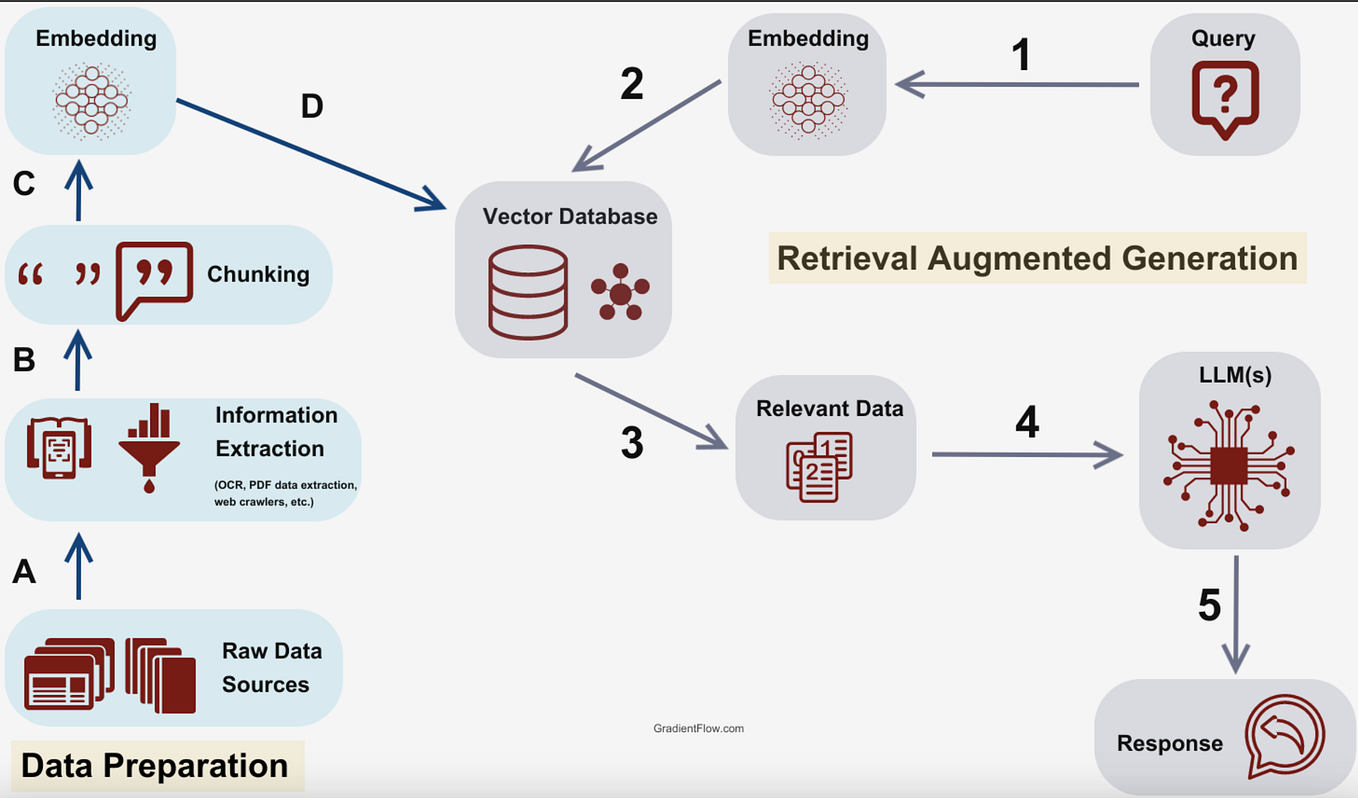
Let's start by looking at a diagram of the entire pipeline we are about to build. This will serve as our map for the lesson. We will implement each of these steps in code.
Step 1: Setting Up the Local Environment
Before writing code, we need to set up our environment. This involves installing the necessary Python libraries and using Ollama to download a local LLM and an embedding model.
The following video provides a clear, step-by-step guide to getting everything installed and ready. The approach of using local models is great because it's free, private, and gives you full control over the stack.
How to Build a Local AI Agent With Python (Ollama, LangChain & RAG)
This video, 'How to Build a Local AI Agent With Python' by Tech With Tim, will guide you through the initial setup. It covers installing Python dependencies and using Ollama to pull the models we need.
Watch the segment from 02:00 to 07:01. Follow the instructions to: Create a Python virtual environment. Install the required libraries (langchain, langchain-ollama, langchain-chroma, pandas). Install Ollama and pull the llama3.2 and mxbai-embed-large models.
Once you have completed this setup, you'll have all the tools necessary to build our pipeline.
Step 2: The Ingestion Pipeline (Data Preparation)
The first half of the RAG process is "ingestion"—preparing our knowledge base. This involves loading our source documents, chunking them, creating embeddings, and storing them in our vector database. We'll implement this as a process that runs once to build the database.
Loading and Chunking Documents
In the previous lesson, we discussed various chunking strategies. While the video uses a simple approach of treating each row of a CSV as a document, it's important to see how a more robust chunking strategy like Recursive Character Splitting would be implemented.
First, let's look at a different video that focuses specifically on loading files and applying this chunking method.
RAG + Langchain Python Project: Easy AI/Chat For Your Docs
The video 'RAG + Langchain Python Project' by pixegami demonstrates how to load documents from a directory and use LangChain's RecursiveCharacterTextSplitter.
Watch from 01:38 to 05:09. This section shows how to use a DirectoryLoader to load files and a RecursiveCharacterTextSplitter to chunk them, which directly applies the concepts from our last lesson.
Here's a code snippet summarizing what you saw, which you could use as a template for loading and chunking text files:
from langchain_community.document_loaders import DirectoryLoader
from langchain.text_splitter import RecursiveCharacterTextSplitter


# 1. Load documents
loader = DirectoryLoader("./data/", glob="**/*.md")
documents = loader.load()


# 2. Initialize the splitter
text_splitter = RecursiveCharacterTextSplitter(
    chunk_size=1000,
    chunk_overlap=200
)


# 3. Split documents into chunks
chunks = text_splitter.split_documents(documents)
print(f"Split {len(documents)} documents into {len(chunks)} chunks.")
Embedding Chunks and Storing in ChromaDB
Now, let's proceed with the main tutorial from Tech With Tim. The next segment will walk you through the entire ingestion process:
- Loading data from a CSV file.
- Creating
Documentobjects in LangChain. - Initializing the local Ollama embedding model.
- Creating a persistent ChromaDB vector store and ingesting the documents. The code cleverly checks if the database already exists to avoid re-processing, which is a good practice.
How to Build a Local AI Agent With Python (Ollama, LangChain & RAG)
Let's return to the 'How to Build a Local AI Agent' video. This segment covers the entire data preparation pipeline, from loading the data to storing it in a vector database.
Watch from 13:42 to 23:18. Pay close attention to how the code: Loads the CSV with Pandas. Iterates through rows to create LangChain Document objects, combining text fields to form the page_content. Initializes OllamaEmbeddings with our local embedding model. Creates a persistent Chroma vector store from the documents.
After this step, you will have a local folder (e.g., chroma_langchain_db) containing your indexed knowledge base. The heavy lifting is now done!
Step 3: The Retrieval and Generation Pipeline
With our knowledge base indexed, we can now build the "online" part of the application that answers user questions. This involves three key actions: Retrieve, Augment, and Generate.
The final segment of the video shows exactly how to implement this using LangChain.
- Create a Retriever: A retriever is an interface that fetches documents from our vector store based on a query.
- Define a Prompt Template: We'll create a template that instructs the LLM how to use the retrieved documents (
context) to answer the user'squestion. - Build the Chain: Using LangChain Expression Language (LCEL), we'll pipe everything together: the retriever gets the context, which is then fed into the prompt, and the final prompt is sent to the LLM.
How to Build a Local AI Agent With Python (Ollama, LangChain & RAG)
This final segment brings it all together, building the query-time logic that finds relevant information and generates an answer.
First, watch from 08:22 to 13:42 to see how a basic LLM chain is constructed in LangChain. Then, watch the main segment from 23:18 to 27:41. This is the crucial part that shows you how to: Turn your vector store into a retriever. Use the retriever to find relevant documents for a given question. Pass these documents into the chain you learned about earlier to generate a grounded response.
The core logic that connects retrieval to generation looks like this:
# The user's question
question = "How are the vegan options?"


# 1. Retrieve relevant documents from the vector store
# The retriever automatically embeds the question and performs a similarity search.
retrieved_docs = retriever.invoke(question)


# 2. Augment the prompt and Generate a response
# The `chain.invoke` call passes the question and the retrieved docs
# to the prompt template, then sends the result to the LLM.
result = chain.invoke({
    "reviews": retrieved_docs,  # The retrieved documents serve as context
    "question": question
})

print(result)
This simple flow—retrieve.invoke() followed by chain.invoke()—is the heart of a RAG pipeline.
Conclusion
Congratulations! You have now implemented a full, functioning RAG pipeline from scratch. You saw how to connect each conceptual step to a concrete piece of code, resulting in an application that can answer questions based on a private knowledge base, all running locally on your machine.
Key Takeaways:
- A RAG pipeline is composed of two main phases: an offline ingestion phase (load, chunk, embed, store) and an online retrieval & generation phase.
- Tools like Ollama and ChromaDB make it possible to build and run the entire RAG stack locally, ensuring privacy and control.
- LangChain provides the "glue" that connects all the components: document loaders, text splitters, embedding models, vector stores, and LLMs.
- The core of the RAG process at query time is to use a retriever to find relevant context, augment a prompt with that context, and have an LLM generate an answer based on it.
Now that you have a working RAG system, a natural next question is: "How good is it?" In our next lesson, we will explore methods for evaluating the quality of RAG output, focusing on key criteria like relevance and faithfulness.