
Hello! Welcome to the first lesson of our "Publishing on Amazon KDP" module.
In our previous lessons, we focused on finalizing your book file. We created a navigable table of contents and, most recently, embedded the crucial metadata—like the title, author, and cover image—directly into the file. Your book is now a complete, professional digital package.
Today, we take a major step toward your goal of earning passive income. We're moving from preparing the product to setting up the store. This lesson will guide you through the one-time, essential process of setting up your Amazon Kindle Direct Publishing (KDP) account. This is the administrative backbone of your publishing business, enabling you to upload books, track sales, and most importantly, get paid for your work.
We will break this process down into three manageable parts:
- Author/Publisher Information: Establishing your legal identity.
- Getting Paid: Connecting your bank account to receive royalties.
- Tax Information: Completing the required tax interview to ensure compliance.
Let's get your publishing account ready for business.
Getting Started: Creating Your KDP Account
The first step is straightforward: creating the basic account. This process involves signing up on the KDP website and enabling security features.
How To Setup an Amazon KDP Account (US & Non-US)
The video 'How To Setup an Amazon KDP Account' by Greg Gottfried provides a clear, screen-by-screen walkthrough of the initial sign-up process. It's a perfect starting point.
Watch from the beginning (00:30) to 02:32. Follow along as the video shows how to navigate to the KDP site, create an account with your email, verify it, and set up two-step verification with your phone number. This security step is standard and helps protect your account.
Once you've completed these initial steps, you'll land on your KDP dashboard and be prompted to complete your account information. This is where we'll dive into the three key sections.
Part 1: Author/Publisher Information
This section requires your legal information. It’s crucial to be accurate here, as this information is used for payments and tax forms.
A key decision you'll make is whether to register as an Individual or a Corporation.
- Individual: This is the simplest path and the best choice for most new authors. You'll operate as a sole proprietor, and the income will be tied to you personally.
- Corporation: This is for those who have already set up a legal business entity (like an LLC). This separates the business financially and legally from you personally.
Is Your Amazon KDP Account Set Up Correctly?
For a detailed comparison of these two options, the video 'Is Your Amazon KDP Account Set Up Correctly?' by Paul Marles offers an excellent breakdown of the pros and cons.
Watch the segment from 01:17 to 06:29. The presenter discusses the tax and liability implications of each choice. Pay close attention to his advice: for most people starting out, it's best to begin as an 'Individual' to avoid getting bogged down in administrative tasks before you've even published a book. You can always change this later if your publishing business grows significantly.
Important Note: The name you provide in this section must be your full legal name (or your registered company's legal name), not a pen name. Pen names are added later during the book setup process.
For a quick reference of the steps involved, you can consult the official Amazon KDP help page.
Create a KDP Account - Amazon.com
Amazon's official guide, 'Create a KDP Account', provides a concise text-based summary of this section.
Read the section titled 'Author/Publisher Information' to see the official instructions on selecting a business type and entering your legal name and address.
Part 2: Getting Paid (Bank Information)
This is where you tell Amazon where to send your royalties. The process is straightforward if your bank is in a country supported by KDP for direct deposit.
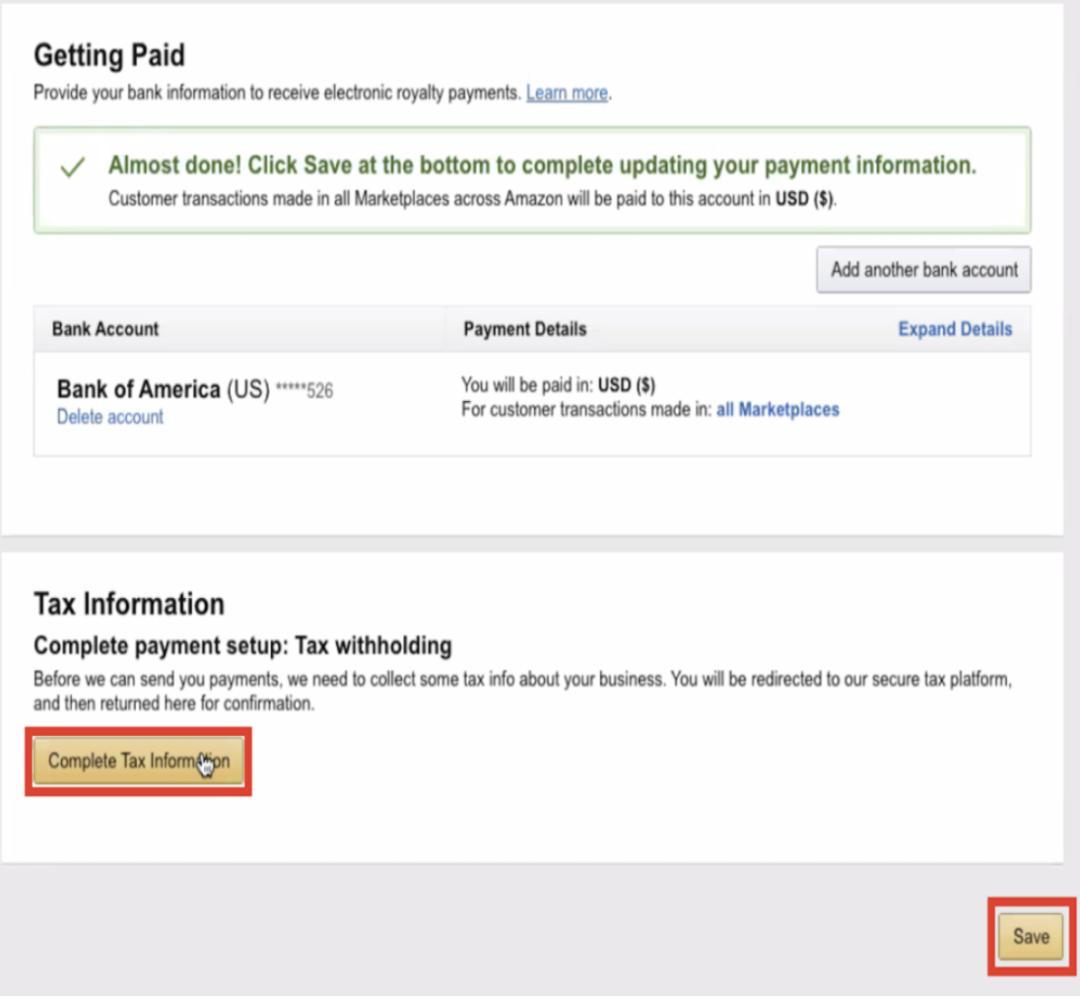
However, a common challenge arises for authors whose bank's country is not on KDP's list for direct deposits. Fortunately, there are excellent, free solutions for this.
How To Setup an Amazon KDP Account (US & Non-US)
The 'How To Setup an Amazon KDP Account' video provides a fantastic guide to solving this problem, which aligns perfectly with your preference for free tools.
Watch carefully from 04:52 to 07:59. The video explains how to use services like Payoneer or Wise.com to create a virtual U.S. bank account. It strongly recommends Wise.com because it's completely free for receiving payments from Amazon. By signing up for Wise, you'll get U.S. bank details that you can enter directly into KDP, solving the international payment issue at no cost.
By using Wise, you can receive payments from Amazon no matter where your local bank is located, making your publishing business truly global.
Part 3: Completing the Tax Information
This is often the most intimidating step, but KDP's online interview makes it manageable. Amazon is required by U.S. law to collect tax information from all publishers.
The questions you answer will depend on whether you are a U.S. person for tax purposes.

For Non-U.S. Publishers:
You will be guided through filling out a form equivalent to the W-8BEN. The most important pieces of information you'll provide are:
- Your legal name and address.
- Your foreign Tax Identification Number (TIN). This is the tax ID number issued by your own country's government.
Providing your TIN is crucial because your country may have a tax treaty with the U.S. This treaty can reduce or even eliminate the amount of U.S. tax that Amazon is required to withhold from your royalties.
Is Your Amazon KDP Account Set Up Correctly?
To understand the tax process and the importance of treaties, watch this segment from Paul Marles's video. It demystifies the concept of tax withholding.
Watch from 07:51 to 10:57. The video explains that without a TIN, Amazon may withhold a default of 30% of your royalties. It then shows how tax treaties affect this rate, giving examples where the withholding is 0% for UK residents and 5% for Australian residents. This highlights why providing your local tax number is so important.
For U.S. Publishers:
You will be asked to provide your Social Security Number (SSN) or Individual Taxpayer Identification Number (ITIN) for individuals, or an Employer Identification Number (EIN) for businesses.
The KDP tax interview will guide you through all the necessary steps. Once completed and validated, you'll see a green checkmark, and your account will be fully set up.
Test your understanding!
You are a publisher living in the UK and setting up your KDP account as an individual. When you complete the tax interview, Amazon informs you that your withholding rate is 0%. Your friend in Australia, however, has a 5% withholding rate. Why is there a difference?
Show answer
The difference is due to the specific tax treaty between the publisher's country and the United States. The US-UK tax treaty allows for a 0% withholding rate on royalties for UK residents who provide their tax information. The US-Australia treaty, on the other hand, specifies a 5% withholding rate. Each country's treaty with the U.S. is different.
Conclusion
Congratulations! By following these steps, you will have a fully functional Amazon KDP account. This is the foundational platform upon which you will build your passive income stream as an author.
Key Takeaways:
- Setting up a KDP account involves three main parts: Author Information, Payment Details, and Tax Information.
- For your Author Information, it is best to start as an Individual and use your full legal name.
- If your country's bank isn't supported for direct deposit, you can use a free service like Wise.com to get U.S. bank details.
- Completing the tax interview is mandatory. As a non-U.S. publisher, providing your local Tax Identification Number (TIN) allows you to benefit from tax treaties, which can significantly reduce or eliminate U.S. tax withholding on your earnings.
Preview of the Next Lesson:
Your KDP account is now your empty digital storefront. In the next lesson, we'll start putting products on the shelf and writing the signs to attract customers. You will learn how to write a compelling book description (blurb) using persuasive copywriting and keyword optimization to maximize your book's discoverability on the Amazon store.