Hello! Welcome to our next lesson on recursion.
In the previous lesson, we focused on designing recursive solutions. You learned the 5-step framework for breaking down a problem into a base case and a recursive step, allowing you to solve complex problems like the "Unique Paths in a Grid" with surprisingly elegant code.
Today, we'll pull back the curtain to see how your computer actually executes these recursive functions. Our goal is to trace the call stack for a simple recursive function. This isn't just a theoretical exercise; building a clear mental model of the call stack is essential for debugging, understanding performance, and grasping more advanced concepts like memoization.
What is the Call Stack?
You've heard the term "call stack," and you might have seen a "stack overflow" error. But what exactly is a stack in this context? At its core, the call stack is the mechanism that a program uses to keep track of where it is in a sequence of function calls.
To understand this better, let's start with a clear definition of a stack as a data structure and see how it relates to function calls.
Recursion for Beginners: A Beginner's Guide to Recursion
This video from North Bay Python provides an excellent analogy for what a stack is and how it works. It then introduces the 'call stack' as the specific stack Python uses to manage function execution.
Watch from 04:26 to 08:14. Pay close attention to the concepts of 'pushing' and 'popping' and how a 'frame object' is created for each function call.
As the video explained, the call stack operates on a Last-In, First-Out (LIFO) principle.
- Push: When a function is called, a frame object is created and pushed onto the top of the stack. This frame contains all the information for that specific call, including its parameters, local variables, and the "return address" (where to resume execution after the function finishes).
- Pop: When a function completes and returns, its frame is popped off the top of the stack, and the program execution jumps back to the stored return address.
This works just as well for a normal sequence of functions (e.g., A() calls B() which calls C()) as it does for recursion.
Tracing the Call Stack for a Recursive Function
So, what makes recursion special? Nothing, from the call stack's perspective! A recursive call is simply a function calling another function—it just happens to be calling itself. Each call gets its own separate frame with its own local variables.
Let's trace the classic factorial function.
def factorial(n):
    if n <= 1: # Base Case
        return 1
    else: # Recursive Step
        return n * factorial(n - 1)

factorial(4)
Here's how the call stack behaves when factorial(4) is executed:
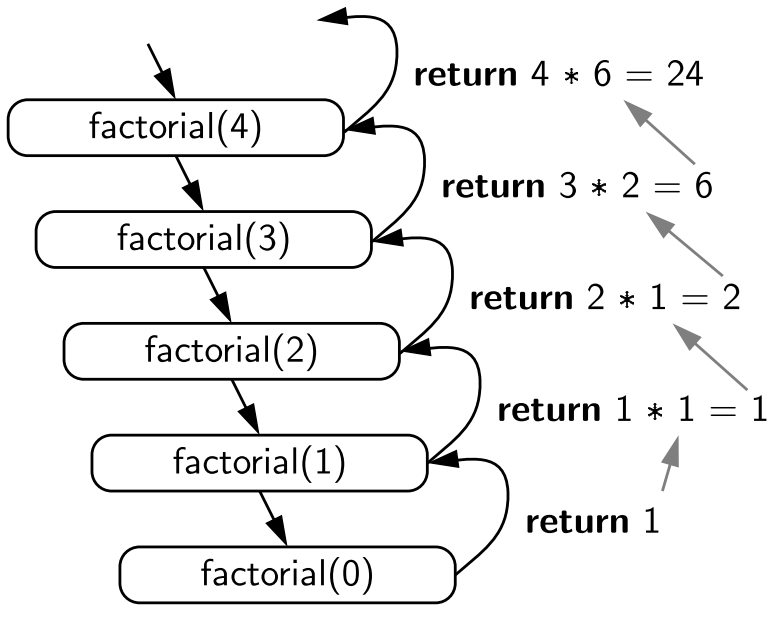
factorial(4)is called. A frame is pushed forfactorial(4). It needs to compute4 * factorial(3), so it pauses and waits forfactorial(3)to return a value.factorial(3)is called. A new frame forfactorial(3)is pushed on top. It needs to compute3 * factorial(2), so it also pauses.factorial(2)is called. A frame forfactorial(2)is pushed on top. It needs2 * factorial(1).factorial(1)is called. A frame forfactorial(1)is pushed. It hits the base case (n <= 1) and returns1.- The
factorial(1)frame is popped. The value1is returned to its caller,factorial(2). factorial(2)'s frame is now on top. It can complete its work:2 * 1 = 2. It returns2.- The
factorial(2)frame is popped. The value2is returned tofactorial(3). factorial(3)'s frame is now on top. It completes its work:3 * 2 = 6. It returns6.- The
factorial(3)frame is popped. The value6is returned tofactorial(4). factorial(4)'s frame is now on top. It completes its work:4 * 6 = 24. It returns24.- The
factorial(4)frame is popped. The final value,24, is returned.
This process of building up the stack to the base case is often called the winding phase, and the process of returning values and clearing the stack is the unwinding phase.
This video segment provides a great visual walkthrough of exactly this process.
Recursion for Beginners: A Beginner's Guide to Recursion
Watch this part of the 'Recursion for Beginners' video to see an animated trace of the call stack for the factorial function. This will help solidify your mental model.
Watch from 12:34 to 14:06. Notice how each recursive call adds a new frame with its own 'number' variable.
The image below provides a static summary of this entire process for factorial(4).
Making the Call Stack Visible with print()
One of the simplest ways to trace execution is by adding print() statements. This can help you "see" the winding and unwinding phases in your own code.
Recursion in Python: An Introduction
The article 'Recursion in Python: An Introduction' demonstrates a great way to visualize the call stack using print statements. This is a practical debugging technique.
In the article, find the subsection titled 'Define a Python Factorial Function'. Read the second code block, where print() statements are added to the factorial function, and observe the output it produces. This directly shows the call sequence and the return sequence.
As you saw, the output clearly shows the calls stacking up (n=4, n=3, n=2, n=1) before any of them return. Then, they return in the reverse order, demonstrating the LIFO nature of the call stack.
Test your understanding!
Consider the following recursive function. What will it print to the console when print_fun(3) is called? Try to trace the call stack on paper first.
def print_fun(n):
    if n < 1:
        return
    else:
        print(n, end=" ")
        print_fun(n - 1)
        print(n, end=" ")

print_fun(3)
Show answer
The output will be: 3 2 1 1 2 3
Trace:
print_fun(3)is called. It prints3. It callsprint_fun(2).print_fun(2)is called. It prints2. It callsprint_fun(1).print_fun(1)is called. It prints1. It callsprint_fun(0).print_fun(0)is called. It hits the base case (n < 1) and returns.- Execution returns to
print_fun(1). It now executes the line after the recursive call, printing1. It returns. - Execution returns to
print_fun(2). It executes its second print statement, printing2. It returns. - Execution returns to
print_fun(3). It executes its second print statement, printing3. It returns.
Visualizing the Call Stack with a Debugger
While print() statements are useful, the most powerful tool for observing program flow is a debugger. A debugger allows you to pause your program at any line and inspect the state, including the current call stack. As a computer science student, learning to use a debugger is a critical skill.
Simple Explanation of Recursion | Recursion Python| Data Structures & Algorithms Tutorial Python #20
This short video from codebasics demonstrates how to use a debugger in Python to step through a recursive function. You will visually see the call stack grow and then unwind.
Watch the entire segment from 07:50 to 09:18. Pay close attention to the 'Frames' or 'Call Stack' window in the debugger IDE, which lists the active function calls.
When the Stack Gets Too Deep: Stack Overflow
What happens if your recursive function never reaches its base case? Each call pushes a new frame onto the stack, but no frames are ever popped. The call stack will grow and grow until it exhausts the memory allocated to it.
When this happens, Python halts execution and raises a RecursionError.
Recursion in Python: An Introduction
Let's revisit the Real Python article to see how it explains this common error.
Read the section 'Recursion in Python', from the beginning down to the part that explains the RecursionError. This will connect the theoretical call stack to a practical error you will definitely encounter.
This error is a direct consequence of an infinitely growing call stack. It's almost always caused by a missing or incorrect base case in your recursive logic.
Conclusion
Today, you've delved into the mechanics of how recursion is executed. By understanding the call stack, you've moved from just writing recursive code to visualizing its flow, which is a big step towards mastering it.
Key Takeaways:
- The call stack is a LIFO (Last-In, First-Out) data structure that manages function execution.
- Every function call, recursive or not, pushes a new frame (containing local variables and a return address) onto the stack.
- When a function returns, its frame is popped off the stack.
- Recursive functions build a stack of frames during the "winding" phase until a base case is hit, and then collapse the stack during the "unwinding" phase.
- A
RecursionError(stack overflow) occurs when the stack grows too large, usually due to a flawed base case. - You can trace the stack using
print()statements or, more powerfully, with a debugger.
Up Next:
Now that you can trace the execution of a recursive function, you might have noticed something. In problems like unique_paths from our last lesson, the function often recalculates the same value multiple times. For example, paths(3, 3) calls paths(2, 3) and paths(3, 2), both of which will end up needing to calculate paths(2, 2). This is inefficient.
In our next lesson, we will address this inefficiency by learning about memoization, a powerful optimization technique that stores the results of expensive function calls and reuses them to avoid redundant computation. Your understanding of the call stack will be the foundation for grasping how and why memoization works.