Hello! Welcome back.
In our last lesson, we explored the fundamentals of the heapq module, learning how to create a min-heap and perform the core heapify, heappush, and heappop operations. We saw that a heap always keeps the smallest element at the very front (heap[0]), making it instantly accessible.
Today, we'll use this powerful feature to build a Priority Queue. A priority queue is a fundamental data structure in computer science, especially in algorithms related to scheduling, pathfinding (like Dijkstra's), and event simulation. By the end of this lesson, you will be able to implement a priority queue using the heapq module.
This lesson builds directly on your understanding of heapq and will be a crucial tool in your competitive programming arsenal.
1. What is a Priority Queue?
A priority queue is an abstract data type where each element has an associated "priority." When you extract an element from the queue, you don't get the one that was added first (like a regular queue), but the one with the highest priority.
Python's heapq module implements a min-heap, which means it's naturally suited for priority queues where the lowest priority number corresponds to the highest priority. For example, a task with priority 1 will be processed before a task with priority 5.
2. The Core Technique: Using Tuples for Priority
So, how do we associate a priority with a piece of data using the heapq module, which just works on a simple list? The answer is elegant and very common in Python: we use tuples.
We can store our items as tuples in the format (priority, data). When Python's heap functions compare two such tuples, they automatically compare the first elements (the priorities). If the priorities are different, that's all that's used for ordering. The data part is only considered if the priorities are identical.
useful interview data structures: heapq (intermediate) anthony explains #385
The following video from the anthonywritescode channel provides a clear, practical demonstration of this tuple-based approach to creating a priority queue. Pay close attention to how the first element of the tuple dictates the heap order.
Watch the clip from 04:52 to 06:14. Notice how pushing tuples like (1, 'foo') and (5, 'bar') into the heap results in them being popped in order of their first element.
Let's see this in a code example. Imagine we are managing a list of tasks with different urgency levels.
import heapq

# Our priority queue will be a simple list
tasks = []

# heappush takes the list and the item to add.
# The item is a tuple: (priority, task_description)
heapq.heappush(tasks, (5, 'Write a report'))
heapq.heappush(tasks, (1, 'Call a client - URGENT'))
heapq.heappush(tasks, (3, 'Schedule a meeting'))

print("Current tasks in heap:", tasks)

# Now, let's process the tasks. heappop will always return
# the item with the smallest priority number.
print("\nProcessing tasks in priority order:")
while tasks:
    priority, task = heapq.heappop(tasks)
    print(f"Priority {priority}: {task}")
Expected Output:
Current tasks in heap: [(1, 'Call a client - URGENT'), (5, 'Write a report'), (3, 'Schedule a meeting')]

Processing tasks in priority order:
Priority 1: Call a client - URGENT
Priority 3: Schedule a meeting
Priority 5: Write a report
Notice that the order in which we pushed the items doesn't matter. The heappop operation consistently retrieves the item with the highest priority (lowest number).
3. A Robust Priority Queue: Handling Tie-Breakers
There's a subtle issue with the simple (priority, data) approach. What if two tasks have the same priority?
heapq.heappush(tasks, (5, 'Task A'))
heapq.heappush(tasks, (5, 'Task B'))
Python would see the priorities are equal and then try to compare the second elements: 'Task A' and 'Task B'. This works for strings, but if your data was a complex object that doesn't have a natural comparison order, your program would crash with a TypeError.
Furthermore, you might want items with the same priority to be processed in the order they were added (a "First-In, First-Out" or FIFO behavior).
The standard solution is to add a third element to the tuple: an entry count. This count is a unique, always-increasing number that acts as a tie-breaker.
The structure becomes: (priority, entry_count, data)
The official Python documentation for heapq discusses this exact problem and presents the robust solution. Reading this will solidify your understanding of how to build a production-ready priority queue.
Read the section titled 'Priority Queue Implementation Notes'. Focus on the challenges it lists and the solution of using a 3-element tuple with an entry count.
Here's how to implement it using itertools.count to generate the unique entry counts:
import heapq
import itertools

tasks = []
counter = itertools.count() # Creates a counter that starts at 0 and increments forever

# Add tasks with the same priority
heapq.heappush(tasks, (2, next(counter), 'Review code')) # counter is now 0
heapq.heappush(tasks, (1, next(counter), 'Fix critical bug')) # counter is now 1
heapq.heappush(tasks, (2, next(counter), 'Design new feature')) # counter is now 2

print("Robust tasks in heap:", tasks)

print("\nProcessing tasks:")
while tasks:
    priority, count, task = heapq.heappop(tasks)
    print(f"Priority {priority}, Count {count}: {task}")
Expected Output:
Robust tasks in heap: [(1, 1, 'Fix critical bug'), (2, 0, 'Review code'), (2, 2, 'Design new feature')]

Processing tasks:
Priority 1, Count 1: Fix critical bug
Priority 2, Count 0: Review code
Priority 2, Count 2: Design new feature
As you can see, after the critical bug is fixed, 'Review code' (with count=0) is processed before 'Design new feature' (with count=2), even though they share the same priority. This is the stable, predictable behavior we want.
Test your understanding!
You have an empty priority queue that uses the (priority, count, data) format. You add the following items in this specific order:
heappush(pq, (3, next(counter), "Task C"))heappush(pq, (1, next(counter), "Task A"))heappush(pq, (2, next(counter), "Task B"))heappush(pq, (1, next(counter), "Task D"))
In what order will the tasks be popped from the queue?
Show answer
The counter will assign values 0, 1, 2, and 3 respectively. The tuples pushed will be:
(3, 0, "Task C")(1, 1, "Task A")(2, 2, "Task B")(1, 3, "Task D")
The popping order is determined first by priority, then by the entry count.
- Task A: Priority 1, count 1.
- Task D: Priority 1, count 3. (Popped after Task A because its count is higher).
- Task B: Priority 2, count 2.
- Task C: Priority 3, count 0.
So the final order is: Task A, Task D, Task B, Task C.
4. Encapsulating the Logic in a Class
For reusability in competitive programming templates or larger projects, it's a good practice to wrap this logic inside a class. This hides the implementation details of the heap and provides a clean interface.
The image below shows a simple but effective PriorityQueue class. It uses heapq.heappush in its _put method and heapq.heappop in its _get method, operating on an internal list self.queue.
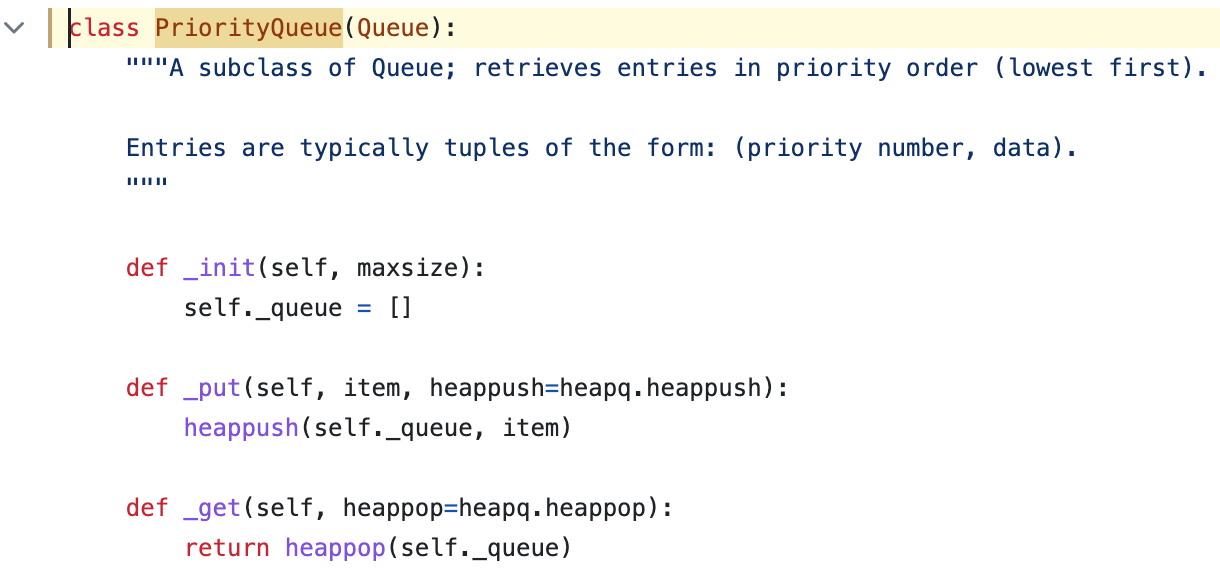
This class structure makes your main code cleaner:
# Assuming the class from the image is defined
pq = PriorityQueue()
pq.put((1, "High priority task"))
pq.put((5, "Low priority task"))
item = pq.get() # returns (1, "High priority task")
Conclusion
You've now mastered a crucial skill: implementing a priority queue. This data structure is not just a theoretical concept; it's a practical tool for solving a wide range of algorithmic problems efficiently.
Key Takeaways:
- A Priority Queue processes items based on priority, not just insertion order.
- In Python, it's efficiently implemented using the
heapqmodule on a list. - The standard method is to store items as tuples, where the first element is the priority:
(priority, data). - For a robust implementation that handles ties and non-comparable data, use a 3-element tuple with a tie-breaking entry count:
(priority, count, data). - Encapsulating this logic in a
classprovides a clean and reusable interface.
Up Next:
In the next lesson, "Solve Top-K element problems using a min-heap," we will immediately apply what you've learned. You'll see how a priority queue is the perfect tool for finding the 'k' largest or smallest elements in a large dataset, a classic problem in competitive programming.